Choosing between a 24GB and 48GB GPU server can determine whether your large language model runs comfortably, struggles with memory limits, or becomes unnecessarily expensive to host.
However, the decision is more complicated than comparing two VRAM numbers.
A 24GB GPU may be sufficient for a quantized 7B or 14B model, a development chatbot, or a lightly loaded inference API. A 48GB GPU can provide additional room for larger model weights, longer context windows, and more concurrent requests.
But 48GB of VRAM does not automatically deliver twice the inference speed of 24GB. GPU architecture, memory bandwidth, compute performance, quantization, and serving software all influence real-world results.
In this 24GB vs 48GB GPU Server comparison, we examine VRAM requirements for LLM inference, model quantization, KV cache, context length, concurrency, GPU rental costs, and practical deployment choices.
We also explain when GPU hosting providers such as RunPod, Vast.ai, Cherry Servers, and Vultr may fit different workloads.
Editorial methodology: This guide uses documented GPU specifications, established model-memory calculations, and inference-serving principles reviewed in October 2026. Model fit estimates are illustrative, not guarantees. GXCOM.NET has not independently benchmarked every GPU or hosting configuration discussed below.
24GB vs 48GB GPU Server: Quick Verdict
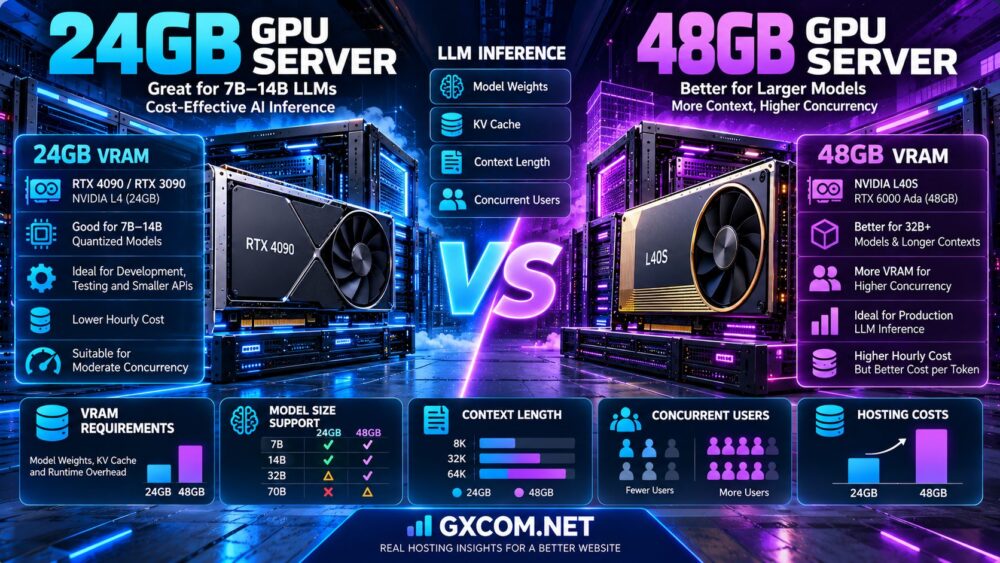
Choose a 24GB GPU server if you mainly run quantized small-to-medium LLMs, development environments, single-user assistants, or inference workloads with modest concurrency.
Choose a 48GB GPU server if your application requires larger model weights, longer contexts, more concurrent requests, or additional VRAM headroom for production inference.
If the model already fits comfortably within 24GB and the workload is compute-bound rather than memory-limited, upgrading to a 48GB card may not provide a proportional performance improvement.
| Comparison | 24GB GPU Server | 48GB GPU Server |
|---|---|---|
| VRAM capacity | 24GB | 48GB |
| Typical examples | RTX 3090, RTX 4090, NVIDIA L4 | L40S, RTX 6000 Ada |
| Quantized 7B–8B models | Usually practical | Usually practical with more headroom |
| Quantized 14B models | Often practical with careful configuration | More room for context and concurrency |
| Quantized 30B–32B models | Potentially tight, configuration-dependent | Often more practical |
| 70B at 4-bit | Generally insufficient for full single-GPU residency | Potentially feasible with suitable quantization and limited overhead |
| Long context | More restrictive | More memory headroom |
| Concurrent inference | Lower memory capacity | Higher potential memory capacity |
| Rental economics | Often lower hourly cost | May reduce cost per completed workload |
| Best fit | Development and smaller inference deployments | Larger or memory-intensive production workloads |
These are broad workload guidelines. Actual model compatibility depends on architecture, quantization format, context length, inference framework, and runtime memory usage.
What Does GPU VRAM Actually Do for LLM Inference?
GPU video memory, commonly called VRAM, stores data needed by the GPU during computation.
For LLM inference, memory consumption includes more than the model itself.
Model Weights
Model weights contain the learned parameters used to generate predictions.
Larger models generally require more memory to store their weights.
KV Cache
The key-value cache stores attention-related information used during autoregressive generation.
Its memory requirements can grow with context length and the number of active sequences.
Runtime Buffers
Inference engines require memory for intermediate computations, temporary tensors, communication buffers, and other runtime operations.
CUDA Graphs and Framework Overhead
Depending on the serving engine, additional GPU memory may be reserved for execution graphs and runtime optimization.
Why Total VRAM Matters
A model that occupies 20GB of weights on a 24GB GPU does not necessarily leave enough room for practical production inference.
The remaining memory must support the inference engine, KV cache, and concurrent requests.
How Much VRAM Does an LLM Need?
A useful first approximation is:
Model weight memory ≈ Parameter count × Bytes per parameter.
For an unquantized model stored in FP16 or BF16, each parameter generally requires approximately two bytes.
For INT8, the raw weight storage is approximately one byte per parameter.
For idealized 4-bit storage, the raw weight requirement is approximately half a byte per parameter.
Actual quantized checkpoints usually need additional space for scales, metadata, alignment, and other implementation details.
Illustrative Weight Memory by Model Size
| Model Size | FP16/BF16 Raw Weights | INT8 Raw Weights | Ideal 4-bit Raw Weights |
|---|---|---|---|
| 7B | 14GB | 7GB | 3.5GB |
| 8B | 16GB | 8GB | 4GB |
| 14B | 28GB | 14GB | 7GB |
| 32B | 64GB | 32GB | 16GB |
| 70B | 140GB | 70GB | 35GB |
All figures use decimal GB and represent theoretical weight storage only. They exclude quantization metadata, KV cache, runtime overhead, and other allocations. Actual model checkpoints can differ from these estimates.
Why a 70B 4-bit Model Is Not Automatically Easy on 48GB
The ideal raw weight estimate for a 70B model at four bits is approximately 35GB.
That leaves a theoretical 13GB before accounting for quantization metadata, runtime allocations, and KV cache on a 48GB GPU.
Some configurations may fit, but others may exceed the available memory, especially with long contexts or substantial concurrency.
A 48GB GPU should therefore be tested against the exact model and serving configuration before production deployment.
24GB GPU Server: What Can You Realistically Run?
24GB GPUs are widely used for local AI development, model experimentation, and smaller inference deployments.
7B and 8B Models
Quantized 7B and 8B models are generally good candidates for 24GB cards.
Depending on the model and inference engine, there may be enough memory for useful context lengths and limited concurrency.
14B Models
A 14B model stored in FP16 requires approximately 28GB of raw weights, exceeding 24GB before runtime overhead.
Quantization can substantially reduce that requirement.
For example, ideal 4-bit raw weights for 14B parameters require approximately 7GB, leaving more room for the inference runtime.
32B Models
A 32B model at ideal 4-bit precision requires approximately 16GB for raw weights.
Although this may appear to fit, quantization metadata and KV cache can make the remaining memory tight.
Whether a specific 32B model works depends on its architecture, context length, quantization implementation, and inference software.
70B Models
A full 70B model is generally too large for single-GPU residency on a 24GB card at conventional 4-bit precision.
CPU offloading or multi-GPU deployment may make some configurations possible, but these approaches introduce performance and complexity trade-offs.
Best 24GB Workloads
- Development and testing of quantized LLMs
- Single-user AI assistants
- Low-concurrency chatbot APIs
- Embedding and reranking workloads, depending on the model
- Selected computer vision tasks
- Smaller RAG inference deployments
48GB GPU Server: When Is the Upgrade Worth It?
48GB GPUs provide additional memory capacity for model weights, runtime buffers, and KV cache.
Larger Quantized Models
Models in the 30B–32B range may become easier to deploy with useful context lengths and additional memory headroom.
Longer Context Windows
Long prompts and document-heavy workflows can increase KV cache requirements.
Additional VRAM may allow longer contexts without aggressive cache compression or offloading.
Concurrent Requests
Serving multiple active users requires memory for their sequences.
48GB can support a larger aggregate KV cache than 24GB, assuming comparable model and cache configurations.
Production Headroom
Running a GPU close to its memory limit can increase the risk of out-of-memory failures when workload characteristics change.
Additional capacity can provide useful operating margin.
What 48GB Does Not Guarantee
48GB does not guarantee higher token generation speed, better latency, or twice the number of supported users.
Those results depend on the GPU and serving system.
24GB vs 48GB GPU: VRAM Capacity Is Not Compute Performance
Two GPUs with different memory capacities may use different processor architectures, memory technologies, and power limits.
RTX 4090 vs L40S
An RTX 4090 has 24GB of memory, while an L40S has 48GB.
The L40S offers more memory capacity, but it should not automatically be assumed to generate tokens faster in every model.
Actual inference performance depends on workload, precision, kernels, batching, and hardware characteristics.
Memory Bandwidth
Memory bandwidth can be important during token generation, especially for workloads limited by reading model weights.
Compute Throughput
Tensor processing performance and supported precision formats also affect inference speed.

Software Optimization
Different inference engines may produce different performance results on the same GPU.
Performance Verdict
Use VRAM capacity to establish whether a workload fits, then benchmark the exact GPU to determine how fast it runs.
KV Cache: Why Context Length Changes VRAM Requirements
The KV cache is one of the most important reasons a model can fit in memory but fail under production traffic.
For a conventional transformer with attention KV caching, an illustrative cache estimate is:
KV cache bytes ≈ 2 × Layers × KV Heads × Head Dimension × Tokens × Bytes per Element.
The formula represents keys and values and assumes a standard cache layout. Architectures using grouped-query attention, multi-query attention, sliding-window attention, or other mechanisms can have different memory behavior.
Illustrative KV Cache Example
Assume a model with 32 layers, 8 KV heads, head dimension 128, and a two-byte KV cache data type.
At 8,192 cached tokens, the estimated cache is approximately 1GiB.
At 32,768 cached tokens, it grows to approximately 4GiB.
At 65,536 cached tokens, it grows to approximately 8GiB.
These calculations apply only to the stated hypothetical architecture and cache format. They are not universal estimates for all 7B, 14B, or 32B models.
Concurrent Users
Multiple active sequences increase aggregate cache demand.
Shared prefixes, prefix caching, cache block allocation, and request scheduling can change the effective memory requirement.
Why 48GB Helps
Additional VRAM can support a larger cache budget after loading model weights.
However, cache capacity alone does not guarantee higher throughput.
Quantization: FP16 vs INT8 vs INT4
Quantization reduces model storage and may reduce memory bandwidth requirements.
FP16 and BF16
FP16 and BF16 commonly use two bytes per parameter.
They are often used when accuracy requirements, hardware support, and available memory permit.
INT8
Eight-bit weight quantization can substantially reduce memory compared with FP16.
Actual performance and output quality depend on the method and supported kernels.
INT4
Four-bit quantization can make larger models practical on GPUs with limited VRAM.
However, reduced weight precision may introduce quality or compatibility trade-offs.
Quantization Does Not Necessarily Reduce KV Cache
Weight quantization and KV cache precision are separate settings.
A 4-bit weight model may still use FP16 or BF16 KV cache unless the serving system is configured otherwise.
Quantization Verdict
Choose a quantization format based on model quality, memory requirements, and measured inference performance.
24GB vs 48GB GPU for RAG Applications
Retrieval-augmented generation combines a language model with an external information retrieval system.
RAG does not automatically require a large GPU, but the amount of retrieved text included in each prompt can increase inference memory usage.
Short-Context RAG
A compact model with limited retrieved context may work well on 24GB.
Document-Heavy RAG
Long documents and large retrieved contexts can increase KV cache requirements.
Multiple Concurrent Users
Production RAG services must account for simultaneous requests and variable prompt lengths.
RAG Recommendation
Start by measuring prompt token counts and concurrent sequence demand. Move to 48GB when actual memory measurements show that 24GB cannot support the required service level.
24GB vs 48GB GPU for vLLM Inference
vLLM is a popular inference-serving framework that provides memory management and request scheduling capabilities.
GPU Memory Utilization
vLLM provides a GPU memory utilization setting that controls the fraction of device memory allocated to the model executor.
Its documented default is 0.92 in the current configuration reference, but defaults and supported behavior should be checked against the installed version.
KV Cache Configuration
vLLM supports configuration of KV cache data types and memory allocation behavior.
Maximum Model Length
Maximum context settings can influence cache planning and whether a model initializes successfully.
Concurrency
Continuous batching can improve GPU utilization, but memory and compute limits still apply.
Production Recommendation
Monitor GPU memory, cache utilization, throughput, time to first token, and request latency under realistic load.
GPU Inference Latency: TTFT and TPOT
LLM serving performance should be evaluated with more than a single tokens-per-second figure.
Time to First Token
TTFT measures the time between a request and the first generated token.
Long prompts, queueing, and prefill computation can affect TTFT.
Time per Output Token
TPOT measures the time between generated tokens during decoding.
Aggregate Throughput
Aggregate throughput measures total tokens generated across requests over time.
Tail Latency
High-percentile latency matters for user-facing applications where occasional slow responses create poor experiences.
Why VRAM Alone Is Insufficient
A larger-memory GPU may support more active requests while a smaller-memory but faster GPU performs better for low-concurrency decoding.
Benchmark both scenarios before choosing a production server.
24GB vs 48GB GPU Hosting Costs
GPU hosting costs depend on the actual GPU model, rental type, region, availability, storage, networking, and service model.
GPU Hourly Rental
Providers commonly charge for GPU compute time.
However, hourly prices are not directly comparable when one offering uses a different GPU architecture or availability model.
Persistent Storage
Model files, container images, datasets, and checkpoints may require persistent storage.
Network Transfer
Data transfer charges can matter when moving large datasets or serving substantial traffic.
Idle GPU Time
An always-on GPU can generate charges even when no inference requests are being processed.
Deployment and Maintenance
Container setup, model loading, software updates, and failed jobs can increase effective operating costs.
Cost Verdict
Compare the cost of completed inference work, not just the GPU's hourly rental rate.
Hypothetical Monthly GPU Hosting Cost
Consider two hypothetical GPU rental offers:
| Cost Component | 24GB GPU | 48GB GPU |
|---|---|---|
| Illustrative GPU rate | $0.50/hour | $0.90/hour |
| GPU usage | 240 hours | 240 hours |
| GPU compute total | $120 | $216 |
| Illustrative storage | $12 | $18 |
| Illustrative network and extras | $8 | $12 |
| Estimated total | $140 | $246 |
These numbers are hypothetical planning examples, not quotations from any named provider. Actual rates and fees vary.
In this example, the 48GB configuration costs approximately 76% more overall.
That premium may be justified if the additional memory enables a model, context length, or concurrency target that the 24GB option cannot support.
Cost per Million Tokens: A Better Metric
For inference APIs, hourly GPU price is only part of the calculation.
A useful metric is the cost per million successfully generated output tokens.
GPU cost per million output tokens = GPU hourly cost × 1,000,000 ÷ (3,600 × sustained output tokens per second).
This simplified formula excludes input-token processing costs, storage, networking, engineering, and idle time.
Hypothetical Throughput Example
| Metric | 24GB Configuration | 48GB Configuration |
|---|---|---|
| Illustrative GPU rate | $0.50/hour | $0.90/hour |
| Hypothetical sustained output throughput | 40 tokens/s | 100 tokens/s |
| Output tokens per hour | 144,000 | 360,000 |
| GPU cost per million output tokens | Approximately $3.47 | $2.50 |
Throughput figures are hypothetical and are not benchmark results for any specific 24GB or 48GB GPU. They illustrate how higher realized throughput could offset a higher hourly rental price.
If the 48GB configuration produces the same throughput as the 24GB configuration, the cost advantage disappears.
GPU Utilization: Why Idle Time Changes Everything
Consider an inference service that receives requests for only a few hours each day.
Keeping a GPU running continuously can create substantial idle costs.
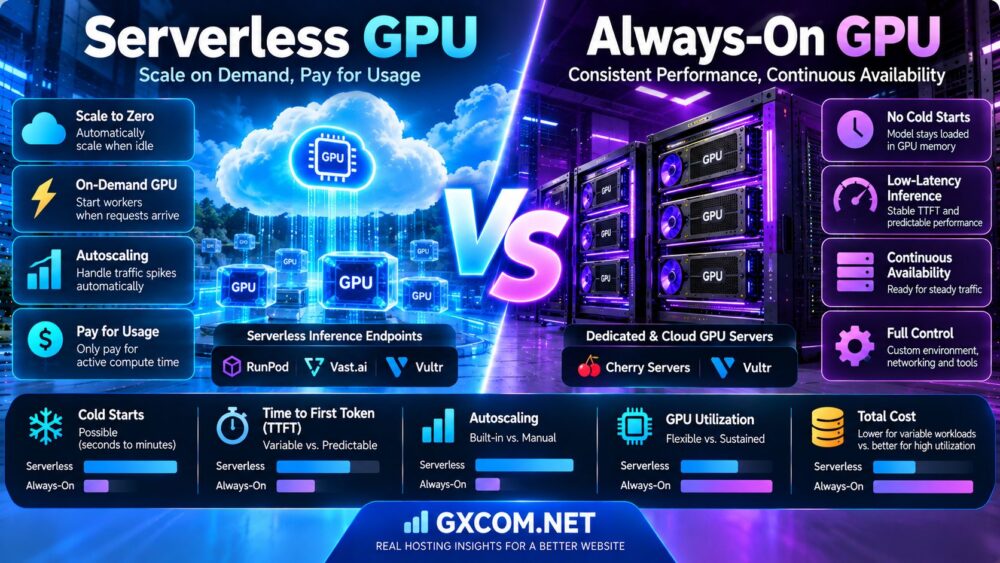
Always-On GPU
Always-on deployments may offer predictable availability and avoid cold-start delays.
On-Demand GPU
On-demand deployments can reduce unused compute time when workloads are intermittent.
Serverless GPU
Serverless GPU platforms may charge based on active execution and related resource consumption.
However, cold starts, minimum worker settings, storage, and execution policies can affect the final cost.
Utilization Verdict
A well-utilized 48GB GPU can sometimes be more economical per completed request than an underutilized 24GB GPU.
The reverse can also be true.
24GB vs 48GB: One GPU or Two GPUs?
Two 24GB GPUs provide 48GB of aggregate physical GPU memory, but that is not equivalent to a single 48GB memory space.
Separate Memory Spaces
Each GPU has its own memory allocation.
A model cannot automatically treat two 24GB cards as one ordinary 48GB GPU.
Tensor Parallelism
Some inference frameworks can distribute model computation and weights across multiple GPUs.
This introduces communication overhead and software configuration requirements.
Interconnects
PCIe topology, GPU communication support, and network architecture affect multi-GPU efficiency.
Single 48GB GPU Advantage
A single 48GB GPU can simplify deployment when the complete model and runtime fit in its memory.
Dual 24GB GPU Advantage
Two 24GB GPUs may be useful for running separate inference replicas or distributing workloads, provided the application supports the arrangement.
Decision
Choose based on model partitioning, software support, throughput, hardware cost, and the intended serving architecture.
Where to Rent 24GB and 48GB GPU Servers
GPU availability changes frequently. The following providers are worth comparing for different deployment models.
RunPod
RunPod offers GPU Pods and serverless inference products, with GPU availability and rates depending on the selected hardware and deployment tier.
It is worth considering for developers who want container-based GPU workloads and a choice between persistent and request-oriented deployment models.
For provider-specific details, read our RunPod GPU Cloud Review.
Vast.ai
Vast.ai operates a GPU rental marketplace where available machines, prices, and host characteristics vary.
It may be relevant for cost-sensitive experimentation and flexible GPU selection.
Evaluate host reliability, storage terms, network connectivity, and interruption conditions before deployment.
For more information, see our Vast.ai GPU Marketplace Review.
Cherry Servers
Cherry Servers offers dedicated infrastructure and GPU-related server configurations.
It may be relevant for teams considering longer-running workloads, physical server control, or custom infrastructure requirements.
Confirm the actual GPU model and memory capacity available for the intended region.
Vultr
Vultr offers cloud GPU infrastructure alongside its general cloud compute services.
It may be worth evaluating for organizations already using Vultr networking, automation, or other infrastructure services.
GPU model availability and regional capacity should be verified before purchasing.
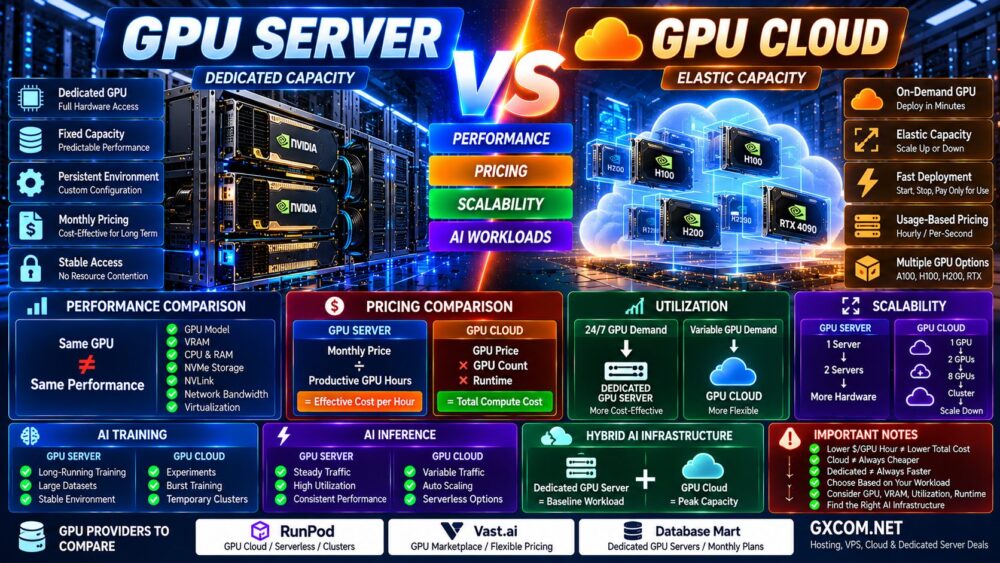
GPU Cloud vs Dedicated GPU Server
The choice between renting a cloud GPU and leasing a dedicated GPU server affects more than hourly pricing.
Cloud GPU
Cloud GPU products can offer flexible provisioning and shorter commitments.
Dedicated GPU Server
Dedicated GPU infrastructure may suit sustained workloads, specialized configurations, and teams requiring greater control over physical hardware.
Cost Comparison
For intermittent workloads, flexible GPU rental can reduce idle costs.
For consistently high utilization, longer-term dedicated infrastructure may deserve evaluation.
Read our Cloud GPU vs Dedicated GPU Server Comparison for the broader deployment decision.
How to Benchmark a 24GB GPU Against a 48GB GPU
Use the same model and representative requests whenever possible.
- Record the exact GPU model and VRAM capacity.
- Use the same model checkpoint and quantization format.
- Use compatible inference engine versions.
- Match context length and prompt distributions.
- Test one active request first.
- Increase concurrency gradually.
- Measure time to first token.
- Measure output tokens per second.
- Record p95 and p99 latency.
- Monitor peak GPU memory consumption.
- Record out-of-memory failures and rejected requests.
- Measure sustained performance over time.
- Include idle, storage, and network costs.
- Calculate cost per completed request and per million tokens.
A successful benchmark should report the model, GPU, precision, context length, concurrency, and serving configuration.
Common Mistakes When Choosing GPU VRAM
Mistake 1: Comparing Only VRAM Capacity
Memory capacity determines what may fit, but not how quickly it runs.
Mistake 2: Ignoring KV Cache
Long contexts and concurrency can consume substantial additional memory.
Mistake 3: Assuming 4-bit Models Use Exactly Half a Byte per Parameter
Real quantized checkpoints require metadata and other overhead.
Mistake 4: Assuming Two 24GB GPUs Equal One 48GB GPU
Multi-GPU execution requires software support and introduces communication costs.
Mistake 5: Buying More VRAM Without Measuring Utilization
Additional memory provides little benefit when the application is constrained by CPU preprocessing, networking, or another bottleneck.

Mistake 6: Comparing Only Hourly Prices
Storage, failed jobs, idle time, throughput, and operational complexity affect total cost.
24GB vs 48GB GPU: Workload Recommendations
| Workload | Starting Recommendation | Reason |
|---|---|---|
| Quantized 7B chatbot | 24GB | Often enough memory for weights and useful cache capacity |
| Quantized 14B assistant | 24GB, then benchmark | Can fit with appropriate quantization and runtime settings |
| Quantized 32B inference | 48GB | More practical memory headroom |
| 70B 4-bit experiment | 48GB minimum candidate, validate carefully | Weight memory and runtime overhead may still be restrictive |
| Short-context RAG prototype | 24GB | Often a reasonable initial test environment |
| Long-context RAG service | 48GB | Additional KV cache capacity |
| Low-concurrency API | 24GB | Lower memory demand may favor a smaller instance |
| Higher-concurrency API | 48GB | Greater potential cache capacity, subject to compute limits |
| Intermittent development | 24GB on demand | Avoid paying for unused capacity |
| Always-on production inference | Benchmark both | Optimize service-level performance and total cost |
Frequently Asked Questions
Is 24GB VRAM enough for LLM inference?
Yes, for many quantized small-to-medium models. Actual requirements depend on model architecture, quantization, context length, and concurrency.
Is 48GB VRAM twice as fast as 24GB?
No. VRAM capacity and inference speed are different characteristics.
Can a 24GB GPU run a 14B model?
Many 14B models can run with suitable quantization and context settings. FP16 weights alone would typically exceed 24GB.
Can a 24GB GPU run a 32B model?
Some 32B models may fit using aggressive quantization and constrained cache settings, but production headroom can be limited.
Can a 48GB GPU run a 70B model?
Some heavily quantized 70B configurations may fit, but metadata, KV cache, runtime overhead, and context length can make deployment difficult. Verify the exact model.
What is KV cache?
KV cache stores attention-related information used during autoregressive generation. Its memory requirements depend on model architecture and active token sequences.
Does a longer context window require more VRAM?
Often yes, particularly for architectures using conventional attention KV caching.
Does quantization reduce VRAM usage?
Yes, weight quantization can reduce model memory substantially, although actual savings depend on the format and implementation.
Does INT4 quantization automatically reduce KV cache memory?
No. Weight quantization and KV cache precision are separate considerations.
Which is better for vLLM, 24GB or 48GB?
24GB can be sufficient for smaller models. 48GB offers more capacity for larger models and KV cache, but performance must be measured.
Is an RTX 4090 faster than an L40S?
The answer depends on the model, precision, batch size, inference engine, and performance metric. The L40S has more VRAM, but that alone does not determine speed.
Are two 24GB GPUs equivalent to one 48GB GPU?
No. Their memory spaces are separate, and combining them requires appropriate parallelism or workload distribution.
Where can I rent a 24GB GPU server?
RunPod and Vast.ai are among the providers worth checking for compatible 24GB GPU offerings. Availability changes.
Where can I rent a 48GB GPU server?
RunPod, Vast.ai, and selected dedicated infrastructure providers may offer 48GB GPU configurations, subject to current inventory.
Which is cheaper, RunPod or Vast.ai?
Rates vary by GPU, host, service tier, and availability. Compare the total cost and operational conditions of deployable offers.
Should I rent a GPU hourly or monthly?
Hourly rental can be attractive for intermittent workloads. Monthly or dedicated commitments may be worth evaluating for consistently high utilization.
How should I compare GPU hosting costs?
Measure completed inference requests, sustained token throughput, latency, storage, network costs, and idle time.
Can 48GB GPU memory improve concurrency?
It can increase memory available for concurrent sequences, but compute throughput and serving configuration may still limit capacity.
Is 24GB enough for RAG?
It may be sufficient for smaller models and moderate retrieved context lengths. Measure the actual prompt and concurrency requirements.
When should I upgrade beyond 48GB?
Consider larger-memory or multi-GPU infrastructure when model weights, context length, concurrency, or reliability requirements exceed a tested 48GB configuration.
Final Verdict: 24GB vs 48GB GPU Server
The right 24GB vs 48GB GPU Server decision begins with the actual model and inference workload.
For quantized 7B–14B models, prototypes, and modest API traffic, 24GB is often a practical starting point.
For larger models, long-context applications, and more demanding concurrent inference, 48GB offers valuable memory headroom.
However, additional VRAM is not a substitute for adequate compute performance, memory bandwidth, efficient inference software, and realistic benchmarking.
Before renting a GPU server, estimate model weight memory, KV cache, runtime overhead, and peak concurrency. Then compare the total cost of delivering the required throughput and latency.
For broader GPU provider selection, explore our NVIDIA GPU Server Providers Guide.
MODEL SIZE → QUANTIZATION → KV CACHE → CONTEXT → CONCURRENCY → GPU PERFORMANCE → HOSTING COST → DEPLOYMENT DECISION
GPU models, rental rates, available VRAM, hosting conditions, and software support can change. Confirm the exact hardware and service terms before deployment.