NVIDIA L4 vs L40S is an important comparison for businesses choosing GPU servers for AI inference, video processing, computer vision, and generative AI. Both accelerators use NVIDIA's Ada Lovelace architecture, but they differ significantly in GPU memory, memory bandwidth, compute performance, video engines, power consumption, and server requirements. Understanding these differences helps buyers select the right GPU infrastructure without overspending on unnecessary hardware.
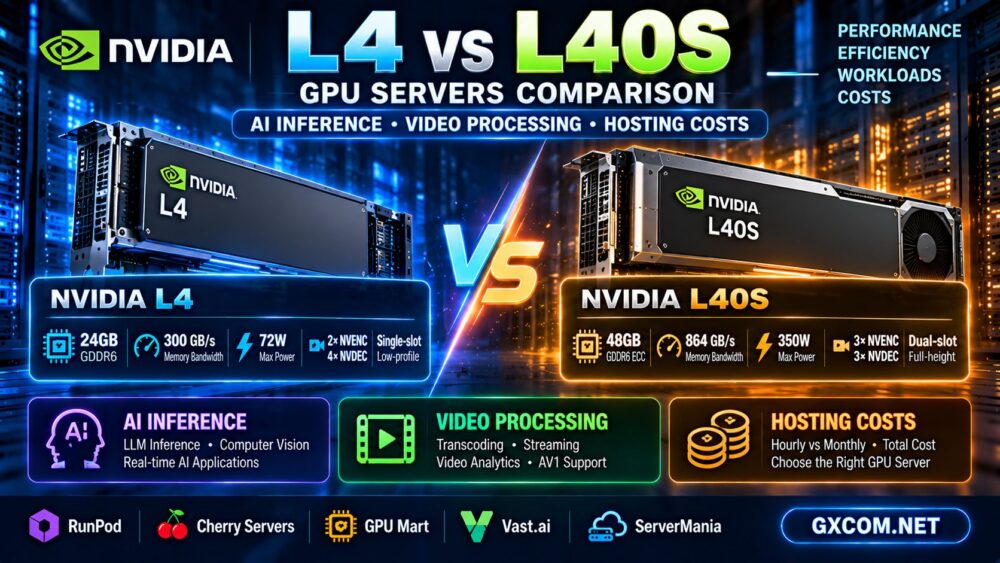
The NVIDIA L4 is a compact, energy-efficient accelerator with 24GB of GPU memory and a 72W maximum thermal design power. The L40S provides 48GB of ECC GDDR6 memory, considerably higher memory bandwidth, and stronger theoretical compute performance, but requires a more substantial server platform.
This guide compares their technical specifications, explains practical AI and video workloads, and shows how to evaluate GPU hosting costs. It also examines infrastructure options from RunPod, Cherry Servers, GPU Mart, Vast.ai, and Database Mart.
NVIDIA L4 vs L40S: GPU Specifications Compared
Before choosing a GPU server, compare the physical accelerator specifications rather than relying on general marketing descriptions.
| Specification | NVIDIA L4 | NVIDIA L40S |
|---|---|---|
| GPU architecture | Ada Lovelace | Ada Lovelace |
| GPU memory | 24GB GDDR6 | 48GB GDDR6 with ECC |
| Memory bandwidth | 300GB/s | 864GB/s |
| FP32 performance | 30.3 TFLOPS | 91.6 TFLOPS |
| Video encoders (NVENC) | 2 | 3 |
| Video decoders (NVDEC) | 4 | 3 |
| Maximum board power | 72W | 350W |
| Form factor | Single-slot, low-profile PCIe | Dual-slot PCIe |
| Typical selection priority | Efficiency, video pipelines, compact inference | More VRAM, compute-intensive AI, graphics |
Source: NVIDIA's published L4 and L40S specifications. Figures describe individual physical GPUs, not guaranteed virtual-instance performance or real application benchmarks.
The L40S provides twice the memory capacity and approximately 2.88 times the theoretical memory bandwidth of the L4. However, these differences do not establish an equivalent improvement in application throughput.
NVIDIA L4 GPU Servers: Efficient AI Inference and Video Processing
The NVIDIA L4 is designed for accelerated computing across AI inference, video analytics, streaming, and visual workloads.
Its low-profile PCIe design and relatively modest power requirements make it relevant for servers where density and energy efficiency are important.
Why Choose an NVIDIA L4 Server?
- 24GB of GPU memory for compatible inference models.
- Low 72W maximum thermal design power.
- Hardware video encoding and decoding acceleration.
- Support for CUDA-based AI software environments.
- Compact physical form factor for supported servers.
- Potentially attractive economics for workloads that do not require 48GB of VRAM.
L4 can be particularly useful when applications process many video streams, perform computer vision inference, or serve models that fit comfortably within the available GPU memory.
However, the GPU may become memory-constrained when running larger language models, longer contexts, or highly concurrent inference workloads.
NVIDIA L40S GPU Servers: More VRAM and Compute Performance
The NVIDIA L40S is a more powerful Ada Lovelace data center accelerator with 48GB of GDDR6 ECC memory and 864GB/s of memory bandwidth.
It is relevant for generative AI, AI inference, graphics rendering, virtual workstations, and workloads that benefit from higher compute capacity.
Why Choose an NVIDIA L40S Server?
- 48GB of GPU memory for larger working sets.
- Higher theoretical memory bandwidth.
- Greater FP32 and Tensor Core compute capability.
- Hardware-accelerated video encoding and decoding.
- Strong relevance for AI image generation and 3D rendering.
- Support for professional graphics and compatible virtual GPU software.
The main trade-offs are higher board power, more demanding cooling and server requirements, and potentially greater infrastructure cost.
For a workload that fits comfortably within 24GB, the additional resources of L40S may not deliver enough benefit to justify its rental premium.
NVIDIA L4 vs L40S for AI Inference
The NVIDIA L4 vs L40S decision for AI inference depends on model memory requirements, quantization, throughput targets, and the number of simultaneous requests.
L4 for Smaller and Optimized AI Models
L4 can be suitable for smaller language models, classification systems, recommendation engines, object detection, and other inference applications that fit within 24GB of GPU memory.
Its lower power requirements may also matter in dense or energy-sensitive deployments.
For language models, the available memory must accommodate more than the model weights. Runtime buffers, attention cache, and request concurrency also consume VRAM.
L40S for Larger Models and Higher Memory Demand
L40S provides 48GB of memory, which can help accommodate larger models, bigger batches, or greater runtime memory overhead.
Its higher compute capacity may also improve inference throughput when the software can use the available hardware efficiently.
However, twice the VRAM does not mean twice the inference speed. Actual results depend on the model architecture, numerical precision, serving framework, and workload.
Example: Approximate LLM Weight Memory
| Dense Model Size | 16-bit Weights | 8-bit Weights | 4-bit Weights |
|---|---|---|---|
| 7B parameters | 14GB | 7GB | 3.5GB |
| 13B parameters | 26GB | 13GB | 6.5GB |
| 30B parameters | 60GB | 30GB | 15GB |
These are simplified decimal weight-only estimates for dense models. Actual memory usage includes quantization metadata, KV cache, framework overhead, and temporary buffers.
A 13B model at 16-bit precision requires approximately 26GB for weights alone, exceeding the L4's 24GB capacity. L40S has more headroom, although a successful deployment still depends on total runtime requirements.
For production deployment planning, read our AI inference server hosting guide.
NVIDIA L4 vs L40S for Video Processing and Streaming
Video processing is one of the most important areas where buyers should avoid judging GPUs solely by compute specifications.
Hardware video engines, codec support, resolution, concurrent streams, and the complete processing pipeline can determine actual throughput.

NVIDIA L4 for Video Transcoding
L4 includes two NVENC engines and four NVDEC engines, according to NVIDIA's specifications.
These resources make it relevant for video ingestion, transcoding, analytics, and AI-enhanced video processing.
Its low power consumption may also be valuable when deploying multiple GPUs for distributed video workloads.
NVIDIA L40S for Video and Graphics Workloads
L40S includes three NVENC and three NVDEC engines.
It can be attractive when a video workflow also includes computationally demanding AI inference, rendering, image enhancement, or generative processing.
However, L40S does not have more video decoders than L4. The best option depends on whether the application is limited by decoding, encoding, GPU computation, or another system component.
What About AV1 Encoding?
Both GPUs belong to the Ada Lovelace generation and support modern hardware-accelerated video workflows, including supported AV1 encoding and decoding.
Before renting a server, verify the required codec, software integration, driver support, and actual video engine access.
Benchmark the Entire Video Pipeline
A realistic video benchmark should include:
- Input video codec, resolution, and frame rate.
- Number of concurrent streams.
- Hardware decoding utilization.
- Preprocessing and AI inference time.
- Hardware encoding utilization.
- CPU, storage, and network bottlenecks.
- Cost per completed video hour.
For example, a GPU with stronger AI compute performance may still deliver limited additional throughput if the application is bottlenecked by decoding or storage.
NVIDIA L4 vs L40S for Generative AI and 3D Rendering
In the NVIDIA L4 vs L40S comparison, generative AI and rendering workloads often place greater emphasis on compute capability and GPU memory.
AI Image Generation
Diffusion models and other image generation systems can benefit from GPU compute performance and available memory.
L4 may be sufficient for smaller models and moderate generation requirements, while L40S can be attractive for larger workflows or higher throughput.
Benchmark image generation time at the same model, resolution, batch size, and numerical precision.
3D Rendering and Visualization
L40S is especially relevant for professional graphics and rendering workloads that benefit from additional GPU memory and compute resources.
Its larger memory capacity may accommodate more complex scenes, textures, and rendering workloads.
L4 remains worth evaluating for lighter visualization tasks and environments where power efficiency matters.
For detailed hardware selection, see our GPU servers for 3D rendering guide.
GPU Power Consumption and Server Requirements
The difference between a 72W L4 and a 350W L40S has implications for physical server design, cooling, and energy consumption.
However, GPU board power is not the same as total server power consumption.
Illustrative GPU-Only Electricity Calculation
Assume each GPU operates continuously at its published maximum board power for 30 days, with electricity priced at a hypothetical $0.12 per kWh.
| Metric | NVIDIA L4 | NVIDIA L40S |
|---|---|---|
| Maximum board power | 72W | 350W |
| 30-day hours | 720 | 720 |
| GPU-only energy | 51.84kWh | 252kWh |
| Illustrative electricity cost | $6.22 | $30.24 |
This is a hypothetical GPU-only calculation at constant maximum board power, not measured consumption or a hosting quote. It excludes CPU, RAM, storage, fans, power conversion losses, and data center overhead.
For hosted GPU servers, electricity is often included within the rental price. Buyers should not add this illustrative electricity cost again unless the provider bills power separately.
NVIDIA L4 vs L40S Hosting Costs: Hourly or Monthly?
Hosting costs depend on GPU availability, physical allocation, CPU and RAM configuration, storage, networking, billing terms, and support.
Cloud GPU instances can be useful for irregular demand, while dedicated servers may be worth evaluating for continuously running workloads.
Hourly GPU Rental
Hourly billing can suit temporary inference testing, video-processing experiments, and development projects.
Confirm whether billing stops when the GPU is released and whether storage or reserved resources continue generating charges.
Monthly GPU Server Rental
Monthly commitments may become attractive when applications use GPU resources consistently.
However, a lower monthly price is not necessarily better if the hardware is substantially slower or unsuitable for the application.
Illustrative Rental Cost Comparison
Assume two hypothetical server offers:
- L4 server: $0.60 per billable hour.
- L40S server: $1.20 per billable hour.
| Monthly Usage | L4 Compute Cost | L40S Compute Cost |
|---|---|---|
| 100 hours | $60 | $120 |
| 300 hours | $180 | $360 |
| 500 hours | $300 | $600 |
| 720 hours | $432 | $864 |
These are hypothetical rates, not current supplier prices. They exclude storage, traffic, licensing, and other charges.
Under these assumptions, L40S would need to deliver approximately twice the useful throughput of L4 to match its compute cost per unit of output. Real workloads may perform differently.
For a broader billing comparison, see our hourly vs monthly GPU server rental guide.
How to Measure GPU Hosting Value
The most useful purchasing metric is often cost per completed workload rather than the lowest advertised hourly price.
For inference:
Cost per million output tokens = total billable infrastructure cost / generated output tokens × 1,000,000
For video processing:
Cost per processed video hour = total billable infrastructure cost / completed video hours
For image generation:
Cost per generated image = total billable infrastructure cost / successfully generated images
Measure these values under comparable quality, latency, and reliability requirements.
Include idle time, storage, networking, and any software licenses required by the production deployment.
Where to Rent NVIDIA L4 or L40S GPU Servers
Different hosting providers offer different approaches to GPU infrastructure. Some specialize in flexible cloud compute, while others focus on dedicated servers or GPU hosting configurations.
Not every provider listed below necessarily offers both L4 and L40S. Confirm the exact GPU model and current availability before ordering.
| Provider | Infrastructure Focus | What to Verify |
|---|---|---|
| RunPod | Cloud GPU computing | Exact GPU, allocation, storage, billing |
| Cherry Servers | Dedicated GPU infrastructure | GPU model, CPU, RAM, networking, contract |
| GPU Mart | GPU hosting configurations | Physical GPU, VRAM, OS, drivers |
| Vast.ai | GPU compute marketplace | Listing hardware, host terms, reliability |
| Database Mart | GPU-related hosting and servers | GPU-equipped plan, licensing, specifications |
RunPod: Cloud GPU Workloads
RunPod is relevant for teams evaluating flexible GPU compute for AI development, inference, and experimentation.
Check the current GPU catalog, instance allocation, persistent storage, and deployment model. Do not assume both L4 and L40S are available at every location.
Cherry Servers: Dedicated GPU Infrastructure
Cherry Servers is worth considering when dedicated hardware, a defined server configuration, and longer-running workloads are priorities.
Confirm whether the required GPU model is offered and review the complete server specifications before comparing costs.
GPU Mart: GPU Server Configurations
GPU Mart can be evaluated for GPU-oriented hosting and server configuration requirements.
Verify the installed GPU, usable VRAM, driver support, and whether the product provides dedicated or virtualized GPU resources.
Vast.ai: Marketplace GPU Rental
Vast.ai provides marketplace-based GPU compute where listings may differ in hardware, storage, reliability, and commercial terms.
For production workloads, consider host availability, data persistence, and recovery procedures alongside the advertised price.
Database Mart: GPU Hosting Evaluation
Database Mart is another candidate for evaluating GPU-related hosting and server solutions.
Check the exact accelerator model, GPU allocation, system resources, operating system, and software compatibility before purchasing.
Procurement reminder: A provider offering GPU hosting in general is not proof that a specific L4 or L40S product is currently available.
NVIDIA L4 vs L40S: Which GPU Should You Choose?
For most buyers, the NVIDIA L4 vs L40S decision should start with workload memory requirements, useful throughput, and total hosting cost.
| Workload | Starting Recommendation | Reason |
|---|---|---|
| Small AI inference models | Evaluate L4 first | 24GB may be sufficient |
| Video decoding and analytics | Benchmark L4 | Efficient design and four NVDEC engines |
| Models needing over 24GB VRAM | Evaluate L40S | 48GB memory capacity |
| Generative AI and rendering | Benchmark L40S | Higher compute capability and VRAM |
| Energy-sensitive deployment | Consider L4 | Lower maximum board power |
| Continuous production inference | Compare both | Cost per useful output determines value |
These recommendations are starting points, not universal benchmark rankings.

GPU Server Buying Checklist
- Verify the exact GPU: Confirm L4 or L40S rather than similarly named products.
- Check usable VRAM: Confirm dedicated allocation or virtual GPU limits.
- Estimate model memory: Include weights, runtime overhead, and concurrency.
- Check video engines: Validate codecs, encoder and decoder access.
- Test software compatibility: Confirm CUDA, drivers, frameworks, and containers.
- Review server hardware: Include CPU, RAM, NVMe, networking, and cooling.
- Compare real throughput: Use representative inference or video benchmarks.
- Check billing terms: Understand hourly, monthly, and idle resource charges.
- Include additional costs: Storage, traffic, licenses, and support.
- Calculate cost per output: Avoid choosing based on hourly price alone.
Frequently Asked Questions
Is NVIDIA L40S better than L4 for AI inference?
L40S offers more memory, higher bandwidth, and stronger theoretical compute capability. It can be better for demanding inference workloads, but L4 may provide better value when the model fits within 24GB and performance requirements are modest.
How much VRAM do NVIDIA L4 and L40S have?
L4 has 24GB of GDDR6 memory, while L40S has 48GB of GDDR6 memory with ECC.
Is NVIDIA L4 good for video transcoding?
Yes. L4 includes dedicated hardware video encoding and decoding engines and is designed for efficient video processing. Actual throughput depends on codec, resolution, concurrency, and the complete processing pipeline.
Does L40S support AV1 encoding?
Yes. NVIDIA specifies AV1 encoding and decoding support for L40S. The application must also support the relevant hardware acceleration interfaces.
Which GPU uses less power?
L4 has a 72W maximum thermal design power, compared with 350W maximum board power for L40S. Actual energy use varies with workload and server configuration.
Can L4 run a large language model?
L4 can run compatible language models that fit within its available memory. Quantization can reduce weight storage, but runtime overhead, context length, and concurrency must also be considered.
Is L40S good for 3D rendering?
L40S is relevant for professional rendering and graphics workloads due to its GPU memory, compute capabilities, and graphics-oriented architecture. Software support and workload benchmarks remain important.
Are L4 and L40S suitable for multi-GPU servers?
Both can be deployed in supported multi-GPU server configurations, but buyers should verify physical topology, PCIe resources, and software scaling. L40S does not support NVLink or MIG according to NVIDIA's published specifications.
Which GPU is cheaper to rent?
Rental prices vary by provider, region, allocation model, and availability. Compare current quotations and measured cost per completed workload rather than assuming one GPU is always cheaper.
Final Verdict: NVIDIA L4 vs L40S GPU Servers
The NVIDIA L4 vs L40S comparison comes down to matching hardware capabilities with actual workload needs.
NVIDIA L4 is a compelling option for efficient AI inference, video analytics, and compact server deployments where 24GB of memory is sufficient.
NVIDIA L40S offers more GPU memory, greater compute capability, and higher memory bandwidth for demanding inference, generative AI, and graphics workloads.
RunPod, Cherry Servers, GPU Mart, Vast.ai, and Database Mart provide different GPU infrastructure options to investigate, subject to exact hardware availability and commercial terms.
Before selecting a server, confirm the physical GPU model, software compatibility, video engine requirements, infrastructure charges, and representative application performance.
AI WORKLOAD → GPU VRAM → VIDEO ENGINES → COMPUTE PERFORMANCE → HOSTING COST → COST PER COMPLETED TASK
The best GPU server is the configuration that meets your performance requirements at the lowest sustainable total cost.