A VPS under $10 per month sounds almost too cheap to be useful.
Yet low-cost virtual private servers can handle surprisingly capable workloads when the server is properly sized and the application is optimized.
The problem is that the phrase cheap VPS under $10 tells you almost nothing about actual performance.
One provider might give you more RAM but weaker shared CPU performance. Another may offer fewer resources on paper but use newer processors, faster NVMe storage or better networking.
Two VPS plans costing roughly the same amount can therefore behave very differently.
So the real question is not:
CAN I BUY A VPS FOR UNDER $10?
It is:
WHAT CAN A VPS UNDER $10 ACTUALLY HANDLE?
This guide explains realistic performance expectations for budget VPS hosting, including CPU, RAM, NVMe storage, bandwidth, WordPress, Docker, development environments and small production workloads.
We will also explain when a sub-$10 VPS is excellent value—and when spending more is the smarter decision.
Use this framework:
$10 BUDGET → WORKLOAD → CPU → RAM → STORAGE → NETWORK → REAL PERFORMANCE
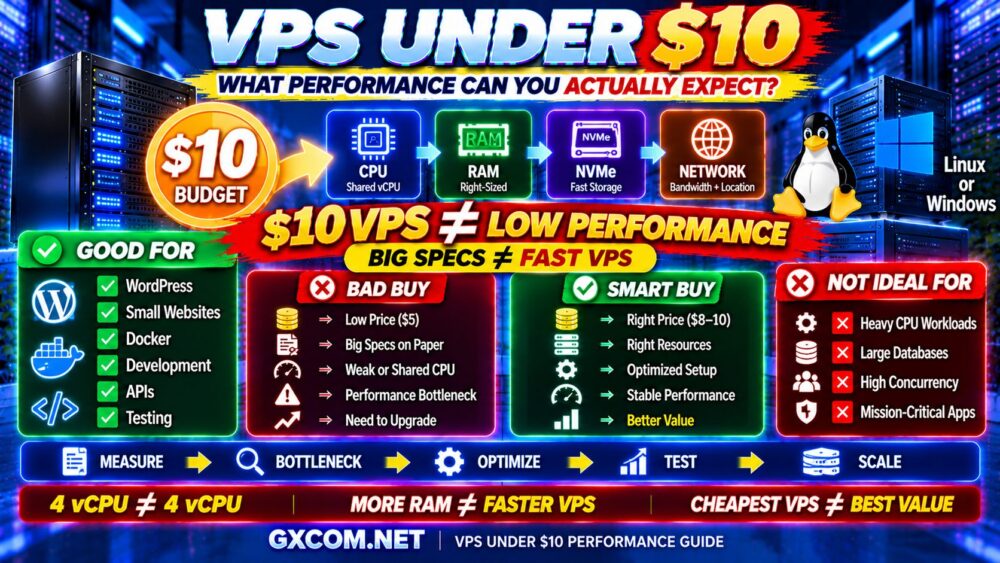
What Can You Expect From a VPS Under $10?
There is no universal specification for a VPS below $10 because providers allocate infrastructure differently.
However, budget VPS plans commonly focus on some combination of:
- Shared vCPU resources
- Modest RAM allocations
- SSD or NVMe storage
- Limited-to-moderate storage capacity
- Monthly traffic allowances
- Self-managed Linux environments
At this price level, you should generally expect compromises somewhere.
The provider may offer:
MORE RAM + SHARED CPU
or:
LESS RAM + STRONGER CPU
or:
SMALLER STORAGE + BETTER NETWORK
This is why specifications must be evaluated as a complete system.
CHEAPEST VPS ≠ BEST VALUE VPS.
VPS Under $10: Realistic Resource Expectations
| Resource | What to Expect | What Matters Most |
|---|---|---|
| CPU | Usually shared vCPU | CPU generation and contention |
| RAM | Enough for lightweight-to-moderate workloads | Actual application usage |
| Storage | SSD or NVMe with limited capacity | I/O performance and limits |
| Bandwidth | Varies significantly | Transfer allowance and routing |
| Management | Often self-managed | Your Linux administration ability |
| Backups | May be optional | Retention and restoration |
These are broad expectations rather than guarantees. VPS specifications and promotions change frequently, so always check the current provider configuration before purchasing.
The Biggest Mistake: Comparing Cheap VPS by RAM Alone
Budget VPS marketing often emphasizes large resource numbers.
RAM is easy to understand:
2 GB → 4 GB → 8 GB
More looks better.
But a server does not become faster simply because it has unused memory.
Imagine two servers:
VPS A
8 GB RAM
Weak or heavily shared CPU
VPS B
4 GB RAM
Stronger CPU with lower contention
If your application uses only 2 GB of memory but performs CPU-intensive work, VPS B may be significantly faster.
This gives us an important rule:
MORE RAM ≠ FASTER VPS.
RAM becomes valuable when the workload actually needs it.
4 vCPU Does Not Always Mean 4 vCPU Performance
The same problem applies to CPU specifications.
A provider advertising four virtual CPUs does not necessarily deliver the same performance as another provider advertising four virtual CPUs.
Differences can include:
- Processor generation
- Clock speed
- Shared CPU allocation
- Host-node utilization
- Virtualization platform
- Resource contention
For low-cost VPS hosting, CPU sharing is especially important.
Many inexpensive workloads are bursty: the server may sit nearly idle and occasionally need significant CPU.
Shared compute can work extremely well for this pattern.
But if your application continuously consumes CPU, a cheap shared-vCPU plan may become the bottleneck.
4 vCPU ≠ 4 vCPU.
How Much RAM Do You Actually Need?
Instead of asking how much RAM you can get for $10, ask how much RAM your application needs.
| RAM | Example Workload |
|---|---|
| 1 GB | Light Linux services, VPN, basic testing |
| 2 GB | Small websites, lightweight applications |
| 4 GB | WordPress, small Docker workloads, development |
| 8 GB | Multiple services, larger applications, memory-oriented workloads |
These are only general planning ranges.
A highly optimized application may use less, while a control panel, database and multiple background services can increase memory requirements substantially.
The best budget VPS is therefore not necessarily the one offering the most RAM.
RIGHT-SIZED RAM > MAXIMUM RAM.
Can a VPS Under $10 Run WordPress?
Yes.
A properly configured low-cost VPS can run WordPress very effectively.
The key word is:
PROPERLY CONFIGURED.
WordPress performance depends on:
- CPU performance
- PHP workers
- RAM
- Database performance
- Storage I/O
- Page caching
- Object caching
- Plugin quality
- Theme efficiency
- CDN usage
A cached WordPress site can serve far more traffic than a poorly optimized dynamic installation running on the same VPS.
This means:
MORE TRAFFIC ≠ AUTOMATICALLY NEED A BIGGER VPS.
Before upgrading, find the actual bottleneck.
How Much Traffic Can a $10 VPS Handle?
This is one of the most common questions—and one of the easiest to answer incorrectly.
There is no universal visitor number.
A VPS does not process “monthly visitors.”
It processes:
- Requests
- PHP execution
- Database queries
- Static files
- API calls
- Background tasks
A website receiving a large amount of cached traffic may require surprisingly little origin-server CPU.
Another site with fewer visitors but expensive database queries can overload the same server.
The better model is:
TRAFFIC
↓
CONCURRENCY
↓
DYNAMIC REQUESTS
↓
CPU / DATABASE LOAD
↓
SERVER CAPACITY

For a deeper explanation, see How Much Traffic Can a VPS Handle?
Can a Cheap VPS Under $10 Run Docker?
Yes, for appropriately sized workloads.
A low-cost Linux VPS can be an excellent Docker host for:
- Development
- Small web applications
- Personal services
- Testing
- Small APIs
- Lightweight databases
But Docker does not eliminate resource requirements.
Every container still consumes:
- CPU
- RAM
- Storage
- Network resources
Running ten lightweight containers may consume fewer resources than one heavy database container.
Therefore:
NUMBER OF CONTAINERS ≠ SERVER LOAD.
Can a VPS Under $10 Run a Database?
Yes, but database performance can expose the limitations of cheap infrastructure quickly.
Databases are sensitive to:
- CPU performance
- RAM
- Disk latency
- IOPS
- Query efficiency
Small MySQL, MariaDB or PostgreSQL workloads can run comfortably on modest VPS infrastructure.
But high-concurrency databases or poorly optimized queries may require stronger CPU and storage performance.
Do not solve every database problem by buying more RAM.
Sometimes the real problem is:
SLOW QUERY → HIGH CPU → LONG EXECUTION → SERVER LOAD
Does NVMe Matter on a Cheap VPS?
NVMe can make a meaningful difference for workloads performing frequent storage operations.
Examples include:
- Databases
- WordPress
- Ecommerce
- Logging
- Search indexes
- Container storage
However, an “NVMe VPS” label does not guarantee unlimited disk performance.
Providers can still apply I/O limits, and shared storage architectures can experience contention.
That is why you should evaluate real storage performance rather than the label alone.
See NVMe VPS Performance Explained for more detail.
Cheap VPS Under $10: Linux or Windows?
For extremely cost-sensitive VPS hosting, Linux usually has an important advantage.
Common Linux distributions such as Ubuntu and Debian do not introduce the same operating-system licensing structure as Windows Server.
Linux can also operate efficiently with relatively modest resources.
Windows VPS hosting has different economics because you need to consider:
- Windows Server licensing
- Higher operating-system overhead
- RDP requirements
- Application requirements
Therefore, if you specifically need Windows, compare the complete cost rather than assuming a sub-$10 Linux VPS can be directly replicated with Windows.
What About a Windows VPS Under $10?
Windows VPS deals around very low price points require especially careful checking.
Ask whether the advertised cost includes:
- Windows Server license
- RDP access
- IPv4
- Storage
- Backups
A server can appear inexpensive until required Windows features are added.
If Windows and RDP are your priority, our Cheap Windows VPS guide focuses specifically on this market.
Best Uses for a VPS Under $10
A sub-$10 VPS can be an excellent fit for many workloads.
1. Small Websites
Personal websites, blogs and small business sites can run efficiently on modest VPS infrastructure.
2. Development
Developers can use inexpensive servers for staging, testing and temporary environments.
3. Learning Linux
A low-cost VPS provides an isolated environment for learning SSH, Nginx, Apache, Docker, databases and system administration.
4. Small APIs
Lightweight Node.js, Python, PHP and similar applications can work well.
5. VPN or Utility Services
Lightweight network services may require relatively few resources, subject to provider policies and applicable rules.
6. Monitoring
A small VPS can host monitoring and status tools.
7. Secondary DNS or Infrastructure Services
Lightweight infrastructure services can be suitable for inexpensive virtual machines.
8. Small Docker Workloads
Containerized applications can run efficiently when their combined resource usage remains modest.
When a VPS Under $10 Is NOT Enough
Low-cost VPS infrastructure is not ideal for every workload.
You should consider stronger infrastructure when running:
- CPU-intensive applications
- Large databases
- High-concurrency ecommerce
- Heavy data processing
- Large production platforms
- Mission-critical business systems
- Sustained compute workloads
The key word is:
SUSTAINED.
Cheap shared CPU infrastructure can often handle short bursts very well.
Continuous heavy workloads are more likely to benefit from stronger or dedicated compute.
Cheap VPS Under $10 vs Premium VPS
| Factor | Budget VPS | Higher-End VPS |
|---|---|---|
| CPU | Often Shared | More dedicated options |
| RAM | Moderate | Larger configurations |
| Storage | Limited capacity | More capacity/performance options |
| Backups | May Cost Extra | More service options |
| Management | Often Self-Managed | Managed options more common |
| Best For | Light/Moderate Workloads | Demanding Production Workloads |
Paying more does not automatically make a VPS better for your application.
If a $7 VPS uses only 30% of its resources, moving to a much larger server may accomplish nothing.
The correct upgrade rule is:
FIND BOTTLENECK → OPTIMIZE → MEASURE AGAIN → UPGRADE IF NEEDED.
Where to Look for Cheap VPS Under $10
Different providers approach the budget market differently.
For example, buyers may compare providers such as RackNerd, VPSDime, IONOS, Contabo, Database Mart, DigitalOcean and Vultr depending on whether the priority is promotional value, RAM, cloud flexibility, location or developer tooling.
But provider rankings are not the main purpose of this article.
If you are ready to compare specific companies, see our Best Cheap VPS Hosting Providers guide.
The important point here is that two servers within the same budget can target very different workloads.
Hidden Costs Can Push a $10 VPS Over Budget
The advertised VPS price may not equal your real infrastructure cost.
Potential extras include:
- Backups
- Snapshots
- IPv4
- Control panel licenses
- Windows Server licensing
- Additional storage
- Bandwidth overages
- Management
Calculate:
BASE VPS
+
BACKUPS
+
IP / SOFTWARE
+
MANAGEMENT
+
OTHER REQUIRED SERVICES
=
REAL VPS COST
For a broader breakdown, see our VPS Hosting Cost guide.
Does a Cheap VPS Need Backups?
Yes.
The value of your data has nothing to do with the price of the server.
A $5 or $10 VPS can contain:
- Website databases
- Customer data
- Application configuration
- Development work
- Business files
Do not assume snapshots are equivalent to a complete backup strategy.
For important workloads, maintain recoverable copies according to the value and recovery requirements of your data.
Managed or Unmanaged VPS Under $10?
At very low price points, VPS hosting is commonly aimed at users comfortable managing their own server.
That means you may be responsible for:
- Linux updates
- SSH security
- Firewall
- Web server
- Database
- Monitoring
- Backups
- Troubleshooting
This creates an important hidden cost:
YOUR TIME.
If you spend hours fixing server problems every month, the cheapest unmanaged VPS may no longer be economically cheap.
See Managed VPS vs Unmanaged VPS for the full comparison.
How to Get Better Performance From a Cheap VPS
1. Use a Lightweight Operating System
Do not install unnecessary software and services.
2. Enable Caching
For websites, caching can dramatically reduce repeated application and database processing.
3. Optimize the Database
Slow queries can consume far more CPU than expected.
4. Use a CDN
Static content can often be delivered away from the origin server.
5. Remove Unnecessary Background Services
Every daemon consumes some combination of RAM, CPU or I/O.
6. Monitor Resources
Track CPU, RAM, storage and network usage before upgrading.
7. Fix the Bottleneck
If CPU is the problem, buying more unused RAM will not solve it.
The process should always be:
MEASURE → IDENTIFY BOTTLENECK → OPTIMIZE → TEST → SCALE
How to Choose a VPS Under $10
1. Define the Workload
Know exactly what you intend to run.
2. Check CPU Allocation
Shared CPU is normal at low price points, but understand its limitations.
3. Choose Enough RAM
Do not buy RAM simply because it looks impressive.
4. Check Storage Technology
NVMe can help I/O-intensive applications.
5. Check Storage Capacity
A fast disk is not useful if you quickly run out of space.
6. Check Bandwidth
Understand monthly traffic limits and overage policies.
7. Choose the Right Location
Lower latency can improve real-world application responsiveness.
8. Check Backups
Determine whether they are included or optional.
9. Check Renewal Terms
Do not assume a promotional price lasts forever.
10. Calculate Total Cost
Include every service you actually need.
VPS Under $10 Buying Checklist
- ✓ CPU generation
- ✓ Shared vs dedicated CPU
- ✓ vCPU allocation
- ✓ RAM
- ✓ NVMe or SSD
- ✓ Storage capacity
- ✓ Bandwidth
- ✓ Network port
- ✓ Server location
- ✓ IPv4 included or extra
- ✓ Linux distribution
- ✓ Backup policy
- ✓ Snapshot support
- ✓ Management
- ✓ Renewal terms
- ✓ Upgrade path
- ✓ Total cost
Then ask:
WHAT BOTTLENECK WILL THIS VPS HIT FIRST?
That question is far more useful than asking which provider gives you the largest number of specifications for $10.
Cheap VPS Under $10 FAQ
Can you get a good VPS for under $10?
Yes. A VPS under $10 can be excellent for small websites, development, testing, lightweight applications, Docker workloads and learning Linux. The quality of the experience depends on CPU allocation, RAM, storage, networking and provider infrastructure.
Can a $10 VPS run WordPress?
Yes. A properly optimized WordPress site can run very well on modest VPS infrastructure. Caching, database optimization, plugin quality and traffic patterns can matter as much as raw server specifications.
How much RAM should a cheap VPS have?
There is no ideal amount for every workload. Lightweight services may require around 1–2 GB, while WordPress and moderate applications often benefit from more. Buy enough memory for your actual application rather than maximizing RAM unnecessarily.
Is 1 GB RAM enough for a VPS?
It can be enough for lightweight Linux services, testing and carefully optimized applications. It may become restrictive when running databases, control panels or multiple services.
Is 2 GB RAM enough for WordPress?
It can be sufficient for a small optimized WordPress installation, particularly with effective caching. Plugins, traffic, PHP workers and database usage can increase requirements.
Is NVMe important for a cheap VPS?
NVMe can improve I/O-sensitive workloads such as databases and dynamic websites, but the storage interface alone does not guarantee performance. Provider I/O limits and contention also matter.
Can I run Docker on a VPS under $10?
Yes. A budget Linux VPS can run Docker and several lightweight containers as long as their combined CPU, RAM, storage and network requirements fit within the server resources.
Should I buy the VPS with the most RAM?
Not necessarily. If your application is CPU-bound, additional unused RAM will not improve performance. Balance CPU, memory, storage and network resources according to the workload.
Final Verdict: Is a VPS Under $10 Worth It?
For the right workload, absolutely.
A cheap VPS under $10 can be one of the best-value products in web infrastructure.
It can run websites, WordPress, Docker, development environments, small databases, APIs and many other lightweight-to-moderate workloads.
But the $10 price ceiling should not become the goal itself.
A server that costs less but constantly hits CPU, RAM or storage limits is not a bargain.
Use this framework:
$10 BUDGET
↓
WORKLOAD
↓
CPU
↓
RAM
↓
NVMe / SSD
↓
NETWORK
↓
REAL PERFORMANCE
↓
REAL COST
Remember:
$5 VPS ≠ $5 REAL COST.
4 vCPU ≠ 4 vCPU.
MORE RAM ≠ FASTER VPS.
NVMe ≠ GUARANTEED FAST APPLICATION.
CHEAPEST VPS ≠ BEST VALUE.
The best VPS under $10 is not the server with the biggest specifications on the product page. It is the server that gives your workload enough real performance, reliability and room to grow without paying for resources you do not need.