NVMe VPS and SSD VPS hosting are both dramatically faster than the HDD-based virtual servers that were common in the past, but they do not use exactly the same storage architecture.
The terminology can also be confusing because NVMe drives are themselves solid-state drives. When hosting providers advertise an “SSD VPS,” they commonly mean a VPS backed by conventional SATA SSD storage, while an “NVMe VPS” uses NVMe storage connected through PCIe.
NVMe is designed specifically for flash storage and supports much greater parallelism and lower protocol latency than the older SATA/AHCI architecture. That can make a meaningful difference for databases, ecommerce, high-traffic websites and other storage-intensive applications.
But faster storage does not automatically mean a faster website.
In this NVMe VPS vs SSD VPS comparison, we examine storage architecture, IOPS, latency, real-world website performance, databases, WordPress, pricing and whether paying more for NVMe VPS hosting is actually worthwhile.
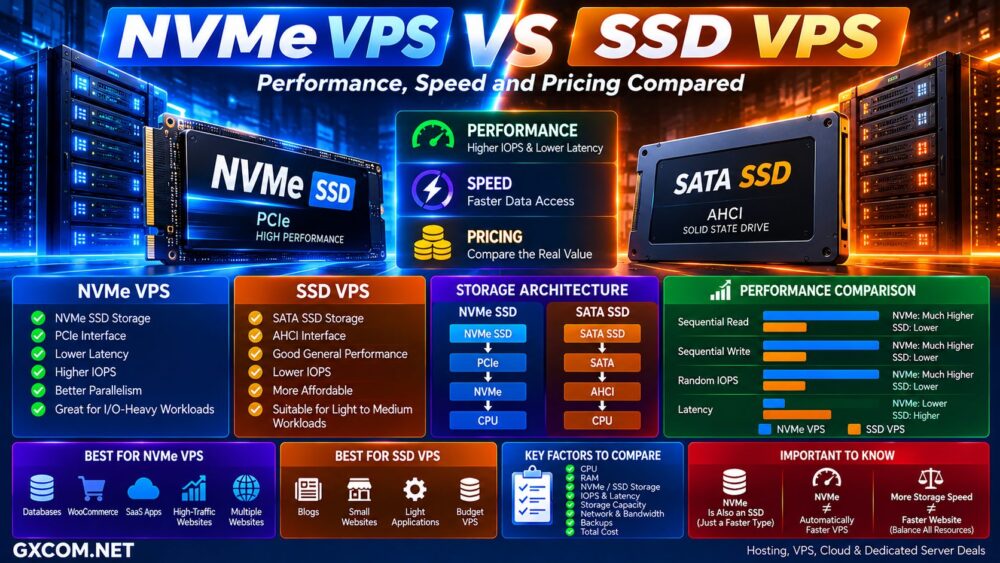
NVMe VPS vs SSD VPS: Quick Comparison
| Feature | NVMe VPS | Traditional SSD VPS |
|---|---|---|
| Storage Technology | NVMe SSD | Usually SATA SSD |
| Interface | PCIe | SATA |
| Typical Protocol | NVMe | AHCI |
| Potential Throughput | Much higher | Lower |
| Potential IOPS | Much higher | Lower |
| Protocol Latency | Lower | Higher |
| Parallel I/O | Excellent | More limited |
| Price | May cost more | Can be cheaper |
| Best For | Databases and I/O-heavy workloads | General websites and lighter workloads |
What Is an SSD VPS?
An SSD VPS is a virtual private server whose storage is backed by solid-state drives rather than mechanical hard drives.
Traditional hosting SSD infrastructure commonly uses SATA with the AHCI protocol.
Compared with HDD storage, SSD eliminates mechanical seek time and can substantially improve random read/write performance, application responsiveness and database access.
This made SSD storage a major VPS upgrade when hosting companies began replacing HDD arrays.
However, SATA was originally designed around an older storage architecture and eventually became a bottleneck as flash memory became faster.
What Is an NVMe VPS?
An NVMe VPS is a virtual server backed by storage using Non-Volatile Memory Express technology.
NVMe was designed specifically for solid-state storage and normally communicates through PCI Express rather than the SATA interface.
The basic difference can be visualized as:
SATA SSD → SATA → AHCI → CPU
NVMe SSD → PCIe → NVMe → CPU
The NVMe architecture supports substantially greater command parallelism and reduces storage-protocol overhead.
This is particularly useful when many storage requests occur simultaneously.
NVMe Is Also an SSD
This is the most important terminology point in the entire comparison.
NVMe VPS vs SSD VPS is not technically NVMe vs solid-state storage.
NVMe drives are SSDs.
The real comparison usually means:
NVMe SSD vs SATA SSD
Hosting companies use “NVMe VPS” and “SSD VPS” because the shorter terminology makes it easier for customers to distinguish the storage tiers.
NVMe VPS vs SSD VPS Speed
On the underlying hardware, NVMe has substantially greater performance potential.
A SATA III interface has a theoretical 6Gb/s limit, with real-world SATA SSD throughput commonly topping out around 550MB/s after overhead.
PCIe provides much greater bandwidth. NVMe also avoids the legacy SATA/AHCI path and communicates more directly with the CPU.
That creates advantages in:
- Sequential throughput
- Random I/O
- IOPS
- Queue depth
- Storage latency
- Concurrent operations
IOPS Matter More Than the NVMe Label
For VPS hosting, sequential headline speed is only part of the story.
Web servers and databases frequently perform large numbers of small random reads and writes.
That makes IOPS — Input/Output Operations Per Second — particularly important.
NVMe is architecturally capable of handling far more simultaneous I/O operations than traditional AHCI storage.
However, VPS customers do not necessarily receive the full performance of the physical drive.
The hosting provider may impose:
- IOPS limits
- Throughput limits
- Shared storage limits
- Fair-use policies
- Virtualization limits
NVMe Hardware ≠ Unlimited NVMe Performance.
Does NVMe VPS Make a Website Faster?
Sometimes — but not always.
A website can be limited by many different components:
CPU → RAM → Database → Storage → PHP → Network → Application Code.
If CPU processing or external API latency is the bottleneck, changing from SATA SSD to NVMe may produce little visible improvement.
Likewise, a heavily cached WordPress page may perform relatively few storage operations when serving visitors.
NVMe becomes more valuable when storage is genuinely part of the bottleneck.
Faster Storage ≠ Automatically Faster Website.
NVMe and SSD VPS Providers to Compare
Once you understand the storage difference, compare VPS providers based on the complete server rather than storage terminology alone.
Among providers relevant to GXCOM.NET readers, UltaHost, VPSServer, AccuWeb Hosting, IONOS, InterServer, RackNerd, VPSHostingService and VPSDime are worth checking when comparing VPS configurations and current storage options.
| Provider | VPS Focus | What to Compare |
|---|---|---|
| UltaHost | VPS / Managed VPS | Storage, CPU, management and locations |
| VPSServer | Cloud VPS | Storage performance and scalable resources |
| AccuWeb Hosting | Linux / Windows VPS | Storage type, OS and management |
| IONOS | VPS / Cloud | Resources and total cost |
| InterServer | VPS | Storage allocation and resources |
| RackNerd | Budget VPS | Price-to-resource ratio |
| VPSHostingService | Linux / Windows VPS | Storage capacity and VPS pricing |
| VPSDime | VPS | RAM, storage and workload value |
Because provider hardware and plans change, verify the current storage technology and resource limits before ordering.
NVMe VPS vs SSD VPS for WordPress
Most WordPress websites do not require NVMe simply because they run WordPress.
A small blog or company website can perform extremely well on quality SATA SSD storage, particularly when full-page caching and a CDN are configured correctly.
NVMe becomes more useful as WordPress generates heavier dynamic activity.
Examples include:
- Large WordPress databases
- High-traffic sites
- Membership websites
- Large admin dashboards
- Frequent searches
- Import and export operations
- Backup processing
- Multiple websites on one VPS
NVMe VPS vs SSD VPS for WooCommerce
WooCommerce generally produces more dynamic database activity than a conventional content website.
Product searches, inventory queries, shopping carts, checkout, customer accounts and order processing can generate frequent database operations.
This makes low-latency storage more valuable as the store grows.
However, CPU performance, available RAM, PHP workers, database configuration and caching can still matter as much as — or more than — the storage interface.
NVMe VPS for Databases
Databases are one of the strongest use cases for NVMe VPS hosting.
MySQL, MariaDB, PostgreSQL and other database engines can generate substantial random I/O under demanding workloads.
Lower storage latency and higher IOPS can improve responsiveness when the database is actually storage constrained.
This can matter for:
- Ecommerce databases
- SaaS applications
- Analytics
- Large WordPress databases
- Forums
- CRM systems
- Search applications
- Transaction-heavy applications
NVMe VPS for Multiple Websites
Storage activity can increase quickly when one VPS hosts many websites.
Each site may simultaneously generate:
- PHP reads
- Database queries
- Log writes
- Cache operations
- Email activity
- Backups
- Cron jobs
NVMe can provide more headroom for these concurrent storage operations.
NVMe VPS vs SSD VPS Pricing
NVMe infrastructure has traditionally been positioned as a premium storage tier, but the price gap has narrowed substantially as NVMe has become common in modern servers.
Many VPS providers now include NVMe storage as a standard feature rather than a costly upgrade.
That means you should not automatically assume:
NVMe VPS = Expensive VPS.
Likewise, a cheaper SATA SSD VPS can still provide better overall value if it includes more RAM, stronger CPU performance, more storage or better network capacity.
Compare the Whole VPS, Not Just Storage
Suppose you have two options:
VPS A → NVMe + Weak CPU + 2GB RAM
VPS B → SATA SSD + Strong CPU + 4GB RAM
It would be incorrect to assume VPS A will always perform better simply because it uses NVMe.
The correct comparison includes:
- CPU model
- vCPU allocation
- Shared or dedicated CPU
- RAM
- Storage technology
- Storage capacity
- IOPS limits
- Network speed
- Bandwidth
- Location
- Backups
- Management
- Total cost
Which VPS Type Fits Different Workloads?
For database-heavy applications, ecommerce, SaaS, high-traffic WordPress and multi-site environments, an NVMe-based VPS from providers such as UltaHost, VPSServer or AccuWeb Hosting is worth comparing where the current plan provides the storage and resource characteristics your workload requires.
For lighter websites or projects where RAM, storage capacity and monthly price matter more than maximum storage I/O, also compare the current offerings from RackNerd, InterServer, VPSHostingService and VPSDime.
The goal is not to buy the fastest storage specification available.
It is to buy the VPS whose complete resource profile matches the workload.
Workload → CPU + RAM → Storage I/O → Network → Location → Total Cost.
NVMe Does Not Fix Low RAM
One particularly important VPS buying mistake is prioritizing NVMe while purchasing too little memory.
If an application constantly runs out of RAM and begins swapping to disk, the server already has a resource-allocation problem.
For many workloads, moving from 2GB to 4GB or 8GB RAM can be more useful than upgrading storage while leaving memory constrained.
Balance Beats One Fast Component.
NVMe Does Not Fix a Slow CPU
The same principle applies to processors.
WordPress PHP execution, compression, application logic and many software workloads depend heavily on CPU performance.
A modern high-frequency processor paired with SATA SSD storage can outperform a weak CPU paired with NVMe in CPU-bound workloads.
Always identify the bottleneck before upgrading.
Local NVMe vs Network Storage
Another complication is that the word “NVMe” does not tell you the complete storage architecture.
A provider may use:
- Local NVMe
- NVMe RAID
- Distributed NVMe storage
- Network-attached block storage
Each architecture has different characteristics for latency, redundancy, migration and failure recovery.
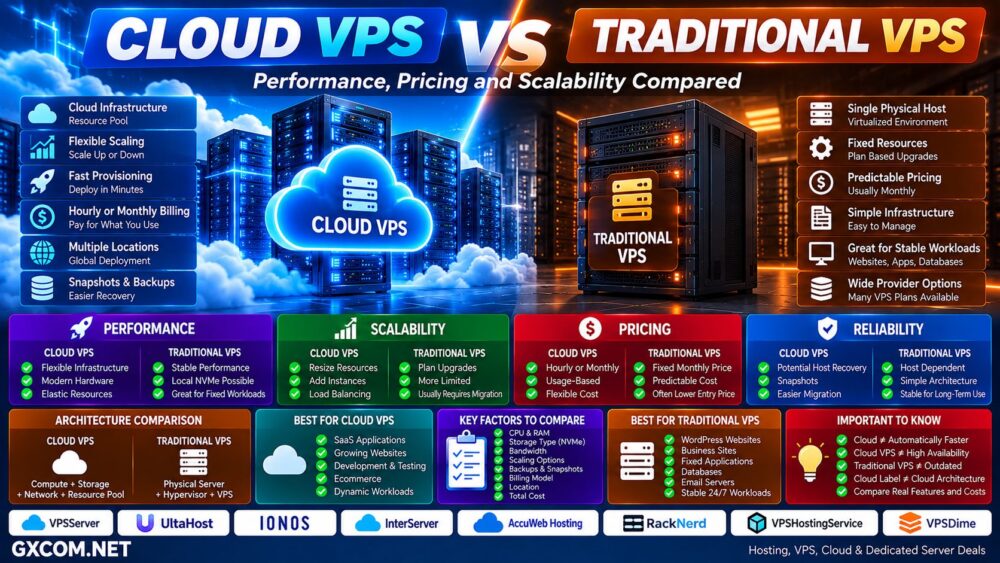
This is particularly important when comparing traditional VPS with cloud VPS infrastructure.
For that architecture comparison, see our
Cloud VPS vs Traditional VPS
guide.
NVMe VPS vs SSD VPS for Backups
Faster storage is not a substitute for backups.
NVMe can improve the speed of backup creation or restoration when storage is the limiting factor, but it does not protect against:
- Accidental deletion
- Malware
- Filesystem corruption
- Application errors
- Account compromise
- Infrastructure failure
Always compare backup frequency, retention and restore options independently from storage performance.
NVMe VPS vs SSD VPS: Pros and Cons
| NVMe VPS | SSD VPS | |
|---|---|---|
| Main Advantage | Higher storage performance potential | Good performance at potentially lower cost |
| Latency | Lower potential latency | Higher than NVMe |
| IOPS | Much higher potential | Lower potential |
| Parallel I/O | Excellent | More limited |
| Price | Increasingly competitive | Often economical |
| Best For | Databases and I/O-heavy applications | General-purpose workloads |
Choose NVMe VPS If…
- Your database performs substantial I/O
- You run a busy ecommerce store
- You host many websites on one VPS
- You operate SaaS applications
- You process large numbers of files
- You run frequent backup or data operations
- Your existing server is storage constrained
- The NVMe plan costs little more than an equivalent SSD plan
SSD VPS Can Still Make Sense If…
- Your workload is relatively light
- Your website is heavily cached
- You need more storage capacity for the budget
- Your application performs little disk I/O
- RAM or CPU is more important to your workload
- The SSD VPS provides significantly better overall resources
How to Compare NVMe VPS Providers
Do not stop when the pricing table says “NVMe.”
Check:
- CPU model and generation
- vCPU count
- Shared vs dedicated CPU
- RAM
- NVMe capacity
- Local vs distributed storage
- RAID or redundancy
- IOPS limits
- Disk throughput limits
- Network port speed
- Included traffic
- Backup policy
- Data center location
- Virtualization technology
- Management level
- Monthly and renewal cost
NVMe VPS vs SSD VPS: Which Should You Choose?
If two VPS plans provide similar CPU, RAM, network, management and pricing, NVMe is generally the more attractive storage technology because it provides substantially greater performance potential and lower protocol overhead.
That does not mean every website needs it.
For small websites and light workloads, conventional SSD storage can remain completely adequate.
For databases, ecommerce, SaaS, busy WordPress sites and applications performing substantial random I/O, NVMe provides more useful storage headroom.
Most importantly, do not evaluate VPS performance from one specification.
NVMe ≠ Fast VPS.
A fast VPS requires a balanced combination of CPU, RAM, storage, network and application configuration.
Use this decision path:
Workload → CPU → RAM → Storage I/O → Network → Location → Provider → Total Cost → Right VPS.
If the price difference is small and the rest of the specifications are comparable, NVMe is a sensible choice. If choosing NVMe forces you to sacrifice RAM, CPU performance or other resources your workload needs more, compare the complete server before deciding.