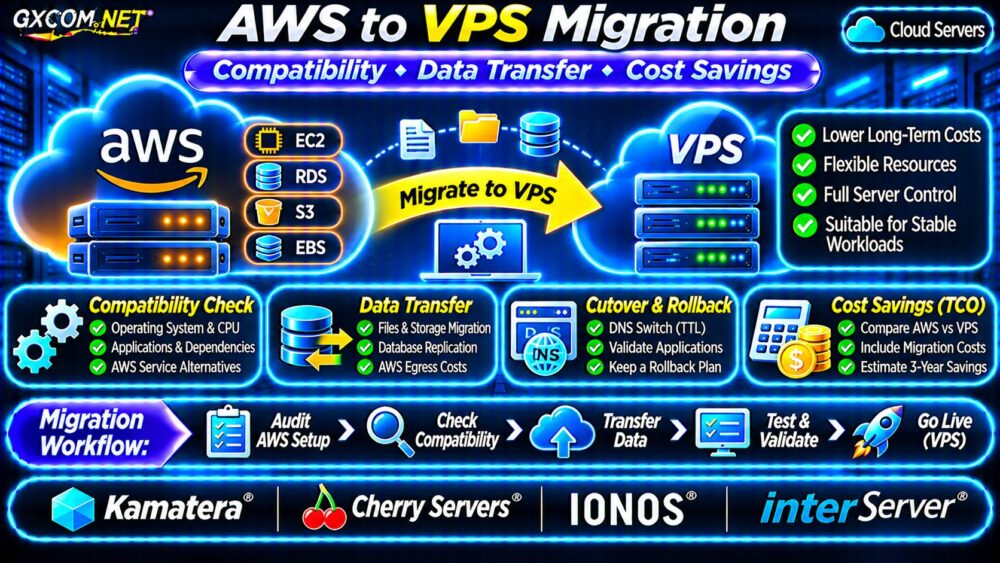
AWS to VPS migration can reduce infrastructure spending for applications that no longer need the full flexibility of Amazon Web Services. However, moving an EC2 workload to a conventional virtual private server involves more than copying files. AWS-specific dependencies, database consistency, outbound transfer charges, and operational responsibilities can change the economics.
This guide explains how to assess compatibility, estimate migration expenses, plan a safe cutover, and calculate whether long-term VPS savings justify the move.
When Does Moving From AWS to VPS Make Sense?
A VPS is worth considering when an application has predictable resource requirements, runs continuously, and relies primarily on standard Linux services. Small business websites, internal applications, and single-server workloads may benefit from simpler monthly pricing.
Migration becomes less attractive when the application depends heavily on AWS-managed databases, serverless functions, autoscaling groups, or tightly integrated cloud services.
Before proceeding, compare infrastructure differences in our VPS vs cloud hosting comparison.
Audit AWS Dependencies Before Migration
Inventory the complete application architecture, not just the EC2 instance. Record the operating system, CPU architecture, application runtime, database engine, storage layout, firewall rules, certificates, and scheduled tasks.
| AWS Component | VPS Migration Consideration |
|---|---|
| EC2 | Operating system, CPU architecture, packages |
| EBS | Disk capacity, filesystem, IOPS, backups |
| RDS | Database hosting, replication, administration |
| S3 | Object storage compatibility and file migration |
| IAM | Replacement credentials and access policies |
| Load balancing | Reverse proxy, TLS, health checks, redundancy |
Applications using AWS SDKs may require code changes when replacing S3, Secrets Manager, or other managed APIs. Verify integrations individually rather than assuming that equivalent-looking services behave identically.
EC2 Image Export and VPS Compatibility
AWS VM Import/Export supports certain EC2 export scenarios, but not every instance is eligible. AWS documents restrictions involving third-party software, encrypted EBS snapshots, disk layouts, and other configurations.
Even when an image can be exported, the destination VPS provider may not accept its format or support the original boot configuration. Windows licensing and Marketplace software require particular attention.
Rebuild or Export?
For many Linux web applications, provisioning a clean destination VPS and reinstalling the application stack is more portable than attempting a complete virtual-machine export.
Document package versions, environment variables, firewall rules, application services, and storage mounts. Test the replacement environment before transferring production traffic.

Preserve an independent recovery copy of the source system before changing its configuration.
Transfer Files and Databases Safely
For ordinary Linux application files, rsync can perform an initial copy followed by a smaller final synchronization. For example, after configuring destination access:
rsync -avz --dry-run /srv/app/ user@destination:/srv/app/The dry run previews file operations. Remove --dry-run only after checking paths, permissions, exclusions, and destination backups. Use SSH authentication and avoid exposing unnecessary services publicly.
Do not copy live PostgreSQL or MySQL data directories as ordinary application files. Use database-native backup tools or supported replication methods to preserve consistency.
Database Cutover and Write Consistency
For small databases, a maintenance window with a final dump and restore may be sufficient. Larger transactional systems may require replication and a controlled write freeze.
AWS Database Migration Service supports selected source and target databases, including change data capture in supported configurations. Confirm endpoint compatibility, replication prerequisites, and any service charges before relying on it.
Validate row counts, critical transactions, application queries, and user authentication on the destination. Keep the original database protected until the cutover is accepted.
Calculate AWS Data Transfer and Exit Costs
Outbound data transfer may generate AWS charges depending on the service, destination, region, usage tier, and applicable pricing rules. Storage requests, temporary snapshots, and parallel infrastructure can also contribute to migration expenses.
Estimate migration time using:
Transfer seconds = data size in bits ÷ effective throughput in bits per second.
For example, transferring 500 GB over an effective 200 Mbps connection takes approximately 5.6 hours using decimal units, excluding interruptions and protocol overhead.
Do not confuse transfer duration with cost. Review the current AWS billing rules and the destination provider’s traffic allowance separately.
Our cloud VPS bandwidth overages guide explains transfer caps and network billing differences.
AWS vs VPS: Illustrative Three-Year Cost Model
Consider a hypothetical application with a $95 monthly AWS infrastructure bill. A replacement VPS costs $32 monthly, with another $13 allocated to backups, monitoring, and related services.
| Illustrative Expense | AWS | VPS |
|---|---|---|
| Monthly infrastructure | $95 | $45 |
| 36-month infrastructure | $3,420 | $1,620 |
| One-time migration | — | $600 |
| 36-month total | $3,420 | $2,220 |
The modeled savings are $1,200 over three years, with a twelve-month migration payback period. These figures are hypothetical, not provider quotations.
The comparison assumes equivalent application requirements and excludes additional administration, downtime losses, taxes, growth, and changing prices. A self-managed database or additional redundancy could eliminate the apparent savings.
For further budgeting methods, see our cloud server cost optimization guide.
Compare Four Approved VPS Infrastructure Providers
Kamatera: Configurable Cloud Servers
Kamatera is relevant when migrating EC2 workloads that need adjustable CPU, memory, and storage configurations. Verify the selected operating system, networking, management options, and backup costs.
Cherry Servers: Infrastructure Control
Cherry Servers is worth evaluating for workloads with specific compute, storage, or network requirements. Confirm the selected product’s virtualization environment and migration responsibilities.
IONOS: VPS and Cloud Alternatives
IONOS offers infrastructure options for teams comparing simpler virtual servers with broader cloud services. Evaluate product-specific resource limits, billing terms, and administrative responsibilities.
InterServer: Conventional VPS Hosting
InterServer provides a comparison point for applications seeking a conventional VPS deployment. Check available Linux configurations, support boundaries, and storage or bandwidth allowances.

None of these providers should be assumed to offer automatic compatibility with every AWS service or EC2 image.
Cutover, Rollback and Decommissioning Checklist
- Inventory AWS services, credentials, storage, and external dependencies.
- Deploy and harden the destination before transferring production data.
- Complete initial file and database synchronization.
- Test application behavior, performance, backups, and restoration.
- Reduce relevant DNS TTL values ahead of the planned cutover.
- Freeze writes or coordinate replication before switching traffic.
- Monitor errors, transactions, latency, and database consistency.
- Decommission AWS resources only after acceptance and backup verification.
Returning DNS to AWS is not a complete rollback if new transactions were written to the VPS. Establish a data reconciliation procedure before switching production traffic.
Our cloud server migration guide covers broader downtime planning and switching procedures.
Frequently Asked Questions
Can Every EC2 Instance Be Moved Directly to a VPS?
No. Image export restrictions, operating system licensing, virtualization differences, and AWS-managed dependencies can prevent direct migration.
Is VPS Hosting Always Cheaper Than AWS?
No. Compare the complete workload, including backups, networking, administration, recovery requirements, and migration expenses.
Final Verdict
AWS to VPS migration makes financial sense when the application is portable, resource demand is predictable, and operational responsibilities remain manageable. Audit AWS dependencies, validate database consistency, calculate realistic migration costs, and test rollback before committing.
Compare Kamatera, Cherry Servers, IONOS, and InterServer against documented workload requirements. Choose the destination that delivers sustainable total costs without sacrificing essential reliability or security.