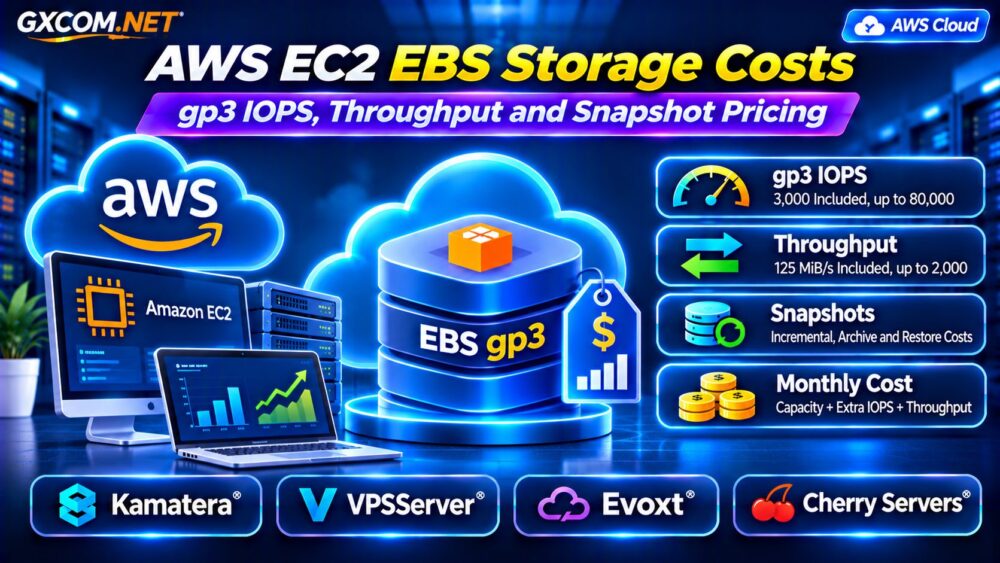
AWS EC2 EBS storage costs can surprise businesses that focus on instance pricing while overlooking attached storage. Amazon Elastic Block Store (EBS) charges separately for provisioned capacity, certain performance settings, and snapshots. A small EC2 instance can therefore generate a larger monthly bill than its advertised compute price suggests.
General Purpose SSD gp3 volumes offer predictable baseline performance, but additional IOPS and throughput increase costs. This guide explains the pricing formula, snapshot charges, and practical ways to optimize storage spending.
What Makes Up an AWS EC2 EBS Bill?
EC2 compute and EBS storage are distinct billing components. Stopping an EBS-backed instance generally stops applicable instance compute charges, but retained EBS volumes can continue accumulating storage charges.
The main expenses include provisioned volume capacity, performance above the gp3 baseline, snapshot storage, and optional recovery features. Data transfers, monitoring, and related infrastructure may add separate charges.
Review EBS usage independently from EC2 instance charges when investigating unexpected bills.
How Does EBS gp3 Pricing Work?
Amazon EBS gp3 separates storage capacity from provisioned performance. Every gp3 volume includes 3,000 IOPS and 125 MiB/s of baseline throughput without additional performance charges.
Higher IOPS and throughput can be provisioned independently, subject to volume size, performance ratios, and supported limits.
In a commonly published US East pricing example, gp3 storage costs $0.08 per GB-month, additional IOPS cost $0.005 per IOPS-month, and additional throughput costs $0.04 per MiB/s-month. These are regional example rates, not universal prices.
Calculate a 200 GB gp3 Volume
Consider a 200 GB volume provisioned for 6,000 IOPS and 250 MiB/s throughout a full month:
- Storage: 200 × $0.08 = $16.00.
- Extra IOPS: (6,000 − 3,000) × $0.005 = $15.00.
- Extra throughput: (250 − 125) × $0.04 = $5.00.
- Estimated EBS volume total: $36.00 monthly.
This calculation excludes EC2 compute, snapshots, taxes, and other services. Confirm regional rates and billing duration before using the estimate for procurement.
gp3 IOPS: When Should You Pay for More?
IOPS measures the number of storage operations completed per second. Database workloads with small random reads and writes may benefit from additional IOPS when monitoring demonstrates sustained storage pressure.
However, increasing provisioned IOPS does not automatically improve application performance. Inefficient SQL queries, insufficient memory, CPU contention, or network limitations may remain the real bottleneck.
Check CloudWatch volume metrics, application response times, and database monitoring before increasing provisioned performance.
Current gp3 volumes support up to 80,000 IOPS, subject to configuration limits and EC2 instance capabilities. Provisioning a high number does not guarantee the attached instance can consume it.

gp3 Throughput Pricing Explained
Throughput measures the volume of data transferred per second. Sequential backups, analytics, and large-file processing can benefit from higher throughput even when IOPS demand is moderate.
gp3 includes 125 MiB/s of baseline throughput. Provisioning additional throughput creates a separate recurring charge.
Performance is also constrained by the instance’s EBS bandwidth and the relationship between provisioned IOPS and throughput. The gp3 maximum of 2,000 MiB/s is a volume-level capability, not a promise for every EC2 configuration.
Benchmark realistic workloads before paying for higher settings.
gp2 vs gp3: Can Migration Reduce Costs?
Older gp2 volumes tie baseline IOPS to allocated storage capacity, while gp3 separates performance from volume size.
For workloads requiring modest storage but substantial IOPS, gp3 may eliminate the need to purchase unnecessary capacity simply to improve performance.
AWS publishes examples where gp3 offers lower capacity pricing than gp2. Nevertheless, compare the complete performance configuration rather than storage price alone.
Check existing gp2 utilization, choose appropriate gp3 settings, and validate application performance after modification. Volume changes should follow normal operational safeguards and backup procedures.
How Much Do EBS Snapshots Cost?
Standard EBS snapshots are incremental. The first snapshot stores the necessary blocks, while later snapshots generally add blocks changed since previous snapshots.
For example, 100 GB of billable standard snapshot data at an illustrative $0.05 per GB-month would cost approximately $5 monthly.
This does not mean every snapshot of a 100 GB volume costs $5. Actual billed storage depends on retained unique blocks, changes, and snapshot dependencies.
Deleting a snapshot releases only data no longer required by other retained snapshots. Review snapshot retention and ownership before deleting recovery points.
Snapshot Archive and Restoration Charges
EBS Snapshot Archive is intended for infrequently accessed, long-term recovery points. Unlike incremental standard snapshots, archived snapshots are stored as full snapshots.
AWS documentation lists example archive storage pricing of $0.0125 per GB-month and restoration charges of $0.03 per GB, with a 90-day minimum archive period.
Restored snapshots also incur applicable standard-tier storage charges. Archiving can therefore reduce long-term retention expenses while introducing retrieval costs and additional recovery time.
Evaluate recovery objectives before choosing archive storage solely because its monthly rate is lower.
Hidden EBS Expenses to Check
Unused volumes can continue generating charges after their associated instances are removed. Oversized volumes, unnecessary provisioned IOPS, and forgotten snapshots also create recurring expenses.
Optional Fast Snapshot Restore has separate charges based on enabled snapshots and Availability Zones. Cross-region snapshot copies, monitoring, and related data operations may introduce additional costs.
Use AWS Cost Explorer and detailed billing usage types to distinguish storage capacity from provisioned performance and recovery services.
Compare AWS Storage With Alternative Cloud Providers
Businesses with predictable workloads may also evaluate providers that bundle storage with compute. These services are not direct replacements for every EBS capability, but they can provide useful pricing alternatives.
Kamatera: Configurable Cloud Servers
Kamatera is relevant for teams comparing configurable compute and storage resources. Check available storage options, backup arrangements, and upgrade policies against your EC2 requirements.
VPSServer: Cloud VPS Configurations
VPSServer can be evaluated for cloud VPS workloads where included storage and predictable resource allocation matter. Verify disk performance, storage limits, and backup costs for the selected plan.
Evoxt: Budget VPS Alternatives
Evoxt may suit smaller applications seeking straightforward VPS configurations. Compare included disk capacity and upgrade options without assuming its storage has EBS-equivalent snapshot or volume-management features.
Cherry Servers: Dedicated Storage Options
Cherry Servers is relevant for storage-intensive workloads considering dedicated infrastructure. Compare available drive configurations, redundancy, management responsibilities, and total monthly expenditure.
For architecture differences, read our Cloud VPS Block Storage vs Local NVMe Comparison.

Seven Ways to Reduce AWS EBS Costs
- Identify unused and unattached EBS volumes.
- Review opportunities to migrate suitable gp2 volumes to gp3.
- Reduce unnecessary provisioned IOPS and throughput.
- Right-size capacity using measured storage requirements.
- Apply snapshot retention policies and remove obsolete recovery points carefully.
- Evaluate archive storage for appropriate long-term snapshots.
- Compare complete EC2 and storage costs against alternative infrastructure.
For broader hosting economics, see our AWS EC2 vs VPS Hosting Guide and Cloud VPS Bandwidth Costs Guide.
Frequently Asked Questions
Is 3,000 IOPS Included With gp3?
Yes. gp3 includes 3,000 provisioned IOPS and 125 MiB/s throughput in its baseline storage price.
Do EBS Volumes Cost Money When EC2 Is Stopped?
Yes. Retained provisioned EBS storage generally continues to incur charges even when its attached EC2 instance is stopped.
Are EBS Snapshots Charged by Volume Size?
Standard snapshots are billed according to stored snapshot data, not simply the volume’s provisioned capacity. Archive snapshots follow different storage rules.
Final Verdict
AWS EC2 EBS storage costs depend on capacity, provisioned gp3 performance, snapshot retention, and optional recovery services. Measure actual workload demand before increasing IOPS or throughput.
For cost-sensitive applications, compare AWS against Kamatera, VPSServer, Evoxt, and Cherry Servers using equivalent compute, storage, backup, and management requirements.
Review our Best Cloud Hosting Solutions for additional infrastructure comparisons.