Choosing a dedicated CPU VPS vs shared CPU VPS affects application performance, server responsiveness, and monthly hosting costs. Shared CPU plans are often attractive for websites with occasional traffic spikes, while dedicated CPU options may provide more predictable resources for sustained workloads.
However, a dedicated vCPU does not always mean exclusive ownership of a physical processor core. Understanding virtualization, CPU contention, fair use policies, and real workload requirements is essential before upgrading.
Dedicated CPU VPS vs Shared CPU VPS: Key Differences
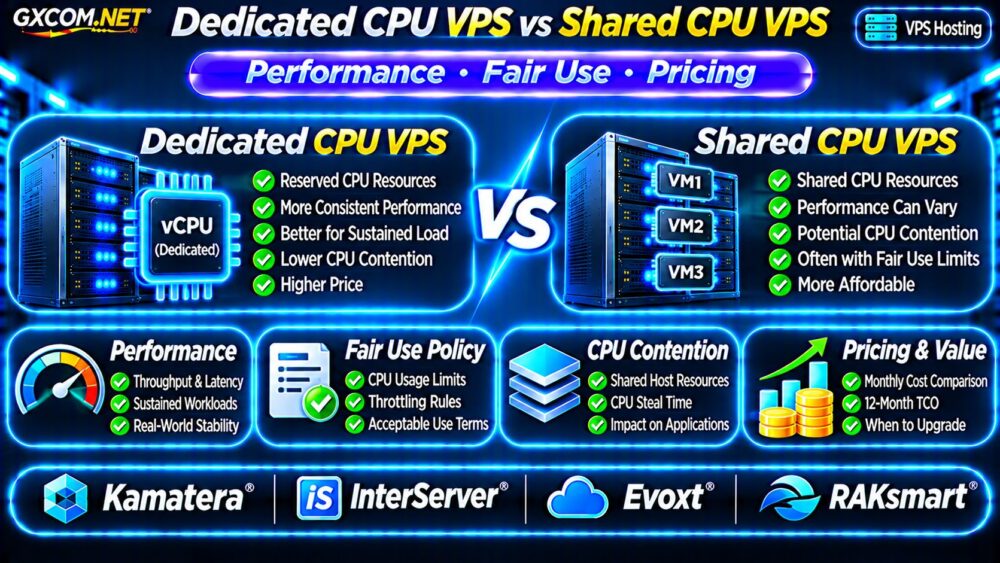
A shared CPU VPS receives virtual processors scheduled alongside other virtual machines on the host. Available CPU time depends on the hypervisor, resource allocation, and competing workloads.
A dedicated CPU VPS generally offers stronger CPU allocation guarantees, but the exact meaning varies by provider. Some products reserve processing capacity, while others assign exclusive physical cores or threads.
| Factor | Shared CPU VPS | Dedicated CPU VPS |
|---|---|---|
| CPU allocation | Shared host capacity | Reserved or isolated allocation, depending on plan |
| Performance consistency | Can vary under contention | Potentially more predictable |
| Sustained workloads | May face usage restrictions | Depends on allocation guarantees |
| Monthly price | Usually lower | Usually higher |
| Best fit | Bursty or moderate workloads | CPU-intensive applications |
Neither category guarantees a particular benchmark score. Processor generation, clock speed, memory, storage, and virtualization overhead also matter.
Does a Dedicated vCPU Mean a Physical Core?
Not necessarily. A vCPU is a virtual scheduling resource, not automatically an entire physical core.
One provider may reserve a logical hardware thread, another may allocate a physical core, and a third may offer priority scheduling without strict physical isolation.
Before ordering, ask whether dedicated means exclusive physical cores, reserved threads, guaranteed CPU time, or simply higher scheduling priority.
Also confirm whether the advertised vCPU count includes simultaneous multithreading threads rather than independent physical cores.
How CPU Contention Affects VPS Performance
CPU contention occurs when multiple virtual machines compete for limited host processing capacity. Under heavy demand, the hypervisor may delay execution of a guest’s scheduled work.
Users might notice slower page generation, delayed background jobs, inconsistent API responses, or longer database processing times.
Understanding CPU Steal Time
On Linux virtual machines, CPU steal time can indicate periods when a runnable guest was waiting for host CPU resources.

Elevated steal time may suggest contention, but it should be interpreted alongside application demand, CPU utilization, and provider-specific virtualization behavior.
For troubleshooting instructions, read our VPS CPU Steal Time Troubleshooting Guide.
Fair Use Policies and CPU Throttling
Some shared VPS products permit short bursts of high CPU activity but restrict prolonged utilization. Providers may enforce acceptable-use limits, scheduling priorities, or other resource controls.
A plan advertising four vCPUs therefore does not necessarily permit four virtual processors to run at maximum capacity continuously.
Dedicated CPU plans may provide more generous sustained-use allowances, but unrestricted utilization should never be assumed.
Questions to Ask Before Buying
- Can the allocated CPU resources run continuously at full utilization?
- Are there CPU usage thresholds or throttling policies?
- Does the plan reserve physical cores, threads, or processing capacity?
- What happens when neighboring virtual machines become busy?
- Can CPU resources be upgraded without rebuilding the server?
Request written clarification when the product description uses ambiguous terms such as dedicated, guaranteed, or premium CPU.
Which Workloads Benefit From Dedicated CPU?
CPU-intensive applications are the strongest candidates. Examples include software compilation, busy application servers, data processing, certain game servers, and databases performing expensive queries.
High-traffic WooCommerce installations may benefit when PHP execution consistently saturates available processors. However, caching, database optimization, and PHP worker limits should be investigated first.
Shared CPU VPS hosting remains suitable for development environments, lightly loaded websites, scheduled applications, and workloads with substantial idle periods.
If a workload is limited by disk latency rather than CPU scheduling, upgrading processors may provide little benefit. Our NVMe VPS vs SSD Performance Guide explains storage-related bottlenecks.
How to Benchmark Shared and Dedicated CPU VPS
Benchmark both options using comparable operating systems, application versions, memory allocations, and testing periods.
Begin with CPU tests such as sysbench, then measure actual application response times, request throughput, and background processing duration.
Repeat measurements during different periods instead of relying on one short test. Track CPU utilization, steal time, application latency, and system load.
Measure Sustained Performance
Short benchmarks may reward temporary boost behavior without revealing performance under continuous demand.
Run representative sustained workloads while monitoring temperatures where exposed, CPU frequency, latency, and error rates. Respect the provider’s acceptable-use policy during testing.
Prioritize P95 and P99 application response times when consistent customer experience matters.
Four VPS Providers to Compare
The following GXCOM.NET-approved affiliate providers are candidates for comparing VPS resources and pricing. Their dedicated CPU availability and allocation guarantees must be checked at the individual product level.
Kamatera: Configurable Cloud Resources
Kamatera is worth evaluating when adjustable cloud resources and deployment flexibility matter. Compare available CPU options, processor characteristics, scaling procedures, and billing terms.
InterServer: VPS Resource Value
InterServer provides another option for comparing VPS resource allocations and recurring costs. Review the selected plan’s CPU usage conditions and upgrade path before purchasing.
Evoxt: Budget VPS Comparison
Evoxt may appeal to cost-conscious developers evaluating vCPU performance against monthly price. Confirm the CPU model, allocation policy, available locations, and sustained-use restrictions.
RAKsmart: VPS Configuration Options
RAKsmart is another candidate for evaluating VPS configurations and regional requirements. Verify CPU isolation claims, network specifications, resource limits, and contract conditions.
Do not assume these four providers offer equivalent dedicated CPU products. Compare verified specifications rather than brand names alone.
Dedicated CPU VPS Pricing and Total Cost
Dedicated CPU capacity generally costs more because the provider must allocate resources with stronger availability guarantees.
Consider a hypothetical shared CPU VPS costing $20 monthly and a dedicated CPU alternative costing $45 monthly.

Over twelve months, the shared plan costs $240 and the dedicated plan costs $540, a difference of $300 before taxes, backups, and other services.
The additional expense may be justified if predictable processing reduces customer-facing latency or engineering time. Otherwise, shared hosting may deliver better value.
These figures illustrate the calculation and are not current provider quotations.
When Should You Upgrade to Dedicated CPU?
Consider upgrading when monitoring consistently shows CPU saturation, performance deterioration under contention, or workload requirements exceeding the shared plan’s permitted sustained utilization.
First investigate inefficient queries, application caching, unnecessary background tasks, and storage bottlenecks.
For broader provider selection, consult our Best VPS Providers Comparison.
Frequently Asked Questions
Is Dedicated CPU VPS Always Faster?
No. A newer shared processor may outperform an older dedicated allocation in some workloads. Consistency and sustained capacity are often more important distinctions.
Can Shared CPU VPS Handle Production Websites?
Yes. Many production websites operate effectively on shared CPU plans when resource demand and usage policies are compatible.
Does Dedicated CPU VPS Eliminate Steal Time?
Not necessarily. Results depend on hypervisor scheduling and the provider’s isolation model. Verify the actual resource guarantees.
Final Verdict
Choose shared CPU VPS hosting for variable workloads and tighter budgets. Consider dedicated CPU VPS hosting when sustained processing demand and predictable application performance justify the premium.
Compare Kamatera, InterServer, Evoxt, and RAKsmart using documented CPU allocation terms, representative benchmarks, and complete monthly costs. The right choice is the plan that meets workload requirements without unnecessary spending.