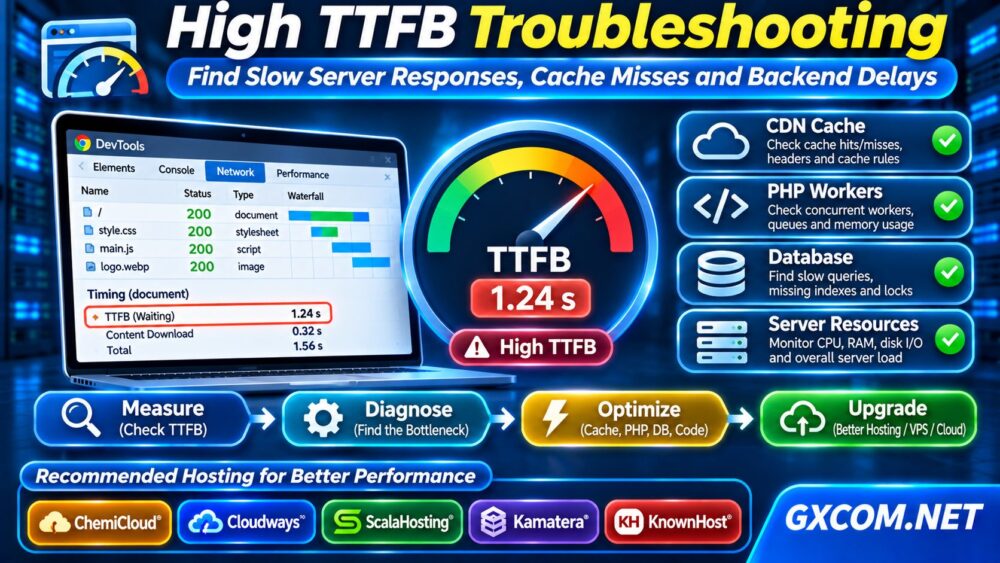
High TTFB troubleshooting begins with one question: why does your browser wait so long for the first byte of a page? A slow response can come from network distance, a cache miss, overloaded PHP workers, expensive database queries, or insufficient server resources. Buying faster hosting before identifying the cause may waste money.
This guide shows how to measure Time to First Byte (TTFB), isolate backend delays, and decide whether optimization or an infrastructure upgrade is appropriate.
What Is TTFB?
Time to First Byte measures the interval between initiating a resource request and receiving the first response byte. In browser navigation, it includes connection-related delays and the server’s processing time; it is not a pure measurement of CPU speed.
Google’s Core Web Vitals guidance commonly treats TTFB of 800 milliseconds or less as a useful target at the 75th percentile. However, TTFB is a diagnostic metric, not itself one of the three Core Web Vitals. A good TTFB does not guarantee fast rendering or interaction.
Step 1: Measure TTFB Correctly
Open Chrome DevTools, select Network, reload the page, and inspect the main document request. Review the Timing panel, especially waiting for server response. Compare repeated navigations and different geographic locations.
For a command-line measurement, run:
curl -s -o /dev/null -w 'TTFB: %{time_starttransfer}s\nTotal: %{time_total}s\n' https://example.com/Replace the example domain with your URL. This reports timing from the curl client’s perspective. DNS, connection setup, TLS negotiation, redirects, and network distance can influence the result.
Test both a cold request and repeated requests. Record the tested URL, location, time, and whether a CDN or cache was involved.
Step 2: Identify CDN Cache Hits and Misses
A content delivery network may serve cached HTML or static resources near visitors. When a request misses cache, the CDN forwards it to the origin, where application processing can increase response time.
Inspect response headers with:
curl -I https://example.com/Depending on the CDN, headers such as CF-Cache-Status, Age, or X-Cache may indicate cache behavior. A cache miss is not automatically a configuration error: authenticated pages, shopping carts, and personalized responses often should not be publicly cached.

Check cache rules, expiration settings, cookies, and unnecessary cache bypasses. Never cache private user content simply to improve a benchmark.
Step 3: Separate Network Delay From Backend Delay
Compare results from several regions and test the origin separately where you have authorized access. If distant locations are consistently slower, investigate routing, connection setup, and CDN coverage.
If the origin is slow even from a nearby test location, examine application processing and server health. Avoid exposing private origin addresses or bypassing production security controls during testing.
Look at server-side request duration, reverse-proxy logs, and application traces. These measurements help distinguish waiting for a connection from waiting for generated HTML.
Step 4: Diagnose WordPress PHP Worker Queues
WordPress dynamically generates uncached pages through PHP and database operations. When concurrent requests exceed available PHP worker capacity, requests may queue before processing begins.
Review PHP-FPM status, active worker counts, slow logs, and hosting resource alerts. A traffic spike, aggressive crawler, or slow plugin can occupy workers and increase TTFB for other visitors.
Our WordPress PHP Worker Limits guide explains concurrency, queues, and when additional application capacity may help.
Before adding workers, confirm sufficient memory. Increasing concurrency without available RAM can make the entire server less stable.
Step 5: Find Slow Database Queries
Database delays often appear as high TTFB on product pages, searches, dashboards, and other dynamic routes. Inspect slow-query logs and application performance traces rather than assuming every query is expensive.
Common causes include missing indexes, inefficient plugin queries, large autoloaded options, and excessive external API calls. Optimize the most expensive operations first, then repeat the same measurement.
Object caching can reduce repeated database work, but cache invalidation and memory usage require attention. A persistent cache does not repair an inefficient query by itself.
Step 6: Check CPU, Memory and Disk Pressure
When application changes do not explain the delay, inspect infrastructure metrics during slow requests. CPU saturation, swapping, disk latency, and shared virtual machine contention can extend processing time.
Useful Linux commands include:
top
vmstat 1 5
iostat -xz 1 5
The final command may require the sysstat package. Correlate measurements with request latency; a single high utilization sample does not prove causation.
For storage-specific diagnosis, see our NVMe VPS vs SSD Performance guide. If CPU scheduling looks suspicious, consult our VPS CPU Steal Time troubleshooting guide.
Step 7: Verify Improvements Under Load
After changing cache rules, PHP settings, or database queries, test the same URLs under comparable conditions. Include both cached and uncached requests, plus realistic concurrent users.
Track median and 75th-percentile TTFB alongside error rates and backend processing time. An optimization that improves one cached homepage but breaks checkout is not a successful fix.
Use our Website Load Testing guide to plan controlled concurrency tests before expected traffic spikes.
When Should You Upgrade Hosting?
Upgrade only when measurements show persistent resource limits, insufficient worker capacity, or unreliable infrastructure after reasonable optimization.
ChemiCloud is relevant for comparing WordPress-oriented hosting. Cloudways offers managed cloud environments for growing applications. ScalaHosting and KnownHost provide managed VPS options, while Kamatera offers configurable cloud servers for teams needing infrastructure flexibility.

Check actual plan resources, support scope, caching features, and data center availability. No provider guarantees a particular TTFB across all applications and visitor locations.
For sites outgrowing entry-level plans, our VPS vs Shared Hosting comparison explains how resource isolation and administrative control differ. These differences matter when repeated uncached requests expose sustained limits rather than occasional network fluctuations.
For purchasing decisions, explore our Managed Cloud Hosting comparison before selecting a deployment model.
Frequently Asked Questions
Is High TTFB Always a Hosting Problem?
No. Cache misses, slow application code, database queries, and network conditions can cause delays even on powerful infrastructure.
Does a CDN Always Reduce TTFB?
No. Cached responses may improve delivery, but uncached requests still depend on origin processing and network paths.
Will More PHP Workers Fix Slow TTFB?
Only when worker queuing is the bottleneck and enough memory exists. Slow individual requests require separate diagnosis.
Final Verdict
Effective high TTFB troubleshooting starts with repeatable measurements, then isolates network, cache, application, database, and infrastructure delays. Fix confirmed bottlenecks before paying for more resources.
When the evidence supports an upgrade, compare hosting, managed VPS, and cloud servers based on workload requirements rather than marketing speed claims.