When SSH suddenly stops working, an unmanaged VPS can feel completely inaccessible. A firewall mistake, failed kernel update, broken network configuration, or full system disk may prevent normal remote administration.
Fortunately, unmanaged VPS rescue access can provide another way to investigate problems. Depending on the provider, recovery options may include a VNC console, rescue environment, boot controls, or operating-system reinstallation.
Understanding these tools before an outage helps developers and administrators recover more safely and choose VPS hosting with appropriate emergency controls.
What Is Unmanaged VPS Rescue Access?
Rescue access refers to management methods that remain available when ordinary SSH or application access fails.
With unmanaged hosting, the customer normally handles operating-system configuration, troubleshooting, security, and recovery. The provider maintains its underlying infrastructure but may offer limited assistance with guest operating-system problems.
Our managed vs unmanaged VPS comparison explains these responsibilities in more detail.
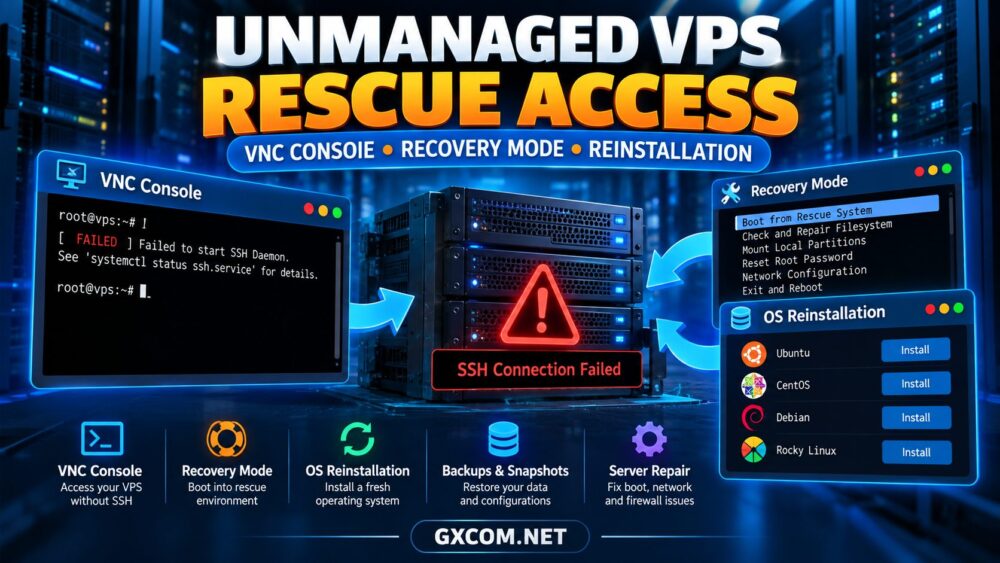
1. VNC Console: Access Your VPS Without SSH
A VNC-based console, or another browser-accessible virtual console, can provide keyboard and screen access through the hosting control panel.
Unlike SSH, this access may work even when the VPS network configuration is broken. It is particularly useful for diagnosing failed boot processes, incorrect firewall rules, and inaccessible network interfaces.
Typical troubleshooting steps include:
- Opening the provider’s console interface
- Checking whether the operating system has booted
- Reviewing network interface configuration
- Inspecting firewall and SSH service status
- Checking available disk space and system logs
Console availability varies by virtualization platform and provider. Some panels expose serial consoles rather than traditional graphical VNC sessions.
2. Recovery Mode: Repair a VPS That Cannot Boot
A rescue environment may boot the server into a separate temporary operating system, allowing administrators to inspect the installed system without starting it normally.
Depending on the platform, this may involve a recovery ISO, rescue image, or specialized maintenance mode.
Common recovery tasks include checking filesystems, inspecting partitions, repairing bootloader configuration, and copying important files to external storage.
Before modifying disks, identify the correct volumes and verify that current backups exist.
Filesystem repair tools can cause additional damage if used incorrectly, particularly on mounted or failing storage.
3. Recovering from SSH and Firewall Mistakes
Accidental firewall changes are a frequent cause of VPS lockouts.
For example, enabling a restrictive firewall before permitting SSH traffic may block the administrator’s own connection.
If an independent console remains accessible, inspect the firewall configuration and restore the required management access.
Also verify that the SSH daemon is running, listening on the expected port, and using the correct authentication settings.
For safer administration, keep an existing SSH session open while testing firewall changes from a second session.
Our unmanaged server security checklist covers additional preventive measures.

4. VPS Reinstallation: When a Fresh System Is Necessary
Reinstallation replaces the operating system and may erase the VPS’s existing data, configuration, and applications.
It can be appropriate after severe misconfiguration, an unsuccessful upgrade, or a security incident where rebuilding from a trusted image is safer than attempting partial repairs.
However, reinstalling should not be the first response to every problem.
Before proceeding:
- Confirm which disks and partitions will be erased
- Export essential files and database backups
- Record application configuration and DNS settings
- Preserve relevant incident evidence when necessary
- Verify access to installation images and credentials
After reinstalling, apply security updates, restore data carefully, and test services before directing production traffic back to the server.
5. Snapshots, Backups and Rescue Access
Rescue tools help administrators reach a damaged system, but they do not replace backups.
A snapshot may provide a convenient rollback point, while an independent backup protects against broader failures and accidental deletion.
Check whether snapshots include all attached storage, how long they are retained, and whether restoration requires downtime.
For production applications, regularly test recovery procedures rather than assuming that successful backup creation guarantees successful restoration.
6. Choosing an Unmanaged VPS with Recovery Controls
When comparing providers, evaluate emergency access alongside CPU, RAM, storage, bandwidth, and price.
| Feature | Why It Matters |
|---|---|
| Independent Console | Diagnose problems when SSH fails |
| Rescue Boot Options | Inspect an unbootable operating system |
| OS Reinstallation | Rebuild a damaged server |
| Snapshots and Backups | Restore data and configurations |
| Power and Boot Controls | Restart or troubleshoot boot failures |
| Support Documentation | Understand platform-specific recovery steps |
Confirm which features are self-service, which require support tickets, and whether additional charges apply.
7. Five VPS Providers Worth Comparing
InterServer — Budget-Oriented VPS Hosting
InterServer is worth evaluating for developers and administrators seeking an economical VPS environment.
Before ordering, confirm the console access method, available operating systems, and recovery responsibilities for the selected VPS plan.
Explore InterServer VPS Plans →
RackNerd — Affordable Linux VPS Projects
RackNerd is relevant to cost-conscious users running small Linux services, development environments, or personal infrastructure.
Ask which emergency controls are available in the customer panel and whether rescue boot options differ between products.
VPSServer — Flexible Cloud VPS Requirements
VPSServer is another option for customers comparing self-managed virtual infrastructure.
Review operating-system choices, backup availability, control-panel capabilities, and the provider’s procedures for restoring an inaccessible instance.
Vultr — Cloud Instance Administration
Vultr can be considered by developers who want cloud instance management and deployment flexibility.
Check the current documentation for console access, rescue options, snapshots, and reinstallation before relying on a particular recovery workflow.
Kamatera — Configurable Cloud Servers
Kamatera suits projects that require adjustable compute configurations and more tailored infrastructure planning.
Confirm the available recovery controls for your chosen operating system and whether support involvement is required for specific rescue operations.
Explore Kamatera Cloud Servers →
8. Recovery Planning Before an Outage
Prepare a recovery checklist while the VPS is healthy. Document access credentials, backup locations, emergency contacts, and essential service dependencies.
Test console access after initial provisioning. Verify that backups can be restored and that the recovery process does not depend entirely on the inaccessible server.

When assessing provider reliability, our Hostwinds VPS review offers another perspective on VPS product evaluation.
9. Balance Recovery Features with Hosting Costs
A low monthly price is attractive, but missing recovery controls can increase the time and effort required to restore a failed server.
Compare backup charges, storage limits, administrative access, and support scope before selecting a plan.
Explore our affordable cloud VPS deals guide for additional purchasing options.
Choose a VPS You Can Recover
Compare hosting providers based on management freedom, backup options, emergency access, and long-term operating costs.
Unmanaged VPS Rescue Access FAQ
Can I access my VPS when SSH is unavailable?
Possibly. An independent provider console may remain accessible, depending on the platform and the cause of the failure.
Does every VPS include rescue mode?
No. Rescue environments and recovery images vary by provider, virtualization technology, and product.
Will reinstalling a VPS delete my files?
It may erase existing data. Always check the provider’s reinstallation behavior and verify backups first.
Is a VNC console the same as a backup?
No. A console provides access to the server, while a backup provides recoverable copies of data.
Final Verdict
Unmanaged VPS rescue access is an important purchasing consideration for anyone responsible for their own server administration.
VNC or serial consoles, recovery environments, reinstallation tools, and tested backups can reduce uncertainty during failures.
Choose a provider whose documented recovery capabilities match your technical skills, operational risks, and application requirements.