NVMe storage can make a VPS feel faster, especially when running databases, WordPress websites, and applications with frequent disk operations. However, impressive storage speeds do not automatically mean your data is safe.
NVMe VPS storage reliability depends on more than the drive interface. RAID design, snapshot policies, backup isolation, shared storage contention, and recovery procedures all influence what happens when something fails.
This guide explains the risks behind NVMe VPS hosting and how to compare providers without confusing performance with data protection.
Does NVMe Make a VPS More Reliable?
NVMe is a storage interface designed for efficient communication with solid-state drives. Compared with older storage interfaces, it can support high throughput and low latency.
But NVMe alone does not guarantee better uptime or stronger data protection. Reliability also depends on drive health, controllers, power protection, filesystem behavior, and the provider’s infrastructure.
A fast NVMe VPS can still experience hardware failure, accidental deletion, corrupted databases, or storage congestion.
For a performance-focused explanation, see our NVMe VPS vs SSD performance guide.
1. RAID Redundancy: What Does It Actually Protect?
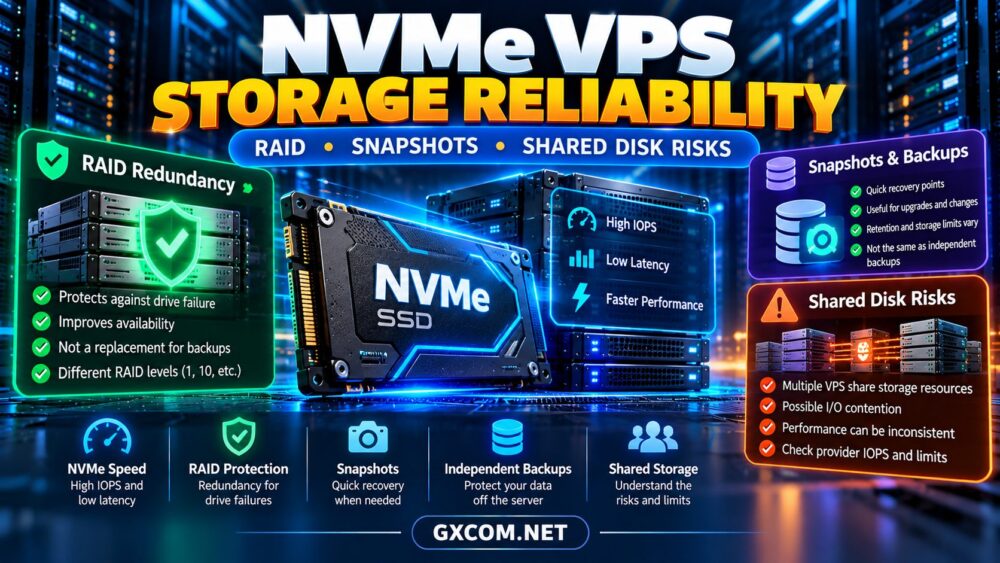
RAID combines multiple storage devices to provide redundancy, performance benefits, or both, depending on the configuration.
RAID 1 mirrors data between drives, while RAID 10 combines mirroring and striping. Other configurations distribute data and parity across multiple disks.
However, RAID is not a backup. It generally cannot protect against accidental deletion, ransomware, application corruption, or an administrator overwriting important files.
Some VPS providers use redundant storage systems without revealing their exact RAID configuration. Ask how drive failures are handled and whether storage redundancy is included in your chosen plan.
2. Snapshots: Convenient Recovery with Limitations
A VPS snapshot captures a recoverable state of a virtual machine or its storage at a particular point in time.
Snapshots are useful before operating-system upgrades, application deployments, and risky configuration changes.
However, snapshot capabilities vary. Some include the entire virtual machine, while others cover only selected disks.
Database consistency is another concern. A crash-consistent snapshot may not provide the same guarantees as an application-consistent backup.
Check snapshot retention, storage charges, restoration behavior, and whether copies remain available after the original instance is deleted.
Our cloud VPS snapshots vs backups comparison explains these differences.
3. Shared NVMe Storage and Noisy Neighbors
Virtual servers often share physical storage infrastructure. Even when the underlying drives are fast, multiple customers may compete for available I/O capacity.
Heavy database queries, backups, or large file transfers from neighboring workloads can affect storage latency.

Advertised NVMe storage does not necessarily include guaranteed IOPS or dedicated disk bandwidth.
For demanding applications, investigate whether the provider publishes I/O limits, fair-use policies, or dedicated storage options.
Consistent latency can matter more than impressive peak benchmark results.
4. IOPS, Throughput and Latency Explained
Three storage metrics help describe VPS performance:
- IOPS: The number of input/output operations completed per second.
- Throughput: The volume of data transferred over time.
- Latency: The time required to complete an individual storage operation.
Small database transactions may depend heavily on latency and random I/O performance. Large backups and media transfers often benefit from higher sequential throughput.
Benchmark results should be interpreted carefully because caching, workload size, queue depth, and neighboring activity can change outcomes.
5. NVMe VPS Backups and Disaster Recovery
A dependable storage strategy includes independent backups rather than relying entirely on the VPS provider’s local redundancy.
Keep recoverable copies outside the primary server or storage failure domain. For important workloads, consider geographically separate backup storage.
Schedule backups according to how much data your business can afford to lose.
Regularly test restoration, including database integrity, application configuration, and the time needed to resume service.
Without restoration testing, a successful backup notification provides limited assurance.
6. How to Evaluate NVMe VPS Storage Reliability
| Feature | Question to Ask |
|---|---|
| Storage Type | Is the selected plan actually NVMe-based? |
| Redundancy | How are physical drive failures handled? |
| Snapshots | What disks are covered and how long are copies retained? |
| Backups | Are independent backups included or separately billed? |
| I/O Limits | Are IOPS or throughput restrictions documented? |
| Recovery | Can customers restore data without a support ticket? |
Compare these answers alongside CPU allocation, RAM, bandwidth, and monthly costs.
7. Four VPS Providers Worth Comparing
Contabo — Resource-Focused VPS Hosting
Contabo is worth comparing for VPS configurations with substantial storage and memory allocations.
However, capacity alone does not establish storage consistency. Review the selected plan’s storage type, I/O limitations, backup options, and workload suitability.
For additional context, read our Contabo VPS performance review.
RackNerd — Budget VPS Deployments
RackNerd can appeal to users running smaller websites, development environments, and cost-sensitive applications.
Verify whether the specific offer includes NVMe storage and examine available backup and recovery controls before purchasing.
For critical databases, prioritize predictable performance over storage capacity alone.
Kamatera — Configurable Cloud Infrastructure
Kamatera is relevant when businesses want configurable compute resources and more control over infrastructure planning.
Compare the available storage options, backup services, instance sizing, and recovery procedures for your intended deployment.
A flexible configuration can help separate development, staging, and production workloads.
Hostwinds — VPS Hosting and Support Options
Hostwinds is another provider to evaluate when comparing VPS resources, operating systems, and management choices.
Check whether the chosen package uses NVMe, what storage protection is provided, and how restoration requests are handled.
Do not assume every VPS product shares the same storage architecture.
8. Choosing NVMe VPS Hosting for Databases
Database workloads require more than fast disks. Sufficient RAM, appropriate CPU allocation, efficient queries, and reliable backups all affect performance.
For transactional applications, measure latency under realistic concurrency rather than relying exclusively on sequential disk benchmarks.
Consider whether the VPS can scale storage and memory without a disruptive migration.
If the application handles important customer data, document recovery objectives before choosing a low-cost plan.

9. Balance Storage Reliability and VPS Pricing
Compare the complete hosting cost, including snapshots, external backups, additional storage, and recovery assistance.
A cheaper NVMe VPS may not be the better purchase if essential protection features require expensive add-ons.
Explore our affordable cloud VPS deals guide to compare purchasing options.
Compare VPS Hosting Beyond NVMe Speed
Evaluate storage reliability, resource limits, backups, and recovery options before choosing a VPS for your next project.
NVMe VPS Storage Reliability FAQ
Does RAID protect an NVMe VPS from data loss?
RAID can protect against certain drive failures, depending on its configuration, but it cannot replace independent backups.
Are VPS snapshots the same as backups?
No. Snapshots are useful recovery points, but their scope, retention, and failure isolation may differ from independent backups.
Can shared NVMe storage become slow?
Yes. Resource contention, I/O limits, and workload characteristics can affect performance even when physical NVMe drives are fast.
Is NVMe necessary for every VPS?
No. Lightweight websites may not require the fastest storage, while databases and I/O-intensive applications can benefit from lower latency.
Final Verdict
NVMe improves storage capabilities, but reliable VPS hosting requires a broader evaluation of redundancy, snapshots, backups, and shared disk behavior.
When comparing Contabo, RackNerd, Kamatera, and Hostwinds, verify the actual storage technology and protection features included in each plan.
Choose infrastructure based on recoverability and consistent application performance, not NVMe branding alone.