Two VPS plans can advertise the same number of virtual CPUs and deliver very different performance under sustained load.
A 4-vCPU server might handle occasional traffic spikes comfortably but struggle with continuous background processing. Another 4-vCPU server may cost more while delivering more predictable response times because its CPU resources are reserved.
That difference is at the center of the shared vCPU vs dedicated vCPU debate.
For WordPress hosting, WooCommerce, databases, SaaS applications, and development workloads, understanding CPU allocation is often more valuable than simply comparing advertised core counts.
In this guide, we explain how shared and dedicated virtual CPUs work, what CPU isolation actually means, how to identify resource contention, and when paying more for dedicated compute makes financial sense.
We also examine relevant offerings from Vultr, Kamatera, Cherry Servers, Contabo, and Hostwinds.
Editorial methodology: This comparison uses publicly documented virtualization concepts and provider CPU allocation policies reviewed in October 2026. GXCOM.NET has not independently benchmarked equivalent shared and dedicated CPU instances from all providers mentioned. Performance examples and cost calculations are hypothetical unless explicitly identified otherwise.
Shared vCPU vs Dedicated vCPU: Quick Verdict
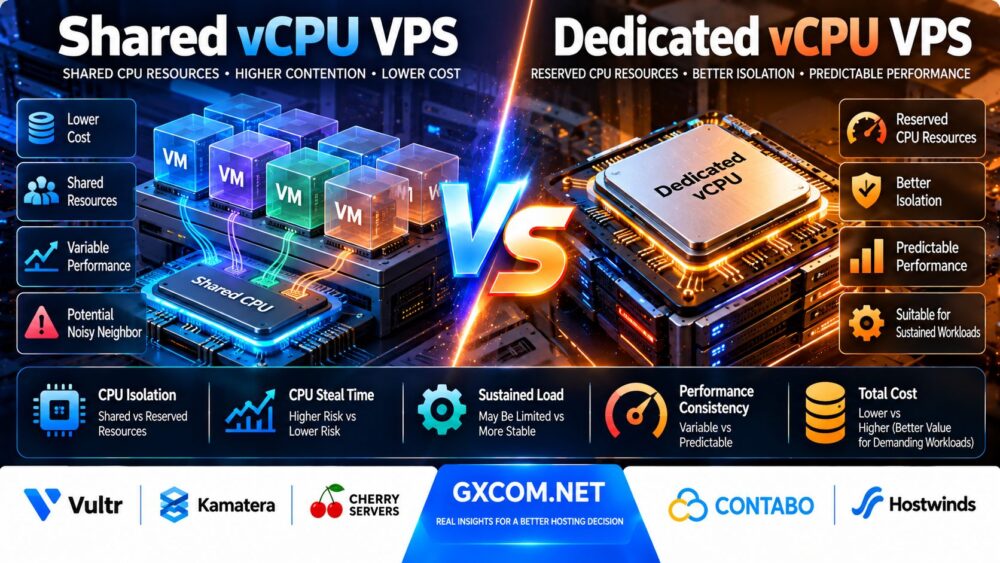
Choose a shared vCPU VPS when your workload is lightweight, intermittent, or tolerant of occasional performance variation.
Choose a dedicated vCPU VPS when your application needs sustained CPU capacity, predictable response times, or stronger isolation from other customers' CPU usage.
Shared CPU hosting is often cost-effective for small websites, development servers, monitoring tools, and low-traffic applications.
Dedicated CPU hosting is often more appropriate for busy application servers, database workloads, continuous processing, and latency-sensitive production systems.
However, a dedicated vCPU is not automatically equivalent to a dedicated physical core. Providers may reserve a hardware thread, a complete core, or another defined share of compute resources.
| Feature | Shared vCPU VPS | Dedicated vCPU VPS |
|---|---|---|
| CPU allocation | Host CPU resources shared with other tenants | Defined CPU resources reserved for the instance |
| Performance consistency | Can vary with host contention | Generally more predictable CPU availability |
| Sustained CPU usage | Subject to provider policies and available capacity | Usually better suited to sustained workloads within plan limits |
| Noisy-neighbor exposure | Potentially higher | Reduced for reserved CPU resources |
| Physical core exclusivity | Not guaranteed | Depends on provider's definition |
| Entry cost | Typically lower | Typically higher |
| Best use cases | Blogs, testing, lightweight services | Production apps, databases, sustained processing |
| CPU performance guarantee | Often limited | Defined by the provider's allocation and terms |
What Is a vCPU in VPS Hosting?
A virtual CPU, or vCPU, is a processing resource presented to a virtual machine by a hypervisor.
The guest operating system sees one or more virtual processors and schedules its applications onto them.
However, the underlying physical hardware may be shared among many virtual machines.
Physical CPU Core
A physical CPU core is an actual processing core within a processor.
Modern processors may support simultaneous multithreading, allowing one physical core to expose multiple logical processors.
Hardware Thread
A hardware thread is a logical execution context supported by a physical CPU core.
Two hardware threads on one core do not provide the same independent processing resources as two separate physical cores.
Virtual CPU
A vCPU is a virtualized processing unit assigned to a guest operating system.
Its relationship to a physical core or hardware thread depends on the virtualization platform and provider allocation policy.
Why 4 vCPUs Do Not Always Mean the Same Performance
Different VPS providers may use different processor generations, CPU frequencies, scheduling policies, oversubscription levels, and hardware thread mappings.
Therefore, comparing vCPU counts without understanding their allocation can be misleading.
What Is a Shared vCPU VPS?
A shared vCPU VPS uses processing capacity from physical CPU resources that may also serve other virtual machines.
The hypervisor schedules CPU execution across the available workloads.
How Shared CPU Scheduling Works
When a virtual machine needs CPU time, the hypervisor schedules its virtual processors onto available physical execution resources.
Other virtual machines may be competing for the same resources.
CPU Oversubscription
Oversubscription occurs when the total virtual CPU capacity allocated to guests exceeds the physical processing resources available for simultaneous execution.
This can be economically efficient because many applications do not use their CPUs continuously.
However, simultaneous high demand can increase contention.
Shared CPU Advantages
- Lower entry cost
- Good resource efficiency for intermittent workloads
- Suitable for small websites and development environments
- Easy to deploy and scale on many cloud platforms
- Often sufficient when CPU usage is consistently low
Shared CPU Limitations
- CPU availability may fluctuate
- Performance can be affected by other tenants
- Provider CPU usage policies may restrict sustained workloads
- Latency can become less predictable under contention
- Advertised vCPU count may overstate usable sustained capacity
What Is a Dedicated vCPU VPS?
A dedicated vCPU VPS provides a defined allocation of CPU resources reserved for the virtual machine.
The precise meaning of dedicated depends on the provider.
Dedicated Hardware Thread
Some providers assign a dedicated physical CPU thread to a virtual CPU.
This reserves a logical execution context, but the physical core may still contain another hardware thread.
Dedicated Physical Core
Other providers reserve a complete physical core, potentially including its hardware threads.
This offers a different level of CPU resource isolation.
Dedicated vCPU Does Not Mean Dedicated Server
A dedicated CPU virtual machine can still share the physical server's memory infrastructure, storage system, networking, and other resources with separate tenants.
CPU reservation is not equivalent to full physical server ownership.
Dedicated CPU Advantages
- More predictable CPU allocation
- Reduced exposure to CPU contention from other guests
- Better suitability for sustained compute workloads
- Potentially more consistent application response times
- Clearer capacity planning when allocation guarantees are documented
Dedicated CPU Limitations
- Higher infrastructure cost
- Different providers define dedicated resources differently
- Performance still depends on processor architecture
- Storage and networking may remain shared
- Reserved CPU capacity can be wasted during idle periods
Shared vCPU vs Dedicated vCPU: CPU Isolation Explained
CPU isolation describes how processing resources are separated between virtual machines.
Hypervisor Scheduling
In a shared CPU environment, the hypervisor determines when each virtual CPU can execute.
Scheduling decisions may depend on priorities, quotas, fairness policies, and physical CPU availability.
CPU Pinning
CPU pinning associates virtual CPU execution with particular physical processing resources.
However, pinning alone does not necessarily guarantee exclusivity if other workloads are allowed to use those resources.
Exclusive CPU Allocation
Stronger isolation requires a provider to reserve defined physical execution resources for the customer.
The reservation should be documented rather than inferred from marketing terminology.
Shared Cache and Memory Bandwidth
Even when CPU execution resources are reserved, some processor caches, memory channels, and other hardware components may remain shared.
Isolation Verdict
Dedicated CPU hosting can reduce CPU scheduling contention, but it does not eliminate every source of performance variability.
CPU Steal Time: How to Detect Shared CPU Contention
CPU steal time is one of the most useful metrics for understanding virtual machine performance.
What Is CPU Steal Time?
On Linux, steal time represents time when a virtual CPU was ready to execute but the hypervisor was running something else.
It can indicate contention for physical CPU resources.
How to Check CPU Steal Time
Use the following command on a Linux VPS:
topLook for the CPU summary field labeled st.
Alternatively, use:
mpstat -P ALL 1The %steal column can help identify scheduling delays.
What Is a Normal Steal Time?
There is no universal threshold that applies to every virtualization platform and workload.
Consistently elevated steal time during periods of application slowdown deserves investigation.
Does Zero Steal Time Guarantee Dedicated CPU?
No. A shared CPU VPS can report little or no steal time when the host has sufficient spare capacity.
Likewise, monitoring behavior can vary across virtualization environments.
What Else Should You Monitor?
- Application response latency
- CPU utilization
- Run queue length
- Load average
- Database query time
- Disk I/O wait
- Memory pressure
CPU steal time is a diagnostic signal, not a complete performance benchmark.
CPU Limits, Throttling and Fair-Use Policies
Not every VPS plan permits the same level of continuous CPU consumption.
CPU Quotas
Some virtualization platforms enforce CPU quotas that limit the amount of processing time a virtual machine can consume during a defined interval.
Fair-Use Policies
Providers may restrict workloads that consume excessive shared resources or interfere with other customers.
Review the acceptable-use policy before deploying a continuous CPU-intensive application.
CPU Credits
Some cloud instance families use CPU credit or burst models.
These systems can provide additional short-term processing capacity but may impose limitations or additional charges after sustained usage.

Throttling vs Contention
Throttling occurs when resource usage is deliberately limited by a policy or quota.
Contention occurs when multiple workloads compete for available processing capacity.
Both can reduce performance, but they have different causes.
Why Dedicated CPU Is Not Always Unlimited CPU
Even dedicated CPU plans can have contractual limits, resource-specific conditions, or charges associated with a particular usage model.
Customers should confirm whether sustained utilization is permitted without additional billing.
Kamatera CPU Types: A Real Example of Why Definitions Matter
Kamatera illustrates why CPU product labels should be read carefully.
The provider documents four CPU allocation types.
| Kamatera CPU Type | Allocation Model | Important Consideration |
|---|---|---|
| Type A: Availability | Non-dedicated physical CPU thread | No guaranteed reserved CPU resources |
| Type B: General Purpose | Dedicated physical CPU thread | Reserved thread resources |
| Type T: Burstable | Dedicated physical CPU thread | Additional CPU usage charges can apply above the documented average threshold |
| Type D: Dedicated | Dedicated physical CPU core, including two threads | Reserved physical core resources |
This distinction shows that a dedicated thread and a dedicated physical core are not identical allocations.
It also demonstrates why buyers must review billing rules. Kamatera's Type T is designed for burstable usage and applies additional CPU consumption charges when average utilization exceeds its documented threshold.
For continuous CPU-intensive workloads, compare Type B and Type D with the exact application requirements rather than assuming all reserved CPU products are interchangeable.
Vultr Shared CPU vs Dedicated CPU Instances
Vultr provides a clear distinction between shared CPU and dedicated CPU cloud instance categories.
Vultr Cloud Compute
Vultr Cloud Compute uses shared CPU resources and is positioned for applications with intermittent processing demand.
Potential use cases include smaller websites, development environments, and lightweight application servers.
Vultr Optimized Cloud Compute
Vultr Optimized Cloud Compute provides dedicated CPU virtual machines designed for more demanding production workloads.
Its product families include general-purpose and workload-optimized configurations.
Which Vultr Product Should You Choose?
Use shared CPU instances when the application can tolerate variable processing availability and does not require continuous CPU capacity.
Consider dedicated CPU instances when predictable compute allocation is more important than minimizing the base server price.
Cherry Servers: Shared Cloud VPS vs Cloud VDS
Cherry Servers offers virtual infrastructure with shared and dedicated resource models.
Cloud VPS
Its Cloud VPS offerings provide virtual servers suitable for lighter general-purpose workloads.
Cloud VDS
Cherry Servers Cloud VDS uses dedicated virtual CPU resources allocated from physical processing cores.
Its documentation describes CPU allocations based on logical core pairs from the same physical core.
Why Cloud VDS Matters
Cloud VDS can provide a middle ground between inexpensive shared CPU hosting and an entire dedicated physical server.
However, customers should still evaluate storage, networking, billing, and workload requirements.
Contabo: Shared VPS vs Max Performance VPS
Contabo offers another example of different CPU allocation models within one provider's product lineup.
Contabo Performance VPS
Contabo's Performance VPS documentation describes shared virtual CPU resources using AMD EPYC processors.
These products may be attractive when customers need substantial RAM or storage alongside general-purpose compute capacity.
Contabo Max Performance VPS
Contabo's Max Performance VPS, also marketed through its VDS product family, allocates dedicated CPU resources.
The provider documents its virtual core counting in relation to simultaneous multithreading.
Why the Product Name Matters
A Contabo Performance VPS and a Contabo Max Performance VPS should not be treated as equivalent CPU products.
Compare the exact plan documentation and resource allocation before purchasing.
For a closer look at its virtual server products, read our Contabo VPS Performance Review.
Hostwinds: Evaluate the Exact VPS CPU Allocation
Hostwinds provides VPS hosting products that may be relevant to customers comparing resource allocations, management options, and hosting costs.
However, a plan advertising multiple virtual CPUs should not automatically be classified as providing exclusive physical CPU cores.
Before purchasing a Hostwinds VPS for sustained compute workloads, confirm the CPU allocation model, usage policy, and any applicable resource restrictions.
For additional provider background, see our Hostwinds Hosting Review.
Shared vCPU vs Dedicated vCPU for WordPress
WordPress performance depends on more than CPU count.
Small Blogs
A small WordPress blog with effective page caching may have low average CPU usage.
Shared CPU hosting can be economical when traffic is modest and application processing is intermittent.
Dynamic WordPress Pages
Logged-in pages, search results, and other uncached requests require application processing.
CPU contention can affect response times when several requests arrive simultaneously.
WooCommerce
WooCommerce checkout, carts, customer accounts, and background tasks can create sustained or unpredictable CPU demand.
Dedicated CPU hosting may be worth considering when real measurements show CPU scheduling delays or insufficient processing capacity.
WordPress Cron Jobs
Scheduled tasks, image processing, imports, and backups can create short periods of higher CPU usage.
WordPress Verdict
Start with actual CPU utilization and dynamic request latency.
Upgrade to dedicated CPU resources when sustained demand or performance variability justifies the additional cost.
Shared vCPU vs Dedicated vCPU for Databases
Database performance can be sensitive to CPU availability, memory pressure, and storage latency.
Query Processing
Complex queries may consume significant CPU time.
Concurrent Connections
High concurrency can increase the number of active database operations.
Storage Bottlenecks
A database limited by disk latency may not benefit substantially from additional CPU isolation.
Memory Bottlenecks
Insufficient memory can increase disk access and reduce database responsiveness.
Database Verdict
Dedicated CPU can help CPU-bound database workloads, but it should be evaluated alongside memory, storage, query efficiency, and application architecture.
Shared vCPU vs Dedicated vCPU for SaaS Applications
SaaS applications frequently process API requests, background jobs, and database transactions.
API Latency
Latency-sensitive APIs may benefit from more predictable CPU scheduling.
Background Workers
Continuous processing tasks can consume CPU resources for extended periods.
Multi-Tenant Applications
Multi-tenant SaaS systems may experience unpredictable load patterns as customers become active.
Autoscaling
Adding application instances can improve capacity, but it does not automatically resolve inefficient code or resource contention within individual servers.
SaaS Verdict
Dedicated CPU hosting is often worth evaluating when application latency or sustained CPU demand becomes a measurable business concern.
How to Benchmark Shared and Dedicated CPU VPS
A fair comparison requires equivalent workloads and careful control of test conditions.
Step 1: Match the Application Environment
Use the same operating system, software versions, application configuration, and representative dataset.
Step 2: Document CPU Specifications
Record the CPU model, virtual CPU count, available memory, and provider allocation policy.
Step 3: Measure Single-Thread Performance
Run a suitable CPU benchmark that reflects workloads sensitive to single-thread execution.
Step 4: Measure Multi-Thread Performance
Test how performance changes when multiple CPU-intensive tasks run simultaneously.
Step 5: Test Sustained Utilization
Measure performance over a representative period rather than relying on a brief benchmark burst.
Follow the provider's acceptable-use policy and avoid excessive testing on shared infrastructure.
Step 6: Monitor CPU Steal Time
Track steal time and other scheduling metrics while the workload is active.
Step 7: Measure Application Latency
Monitor real request response times, including median and high-percentile latency.
Step 8: Repeat Tests
Repeat measurements during different periods to identify variability.
Understanding p95 and p99 Latency
Average response time can hide performance problems that affect a smaller but important percentage of users.
p95 Latency
The 95th-percentile response time indicates the latency at or below which 95% of measured requests fall.
p99 Latency
The 99th-percentile response time indicates the latency at or below which 99% of measured requests fall.
Why Tail Latency Matters
Applications can have acceptable average response times while experiencing slow outlier requests.
CPU scheduling delays may contribute to this variability, although database, storage, network, and application factors can also be responsible.
What to Compare
Compare p50, p95, and p99 latency under equivalent traffic and application conditions.
Do not attribute every latency spike to shared CPU contention without supporting evidence.
Shared vCPU vs Dedicated vCPU: Real Cost Comparison
Dedicated CPU hosting usually has a higher base cost, but the cheapest monthly invoice does not always provide the lowest cost per useful unit of compute.
Price per vCPU
Price per vCPU is easy to calculate but can be misleading because CPU allocation and processor performance vary.
Cost per Completed Task
A more useful metric for batch workloads is the cost of completing a defined amount of work.
Cost per task = Total infrastructure cost / Successfully completed tasks.
Cost per Request
For web applications, compare the cost of serving requests while meeting a defined latency target.
Cost per 1 million requests = Total infrastructure cost / Successful requests × 1,000,000.
Cost of Performance Variability
Slow application responses can create indirect costs through user abandonment, operational troubleshooting, and reduced capacity.
These costs vary by business and should not be assumed without measurement.
Hypothetical Shared vs Dedicated CPU Cost Example
Consider two hypothetical VPS plans running the same application.
| Metric | Shared CPU VPS | Dedicated CPU VPS |
|---|---|---|
| Monthly infrastructure cost | $20 | $55 |
| Advertised vCPUs | 4 | 4 |
| Illustrative sustainable requests/second | 80 | 180 |
| Illustrative monthly request capacity at 100% continuous utilization | 207.36 million | 466.56 million |
| Illustrative cost per 1 million requests at full utilization | $0.096 | $0.118 |
All prices and throughput values above are hypothetical and do not represent provider benchmarks.
The calculation assumes a 30-day month and continuous operation at the stated throughput.
Real applications generally do not operate at maximum capacity continuously, and sustained load may violate the policies of some shared CPU plans.
The example demonstrates why throughput, workload limits, and latency targets must be evaluated alongside price.
Break-Even Analysis: When Is Dedicated CPU Worth It?
There is no universal CPU utilization percentage at which every customer should upgrade.
Instead, evaluate whether the additional cost produces enough useful performance or operational value.
Incremental Monthly Cost
Additional monthly cost = Dedicated CPU plan cost – Shared CPU plan cost.
Incremental Capacity
Additional capacity = Dedicated CPU sustainable throughput – Shared CPU sustainable throughput.
Value of Additional Capacity
If the workload requires more throughput than the shared plan can reliably provide, dedicated CPU may be justified.
Value of Consistency
For latency-sensitive services, reduced performance variability can be valuable even when average CPU utilization is moderate.
Cost of Idle Resources
If the application spends most of its time idle, paying continuously for reserved CPU capacity may be inefficient.
When Shared CPU Is the Better Value
Shared CPU hosting may be the better choice when:
- The application has low average CPU usage
- Traffic is intermittent
- Performance requirements are flexible
- Occasional processing delays are acceptable
- The server is used for development or testing
- Budget is the primary constraint
When Dedicated CPU Is Worth Paying For
Dedicated CPU hosting may be the better choice when:
- CPU utilization is sustained for long periods
- Application latency must remain predictable
- Database or API workloads are CPU-sensitive
- Shared CPU contention has been measured
- Production workloads need reserved compute capacity
- Background processing consumes substantial CPU time
- Capacity planning requires clearer resource guarantees
Dedicated vCPU vs Bare Metal Server
Dedicated CPU VPS hosting and bare-metal hosting provide different levels of resource isolation.
Dedicated CPU VPS
A dedicated CPU VPS reserves defined compute resources while retaining the operational flexibility of a virtual machine.
Bare Metal Server
A bare-metal server provides exclusive access to an entire physical server.
It can offer broader hardware control and isolation from unrelated tenants.
When to Consider Bare Metal
Bare metal may be worth evaluating for specialized hardware requirements, large sustained workloads, or applications requiring extensive system-level control.
For a broader comparison of virtualized and physical infrastructure, see our Dedicated Server vs VPS Comparison.
Provider Comparison: Shared and Dedicated CPU Options
| Provider | Relevant CPU Offering | Best Initial Fit | Important Verification |
|---|---|---|---|
| Vultr | Shared Cloud Compute and Dedicated Optimized Cloud Compute | Cloud applications and production workloads | Instance category and resource specifications |
| Kamatera | Type A, B, T, and D CPU allocation models | Custom CPU requirements | Thread vs core reservation and burst charges |
| Cherry Servers | Cloud VPS and dedicated-resource Cloud VDS | Customers seeking stronger CPU isolation | Exact vCore allocation and network terms |
| Contabo | Shared Performance VPS and dedicated-resource Max Performance VPS | Resource-heavy virtual servers | SMT-based vCore counts and product differences |
| Hostwinds | General VPS hosting | Customers comparing VPS management and resources | CPU allocation and sustained usage policy |
Shared vCPU vs Dedicated vCPU: Pros and Cons
Shared vCPU Advantages
- Lower entry cost
- Efficient for intermittent workloads
- Suitable for lightweight hosting
- Often available in small configurations
- Useful for testing and development
Shared vCPU Limitations
- Potential CPU contention
- Less predictable sustained performance
- Possible fair-use restrictions
- Variable high-percentile latency
- Limited compute guarantees on some plans
Dedicated vCPU Advantages
- Reserved compute resources
- Improved CPU performance predictability
- Reduced exposure to noisy neighbors
- Better fit for sustained workloads
- Clearer capacity planning
Dedicated vCPU Limitations
- Higher base cost
- Definitions vary between providers
- Not equivalent to a full dedicated server
- Other resources may remain shared
- Idle reserved capacity may reduce economic efficiency
15 Questions to Ask Before Buying a Dedicated CPU VPS
- Does each vCPU map to a physical thread or a complete core?
- Are the CPU resources exclusively reserved?
- Does the provider use simultaneous multithreading?
- What processor model and generation are used?
- Is sustained 100% CPU utilization permitted?
- Are there CPU quotas or fair-use restrictions?
- Does the plan use CPU credits or burst billing?
- Can CPU resources be resized?
- Is the storage subsystem shared?
- What are the available RAM and disk configurations?
- How is network bandwidth allocated?
- Are backups included?
- What happens when the server is stopped?
- What is the complete monthly cost?
- Can the application be benchmarked before production migration?
Frequently Asked Questions
What is the difference between shared and dedicated vCPU?
Shared vCPUs use physical processing resources that may also serve other customers. Dedicated vCPUs reserve defined CPU resources for a particular virtual machine.

Is dedicated vCPU faster than shared vCPU?
Dedicated vCPU hosting can provide more consistent performance, especially under sustained load. However, actual speed depends on processor architecture, resource allocation, and workload characteristics.
Does dedicated vCPU mean a dedicated physical core?
Not always. Some providers reserve a physical hardware thread, while others reserve a complete physical core.
What is CPU steal time?
CPU steal time represents time when a virtual CPU was ready to run but the hypervisor scheduled other work.
Is high CPU steal time bad?
Sustained elevated steal time during application slowdown can indicate CPU contention. It should be evaluated with other performance metrics.
Can a shared CPU VPS run at 100% CPU?
Technical capability and permitted sustained usage depend on the provider's resource allocation and acceptable-use policies.
Can a dedicated CPU VPS run at 100% CPU continuously?
Dedicated CPU plans are generally better suited to sustained usage, but customers must still confirm the provider's contractual and billing conditions.
Is shared CPU good for WordPress?
Shared CPU can be suitable for smaller WordPress websites with effective caching and modest processing demand.
Is dedicated CPU better for WooCommerce?
Dedicated CPU may help busy WooCommerce stores with CPU-sensitive dynamic workloads, but performance also depends on databases, caching, memory, and storage.
Does more vCPU mean better performance?
No. CPU generation, clock behavior, thread allocation, scheduling, and workload characteristics all influence performance.
What is the noisy-neighbor effect?
The noisy-neighbor effect occurs when another tenant's resource consumption negatively affects a shared infrastructure workload.
Does CPU pinning guarantee dedicated CPU?
No. CPU pinning associates workloads with particular processing resources but does not necessarily guarantee exclusive access.
What is the difference between a dedicated CPU VPS and bare metal?
A dedicated CPU VPS reserves defined compute resources within a virtualized environment. Bare metal provides exclusive use of an entire physical server.
Does Vultr offer dedicated CPU instances?
Yes. Vultr offers dedicated CPU instances through its Optimized Cloud Compute product family.
Does Kamatera offer dedicated physical cores?
Yes. Kamatera documents Type D as reserving a physical CPU core, including its two hardware threads.
Does Cherry Servers offer dedicated CPU virtual servers?
Yes. Cherry Servers offers Cloud VDS products with dedicated virtual CPU resources.
Does Contabo offer dedicated CPU VPS hosting?
Yes. Contabo's Max Performance VPS product family provides dedicated CPU resources, while its standard Performance VPS uses shared CPU resources.
Is dedicated CPU VPS worth the extra cost?
It can be worth the additional cost when an application needs sustained compute capacity, predictable latency, or documented CPU resource guarantees.
Final Verdict: Shared vCPU vs Dedicated vCPU VPS
The most important lesson from this shared vCPU vs dedicated vCPU VPS comparison is that virtual CPU counts do not tell the whole performance story.
Shared CPU hosting can provide excellent value for lightweight, intermittent workloads.
Dedicated CPU hosting can provide more predictable processing capacity for sustained and latency-sensitive applications.
However, dedicated CPU terminology differs between providers. Some reserve hardware threads, while others reserve complete physical cores.
Before upgrading, measure CPU utilization, steal time, application latency, and sustained throughput. Then compare the cost of the additional guaranteed capacity against the workload's actual requirements.
Vultr, Kamatera, Cherry Servers, and Contabo offer useful examples of different CPU allocation models, while Hostwinds may be worth evaluating for general VPS requirements.
For further context on virtualization and workload performance, see our GPU vs CPU Server Comparison.
WORKLOAD → CPU ALLOCATION → RESOURCE ISOLATION → SUSTAINED PERFORMANCE → LATENCY → TOTAL COST → VPS DECISION
Always verify the provider's current CPU allocation model, fair-use rules, performance guarantees, billing conditions, and hardware specifications before purchasing.