Choosing the right multi-GPU server hosting solution involves more than counting graphics cards. A server with four or eight GPUs may offer substantial compute capacity, but actual performance depends on GPU memory, PCIe connectivity, NVLink availability, interconnect topology, workload parallelism, and software efficiency.
For large language models, AI training, inference, 3D rendering, and high-performance computing, communication between GPUs can become a major factor in performance and cost. Adding more accelerators does not automatically deliver proportional speed improvements.
This guide explains how PCIe, NVLink, and NVSwitch affect multi-GPU infrastructure, when GPU-to-GPU bandwidth matters, how to evaluate scaling efficiency, and how to compare the total cost of multi-GPU hosting. It also examines infrastructure options from Cherry Servers, RunPod, GPU Mart, Vast.ai, and ServerMania.
What Is Multi-GPU Server Hosting?
Multi-GPU server hosting provides access to a computing system equipped with two or more graphics processing units.
These GPUs may be installed within one physical server or distributed across multiple servers connected through a network.
The distinction is important because GPU communication inside one server can use different technologies from communication between separate servers.
Common multi-GPU workloads include:
- Large language model training and fine-tuning.
- LLM inference with tensor or pipeline parallelism.
- Distributed deep learning experiments.
- GPU-accelerated scientific computing.
- Large-scale image and video processing.
- Parallel 3D rendering workloads.
- High-throughput AI inference services.
Before renting multiple GPUs, determine whether your workload needs a larger combined compute budget, additional memory capacity, faster inter-GPU communication, or simply more independent workers.
Single GPU vs Multi-GPU Servers: When Do You Need More GPUs?
A single high-memory GPU can be simpler to deploy and may outperform a poorly configured multi-GPU system on workloads that do not parallelize effectively.
Multi-GPU infrastructure becomes useful when the application can divide work across accelerators or when one GPU cannot accommodate the required model or dataset.
| Factor | Single GPU | Multi-GPU Server |
|---|---|---|
| Deployment complexity | Generally simpler | Requires parallelism and topology planning |
| GPU memory | Limited to one accelerator | Distributed memory across multiple devices |
| Compute capacity | One GPU | Multiple accelerators |
| Communication overhead | No cross-GPU model communication | May require frequent data exchange |
| Scaling | Limited by one device | Depends on workload and implementation |
| Operational cost | Often easier to manage | Additional hardware and infrastructure costs |
For LLM deployments, first calculate the model's memory footprint, KV cache, and concurrency requirements.
Our LLM hosting requirements guide explains how model size and quantization influence GPU memory needs.
PCIe in Multi-GPU Servers: Why Bandwidth Matters
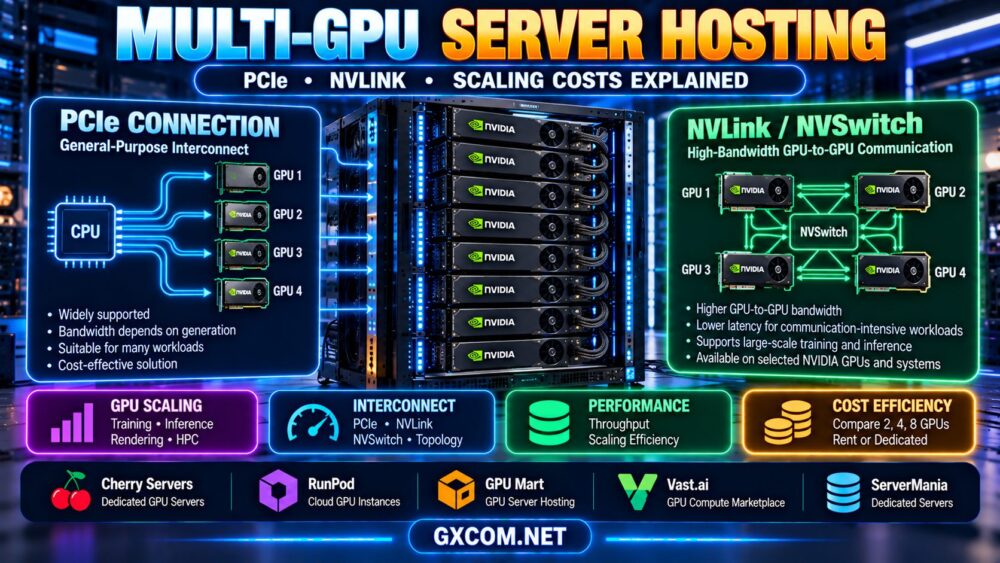
PCI Express, commonly called PCIe, is a high-speed interconnect used to connect GPUs and other devices to the host system.
PCIe generation, link width, CPU platform, and motherboard topology influence the bandwidth available to each GPU.
For example, a GPU installed in a physical x16 slot may not necessarily operate with a full x16 electrical connection. Some server designs divide available PCIe lanes across multiple devices.
PCIe Generation and Theoretical Bandwidth
The following figures are approximate maximum theoretical payload bandwidth values for a full-width PCIe x16 link in one direction, before additional real-world system overhead.
| PCIe Generation | Approximate x16 Bandwidth, One Direction | Important Consideration |
|---|---|---|
| PCIe 3.0 | 15.75 GB/s | Older server platforms |
| PCIe 4.0 | 31.5 GB/s | Common modern GPU connectivity |
| PCIe 5.0 | 63 GB/s | Higher host-device bandwidth |
| PCIe 6.0 | Approximately 121 GB/s | Requires compatible hardware and implementation |
These are interface-level estimates, not guaranteed application transfer speeds. Actual throughput depends on hardware support, negotiated link width, transaction overhead, system topology, and software.
PCIe Lanes and GPU Placement
When comparing multi-GPU servers, ask how many PCIe lanes are available to each GPU and whether those lanes connect directly to the CPU or through switches.
PCIe switches can expand connectivity, but the upstream link and overall topology may still influence aggregate bandwidth.
Does PCIe Bandwidth Affect Every Workload?
No. Workloads that perform mostly independent computation on each GPU may be less sensitive to interconnect bandwidth.
Workloads that frequently exchange large tensors or synchronize results can be more sensitive to communication performance.
What Is NVLink and How Is It Different from PCIe?
NVLink is an NVIDIA interconnect technology designed to provide high-bandwidth communication between compatible GPUs or supported system components.
Unlike PCIe, which is a general-purpose interconnect, NVLink is designed for specific NVIDIA GPU communication architectures.
However, NVLink support is not universal across NVIDIA GPUs. Availability, link count, topology, and bandwidth vary by GPU generation and system design.
A server containing multiple NVIDIA GPUs does not automatically support NVLink.
NVLink Advantages
On supported systems, NVLink can offer advantages for workloads that frequently transfer data between GPUs.
- High-bandwidth communication between compatible accelerators.
- Potentially improved performance for communication-intensive parallel workloads.
- Support for specific multi-GPU memory access and communication capabilities.
- Integration with supported NVIDIA multi-GPU system architectures.
These benefits depend on the actual hardware topology and software stack. NVLink does not automatically turn separate GPU memory devices into one universally addressable pool for every application.
NVLink vs PCIe Comparison
| Feature | PCIe | NVLink |
|---|---|---|
| Primary purpose | General device interconnect | Supported NVIDIA accelerator communication |
| Hardware availability | Broad server platform support | Selected NVIDIA GPUs and systems |
| Bandwidth | Depends on generation and link width | Depends on NVLink generation and topology |
| Multi-GPU communication | Supported with topology-dependent performance | Can provide higher bandwidth on supported systems |
| Best fit | General GPU connectivity and many workloads | Communication-intensive supported workloads |
For purchasing decisions, compare actual GPU-to-GPU transfer performance and application benchmarks rather than relying only on advertised interconnect bandwidth.

NVSwitch: Scaling Beyond Direct GPU Links
NVSwitch is an NVIDIA switching technology used in supported multi-GPU systems to provide high-bandwidth communication among connected accelerators.
It can be particularly relevant in systems designed for large-scale AI training and other communication-intensive workloads.
However, an NVSwitch-based server is not the same as a standard multi-GPU tower or rack server with several PCIe cards.
NVSwitch support depends on the complete system architecture, including compatible GPUs, switching hardware, software, and platform configuration.
Before ordering an eight-GPU system, confirm whether it uses PCIe-only connectivity, direct NVLink connections, or an NVSwitch architecture.
GPU Topology: Why Four GPUs Are Not Always Equivalent
Two servers with the same GPU models and GPU count can deliver different performance because of topology.
Important topology characteristics include:
- Which GPUs have direct peer-to-peer connections.
- Whether NVLink or NVSwitch is available.
- PCIe generation and negotiated link width.
- PCIe switch placement and upstream bandwidth.
- CPU socket and NUMA configuration.
- GPU-to-network adapter proximity.
- Supported peer-to-peer memory transfers.
On compatible NVIDIA systems, tools such as nvidia-smi topo -m can help inspect reported GPU connectivity and relationships.
However, topology output should be interpreted alongside the server's hardware documentation and actual communication benchmarks.
Multi-GPU Training: Data Parallelism vs Model Parallelism
Different parallelism techniques place different demands on GPU memory and interconnect bandwidth.
Data Parallelism
Data parallelism distributes training data across workers that typically maintain model replicas or partition selected training states.
Communication requirements depend on the framework and strategy, including how gradients and optimizer states are synchronized.
Data parallelism can benefit from multiple GPUs, but scaling efficiency depends on communication overhead, batch size, and computational workload.
Tensor Parallelism
Tensor parallelism splits certain model computations across multiple GPUs.
Because participating GPUs may exchange intermediate tensors frequently, communication bandwidth and latency can become important.
For communication-intensive tensor parallel workloads, a suitable high-bandwidth GPU interconnect may provide meaningful benefits.
Pipeline Parallelism
Pipeline parallelism distributes model layers or stages across devices.
Its performance depends on workload scheduling, communication between stages, pipeline balance, and available batch sizes.
Choosing the Right Parallelism Strategy
No single parallelism method is optimal for every model.
Framework support, model architecture, GPU memory, network topology, and expected throughput should guide the decision.
Multi-GPU LLM Inference: Memory Capacity vs Throughput
Multi-GPU inference can solve two different problems:
- Model capacity: Distributing a model across GPUs when it cannot fit on one accelerator.
- Serving throughput: Running multiple replicas or parallel workers to handle more requests.
These approaches are not equivalent.
A model split across GPUs may require communication during generation, while independent replicas can often process separate requests with less cross-GPU model communication.
For models that fit on a single GPU, deploying multiple replicas may be simpler than splitting one model across several GPUs, depending on latency and throughput goals.
Our AI inference server hosting guide explains how VRAM, latency, throughput, and utilization affect production deployments.
Multi-GPU Scaling Efficiency: Why More GPUs Do Not Guarantee Linear Speed
Scaling efficiency measures how effectively additional GPUs translate into higher performance.
A simplified strong-scaling efficiency formula is:
Scaling efficiency = speedup ÷ number of GPUs × 100%
For example, suppose a workload completes four times faster on eight GPUs than on one GPU.
The speedup is 4×, while scaling efficiency is:
4 ÷ 8 × 100% = 50%
This is an illustrative calculation, not a measured result from any hosting provider.
What Reduces Multi-GPU Scaling Efficiency?
- Communication and synchronization overhead.
- Insufficient workload parallelism.
- GPU memory bandwidth limitations.
- CPU, storage, or data-loading bottlenecks.
- Unbalanced workloads across GPUs.
- Interconnect topology and transfer latency.
- Software and framework inefficiencies.
Benchmark the intended application using the exact number of GPUs and topology you plan to rent.
Multi-GPU Server Hosting Providers to Compare
Multi-GPU infrastructure is available through different procurement models, including dedicated GPU servers, cloud GPU instances, and marketplace compute listings.
The following providers are relevant candidates for evaluation. Their inclusion does not imply that every company offers the same GPU counts, NVLink support, or NVSwitch systems.
| Provider | Comparison Role | What to Verify |
|---|---|---|
| Cherry Servers | Dedicated GPU infrastructure | GPU count, PCIe topology, interconnect options |
| RunPod | Cloud GPU instances | Multi-GPU availability, GPU model, instance topology |
| GPU Mart | GPU-focused server hosting | Multi-GPU configurations, VRAM, system resources |
| Vast.ai | GPU compute marketplace | Individual host GPU count, topology, availability |
| ServerMania | Dedicated server infrastructure | Current GPU-equipped offerings and custom options |
Cherry Servers: Dedicated Multi-GPU Infrastructure
Cherry Servers is a relevant candidate for organizations comparing dedicated GPU server configurations.
Before selecting a system, confirm the exact GPU models, available accelerator count, PCIe lane allocation, and whether NVLink or another supported interconnect is present.
For sustained workloads, also review CPU resources, system RAM, NVMe storage, networking, provisioning terms, and hardware support.
RunPod: Flexible Cloud GPU Capacity
RunPod can be evaluated for cloud GPU resources used in AI development, training, and inference.
When selecting a multi-GPU instance, verify the physical GPU arrangement and available communication paths rather than assuming every instance with multiple GPUs has identical topology.
Check billing, persistent storage, regional availability, and the selected deployment environment.
Read our RunPod GPU cloud review for additional platform context.
GPU Mart: GPU Server Configuration Evaluation
GPU Mart is worth reviewing when comparing GPU-focused hosting products and server specifications.
Confirm whether the selected product offers multiple physical GPUs within one server, the GPU allocation method, available VRAM, CPU and RAM resources, and supported operating systems.
Do not assume that multiple virtual GPU allocations provide the same capabilities as multiple directly connected physical GPUs.
Vast.ai: Marketplace-Based Multi-GPU Compute
Vast.ai offers marketplace-style GPU compute listings.
For multi-GPU workloads, evaluate individual listings by GPU count, accelerator model, memory capacity, host characteristics, network configuration, and available topology information.
Marketplace infrastructure may be useful for experimentation, but production suitability should be assessed for the specific listing and workload.
ServerMania: Dedicated Hardware and Custom Requirements
ServerMania can be considered when researching dedicated server infrastructure and potential custom hardware configurations.
Confirm whether suitable GPU-equipped systems are currently available, including the required GPU count and interconnect architecture.
A conventional dedicated server does not automatically include multiple GPUs or NVLink support.
Multi-GPU Hosting Costs: Is an Eight-GPU Server Worth It?
The cost of a multi-GPU server should be evaluated against the amount of useful work it completes.
Relevant cost components include:
- GPU rental or server contract charges.
- CPU and system RAM resources.
- GPU interconnect and server platform configuration.
- NVMe storage and persistent volumes.
- Network traffic and bandwidth.
- Software licensing and management.
- Idle compute capacity.
- Job failures, retries, and operational overhead.
Illustrative Multi-GPU Cost Comparison
Consider two hypothetical configurations processing the same workload:
| Metric | 4-GPU Server | 8-GPU Server |
|---|---|---|
| Illustrative hourly cost | $4 | $8 |
| Illustrative job completion time | 4 hours | 2.5 hours |
| Compute-only job cost | $16 | $20 |
In this example, the eight-GPU configuration finishes the job faster but costs more per completed job.
These figures are hypothetical and do not represent actual provider pricing or benchmarks.
The best option depends on whether shorter completion time justifies the additional cost.
Cost per Completed Job
A useful formula is:
Compute cost per job = billable compute rate × job duration
For continuous production, include idle capacity, storage, network charges, and management expenses when calculating total cost.
PCIe vs NVLink: Which Should You Pay For?
Paying for a higher-bandwidth GPU interconnect makes sense only when the workload benefits from it.
NVLink or NVSwitch may be worth evaluating when:
- The model is distributed across several GPUs.
- Tensor parallelism generates frequent GPU-to-GPU communication.
- The training workload requires substantial synchronization.
- Communication overhead limits scaling efficiency.
PCIe-only systems may be sufficient when:

- GPUs process independent rendering jobs.
- Separate inference replicas handle independent requests.
- GPU-to-GPU data exchange is limited.
- The application performs substantial local computation between transfers.
Do not pay a premium for NVLink solely because it appears in a server specification. Confirm that the software can use the interconnect effectively.
Multi-GPU Server Buying Checklist
- Define the workload: Training, inference, rendering, or scientific computing.
- Confirm GPU count: Determine whether two, four, or eight GPUs are actually needed.
- Check GPU VRAM: Verify memory capacity per GPU and model partitioning requirements.
- Inspect topology: Confirm PCIe generation, link width, NVLink, and NVSwitch support.
- Evaluate CPU and RAM: Avoid host-side bottlenecks.
- Check software support: Verify CUDA, drivers, communication libraries, and frameworks.
- Benchmark scaling: Measure performance on representative workloads.
- Review networking: Especially for multi-node distributed systems.
- Calculate total cost: Compare cost per completed job or useful output.
- Verify contract terms: Check provisioning, availability, support, and billing.
For broader GPU hardware purchasing options, explore our NVIDIA GPU server providers comparison.
Frequently Asked Questions
What is multi-GPU server hosting?
Multi-GPU hosting provides access to servers or computing environments with multiple GPUs for workloads that can use additional accelerator capacity or distributed processing.
Is NVLink faster than PCIe?
Supported NVLink configurations can provide higher GPU-to-GPU communication bandwidth than certain PCIe configurations. Actual performance depends on GPU generation, topology, transfer patterns, and application behavior.
Do all NVIDIA GPUs support NVLink?
No. NVLink availability varies by GPU model, generation, and system architecture.
Can multiple GPUs combine their VRAM?
Multiple GPUs provide separate memory resources. Supported software can distribute models and data across them, but the memory does not automatically become one transparent shared pool for every application.
Do eight GPUs provide eight times the performance?
Not necessarily. Scaling depends on parallelism, communication overhead, workload size, and system configuration.
Is NVLink necessary for LLM inference?
No. Some inference workloads run effectively on PCIe-connected GPUs, especially independent model replicas. Communication-intensive model parallelism may benefit from higher-bandwidth interconnects.
What is the difference between NVLink and NVSwitch?
NVLink is a GPU communication interconnect, while NVSwitch is a switching technology used in supported systems to connect multiple accelerators through a high-bandwidth fabric.
Should I rent one multi-GPU server or several GPU servers?
One server can simplify certain tightly coupled workloads, while multiple servers may suit independent jobs or distributed architectures. Compare network communication, failure handling, software support, and total cost.
Final Verdict: Buy Multi-GPU Capacity Based on Scaling Efficiency
The best multi-GPU server hosting configuration is not necessarily the one with the highest GPU count or most expensive interconnect.
Start with the workload's memory, compute, and communication requirements. Then compare PCIe topology, NVLink or NVSwitch availability, GPU scaling efficiency, and the cost of completing real jobs.
Cherry Servers and GPU Mart are relevant candidates for suitable GPU server configurations, while RunPod and Vast.ai offer cloud or marketplace-based GPU compute options. ServerMania may also be considered when researching current dedicated GPU hardware availability.
Before purchasing, verify the exact server topology, supported GPU communication features, software compatibility, and total operating cost.
WORKLOAD → GPU COUNT → VRAM → PCIe / NVLINK → TOPOLOGY → SCALING EFFICIENCY → COST PER JOB
Choose a configuration that delivers measurable application performance rather than paying for unused GPU capacity.