Choosing between a dedicated GPU vs shared GPU VPS can significantly affect application performance, available VRAM, workload isolation, and hosting costs. Two GPU hosting plans may advertise similar graphics hardware yet deliver very different levels of resource access.
For AI inference, machine learning development, 3D rendering, remote desktops, and other GPU-accelerated applications, the important question is not simply which GPU model appears in the specifications. Buyers must understand how the GPU is allocated, whether resources are shared, and what performance guarantees actually apply.
This guide explains dedicated GPU access, shared GPU VPS hosting, GPU passthrough, virtual GPUs, and NVIDIA MIG. It also shows how to evaluate real-world performance and choose the right infrastructure for your workload.
Dedicated GPU vs Shared GPU VPS: Key Differences
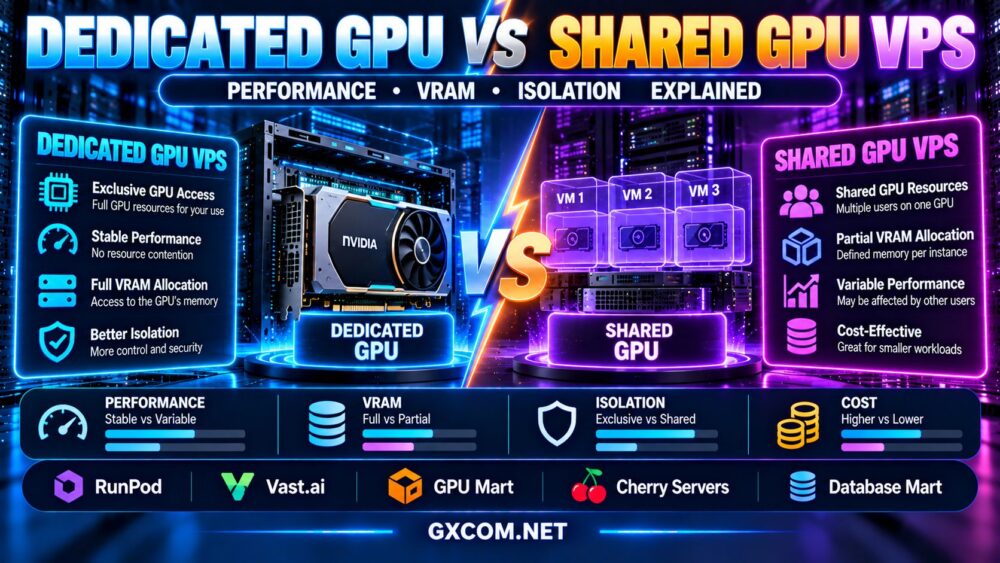
A dedicated GPU generally refers to an accelerator allocated exclusively to one customer, server, or workload. A shared GPU VPS uses a GPU allocation model in which multiple customers or virtual environments may access resources from the same physical accelerator.
However, hosting providers do not always use these terms consistently. Some services offer entire physical GPUs inside virtual machines, while others allocate virtual GPU profiles, hardware partitions, or software-managed GPU capacity.
| Feature | Dedicated GPU | Shared GPU VPS |
|---|---|---|
| Physical GPU access | Typically exclusive allocation | Physical accelerator may serve multiple tenants |
| VRAM | Usually access to the assigned GPU's usable memory | May have a defined allocation or shared limit |
| Compute resources | Not shared with other GPU tenants on that device | May be partitioned or scheduled among users |
| Performance consistency | Less exposure to GPU-level contention | Depends on virtualization and allocation policy |
| Isolation | Exclusive device access, subject to system architecture | Depends on hardware and software isolation mechanisms |
| Cost structure | Often higher for exclusive capacity | May reduce entry cost for smaller workloads |
| Typical use cases | Demanding AI, rendering, sustained GPU processing | Development, smaller inference jobs, virtual workstations |
These differences describe general deployment models rather than guaranteed features of every hosting product.
What Is a Dedicated GPU VPS?
A dedicated GPU VPS is a virtual server that receives exclusive access to an assigned physical GPU, typically through a device-assignment technology such as PCIe passthrough.
The CPU, memory, and storage may still be virtualized or shared at the host level. Therefore, dedicated GPU access does not automatically mean the customer receives a dedicated physical server.
For GPU-intensive workloads, exclusive accelerator allocation can reduce competition for GPU compute resources and device memory from other GPU tenants.
However, overall performance can still depend on CPU scheduling, PCIe connectivity, storage performance, host configuration, power limits, and network conditions.
Advantages of Dedicated GPU Access
- More predictable access to the assigned GPU.
- Greater control over supported device capabilities.
- Potentially simpler compatibility with demanding GPU applications.
- Reduced GPU-level resource contention from other tenants.
- Access to the assigned GPU's usable VRAM, subject to the product configuration.
Exclusive GPU allocation can be valuable when applications need sustained processing capacity or large memory allocations.
What Is a Shared GPU VPS?
A shared GPU VPS provides GPU acceleration without necessarily allocating an entire physical accelerator to one customer.
Depending on the platform, multiple virtual machines or workloads may use the same physical GPU through supported virtualization, scheduling, or partitioning technologies.
This approach can improve hardware utilization and make smaller GPU allocations available to users who do not need an entire accelerator.
However, shared GPU hosting is not one uniform technology. A hardware-partitioned GPU instance can behave differently from a time-sliced virtual GPU.
Advantages of Shared GPU Hosting
- Potentially lower cost for modest GPU requirements.
- Access to GPU acceleration without reserving an entire device.
- Useful resource sizing for smaller applications.
- Suitable for selected development, graphics, and inference workloads.
Buyers should not assume that shared GPU access guarantees a particular fraction of GPU performance unless the provider explicitly defines that entitlement.
GPU Passthrough vs vGPU vs MIG: How GPU Virtualization Works
Understanding the underlying allocation technology is essential when comparing GPU VPS offers.
GPU Passthrough
GPU passthrough assigns a physical GPU device to a virtual machine, allowing the guest operating system to access the assigned hardware.
It is commonly associated with exclusive GPU allocation, although implementation and supported features depend on the hypervisor, device, and provider.
Virtual GPU (vGPU)
Virtual GPU technology can expose GPU resources to multiple virtual machines using supported hardware, software, drivers, and licensing.
Different vGPU profiles may define memory capacity and other resource characteristics. Some implementations share compute resources through scheduling rather than guaranteeing a fixed percentage of processing throughput.
NVIDIA Multi-Instance GPU (MIG)
NVIDIA MIG, on supported accelerator models, allows a physical GPU to be divided into hardware-isolated instances with defined portions of GPU resources.
MIG is different from simply time-sharing one GPU. However, partition sizes, available features, supported GPUs, and operational constraints depend on the hardware generation and configuration.
| Technology | Allocation Model | Important Limitation |
|---|---|---|
| GPU Passthrough | Physical device assigned to a VM | Host CPU, RAM and storage may still be shared |
| vGPU | Virtual GPU profiles or scheduled access | Compute isolation depends on implementation |
| MIG | Supported hardware partitions | Available only on compatible GPUs and configurations |
When purchasing, ask the provider to identify the actual GPU allocation technology rather than relying only on the words “dedicated” or “shared.”

VRAM Allocation: Dedicated Memory vs Shared GPU Memory
GPU VRAM is one of the most important specifications for AI models, rendering applications, and large graphics workloads.
With exclusive access to a physical GPU, the customer generally has access to that device's usable memory, subject to hardware and software overhead.
With virtualized or partitioned GPU access, the instance may receive a smaller defined VRAM allocation.
For example, a physical GPU containing a large amount of VRAM does not mean every shared GPU VPS on that host can use all of it.
Buyers should verify:
- The exact VRAM available to their instance.
- Whether the allocation is dedicated, partitioned, or dynamically shared.
- Whether memory oversubscription is possible.
- Whether the required model or dataset fits in usable VRAM.
- How memory limits are enforced.
- Whether additional GPU memory can be obtained by upgrading.
For LLM inference, insufficient VRAM may require model quantization, offloading, smaller batch sizes, or a different accelerator configuration.
Our NVIDIA AI GPU servers guide provides additional context for selecting GPU hardware for AI workloads.
Performance: Does a Dedicated GPU Always Run Faster?
A dedicated GPU does not automatically outperform every shared GPU configuration.
Actual performance depends on GPU architecture, memory bandwidth, compute capability, workload characteristics, resource allocation, and system-level bottlenecks.
For example, a newer shared accelerator partition may outperform an older dedicated GPU on a particular task. Conversely, a dedicated GPU may deliver more consistent throughput when a shared environment experiences contention.
AI Inference Performance
For inference workloads, compare model compatibility, usable VRAM, first-token latency, tokens per second, concurrent requests, and sustained throughput.
3D Rendering Performance
Rendering performance depends on the GPU architecture, available VRAM, rendering engine, driver compatibility, and scene complexity.
Remote Desktop Performance
Virtual workstations depend on graphics acceleration, supported display protocols, video encoding, network latency, and operating system compatibility.
For broader hardware comparisons, see our GPU vs CPU server comparison.
GPU Isolation and the Noisy Neighbor Problem
In shared infrastructure, one customer's workload may compete with other tenants for certain physical resources.
This is often called the noisy neighbor problem.
However, the degree of contention depends on the GPU allocation mechanism. Hardware partitioning, resource scheduling, and provider admission controls can produce different isolation characteristics.
Buyers should distinguish between:
- Memory isolation: Whether GPU memory is separated between tenants.
- Compute isolation: Whether processing resources are partitioned or time-shared.
- Performance isolation: Whether neighboring workloads can affect latency or throughput.
- Security isolation: Whether hardware and software controls prevent unauthorized cross-tenant access.
Performance isolation and security isolation are not identical. A platform can enforce memory access boundaries while still allowing performance variability.
For sensitive workloads, review the provider's security documentation, virtualization architecture, and contractual assurances rather than assuming that a dedicated label alone guarantees complete isolation.
Dedicated GPU vs Shared GPU VPS for AI and Machine Learning
The right GPU allocation depends on model size, training method, concurrency, and workload duration.
| Workload | Suggested Starting Point | Primary Reason |
|---|---|---|
| Learning CUDA and small experiments | Shared or modest dedicated allocation | Limited initial compute requirements |
| Small-model inference | Shared or partitioned GPU, if compatible | Potentially efficient resource sizing |
| Large-model inference | Dedicated GPU or suitably sized partition | VRAM and predictable throughput |
| Long-running GPU training | Dedicated GPU capacity | Sustained compute access |
| Interactive remote workstation | Compatible vGPU or dedicated GPU | Graphics drivers and display features |
| Multi-GPU distributed workloads | Dedicated multi-GPU infrastructure | Interconnects and coordinated processing |
These are starting points, not universal requirements. Benchmark the actual model or application before committing to a long-term plan.
GPU VPS Providers and Infrastructure Options to Compare
Different hosting companies offer different forms of GPU access. Some focus on GPU VPS products, while others provide cloud GPU instances, marketplaces, or dedicated physical servers.
The following five providers are relevant candidates for evaluating these infrastructure models. This comparison does not imply that every provider offers both dedicated and shared GPU VPS plans.
| Provider | Comparison Role | What to Verify |
|---|---|---|
| GPU Mart | GPU-focused hosting | GPU assignment, VRAM, OS compatibility |
| RunPod | Cloud GPU compute | Instance allocation, GPU access, storage |
| Vast.ai | GPU compute marketplace | Host specifications, isolation, availability |
| Cherry Servers | Dedicated physical GPU infrastructure | Exclusive hardware, contract, configuration |
| Database Mart | GPU-related hosting evaluation | Current GPU product type and virtualization |
GPU Mart: Verify GPU VPS Allocation
GPU Mart is a relevant candidate for users researching GPU-focused virtual server and hosting products.
Before ordering, confirm whether the selected plan assigns a physical GPU, exposes a virtual GPU profile, or uses another resource allocation mechanism.
Also verify available VRAM, supported operating systems, GPU drivers, remote desktop functionality, and the scope of technical support.
RunPod: Compare Cloud GPU Resource Access
RunPod is useful for evaluating cloud GPU infrastructure for AI development and GPU-intensive applications.
Review the actual GPU resources associated with each selected instance, the deployment model, storage persistence, and billing conditions.
GPU compute platforms should not automatically be classified as shared GPU VPS providers simply because they deliver GPU resources through a cloud interface.
Read our RunPod GPU cloud review for a more focused platform discussion.
Vast.ai: Compare GPU Marketplace Listings
Vast.ai provides a marketplace-style approach to renting GPU compute capacity.
When reviewing listings, evaluate the GPU model, available memory, host characteristics, instance availability, storage arrangements, and the exact access model.
Because infrastructure characteristics can vary between listings, compare individual offers rather than assuming every marketplace instance has identical isolation or performance.
Cherry Servers: Dedicated GPU Server Alternative
Cherry Servers is relevant when a buyer needs exclusive physical infrastructure instead of a virtualized GPU allocation.
Dedicated GPU server rental can be attractive for sustained processing, custom configurations, and workloads that require predictable access to physical hardware.
Confirm current GPU-equipped server availability, hardware specifications, management responsibilities, and contract terms.
Database Mart: Evaluate GPU Hosting Specifications
Database Mart can be considered when researching GPU-related hosting products and virtual server configurations.
Verify the exact product currently offered, including whether GPU access is dedicated, virtualized, or provided through another infrastructure arrangement.
Operating system licensing, GPU drivers, VRAM limits, and management services should be checked before purchase.
GPU VPS Pricing: What Are You Actually Paying For?
Dedicated GPU access often requires paying for exclusive accelerator capacity, while shared GPU services may allow smaller allocations.
However, the lowest advertised price does not necessarily provide the best value.
Compare:
- Physical GPU model and generation.
- Guaranteed or allocated VRAM.
- GPU compute access and scheduling policy.
- CPU and system RAM.
- SSD or NVMe storage.
- Network traffic and bandwidth.
- GPU driver and virtualization licensing.
- Windows licensing where applicable.
- Backups and persistent storage.
- Billing increments, minimum terms, and idle resource charges.
A shared GPU instance can be economical for lightweight workloads, but sustained processing requirements may justify dedicated resources.
For budget-oriented GPU VPS purchasing, consult our affordable NVIDIA GPU VPS guide.
When Should You Upgrade to a Dedicated GPU?
Consider dedicated GPU access when shared resources consistently fail to meet your application's requirements.
Potential warning signs include:
- GPU memory allocations are too small for the workload.
- Latency or throughput varies significantly during comparable tests.
- Required drivers or device capabilities are unavailable.
- Long-running processing jobs need more predictable access.
- Virtual GPU licensing or partition restrictions limit the application.
- The total cost of multiple shared instances approaches a suitable dedicated configuration.
However, upgrading will not automatically solve CPU bottlenecks, inefficient model configurations, slow storage, or network limitations.

For organizations considering exclusive physical hardware, our GPU server rental vs buying comparison explains longer-term infrastructure economics.
How to Benchmark Dedicated and Shared GPU VPS Plans
Meaningful testing should use the same application, input data, software environment, and performance metrics wherever possible.
- Confirm GPU identity: Record the GPU model, driver version, and available VRAM.
- Check allocation: Identify passthrough, vGPU, MIG, or another mechanism.
- Measure application performance: Use representative inference, rendering, or workstation workloads.
- Repeat tests: Look for variation across comparable runs.
- Monitor utilization: Observe GPU compute, memory usage, CPU, and storage activity.
- Compare sustained performance: Include longer tests where relevant.
- Calculate total cost: Evaluate the expense of completing a real workload, not only the hourly rate.
Do not compare benchmark results from different GPU generations or configurations as though they isolate the effect of GPU sharing alone.
Frequently Asked Questions
Is a dedicated GPU better than a shared GPU VPS?
Dedicated GPU access can provide more predictable accelerator availability and fewer GPU-level contention concerns. However, actual performance depends on the hardware and workload. A shared configuration may be sufficient for smaller applications.
Does a shared GPU VPS have dedicated VRAM?
Some virtualization and partitioning technologies provide defined VRAM allocations, while other approaches use different memory-sharing policies. Verify the selected plan's exact implementation.
Is GPU passthrough the same as a dedicated server?
No. GPU passthrough can assign a physical GPU to a virtual machine while other host resources remain virtualized or shared.
Is NVIDIA MIG the same as vGPU?
No. MIG provides supported hardware-level GPU partitioning, while vGPU is a broader virtualization approach with implementation-specific scheduling and resource policies.
Can a shared GPU VPS run large language models?
Yes, if the model and its runtime requirements fit within the available VRAM and compute resources. Larger models or demanding concurrency may require more substantial GPU allocations.
Does shared GPU hosting cause security risks?
Multi-tenant GPU infrastructure requires appropriate isolation and security controls. The risk depends on the hardware, virtualization stack, provider practices, and configuration rather than sharing alone.
Should I choose GPU VPS or dedicated GPU servers for AI training?
For sustained training, dedicated GPU resources may offer more predictable compute access. Smaller experiments may be suitable for shared or partitioned GPU instances. Compare hardware compatibility, performance, availability, and total cost.
Final Verdict: Choose GPU Allocation Based on Workload
The dedicated GPU vs shared GPU VPS decision should be based on usable VRAM, actual compute allocation, isolation requirements, application compatibility, and total workload cost.
Dedicated GPU access is often worth evaluating for sustained AI processing, demanding rendering, and workloads requiring exclusive accelerator capacity. Shared GPU VPS hosting may provide better resource efficiency for smaller or intermittent workloads.
GPU Mart, RunPod, Vast.ai, Cherry Servers, and Database Mart represent different GPU infrastructure options worth researching, subject to verification of their current products and allocation methods.
WORKLOAD → GPU ALLOCATION → VRAM → COMPUTE ISOLATION → PERFORMANCE → COMPATIBILITY → TOTAL COST
Before purchasing, ask how the GPU is allocated, what resources are guaranteed, and whether the selected instance has been tested with your actual application.