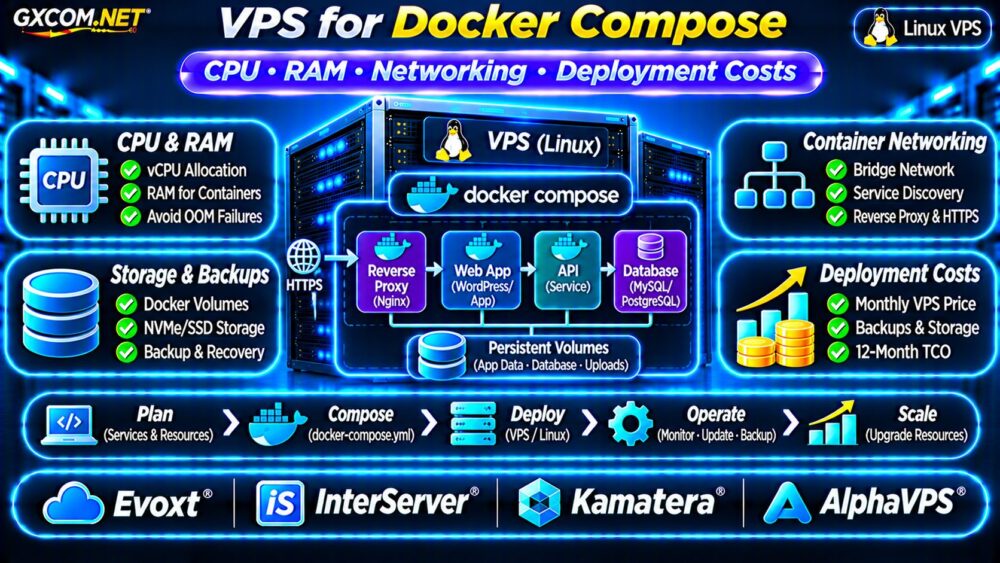
Choosing a VPS for Docker Compose requires balancing CPU capacity, memory, container networking, persistent storage, and operating costs. Docker Compose simplifies multi-container deployment, but an undersized Linux VPS can still experience slow applications, database failures, and unexpected downtime.
This guide explains practical server requirements, deployment decisions, and hosting costs for developers running web applications, APIs, databases, and background workers on a single virtual server.
Why Use a VPS for Docker Compose?
Docker Compose defines multiple containers, networks, and volumes in one YAML configuration. It works well for small SaaS applications, staging environments, internal tools, and self-hosted services.
A Linux VPS provides root access and control over container configuration. Unlike managed application platforms, however, you are usually responsible for security updates, monitoring, backups, and recovery.
For a broader infrastructure comparison, see our Cloud Hosting vs VPS Comparison.
Docker Compose VPS CPU Requirements
CPU demand depends on the containers running simultaneously. A reverse proxy consumes relatively little processing power under light traffic, while application workers, databases, and background jobs can create sustained CPU load.
One or two vCPUs may support a small development stack. Production applications with multiple active services often benefit from additional CPU capacity.
Shared vs Dedicated vCPU
Shared vCPUs can offer good value for applications with intermittent demand. Dedicated CPU allocations may provide more predictable performance for sustained processing, although isolation guarantees vary between providers.
Measure CPU utilization, throttling, and application latency before upgrading. Container CPU limits also need attention because they can restrict workloads independently of the VPS allocation.
How Much RAM Does Docker Compose Need?
Memory planning should include the Linux operating system, Docker services, application containers, databases, and filesystem cache.
| Deployment Type | Starting VPS Configuration |
|---|---|
| Development: proxy and small application | 1–2 vCPU, 2GB RAM |
| Small production application with database | 2 vCPU, 4GB RAM |
| Multiple applications and background workers | 4 vCPU, 8GB RAM |
| Busy database-backed application stack | 4–8 vCPU, 16GB+ RAM |
These are illustrative starting configurations, not guaranteed requirements. Actual memory consumption depends on application frameworks, concurrency, database buffers, and container limits.
Prevent Out-of-Memory Failures
Containers share the host kernel. If combined memory demand exceeds available capacity, the Linux out-of-memory killer may terminate processes.

Monitor memory usage and configure appropriate container limits. Leave sufficient headroom for operating system services and traffic spikes.
Docker Compose Networking on a VPS
Compose commonly creates a project-specific bridge network that allows containers to communicate through service names.
For example, an application can connect to a database using its Compose service name instead of a public IP address.
Only publish ports that must receive external traffic. Database services generally should remain accessible through private container networks rather than public interfaces.
Reverse Proxy and HTTPS
A reverse proxy such as Nginx, Caddy, or Traefik can route incoming HTTPS requests to internal application containers.
Configure TLS certificates, firewall rules, and application-level authentication. Docker-published ports may interact with host firewall rules differently from ordinary services, so verify exposure using external network tests.
Example Docker Compose Deployment
The following simplified configuration demonstrates an application service with a private network and persistent data directory. Replace the placeholder image with a trusted, maintained application image before deployment.
services:
  app:
    image: example/app:1.0
    restart: unless-stopped
    ports:
      - "127.0.0.1:8080:8080"
    volumes:
      - app_data:/app/data
    networks:
      - backend

networks:
  backend:

volumes:
  app_data:
Binding the published port to localhost limits direct external exposure. A separately configured reverse proxy can provide controlled public access.
Use versioned images, validate configuration with docker compose config, and test deployments before production updates.
Persistent Storage and Database Backups
Containers are replaceable, but application data must survive container recreation. Docker volumes provide persistent storage independent of individual container lifecycles.
For databases, use supported backup tools and verify consistency rather than assuming that copying active volume files produces a reliable backup.
NVMe storage may help database-intensive workloads, but capacity, write latency, and backup procedures are equally important.
Review our VPS Snapshot Backup and Recovery Guide before hosting production data.
Deployment Security and Maintenance
Running Docker does not remove the need to secure the VPS. Apply operating system patches, restrict SSH access, and protect the Docker socket because access to it can provide extensive control over the host.
Avoid unnecessary privileged containers, store secrets securely, and use maintained images from trusted sources.
For security fundamentals, consult our Unmanaged Server Security Checklist.
Four Linux VPS Providers to Compare
The following GXCOM.NET-approved affiliate providers are candidates for Docker Compose hosting. Confirm Docker compatibility, virtualization restrictions, and resource policies for each specific plan.
Evoxt: Budget Linux VPS
Evoxt is worth evaluating for cost-conscious developers deploying smaller container stacks. Compare CPU allocation, available memory, storage capacity, and bandwidth limits.
InterServer: VPS Resource Planning
InterServer offers another comparison point for Linux VPS resources and recurring costs. Check operating system options, resource upgrades, and administration responsibilities.
Kamatera: Configurable Cloud VPS
Kamatera may suit teams that want adjustable server configurations. Evaluate available CPU and RAM combinations, backup options, network requirements, and billing arrangements.
AlphaVPS: Linux Hosting Value
AlphaVPS can be compared for Linux VPS pricing and infrastructure requirements. Verify storage performance, Docker prerequisites, network allowances, and support boundaries.
Do not select a provider based on advertised vCPU counts alone. Test application behavior and review acceptable-use terms before committing to production.
Docker Compose VPS Deployment Costs
Consider a hypothetical Linux VPS costing $18 monthly, backup storage costing $5, and monitoring services costing $7.
The infrastructure subtotal is $30 monthly, or $360 annually. Adding a separate staging VPS at $12 monthly increases the annual total to $504.

These figures exclude taxes, engineering time, software licenses, excess bandwidth, and additional recovery infrastructure. They are illustrative calculations, not provider quotations.
Compare alternatives using our Best VPS Providers Guide.
When Should You Move Beyond One VPS?
A single VPS can be economical, but it remains a single point of failure. Growing applications may need separate database servers, managed storage, load balancing, or multi-node orchestration.
Docker Compose manages multi-container applications but does not automatically provide cross-server failover or high availability.
Scale when monitoring, availability requirements, and recovery objectives justify the additional infrastructure cost.
Frequently Asked Questions
Is 2GB RAM Enough for Docker Compose?
It can support lightweight development workloads, but production databases and multiple application services may require considerably more memory.
Can Docker Compose Run on a Cheap VPS?
Yes, provided the VPS supports the required Linux kernel and Docker features and has adequate resources for the workload.
Does Docker Compose Include Automatic Backups?
No. Persistent volumes and database backups require separate configuration, storage, and recovery testing.
Final Verdict
The best VPS for Docker Compose balances application CPU demand, memory headroom, secure networking, reliable storage, and predictable operating costs.
Compare Evoxt, InterServer, Kamatera, and AlphaVPS using actual resource requirements and verified product terms. Start with a manageable deployment, monitor real workloads, and expand infrastructure when performance or availability demands justify it.