Cloud VPS backup costs can significantly increase the price of hosting business applications, databases, and websites. A cloud server advertised at an affordable monthly rate may require additional spending on snapshots, backup storage, retention, cross-region transfers, and disaster recovery infrastructure.
Understanding these charges before deployment helps businesses avoid unexpected bills while maintaining reliable recovery options. This guide explains snapshot pricing, retention policies, and realistic recovery budgets.
What Determines Cloud VPS Backup Costs?
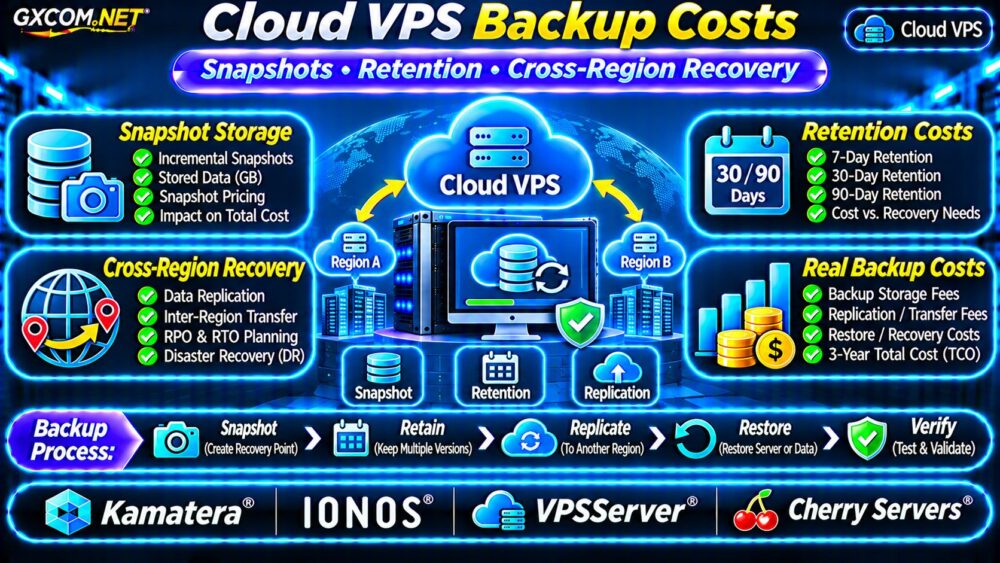
Backup pricing depends on the provider’s storage architecture, billing model, backup frequency, and recovery requirements. Some services charge for allocated backup capacity; others charge for stored data, protected server size, or individual backup features.
Common cost components include:
- Snapshot or backup storage capacity.
- Daily, weekly, or continuous backup schedules.
- Retention periods and additional recovery points.
- Cross-region replication and network transfers.
- Temporary recovery servers and restored volumes.
Do not assume that an advertised backup feature includes unlimited retention or free restoration.
Snapshots vs Full Backups: Why Pricing Differs
A snapshot records a storage volume’s state at a particular point in time. Depending on the platform, subsequent snapshots may use incremental storage rather than storing complete copies of unchanged blocks.
However, incremental billing does not mean every snapshot consumes negligible space. Frequently modified blocks, database activity, and retention dependencies can increase stored data.
Independent backups provide additional protection when the primary account, region, or storage platform becomes unavailable.
For practical backup fundamentals, read our VPS Snapshot Backup and Recovery Guide.
How Retention Periods Affect Snapshot Costs
Keeping more recovery points generally increases storage consumption, although the relationship is not always linear.
Consider a hypothetical 100GB VPS volume with daily snapshots. If the provider charges $0.06 per GB-month of billable snapshot storage, the monthly charge depends on actual stored data rather than simply multiplying 100GB by thirty snapshots.
| Retention Scenario | Assumed Stored Data | Monthly Cost |
|---|---|---|
| 7-day retention | 120GB | $7.20 |
| 30-day retention | 180GB | $10.80 |
| 90-day retention | 300GB | $18.00 |
These figures are fictional examples. Real storage consumption depends on changed blocks, snapshot implementation, compression, and provider billing rules.

Choose Retention Based on Recovery Needs
A practical policy might combine daily recovery points for recent incidents, weekly copies for longer investigations, and monthly archives for extended retention.
Longer retention is not automatically better. Define recovery objectives, regulatory requirements, and acceptable storage expenses before setting schedules.
Cross-Region Backup and Recovery Charges
Cross-region backups can protect against regional outages, but they introduce additional cost categories.
Potential charges include inter-region data transfer, destination storage, replication operations, restored volumes, and compute resources needed during recovery.
Some providers do not offer automatic cross-region snapshot replication for every Cloud VPS product. In those cases, businesses may need independent backup software or object storage.
Our Cloud VPS Bandwidth Costs Guide explains related network billing considerations.
Does Cross-Region Backup Guarantee Fast Recovery?
No. Having a backup in another region does not automatically create a running replacement application.
Recovery may require provisioning a new VPS, restoring data, configuring networking, updating DNS, and validating application functionality.
For architecture decisions, see our Dedicated vs Cloud Server Comparison.
RPO and RTO: The Cost of Recovery Requirements
Recovery point objective (RPO) describes acceptable data loss. Recovery time objective (RTO) describes the targeted time to restore service.
Shorter recovery objectives may require frequent backups, database log archiving, replicated storage, or standby infrastructure.
These capabilities increase costs but can reduce business disruption. A small informational website and a transactional database rarely need identical recovery strategies.
Remember that replication is not a replacement for independent backups: accidental deletions and corrupted data may also be replicated.
Calculate Monthly and Three-Year Backup Costs
A useful planning formula is:
Monthly backup cost = stored backup data + replication transfer + backup service fees + expected recovery expenses.
Consider a fictional deployment with the following monthly budget:
| Component | Illustrative Cost |
|---|---|
| Primary Cloud VPS | $30 |
| Local snapshot storage | $12 |
| Cross-region backup storage | $9 |
| Replication transfer | $4 |
| Monitoring | $5 |
| Monthly total | $60 |
The annual total is $720, and the three-year baseline is $2,160, assuming unchanged usage and pricing.
This estimate excludes taxes, temporary recovery compute, application licenses, engineering time, and unexpected restoration charges.
Four Cloud VPS Providers to Compare
These GXCOM.NET-approved affiliate providers are relevant infrastructure candidates. Verify current backup functionality and pricing for the exact product selected.
Kamatera: Configurable Cloud Infrastructure
Kamatera is worth evaluating for adjustable cloud server resources and backup planning. Request details about snapshot availability, backup storage billing, supported locations, and recovery procedures.
IONOS: Cloud Server Backup Budgeting
IONOS provides another option for comparing cloud infrastructure and data protection costs. Check the selected product’s backup features, storage charges, and retention controls.
VPSServer: Cloud VPS Recovery Options
VPSServer can be assessed for Cloud VPS deployment and recovery requirements. Confirm snapshot scheduling, restoration methods, backup storage limits, and regional availability.
Cherry Servers: Infrastructure Recovery Planning
Cherry Servers is relevant when evaluating cloud infrastructure and recovery architecture. Verify applicable backup products, independent storage options, and geographic recovery capabilities.
None of these providers should be assumed to include free cross-region replication or unlimited snapshots without written confirmation.
How to Reduce Cloud VPS Backup Expenses
- Remove expired recovery points using documented retention policies.
- Use incremental backups where supported and appropriate.
- Exclude reproducible caches and unnecessary temporary files.
- Separate database backups from full-server snapshots when useful.
- Monitor storage growth and transfer charges monthly.
- Test restoration before reducing backup coverage.
When moving infrastructure between platforms, review our Cloud Server Migration Guide to plan service transitions.

Cloud VPS Backup Buying Checklist
Before purchasing, ask providers whether snapshots are incremental, how retained blocks are billed, whether backups survive server deletion, and what happens when a subscription ends.
Also verify cross-region availability, encryption, restore charges, storage limits, and support responsibilities. Request a sample invoice or documented pricing calculation whenever possible.
Frequently Asked Questions
Are Cloud VPS Snapshots Free?
Not necessarily. Some plans include limited backup capacity, while others bill snapshot storage or backup services separately.
Does 90-Day Retention Cost Three Times More Than 30 Days?
Not necessarily. Incremental storage, data changes, compression, and retention rules determine actual consumption.
Are Cross-Region Backups Enough for Disaster Recovery?
They improve geographic resilience but do not guarantee rapid application recovery. Test infrastructure restoration, networking, and data consistency.
Final Verdict
Cloud VPS backup costs should be evaluated alongside server pricing, not after deployment. Snapshot retention, independent storage, regional transfers, and recovery testing all influence total ownership costs.
Compare Kamatera, IONOS, VPSServer, and Cherry Servers using product-specific backup terms. Choose a recovery strategy that meets business requirements without paying for unnecessary retention or untested protection.