Cheap dedicated server hardware can look like an excellent deal. A provider may advertise a high core count, generous RAM, and substantial storage capacity at a relatively low monthly cost. But the specifications do not always tell the full story.
Many affordable dedicated servers use older processor generations, established enterprise platforms, or refurbished components. That is not automatically a disadvantage. Well-maintained older hardware can still deliver dependable performance for websites, development environments, backups, and other predictable workloads.
The real question is whether the hardware offers enough performance, reliability, and upgrade flexibility for your applications.
This guide explains how to evaluate used CPUs, older Intel Xeon and AMD EPYC platforms, DDR4 versus DDR5 memory, SSD and NVMe storage, replacement policies, and the long-term costs of choosing budget bare metal infrastructure.
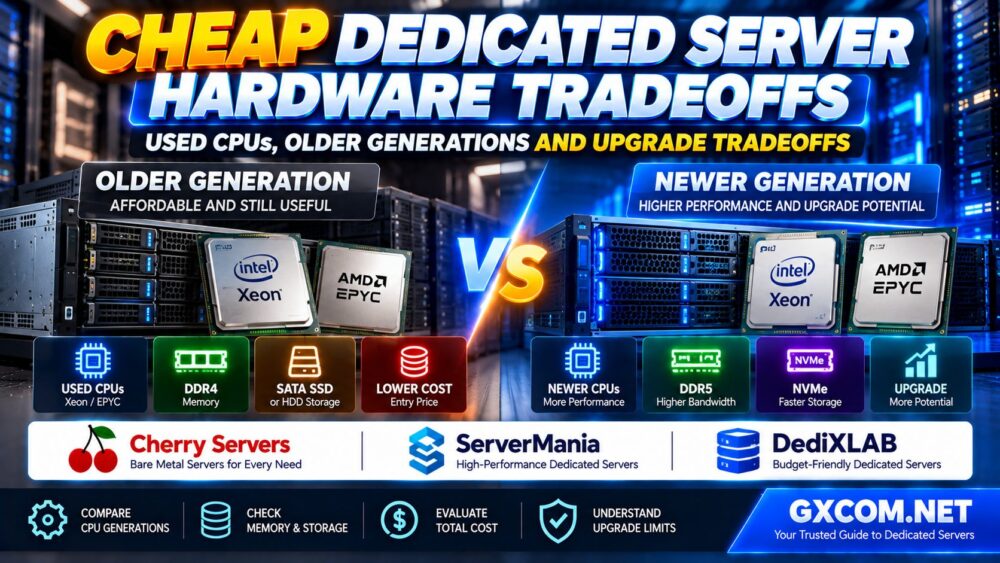
Is Older Dedicated Server Hardware Worth Buying?
Older dedicated server hardware can be worth renting when its capabilities match your workload and the provider maintains the equipment properly.
For example, a server hosting a small collection of websites may not require the newest processor architecture. A database platform handling latency-sensitive queries, however, may benefit significantly from stronger per-core performance and faster storage.
Before choosing a low-cost dedicated server, evaluate three factors:
- Performance: Can the processor, memory, and storage handle your actual workload?
- Reliability: How does the provider test, maintain, and replace aging components?
- Upgrade flexibility: Can you add RAM, improve storage, or migrate to newer hardware without major disruption?
A cheap server is a good deal only when its total cost and operational limitations remain acceptable.
Old vs New Dedicated Server Hardware: Quick Comparison
| Factor | Older Server Platform | Newer Server Platform |
|---|---|---|
| Processor | Potentially more affordable, but generation-dependent performance | May offer newer architectures and improved efficiency |
| Memory | Often DDR4 or earlier technologies | May support DDR5 and higher bandwidth |
| Storage | May offer SATA SSDs, HDDs, or earlier NVMe configurations | May support newer NVMe interfaces and higher I/O capacity |
| Expansion | Limited by motherboard, CPU and available slots | Potentially broader expansion options |
| Power efficiency | Varies widely by processor and platform | Can be more efficient for equivalent work |
| Acquisition cost | Often attractive for budget-oriented hosting | May carry a higher infrastructure cost |
| Best fit | Predictable, cost-sensitive workloads | Demanding or rapidly growing workloads |
These are general tendencies, not guarantees. A carefully configured older server can outperform a poorly configured newer system in a particular workload.
1. Used CPUs: What Does Refurbished Server Hardware Mean?
In dedicated hosting, a refurbished server generally refers to hardware that has previously been deployed and then inspected, repaired, or prepared for further service.
It does not necessarily mean the CPU itself is damaged or unreliable.
Modern processors have no mechanical moving parts, and their practical reliability depends on operating conditions, cooling, electrical stability, and component quality.
However, the complete server contains additional components that may require maintenance or replacement.
These include:
- Storage drives
- Cooling fans
- Power supplies
- Motherboards
- Memory modules
- Network adapters
When evaluating refurbished hardware, focus on the provider's testing procedures and replacement commitments rather than assuming every used component is unsuitable.
2. Older Intel Xeon vs Newer Xeon Processors
Intel Xeon processors have been widely used in dedicated hosting for many generations.
Older Xeon systems can remain useful for web hosting, background services, file storage, and workloads that do not require the newest instruction sets or memory technologies.
However, Xeon branding alone does not indicate performance.
Why CPU Generation Matters
Different processor generations can vary in:
- Per-core performance
- Core and thread counts
- Memory support and bandwidth
- Cache architecture
- PCIe connectivity
- Power efficiency
- Hardware security features
Even processors with similar core counts may deliver different results under the same application workload.
Intel also cautions that processor model numbers should not be treated as a direct performance ranking across different families.
High Core Count Does Not Always Mean Better Hosting Performance
A server with many older cores may be useful for highly parallel workloads.
However, a newer processor with fewer but faster cores may be preferable for latency-sensitive applications or workloads that cannot efficiently use many threads.
Before buying, compare the exact CPU models and review workload-relevant benchmarks rather than relying on core count alone.
3. Older AMD EPYC vs Newer EPYC Servers
AMD EPYC processors are another important category in dedicated server hosting.
Different EPYC generations offer different combinations of cores, memory channels, platform connectivity, and supported technologies.
For example, some fourth-generation EPYC 9004 processors support DDR5 memory and PCIe 5.0, while earlier platforms use different memory and I/O technologies.
This matters when your workload depends on memory bandwidth, fast storage, or expansion capabilities.
When an Older EPYC Server Can Make Sense
Older EPYC hardware may remain attractive for workloads such as:
- Virtual machine hosting
- Parallel application processing
- Development and testing
- Self-managed infrastructure services
- Predictable batch workloads
But the actual result depends on the processor model, memory configuration, storage system, and software stack.
Do not assume that every EPYC processor is automatically faster than every Xeon processor, or vice versa.
4. DDR4 vs DDR5: Does Memory Generation Matter?
Memory capacity and memory bandwidth affect different aspects of server performance.
For applications that frequently access large amounts of data, memory bandwidth can become important.
DDR5-capable server platforms may provide advantages over older DDR4 configurations, but the difference depends on the workload and processor architecture.

For many small websites, having sufficient RAM is more important than moving to a newer memory generation.
For memory-intensive databases, analytics, and virtualization, both memory capacity and bandwidth deserve careful attention.
Check the Full Memory Configuration
Ask the provider about:
- Total installed RAM
- Memory generation
- ECC support
- Memory channel population
- Maximum supported capacity
- Available upgrade options
Two servers with the same amount of RAM may deliver different memory bandwidth because of their CPU platforms and DIMM configurations.
5. SATA SSD vs NVMe: Where Budget Servers Cut Costs
Storage is one of the most important components to inspect when evaluating cheap dedicated server hardware.
Some affordable systems offer large HDD capacity, while others provide SATA SSDs or NVMe drives.
These technologies have different latency, throughput, and workload characteristics.
HDD Storage
Hard drives may be suitable for capacity-oriented workloads such as archives, backups, and files that do not require low-latency random access.
SATA SSD Storage
SATA SSDs generally offer much lower access latency than mechanical hard drives and can work well for many websites and business applications.
NVMe Storage
NVMe drives use a different interface designed for efficient access to solid-state storage.
They can be particularly valuable for database-intensive workloads, frequent builds, and applications generating substantial random I/O.
However, a fast NVMe drive will not automatically solve application-level bottlenecks.
Used Drives Require Additional Questions
When renting a server with existing storage devices, ask whether the provider checks drive health and replaces failing components.
Relevant information may include SMART health data, SSD wear indicators, drive replacement policies, and available redundancy.
Do not assume that a drive is reliable merely because it passes one health check.
Independent backups remain essential regardless of storage type.
6. Are Older Dedicated Servers Less Reliable?
Hardware age can influence maintenance requirements, but age alone does not determine whether a server will fail.
Different component models and operating environments have different reliability characteristics.
Large-scale storage reliability studies, including Backblaze Drive Stats, demonstrate that failure behavior varies by drive model and operating population.
These statistics should not be treated as a prediction for an individual server.
Instead, evaluate the provider's operational practices:
- Hardware inspection and testing
- Monitoring and failure detection
- Replacement component availability
- Storage redundancy options
- Remote management access
- Support response procedures
- Backup and recovery responsibilities
A well-maintained older server may be a reasonable choice. An inexpensive server with weak replacement support may create unnecessary operational risk.
7. Upgrade Tradeoffs: What Can You Change Later?
One of the biggest limitations of older dedicated hardware is the upgrade path.
Adding RAM or replacing storage may be straightforward on some platforms, but CPU upgrades are constrained by motherboard sockets, firmware, power delivery, cooling, and provider inventory.
In many cases, moving to a different dedicated server is more practical than upgrading the processor in place.
CPU Upgrades
Confirm whether the provider offers in-place processor upgrades or requires a full server migration.
RAM Upgrades
Ask about maximum supported capacity, available DIMM slots, and upgrade-related downtime.
Storage Upgrades
Check available drive bays, supported interfaces, RAID configuration, and whether existing data must be migrated.
Network Upgrades
Verify available port speeds, traffic policies, and whether faster connectivity requires a different server platform.
Upgrade flexibility should be evaluated before ordering, not only after the server reaches its limits.
8. Cheap Dedicated Server Hardware vs Modern VPS
An older dedicated server can provide exclusive physical resources, while a modern VPS may run on newer hardware with a more flexible virtualization platform.
Neither option is automatically faster.
An older dedicated CPU may deliver weaker per-core performance than a newer processor used by a VPS provider.
On the other hand, dedicated hardware can provide more predictable access to physical resources for certain sustained workloads.
Consider:
- Actual CPU performance
- Memory allocation
- Storage latency
- Resource contention
- Upgrade flexibility
- Management requirements
- Total operating cost
For a complete infrastructure comparison, read our Budget Bare Metal vs VPS Guide.
9. Total Cost: Why the Cheapest Hardware May Not Be the Best Value
The advertised monthly server price is only one part of the purchasing decision.
Older hardware may have a lower rental cost, but an unsuitable platform can increase operational expenses.
Potential cost factors include:
- Additional administration time
- Hardware replacement downtime
- Application performance limitations
- Migration costs
- Backup storage
- Licensing requirements
- Paid support
- Future upgrade restrictions
Power efficiency also matters, although its financial impact depends on whether electricity costs are included in the hosting fee.
For a more complete purchasing framework, see our Dedicated Server Total Cost Guide.
10. When Is Older Dedicated Hardware a Smart Choice?
Older server hardware may be a sensible option when:
- Your workload has predictable resource requirements
- Applications do not require recent CPU instruction sets
- Current storage performance is sufficient
- You have reliable backups and recovery procedures
- The provider offers acceptable hardware support
- You do not expect rapid capacity growth
Typical candidates include certain web hosting environments, development servers, staging systems, backup infrastructure, and established applications with modest performance requirements.
The key is matching the server to the workload rather than purchasing the largest advertised specifications.
11. When Should You Pay More for Newer Hardware?
Newer server hardware may be worth the additional cost when your workload depends on:
- Strong single-thread performance
- High memory bandwidth
- Large-scale virtualization
- Fast NVMe storage
- Modern CPU instructions
- Higher network throughput
- Long-term hardware expansion
- Better performance per unit of energy
Applications with growing transaction volumes or demanding databases should be tested against representative hardware before committing to a long-term configuration.
For a broader selection framework, see our Best Budget Dedicated Servers Guide.
12. Dedicated Server Providers Worth Comparing
When shopping for affordable dedicated hardware, compare the exact CPU model, RAM configuration, storage devices, network specifications, and support commitments.
Cherry Servers, ServerMania, and DediXLAB are three infrastructure providers worth including in your research.
The following recommendations describe evaluation priorities rather than claiming that every provider sells refurbished hardware or guarantees a specific upgrade option.
Cherry Servers: Compare Bare Metal Configurations
Cherry Servers is relevant for buyers evaluating bare metal infrastructure with different hardware requirements.
Compare the exact processor generation, available memory, storage configuration, and remote management capabilities.
Before purchasing, verify whether the selected product allows hardware changes or requires migration to a different server.
Best evaluation angle: Hardware configuration flexibility and long-term workload suitability.
ServerMania: Evaluate Processor and Infrastructure Requirements
ServerMania is another candidate for comparing dedicated server infrastructure.
Review the advertised CPU model, memory capacity, disk options, network connectivity, and hardware support arrangements.
For older platforms, ask about component replacement procedures and future upgrade availability.
Best evaluation angle: Dedicated hardware performance, network requirements, and operational support.
DediXLAB: Compare Budget-Oriented Dedicated Hardware
DediXLAB can be included when evaluating affordable self-managed dedicated infrastructure.
Focus on the relationship between hardware generation, workload performance, storage type, and total cost.
Confirm the exact product specifications and any upgrade restrictions before committing to a configuration.
Best evaluation angle: Budget hardware selection and self-managed infrastructure tradeoffs.
13. Cheap Dedicated Server Hardware Buying Checklist
| Item | Question to Ask |
|---|---|
| CPU | What is the exact processor model and generation? |
| CPU performance | Are representative single-thread and multi-thread benchmarks available? |
| RAM | How much memory is installed, and what type is it? |
| Storage | Are the drives HDD, SATA SSD, or NVMe? |
| Drive health | How are storage devices tested and replaced? |
| Redundancy | Which RAID or disk protection options are available? |
| Network | What are the port speed, traffic policy, and bandwidth terms? |
| Remote management | Is console or rescue access available? |
| Upgrades | Can RAM and storage be upgraded without migrating? |
| Support | What happens when hardware fails? |
| Migration | What is the process for moving to newer hardware? |
| Total cost | Are backups, licensing, and support included? |
14. Common Mistakes When Buying Older Dedicated Servers
- Comparing CPU core counts without checking processor generation.
- Assuming all Intel Xeon or AMD EPYC processors perform similarly.
- Ignoring per-core performance for latency-sensitive workloads.
- Choosing HDD storage for demanding random-I/O applications.
- Assuming that advertised RAM can be expanded indefinitely.
- Overlooking remote management and hardware replacement policies.
- Confusing RAID with independent backups.
- Assuming refurbished hardware is automatically unreliable.
- Ignoring the cost of future migration.
- Choosing the lowest monthly price without calculating total value.
Frequently Asked Questions
Are used CPUs safe for dedicated server hosting?
Previously deployed CPUs can remain suitable when the server has been properly tested and maintained. Evaluate the complete hardware platform and provider support rather than judging reliability solely by CPU age.

Is an old Intel Xeon still good for hosting?
It can be. Older Xeon processors may be sufficient for predictable web hosting and infrastructure workloads, but their performance should be compared with newer alternatives using relevant benchmarks.
Is an older AMD EPYC server worth renting?
Older EPYC platforms may offer useful core counts and memory capacity for certain workloads. Check the exact processor generation, memory technology, storage support, and upgrade limitations.
Is DDR5 necessary for a dedicated server?
No. DDR4 can remain adequate for many applications. DDR5 may be more attractive for workloads that benefit from higher memory bandwidth and newer platform capabilities.
Should I choose NVMe over SATA SSD?
Choose based on workload requirements. NVMe can be valuable for storage-intensive applications, while SATA SSDs may be sufficient for less demanding hosting environments.
Are refurbished dedicated servers less reliable?
Not necessarily. Reliability depends on component condition, maintenance, monitoring, and replacement procedures. Hardware age is one consideration, not a complete reliability assessment.
Can I upgrade an old dedicated server later?
Some RAM and storage upgrades may be available, but CPU and platform upgrades are often limited. Confirm the provider's options before purchasing.
Is a cheap dedicated server better than a VPS?
Not always. An older dedicated server provides exclusive physical resources, while a VPS may benefit from newer host hardware and easier scaling. Compare measured performance and total cost.
Final Verdict: Buy the Right Hardware, Not Just the Lowest Price
Cheap dedicated server hardware can provide excellent value when older processors, memory, and storage are well matched to the workload.
Used CPUs and previous-generation server platforms are not automatically poor choices. The real risks come from inadequate performance, limited upgrade paths, weak maintenance practices, and unexpected operating costs.
Before ordering, compare the exact CPU generation, RAM technology, storage configuration, provider support, and future migration options.
Cherry Servers, ServerMania, and DediXLAB are relevant providers to investigate, but the best choice depends on the specific hardware offered and the requirements of your applications.
WORKLOAD → CPU GENERATION → RAM → STORAGE → RELIABILITY → UPGRADE PATH → TOTAL COST.
The best budget dedicated server is the one that delivers dependable performance and predictable long-term value, not simply the one with the cheapest advertised specifications.