Finding the best budget dedicated servers is not simply about choosing the lowest monthly price. A cheap physical server can offer excellent value for websites, databases, development environments, and business applications—but only when its hardware, network, support, and operating costs match the workload.
Some affordable bare metal servers use older processors or limited storage configurations. Others offer more modern hardware but charge separately for setup, additional IP addresses, backup storage, or management services.
The result? Two dedicated servers with similar advertised prices can deliver very different long-term value.
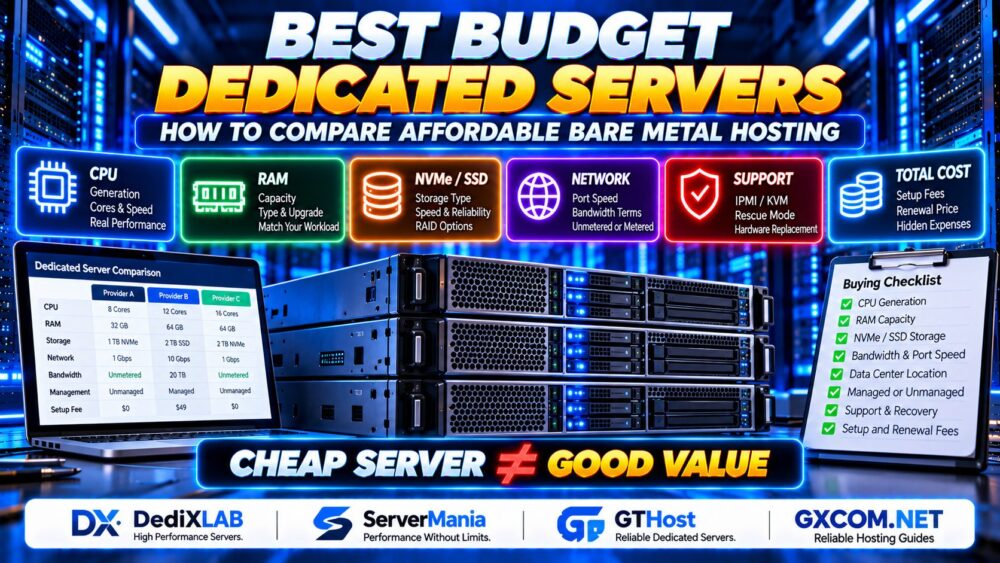
CHEAP SERVER ≠ GOOD VALUE.
This guide explains how to compare affordable dedicated hosting, which specifications matter most, where budget servers make sense, and how to evaluate providers without paying for resources you do not need.
What Is a Budget Dedicated Server?
A budget dedicated server is a physical server offered at a comparatively affordable price, usually through an entry-level configuration, older hardware generation, discounted inventory, or a limited set of included services.
Unlike a typical shared VPS, a traditional dedicated server provides exclusive access to an entire physical machine.
That means the server's processor, memory, and local storage are allocated to your environment rather than divided into multiple independently managed virtual machines for unrelated customers.
However, dedicated hardware does not guarantee superior performance in every situation. A modern VPS running on fast processors and NVMe storage may outperform an inexpensive dedicated server built around much older components.
The correct comparison is therefore not simply dedicated versus virtualized hosting. It is the performance, reliability, and operating cost of the actual configurations being considered.
Best Budget Dedicated Server Providers to Consider
When evaluating affordable bare metal hosting, it helps to shortlist providers based on the type of workload and level of server administration you need.
The following providers are useful candidates for comparison, but their configurations, availability, and included features must be verified before purchase. This is a workload-based shortlist, not a ranking based on independent benchmark testing.
1. DediXLAB — For Cost-Conscious Bare Metal Buyers
DediXLAB is worth evaluating when you want to compare dedicated server configurations with a strong focus on hardware value and self-managed infrastructure.
Rather than choosing a server based on its headline processor model alone, examine the exact CPU generation, installed memory, storage type, and network allocation offered with the selected configuration.
Best suited for: Technically experienced buyers comparing dedicated hardware for predictable workloads.
Before ordering, verify: Hardware inventory, deployment time, remote management availability, bandwidth terms, and support responsibilities.
2. ServerMania — For Business Workloads and Configuration Flexibility
ServerMania is another provider to evaluate when comparing dedicated hosting for business applications, databases, and growing infrastructure requirements.
For a budget-focused deployment, consider whether the available hardware configuration provides sufficient performance without requiring expensive upgrades immediately after launch.
Network requirements and physical server location should also be part of the decision.
Best suited for: Businesses that want to compare dedicated server configurations against specific application and infrastructure needs.
Before ordering, verify: Current hardware options, service location, setup charges, support scope, and upgrade arrangements.
3. GTHost — For Location-Sensitive Dedicated Hosting
GTHost can be included when comparing affordable dedicated infrastructure, particularly when network location and deployment requirements are important to the workload.
For websites serving a geographically concentrated audience, selecting an appropriate data center may improve latency more than a small increase in processor specifications.
For high-transfer applications, pay close attention to the relationship between port speed, included traffic, and any applicable bandwidth restrictions.
Best suited for: Buyers comparing dedicated server locations and network requirements alongside hardware costs.
Before ordering, verify: Availability in the required region, traffic policy, hardware specifications, and current service terms.
Budget Dedicated Server Comparison: What Actually Matters?
Before selecting a provider, compare each offer using the same technical and operational criteria.
| Factor | What to Compare | Why It Matters |
|---|---|---|
| CPU | Architecture, generation, cores, clock speed | Determines application and processing performance |
| RAM | Capacity, type, upgrade options | Affects databases, caching, and concurrent workloads |
| Storage | HDD, SATA SSD, NVMe, redundancy | Influences latency, throughput, and recovery planning |
| Network | Port speed, transfer allowance, routing | Affects throughput, latency, and traffic costs |
| Management | Managed or unmanaged responsibilities | Determines administration and support workload |
| Recovery | IPMI, KVM, rescue mode, backups | Improves access and restoration options during failures |
| Contract | Setup fees, renewal terms, cancellation | Determines the actual financial commitment |
For a deeper explanation of processor selection, memory requirements, storage interfaces, and network specifications, see our Dedicated Server Hardware Guide.
1. CPU Generation Matters More Than Core Count Alone
One of the biggest mistakes in budget dedicated hosting is assuming that a server with more CPU cores must be faster.
An older dual-processor system may advertise an impressive number of cores while offering weaker single-thread performance, higher power consumption, or lower efficiency than a newer single-socket platform.
For workloads such as WordPress, PHP applications, and many game servers, single-thread performance can be particularly important.
For parallel processing, virtualization, or workloads designed to use many threads, additional cores may offer greater benefits.
Some affordable dedicated servers use previous-generation processors or refurbished components. Before choosing a configuration, read our Cheap Dedicated Server Hardware Guide to understand used CPUs, older processor generations, storage differences and upgrade limitations.
Compare:
- Exact CPU model and generation
- Single-core and multi-core benchmark results
- Base and boost clock characteristics
- Memory platform and supported capacity
- Expected application behavior under sustained load
MORE CORES ≠ MORE PERFORMANCE.

A budget server should be selected for its real workload, not its specification sheet alone.
2. Choose RAM Based on the Application
Memory requirements vary significantly between applications.
A lightweight web server may need relatively little RAM, while a database-heavy application, container platform, or virtualization environment may require much more.
Consider memory used by:
- The operating system
- Web servers and application runtimes
- Database buffer pools
- In-memory caches
- Background jobs and scheduled tasks
- Monitoring and security software
Leave room for normal traffic fluctuations and future growth.
However, buying excessive RAM that remains unused does not automatically improve performance. Identify the workload's memory bottlenecks before upgrading.
3. NVMe vs SSD vs HDD: Do Not Ignore Storage
Storage performance can make a significant difference to the responsiveness of database-driven websites and applications.
NVMe Storage
NVMe drives can provide high throughput and low latency, making them attractive for database-intensive applications and workloads involving frequent random I/O.
SATA SSD Storage
SATA SSDs may offer sufficient performance for many websites, business applications, and general-purpose workloads at a potentially lower cost.
HDD Storage
Hard drives remain useful for some capacity-focused workloads, but their random I/O performance is generally much lower than that of SSDs.
For a production website with substantial database activity, storage latency may be more important than raw storage capacity.
Also check whether the server includes redundant drives and whether replacement procedures are documented.
RAID can help maintain availability during certain drive failures, but it is not a substitute for independent backups.
4. Understand Bandwidth and Port Speed
Budget dedicated server advertisements often emphasize network port speeds such as 1 Gbps or 10 Gbps.
But a high-speed port does not necessarily mean that the server can transfer unlimited data at that speed continuously.
Important questions include:
- Is bandwidth metered or unmetered?
- What monthly transfer allowance applies?
- Is the port dedicated or shared?
- Are fair-use restrictions involved?
- What happens after a traffic allowance is exceeded?
- Are outbound and inbound transfers treated differently?
A server with a faster advertised port may still be less suitable than another configuration with clearer transfer allowances and more consistent network performance.
1 GBPS PORT ≠ GUARANTEED 1 GBPS THROUGHPUT.
For bandwidth-intensive workloads, compare the actual service agreement rather than relying only on promotional language.
5. Calculate the Real Cost of Affordable Dedicated Hosting
The advertised rental price is only one component of the total cost.
Potential additional expenses include:
- One-time setup fees
- Operating system licenses
- Control panel subscriptions
- Additional IP addresses
- Backup storage
- Extra bandwidth or network upgrades
- Managed administration
- Migration services
- Taxes and payment-related charges
For example, an unmanaged server may appear less expensive than a managed alternative, but the cost of an administrator's time can change the comparison.
Evaluate both the initial payment and the expected recurring cost over the intended deployment period.
Our Dedicated Server Total Cost of Ownership Guide provides a more detailed framework for evaluating hidden expenses and long-term infrastructure costs.
6. Managed vs Unmanaged: Which Is Better for a Small Budget?
Many affordable dedicated server plans are unmanaged, meaning the customer is responsible for most operating system and application administration.
That commonly includes:
- Installing and updating software
- Configuring firewalls and SSH access
- Monitoring system health
- Managing security patches
- Maintaining backups
- Responding to application incidents
The hosting provider typically remains responsible for physical infrastructure according to its contract.
Unmanaged hosting may be cost-effective for developers, system administrators, and organizations with sufficient technical expertise.
However, a business without reliable administrative support should consider the operational risks before choosing the lowest-priced option.
A server is not truly affordable if preventable downtime repeatedly interrupts revenue-generating services.
For bandwidth-intensive workloads, read our Cheap Unmetered Dedicated Servers Guide to understand port speeds, fair use policies, and hidden network limitations before choosing a plan.
7. Match the Server to Your Workload
Different applications benefit from different hardware priorities.
| Workload | Primary Consideration | Buying Advice |
|---|---|---|
| WordPress websites | Single-thread CPU speed, database latency | Prioritize responsive CPU performance and SSD storage |
| eCommerce | Database performance, resilience | Evaluate storage, backups, and operational support |
| Development environments | Flexibility and sufficient resources | Choose hardware that matches build and testing workloads |
| Game servers | CPU speed and network latency | Review single-thread performance and server location |
| Backup or file storage | Capacity, durability, transfer | Compare storage design and bandwidth terms |
| Virtualization | CPU threads, RAM, storage I/O | Allow headroom for multiple guest workloads |
There is no universal best budget dedicated server. The right configuration depends on how the application consumes CPU, memory, storage, and network resources.
8. Why Server Location Still Matters
Data center location can affect application latency, network routing, regulatory considerations, and disaster recovery planning.
For a website serving primarily North American visitors, a suitable North American location may provide better network proximity than a distant overseas facility.
However, geography alone does not determine performance. Network quality, transit providers, congestion, and routing paths also matter.
Before purchasing, check whether the provider offers looking-glass tools, test IP addresses, or other reasonable methods for evaluating network connectivity.
When comparing providers such as GTHost, ServerMania, and DediXLAB, evaluate the actual available locations for the configurations under consideration.
9. Check Support and Disaster Recovery Options
Budget hosting buyers sometimes focus so heavily on hardware specifications that they overlook what happens when a server becomes inaccessible.
Before ordering, ask:
- Is remote console access available?
- Can the server be rebooted remotely?
- Is a rescue environment provided?
- How are failed drives replaced?
- Does the provider offer a documented support process?
- Are backups included or separately purchased?
- What happens during a major infrastructure outage?
Remote management access is particularly valuable when firewall rules, boot configurations, or operating system problems prevent normal SSH or RDP connections.
For business-critical services, independent off-site backups and a tested recovery procedure are essential regardless of the server's purchase price.
10. How to Avoid Common Budget Dedicated Server Mistakes
Before completing your order, watch for these common purchasing errors.
Choosing the Cheapest CPU Without Checking Its Age
Older processors can be useful for certain workloads, but an unusually low price may reflect an aging hardware platform with weaker performance or limited upgrade options.
Confusing a Dedicated Server with a VPS
Some products advertise dedicated CPU resources while still running as virtual machines. Confirm whether the service provides an entire physical server or a virtualized instance.
Ignoring Storage Redundancy
A single inexpensive drive can create a significant availability risk. Determine whether the application requires redundant storage and how failed drives are replaced.
Assuming Unlimited Traffic Means No Restrictions
Review network policies, port allocations, and fair-use provisions before selecting a high-bandwidth plan.
Overlooking Renewal and Setup Terms
A promotional offer may not represent the recurring price. Confirm the actual billing arrangement and cancellation conditions.
Buying Hardware Before Estimating Workload
Start with application requirements and expected growth, then select the hardware that meets those needs with reasonable capacity headroom.
11. Budget Dedicated Server Buying Checklist
Use this checklist when comparing affordable bare metal hosting offers.
- CPU: Confirm the exact model and generation.
- RAM: Check capacity, type, and upgrade options.
- Storage: Compare NVMe, SSD, HDD, and redundancy.
- Network: Review port speed, transfer limits, and routing.
- Location: Choose a data center appropriate for users.
- Management: Confirm customer and provider responsibilities.
- Recovery: Check console access, rescue tools, and backups.
- Billing: Verify setup charges and recurring terms.
- Support: Understand hardware replacement procedures.
- Growth: Evaluate upgrade or migration options.
For readers comparing actual offers rather than long-term hardware suitability, our Affordable Dedicated Server Deals page focuses on purchasing opportunities and offer evaluation.

12. When Is a Budget Dedicated Server Worth Buying?
Affordable dedicated hosting is particularly attractive when an application needs predictable access to physical hardware and has a relatively stable resource profile.
It can be a good fit for:
- Established websites with consistent traffic
- Database-heavy applications
- Self-hosted business services
- Development and testing infrastructure
- Selected game server workloads
- Organizations with in-house Linux administration skills
However, a dedicated server may not be the most economical choice when demand fluctuates dramatically, the workload is very small, or the organization cannot manage its own infrastructure.
In those cases, a suitable VPS, managed hosting service, or cloud platform may offer better overall value.
Frequently Asked Questions
What is the best budget dedicated server?
The best budget dedicated server is the configuration that meets your workload's CPU, RAM, storage, network, and reliability requirements at a sustainable total cost. DediXLAB, ServerMania, and GTHost are among the providers worth evaluating for relevant dedicated hosting requirements.
Are cheap dedicated servers reliable?
They can be reliable, but reliability depends on hardware condition, storage redundancy, network quality, provider operations, and maintenance practices. A low monthly price alone does not establish reliability.
Is a budget dedicated server better than a VPS?
Not always. A modern VPS may outperform an older dedicated machine for some applications. Dedicated servers become attractive when exclusive physical hardware, predictable resource access, or specific configuration requirements justify the additional responsibility.
Can I host WordPress on a budget dedicated server?
Yes. WordPress can run on dedicated hardware, but a well-configured VPS or managed WordPress service may be more economical for smaller websites. Evaluate actual traffic, caching, database activity, and administration requirements.
Should I choose NVMe storage for cheap dedicated hosting?
NVMe can be valuable for workloads sensitive to storage latency, especially databases and applications with frequent random I/O. SATA SSD storage may still be sufficient for less demanding workloads.
Do budget dedicated servers include backups?
Backup inclusion varies by provider and product. Never assume that backups, off-site storage, or restoration assistance are included unless the service agreement explicitly confirms them.
What is the biggest hidden cost of cheap dedicated hosting?
There is no single universal answer. Common overlooked expenses include administration time, setup charges, licenses, backup services, additional bandwidth, and downtime-related operational costs.
Are budget bare metal servers suitable for business websites?
Yes, when the server provides adequate performance, security, monitoring, backups, and recovery arrangements. Business-critical applications should be evaluated on total operational risk rather than rental cost alone.
Final Verdict: Buy the Right Hardware, Not the Lowest Price
The best budget dedicated servers offer a practical balance of hardware performance, network quality, support arrangements, and predictable operating costs.
Start by identifying your workload. Compare CPU generations instead of core counts alone, select appropriate storage, review bandwidth terms, and confirm the responsibilities involved in running an unmanaged physical server.
Providers such as DediXLAB, ServerMania, and GTHost can form part of your shortlist, but the final decision should depend on the exact configuration and contract available when you order.
WORKLOAD → HARDWARE → NETWORK → SUPPORT → TOTAL COST.
CHEAP SERVER ≠ GOOD VALUE.
The best affordable bare metal hosting is not necessarily the cheapest server you can find. It is the one that delivers the resources and reliability your project actually needs without creating avoidable operational costs.