Choosing a cheap dedicated server vs high-end VPS becomes increasingly important when your application needs more CPU power, memory, and predictable performance. A premium VPS may look attractive because it offers flexible upgrades, while an entry-level dedicated server can provide exclusive access to physical hardware at a competitive monthly price.
However, the cheaper option is not always the better investment. CPU sharing, storage performance, management responsibilities, and future scaling costs can change the calculation. This guide explains when dedicated hosting becomes more cost-effective and how to compare real infrastructure value.
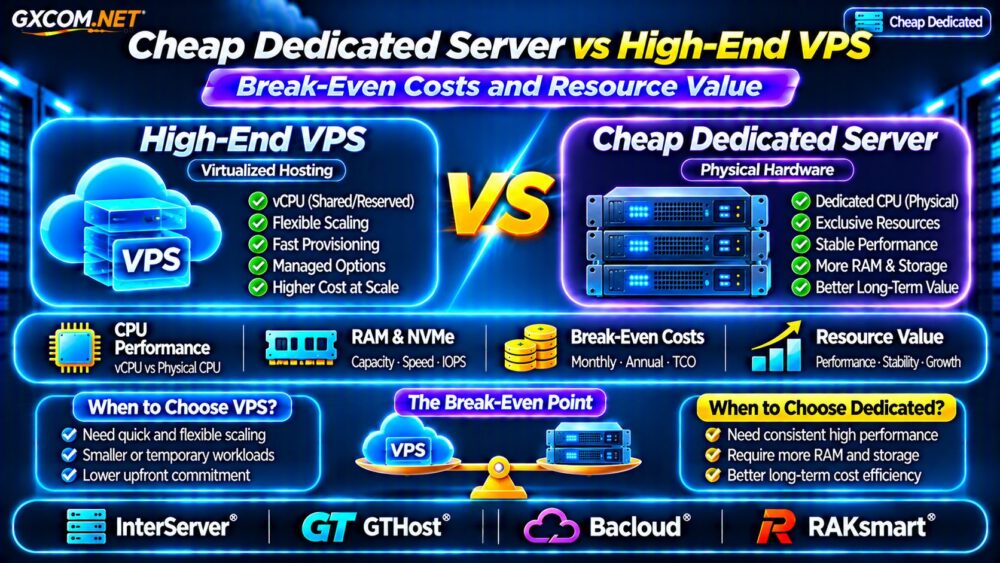
Cheap Dedicated Server vs High-End VPS: Key Differences
A high-end VPS runs inside a virtualized environment. Depending on the plan, CPU resources may be shared, reserved, or dedicated to the virtual machine. RAM allocations are generally defined, while storage and network performance depend on the provider’s architecture.
A dedicated server gives one customer control of an entire physical machine. This eliminates competition with unrelated tenants for the host’s physical CPU resources, although applications on that server still compete with each other.
| Feature | High-End VPS | Cheap Dedicated Server |
|---|---|---|
| CPU | Shared or dedicated vCPU | Exclusive physical processor |
| RAM | Allocated virtual memory | Installed physical memory |
| Storage | Virtualized or local storage | Physical drives assigned to server |
| Scaling | Often easier to resize | May require hardware changes |
| Administration | Depends on service plan | Often customer-managed |
| Availability | Platform-dependent | Requires physical failure planning |
When Does Dedicated Hosting Reach the Break-Even Point?
The break-even point occurs when a dedicated server delivers better value for the resources your workload actually uses, after accounting for additional operating expenses.
Consider a hypothetical comparison:
- High-end VPS: $65 monthly with 8 vCPU, 16 GB RAM, and NVMe storage.
- Entry-level dedicated server: $80 monthly with a physical processor, 32 GB RAM, and local SSD storage.
The dedicated option costs $15 more monthly, or $180 annually. However, it offers more installed memory and potentially more predictable sustained CPU performance.
If the VPS requires a $25 monthly upgrade to handle production demand, its effective price becomes $90. At that point, the $80 dedicated configuration is cheaper before management, backup, and migration costs.

These prices are illustrative assumptions, not verified provider offers. Compare equivalent workloads rather than assuming that eight virtual cores equal eight physical cores.
CPU Performance: Shared vCPU vs Physical Cores
CPU allocation is often the most important difference for sustained workloads.
Some VPS plans share physical processors across customers. Performance can vary when neighboring workloads consume resources, although scheduling policies and reserved CPU products may reduce this problem.
Dedicated hardware removes unrelated tenant contention on the host CPU. Nevertheless, older processors can perform worse than modern virtual machines using newer hardware.
Compare CPU architecture, generation, clock behavior, cache, and sustained benchmark results. Our VPS CPU Steal Time Troubleshooting Guide explains one important virtualization performance signal.
RAM and NVMe Storage: Compare Useful Resources
Memory capacity matters for databases, caching, and applications with large working datasets. A dedicated server offering 32 GB RAM may reduce memory pressure compared with a 16 GB VPS, provided the workload actually needs that capacity.
Storage requires closer inspection. A modern VPS backed by fast NVMe infrastructure may outperform an inexpensive dedicated machine with older SATA drives.
Compare random IOPS, latency, usable capacity, disk redundancy, and backup arrangements. Do not treat an NVMe label as proof of consistently superior application performance.
For additional context, read our NVMe VPS vs SSD Performance Comparison.
Hidden Costs That Change the Calculation
Dedicated server rental is only part of the total cost. Additional expenses can include operating system licensing, backup storage, security monitoring, management services, replacement hardware arrangements, and migration labor.
VPS plans can also carry charges for snapshots, additional bandwidth, dedicated IP addresses, and premium support.
Calculate total monthly cost using:
Total hosting cost = server rental + backups + licensing + management + networking + amortized migration expenses.
A cheaper physical server becomes poor value if administration costs exceed the savings. Likewise, an expensive VPS may be worthwhile when managed operations and rapid resizing reduce engineering time.
Four Hosting Providers Worth Comparing
The following approved providers represent potential infrastructure purchasing options. Exact configurations, availability, and prices must be checked before ordering.
1. InterServer: VPS and Dedicated Comparison
InterServer is a useful starting point for buyers comparing virtual and physical hosting. Review current processor models, memory allocations, storage options, support responsibilities, and recurring prices.
Compare the cost of upgrading an existing VPS against migrating to an entry-level dedicated configuration.
2. GTHost: Physical CPU and Network Requirements
GTHost is worth evaluating when sustained CPU usage and deployment location matter. Examine processor generation, RAM, storage configuration, network capacity, and hardware replacement procedures.
Confirm that the selected server offers measurable improvements over your current VPS.
3. Bacloud: Budget-Oriented Dedicated Infrastructure
Bacloud can be considered when minimizing recurring infrastructure costs is a priority. Compare entry-level hardware carefully, including processor age, storage technology, memory, and expansion limitations.
A lower monthly price does not automatically mean better performance per dollar.
4. RAKsmart: Regional Deployment and Configuration
RAKsmart provides another comparison candidate for businesses considering regional dedicated infrastructure. Review available locations, hardware specifications, network policies, setup charges, and management options.
Request a complete quotation before comparing total costs.
Which Workloads Benefit Most From Dedicated Servers?
Dedicated hosting can make sense for sustained database processing, high-concurrency applications, virtualization, and background computing jobs that consistently consume substantial resources.

A high-end VPS may remain preferable for seasonal traffic, development environments, smaller applications, and workloads needing frequent vertical resizing.
Before migrating, review our Dedicated vs Cloud Server Comparison to understand broader architecture tradeoffs.
Upgrade Planning and Migration Risks
Moving from a VPS to dedicated hardware can require application migration, database synchronization, DNS changes, firewall configuration, and downtime planning.
Evaluate whether the provider supports remote management, rescue access, operating system reinstallations, and storage upgrades.
Our Dedicated Server Upgrade Paths Guide covers additional long-term planning considerations.
Frequently Asked Questions
Is a Cheap Dedicated Server Faster Than a High-End VPS?
Not necessarily. Performance depends on processor generation, storage, virtualization policies, and workload characteristics. Benchmark both options before purchasing.
When Should I Upgrade From VPS to Dedicated Hosting?
Consider upgrading when sustained resource demand, predictable performance requirements, and total operating costs justify physical hardware.
Are Dedicated Servers Always Cheaper Long Term?
No. Management, backups, hardware limitations, and migration expenses can outweigh lower rental prices.
Final Verdict
The right choice between a cheap dedicated server and a high-end VPS depends on sustained resource demand and total ownership costs.
Compare InterServer, GTHost, Bacloud, and RAKsmart using current quotations, processor benchmarks, storage performance, and management requirements. Upgrade when dedicated hardware offers measurable value—not simply because the advertised specifications look larger.