Unmanaged dedicated server firewall setup is one of the first responsibilities after deploying a Linux machine. Without sensible network rules, exposed services can attract automated scans, password attacks, and unwanted connections. Yet an incorrect firewall change can also disconnect the administrator from the server.
This guide explains a cautious nftables workflow, SSH hardening, port auditing, and the recovery features worth checking before purchasing unmanaged dedicated hosting.
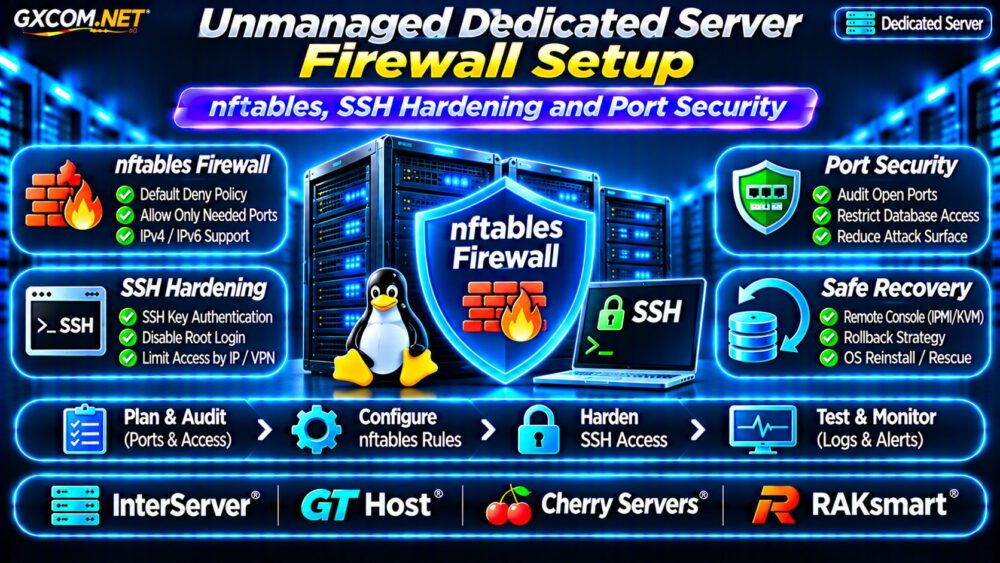
Why Unmanaged Dedicated Servers Need Host Firewalls
Unmanaged hosting usually leaves operating system security and service configuration to the customer. A provider may protect its upstream network, but that does not automatically restrict connections to your SSH daemon, database, or administrative dashboard.
A host firewall limits permitted traffic at the operating system. It complements application authentication, patching, and provider-side network controls rather than replacing them.
Start with our Unmanaged Server Security Checklist to review the wider deployment responsibilities.
Before Changing nftables: Prevent SSH Lockouts
Record your current SSH port and administrator IP address. Keep an existing SSH session open while testing a second connection. Confirm that your hosting provider offers a usable remote console, rescue environment, or documented recovery procedure.
Schedule an automatic rollback before applying unfamiliar rules. On a system with systemd, a temporary rollback job can restore a known-good ruleset if you lose access. Test the rollback mechanism in a safe environment first.
Also inspect existing firewall management. If firewalld or another tool owns nftables rules, use its supported interface instead of installing conflicting independent configurations.
Build a Default-Deny nftables Policy
For a standalone web server, an inbound default-deny policy can allow established connections, loopback traffic, SSH from trusted addresses, and public HTTP/HTTPS traffic. Outbound filtering can be introduced separately after application dependencies are understood.
Example IPv4 and IPv6 Ruleset
The following example uses an illustrative administrator address. Replace it with your actual trusted IP and verify your SSH port before deployment:
table inet filter {
  chain input {
    type filter hook input priority 0; policy drop;
    iif "lo" accept
    ct state established,related accept
    ct state invalid drop
    ip saddr 198.51.100.10 tcp dport 22 accept
    tcp dport { 80, 443 } accept
    ip protocol icmp accept
    ip6 nexthdr ipv6-icmp accept
  }
  chain forward {
    type filter hook forward priority 0; policy drop;
  }
  chain output {
    type filter hook output priority 0; policy accept;
  }
}
The documentation address is not a real administrator allowlist. This simplified example also requires adaptation for IPv6 administration, container networking, VPNs, monitoring, and any services using forwarding. Do not apply it blindly to production.

Validate Before Applying
Save a proposed ruleset and check its syntax with nft -c -f /path/to/rules.nft. Syntax validation cannot guarantee remote accessibility. Apply changes only with a tested rollback and verify SSH access from a new connection before making them persistent.
SSH Hardening Without Losing Access
SSH keys reduce reliance on reusable passwords. First install a trusted public key, confirm successful key-based login, and ensure an alternative recovery route exists.
Then consider disabling password authentication and direct root login through an appropriate OpenSSH configuration file. Validate changes using sshd -t before reloading the service. Existing distribution drop-in files may override settings, so inspect the effective configuration.
Restrict administrative access by source address or VPN where practical. Moving SSH to a different port may reduce background noise but is not a substitute for authentication and patching.
Audit Exposed Ports and Running Services
Use ss -tulpen to inspect listening sockets. Compare the output against the services your business actually needs. A web server may require ports 80 and 443, while a database should generally remain reachable only by authorized application hosts.
Do not expose Redis, MySQL, PostgreSQL, management panels, or monitoring endpoints simply because the software is installed. Bind internal services to private interfaces where suitable and enforce access controls at multiple layers.
For applications with heavy inbound traffic, our CPU Steal Time Troubleshooting Guide explains how shared-resource contention differs from dedicated hardware behavior.
Firewall Logging, Rate Limits and DDoS Boundaries
Log selected denied traffic with rate limits to avoid overwhelming disk space or system journals. Review authentication failures and firewall counters regularly, but avoid treating every internet scan as a serious incident.
Tools such as fail2ban can complement SSH authentication controls when configured correctly. They do not replace key-based access or upstream protection.
A host firewall cannot stop an attack that saturates the provider’s network before packets reach the server. Ask about upstream filtering and blackhole policies separately from nftables capabilities.
Four Unmanaged Dedicated Providers to Compare
These approved GXCOM.NET affiliate providers are infrastructure candidates. Verify current hardware, console access, rescue procedures, and support scope for each selected configuration.
InterServer: Cost and Recovery Options
InterServer is worth comparing for Linux dedicated hardware and recurring costs. Ask whether remote console access, OS reinstall assistance, and emergency recovery are available with the chosen plan.
GTHost: Network and Administrative Access
GTHost is another candidate when location and network conditions matter. Confirm public and private networking options, recovery access, and responsibilities during firewall-related outages.
Cherry Servers: Bare Metal Management
Cherry Servers can be evaluated for bare metal deployments requiring flexible administration. Request details about management interfaces, rescue workflows, and reinstall procedures before relying on them.
RAKsmart: Regional Dedicated Infrastructure
RAKsmart provides another comparison option for location-specific hosting. Verify Linux image availability, network restrictions, console access, and charges for hands-on support.
None of these descriptions guarantees that a particular plan includes managed firewall configuration. Obtain written confirmation before ordering.
What Does Secure Unmanaged Hosting Really Cost?
The advertised rental is only one component. Budget for monitoring, offsite backups, administrator time, incident response, and recovery testing. A cheaper unmanaged server can become expensive if an outage requires emergency engineering work.

For example, a hypothetical $90 monthly server plus $20 monitoring and $25 backup storage totals $135 monthly before labor. These are planning assumptions, not live provider quotations.
Compare infrastructure alternatives in our Dedicated vs Cloud Server Comparison and review backup planning in our Snapshot Backup and Recovery Guide.
Dedicated Server Firewall Checklist
- Confirm console access and a tested rollback procedure.
- Audit listening ports and document required services.
- Validate nftables syntax and test a second SSH session.
- Enable key-based SSH access before disabling passwords.
- Restrict databases and administrative interfaces.
- Monitor rules, logs, patches, and recovery readiness.
Frequently Asked Questions
Is nftables Better Than iptables?
nftables provides a modern Linux packet-filtering framework, but migration should account for existing tools, distribution defaults, and operational expertise.
Should SSH Be Open to Everyone?
Restricting SSH to trusted IPs or a VPN is preferable when operationally practical, with tested emergency access available.
Can nftables Replace Provider DDoS Protection?
No. Upstream bandwidth saturation requires mitigation before traffic reaches the dedicated server.
Final Verdict
Secure unmanaged dedicated hosting starts with cautious firewall deployment, verified SSH access, and minimal port exposure. Compare InterServer, GTHost, Cherry Servers, and RAKsmart on recovery capabilities and complete operating costs—not rental price alone.