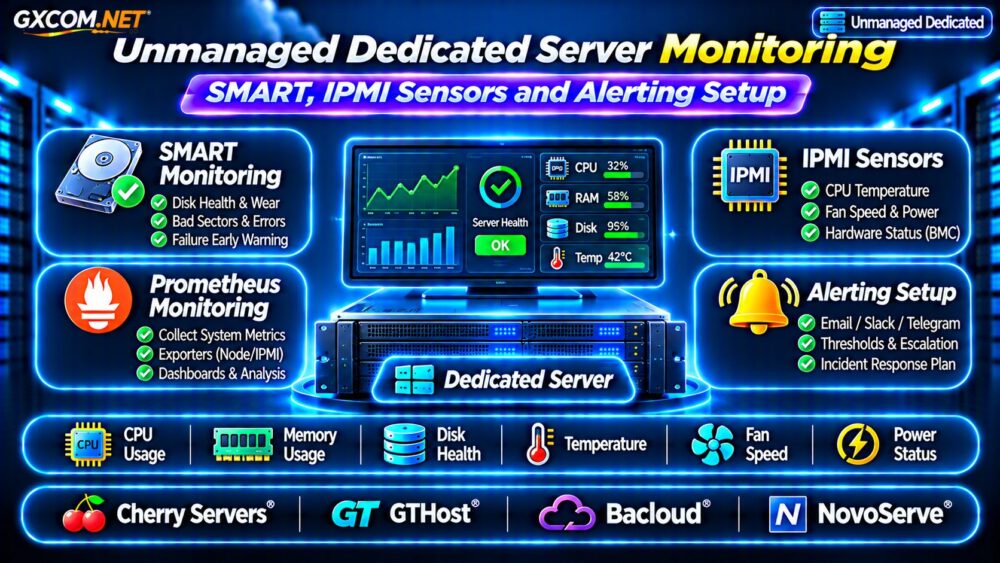
Unmanaged dedicated server monitoring is essential when you are responsible for hardware health, operating system stability, and incident response. Unlike managed hosting, an unmanaged server may require you to detect disk failures, overheating, memory pressure, and network outages without proactive assistance from the provider.
SMART disk diagnostics, IPMI hardware sensors, and centralized alerting can reveal problems before they cause prolonged downtime. This guide explains how to combine these tools, configure useful notifications, and evaluate dedicated hosting providers for remote administration.
What Should You Monitor on an Unmanaged Dedicated Server?
Effective monitoring covers more than CPU usage and available RAM. Physical hardware introduces failure scenarios that virtual server customers may never directly encounter.
Start with five monitoring categories:
- Storage: SMART warnings, media errors, disk temperatures, and RAID degradation.
- Hardware: CPU temperature, fan speed, power supply status, and motherboard sensors.
- Operating system: CPU load, memory pressure, disk space, and filesystem errors.
- Network: Connectivity, packet loss, interface errors, and external reachability.
- Services: HTTP responses, database availability, application latency, and backup completion.
Each category requires appropriate collection methods and alert thresholds. A server can remain reachable while its storage array is already degraded.
SMART Monitoring: Detecting Disk Health Problems
Self-Monitoring, Analysis and Reporting Technology, or SMART, provides diagnostic information from supported storage devices. On Linux, smartmontools includes smartctl for inspecting disk health and smartd for automated monitoring.
Install and Check smartctl
On Debian or Ubuntu, install the monitoring package:
sudo apt update
sudo apt install smartmontools
Identify available devices using lsblk, then inspect a supported drive:
sudo smartctl -a /dev/nvme0For NVMe storage, examine critical warnings, media and data integrity errors, available spare, percentage used, and temperature. Interpret these values using the manufacturer’s specifications.
A successful SMART health result does not guarantee that a drive will remain reliable. Sudden failures can occur without useful advance warnings.
Enable Automated SMART Checks
Use smartd to monitor supported devices and report significant changes. Confirm that the daemon is enabled and configure notification delivery through your monitoring infrastructure.
Test alerts before relying on them. Some hardware RAID controllers obscure individual drive diagnostics, requiring controller-specific utilities instead.
IPMI Sensors: Monitor Physical Server Hardware
Intelligent Platform Management Interface, or IPMI, allows supported baseboard management controllers to expose hardware information independently of the main operating system.

Depending on the platform, sensors may report CPU temperatures, fan speeds, chassis status, and power supply conditions.
Inspect Sensors With ipmitool
On a compatible Linux server, install ipmitool and query locally accessible sensors:
sudo apt install ipmitool
sudo ipmitool sensor list
Not every sensor reports valid values, and some vendors use proprietary interfaces. Confirm the hardware’s supported management method before building automation.
Never expose a BMC or IPMI management interface directly to the public internet. Use an isolated management network, approved VPN access, and restricted administrative credentials.
Remote Management and Recovery
Out-of-band management can help administrators access a server when the operating system becomes unresponsive. Available features may include remote console access, power control, and virtual media.
These capabilities vary by server model and hosting provider. Ask whether remote management is included, restricted, or available only through support requests.
Build a Centralized Monitoring and Alerting Stack
Prometheus, node_exporter, and Alertmanager provide a flexible foundation for collecting Linux metrics and delivering notifications.
Node Exporter exposes operating system measurements. Additional exporters or collection scripts may be needed for SMART attributes and IPMI sensor data.
Deploy monitoring components using supported installation methods, restrict access to metric endpoints, and verify that collection continues after service restarts.
Choose Meaningful Alert Thresholds
Avoid sending notifications for every short CPU spike. Instead, focus on sustained conditions and events requiring action.
| Signal | Suggested Alert Strategy |
|---|---|
| SMART critical warning | Immediate investigation |
| RAID degradation | High-priority notification |
| CPU temperature | Vendor-specific thresholds |
| Disk space | Warn before capacity exhaustion |
| Server unreachable | Confirm with external checks |
| Backup failure | Notify responsible administrator |
Use Alertmanager grouping, routing, and inhibition rules to reduce duplicate notifications. Configure escalation when critical problems remain unresolved.
Why External Monitoring Matters
Monitoring software running exclusively on the dedicated server cannot reliably report an outage when that entire machine loses power or connectivity.
Run external availability checks from a separate system or monitoring service. Test HTTP endpoints, network reachability, and application-specific health checks.
For storage recovery planning, see our Snapshot Backup and Recovery Guide. Monitoring detects problems; backups provide recovery options.
Four Dedicated Hosting Providers to Compare
Hardware monitoring requirements should influence your hosting purchase. The following approved providers are worth evaluating, but management interfaces and sensor access depend on individual products.
Cherry Servers: Hardware Visibility
Cherry Servers is a candidate for infrastructure buyers who prioritize physical hardware control. Ask about available remote management, storage diagnostics, monitoring integrations, and replacement procedures.
GTHost: Remote Administration Requirements
GTHost deserves consideration when evaluating unmanaged physical servers across different locations. Confirm console access, reboot options, hardware monitoring availability, and technical support responsibilities.
Bacloud: Monitoring on a Budget
Bacloud is relevant for cost-conscious deployments. Compare the selected machine’s disk technology, management access, monitoring limitations, and hardware replacement terms before purchasing.
NovoServe: Infrastructure and Network Monitoring
NovoServe can be evaluated for dedicated infrastructure requiring network visibility and remote operational control. Verify which management features are available for the specific configuration and location.
Compare hardware generations, storage options, and remote access capabilities rather than choosing solely by monthly rental price.
Incident Response: What Happens After an Alert?
An alert becomes useful only when someone knows how to respond. Document procedures for failed disks, overheating, unreachable hosts, and degraded storage arrays.

Maintain current backups, recovery credentials, emergency contacts, and configuration records outside the monitored machine.
Review our Unmanaged Server Security Checklist to address operational security alongside monitoring.
Monitoring Costs and Buying Decisions
Free monitoring software does not eliminate operating costs. Budget for external monitoring infrastructure, notification services, storage retention, staff time, and incident response.
A server with dependable remote access and documented replacement procedures may offer better operational value than a cheaper machine with limited management capabilities.
Our Managed vs Unmanaged Hosting Comparison explains related responsibility tradeoffs.
For physical infrastructure alternatives, consult the Bare Metal Server Providers Guide.
Frequently Asked Questions
Can SMART Predict Every Disk Failure?
No. SMART provides useful diagnostic signals, but unexpected failures remain possible. Maintain independent backups and monitor storage redundancy.
Does Every Dedicated Server Support IPMI?
No. Hardware capabilities and provider access policies vary. Confirm BMC or equivalent remote management availability before ordering.
Is Prometheus Enough for Hardware Monitoring?
Not by itself. Appropriate exporters, sensor access, external availability checks, and notification routing are also necessary.
Final Verdict
Reliable unmanaged dedicated server monitoring combines SMART diagnostics, hardware sensor visibility, operating system metrics, and external alerting.
Compare Cherry Servers, GTHost, Bacloud, and NovoServe based on verified remote management capabilities, hardware support procedures, and total operational costs. Build monitoring before production incidents expose gaps in your recovery plan.