Choosing a GPU cloud provider is no longer just about finding the cheapest hourly rate. AI developers also need to consider deployment speed, GPU availability, model compatibility, inference latency, autoscaling, storage, networking, and the cost of keeping infrastructure ready for requests.
In this RunPod vs Vultr Cloud GPU comparison, we examine two different approaches to renting GPU infrastructure for artificial intelligence.
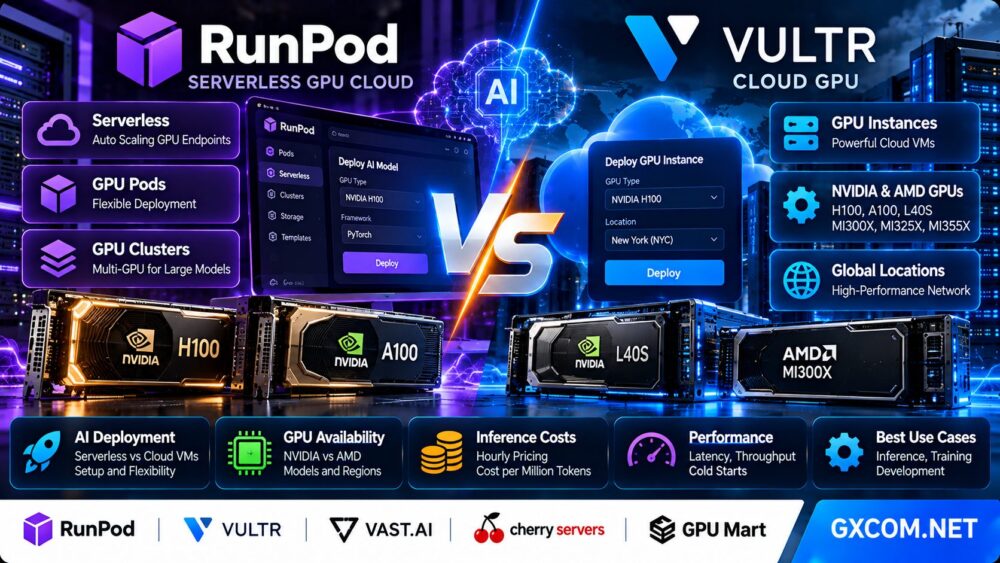
RunPod focuses on accessible GPU compute through Pods, Serverless endpoints, and GPU clusters. Vultr Cloud GPU provides GPU-accelerated virtual machines and infrastructure options across NVIDIA and AMD hardware.
Both can support demanding AI workloads, but their deployment models, billing behavior, and operational responsibilities are not identical.
This guide compares RunPod and Vultr for large language model inference, model development, fine-tuning, AI image generation, and production GPU applications. We also examine Vast.ai, Cherry Servers, and GPU Mart as alternative infrastructure options.
Editorial methodology: This comparison is based on official provider documentation and published product information. GXCOM.NET has not conducted independent side-by-side GPU benchmarks or verified live capacity in every region. GPU stock, prices, and plan specifications can change. Provider performance claims should be validated against your own workload.
RunPod vs Vultr Cloud GPU: Quick Verdict
Choose RunPod if your main priority is flexible GPU access, container-based AI deployment, or serverless inference that can scale with request demand.
Choose Vultr Cloud GPU if you want GPU-accelerated virtual machines, broader cloud infrastructure integration, or access to both NVIDIA and AMD accelerator families.
RunPod Serverless is particularly relevant for inference applications with unpredictable traffic. Its flex workers can scale down when idle, potentially reducing compute costs for applications that do not need a GPU running continuously.
Vultr Cloud GPU is attractive when customers want a conventional cloud instance with operating system control, persistent application services, networking integration, and configurable infrastructure.
However, a Vultr GPU instance that is powered off but not destroyed can continue to incur charges. Buyers should understand the difference between stopping a virtual machine and releasing the underlying resources.
Neither provider is automatically cheaper or faster for every workload.
| Category | RunPod | Vultr Cloud GPU |
|---|---|---|
| Primary GPU products | Pods, Serverless, Clusters | Cloud GPU VMs and GPU infrastructure |
| Deployment style | GPU containers and compute environments | Cloud virtual machines and GPU systems |
| Serverless inference | Yes, dedicated Serverless product | Not the same native product model |
| Autoscaling | Serverless worker scaling | Requires architecture-specific planning |
| NVIDIA GPUs | Multiple GPU generations | Multiple GPU generations |
| AMD GPUs | Verify exact product availability | Officially lists AMD Instinct GPUs |
| Operating system control | Depends on Pod or Serverless product | Cloud VM operating system access |
| Billing model | Depends on Pods, Serverless, or Clusters | GPU instance billing with reserved-resource charges |
| Idle GPU costs | Flex workers can scale to zero | Stopped, undeleted instances may continue billing |
| Best for | Elastic inference and AI experimentation | Persistent GPU applications and integrated cloud infrastructure |
What Is RunPod?
RunPod is a GPU cloud platform designed for AI development, model training, inference, and GPU-accelerated applications.
Its infrastructure offerings include GPU Pods, Serverless GPU endpoints, and GPU clusters.
RunPod GPU Pods
GPU Pods provide compute environments for workloads that need access to one or more GPUs.
They are useful for development, fine-tuning, interactive experiments, model testing, and long-running applications.
Users can select compatible GPU hardware and deploy workloads using supported templates or container environments.
RunPod Serverless
RunPod Serverless runs containerized inference applications behind an API endpoint.
Workers can scale according to incoming requests, and flex workers can scale down when idle.
This can be attractive for applications with irregular traffic, although cold starts and worker initialization can affect latency.
RunPod Clusters
RunPod also offers cluster-oriented GPU infrastructure for workloads that require multiple accelerators or nodes.
Cluster requirements should be evaluated separately from the simpler Pod and Serverless products.
For a detailed explanation of endpoint behavior and cold-start costs, read our RunPod Serverless GPU Review.
What Is Vultr Cloud GPU?
Vultr Cloud GPU is a GPU-accelerated cloud infrastructure product designed for artificial intelligence, machine learning, high-performance computing, and visual workloads.
Unlike a serverless inference endpoint, a Cloud GPU virtual machine provides a more conventional server environment.
Customers can choose supported operating system images, GPU configurations, and related infrastructure resources.
NVIDIA GPU Options
Vultr's published GPU portfolio includes multiple NVIDIA accelerator families for AI inference, training, and other accelerated applications.
Specific models and instance sizes depend on current product availability.
AMD Instinct GPU Options
Vultr also advertises AMD Instinct accelerators, including MI300X, MI325X, and MI355X.
These products can be relevant for organizations evaluating AMD ROCm software and high-memory AI workloads.
However, a GPU being listed in the product portfolio does not guarantee immediate availability in every region.
Cloud Infrastructure Integration
Vultr offers additional cloud infrastructure services that may be useful when designing production applications.
Customers should evaluate storage, networking, backups, monitoring, and security requirements as part of the complete deployment.
Read our Vultr Cloud GPU Review for a closer examination of its GPU infrastructure and purchasing considerations.
RunPod vs Vultr: GPU Availability and Hardware Selection
GPU availability is one of the most important differences between cloud providers.
A low advertised hourly rate is not useful if the required accelerator is unavailable in the desired region or cannot be reserved when needed.
RunPod GPU Selection
RunPod publicly lists a broad selection of NVIDIA GPUs across different memory capacities and compute generations.
Its product catalog includes options suited to smaller inference workloads as well as high-memory accelerators for larger models.
However, availability can differ between deployment products and infrastructure pools.
Vultr GPU Selection
Vultr's published portfolio includes NVIDIA and AMD accelerators.
AMD availability can be a meaningful differentiator for customers working with ROCm or evaluating alternatives to CUDA-dependent infrastructure.
GPU Memory Capacity
GPU memory determines whether model weights, inference caches, training states, and other data can fit on the selected hardware.
For example, a large language model may require more memory than a smaller GPU provides, even if the accelerator has adequate compute capability.
GPU Generation
Newer GPUs may support additional numerical formats and improved compute throughput.
However, actual performance depends on model architecture, runtime support, and optimized kernels.
Full GPU vs Fractional GPU
Some cloud products offer full accelerator access, while others may provide virtualized or partitioned GPU resources.
Confirm whether the selected plan provides an entire physical GPU, a fraction of one, or a multi-GPU configuration.
Region Availability
GPU stock can vary by data center.
When latency, data residency, or network performance matters, check both the GPU model and its available location.
GPU Availability Checklist
- Exact accelerator model
- GPU memory capacity
- Full or fractional allocation
- Available region
- CPU and system RAM
- Local and persistent storage
- Network bandwidth
- Reservation requirements
- Replacement capacity if an instance fails
- Current pricing and billing terms
AI Deployment: RunPod Serverless vs Vultr GPU Instances
The largest architectural difference between the two platforms is how applications are deployed and operated.
Deploying AI on RunPod
For Serverless inference, developers package the application into a compatible container and expose it through a RunPod endpoint.
The platform manages worker execution and request-driven scaling within the selected configuration.
For Pods, developers have more direct control over the running compute environment.
Deploying AI on Vultr
Vultr Cloud GPU deployment resembles provisioning a GPU-enabled virtual machine.

Customers select a region, GPU type, instance configuration, and supported operating system or image.
They can then install or configure their AI software, expose services, and manage the environment.
Containerized Applications
Both approaches can support container-based AI software, but the surrounding operational model differs.
RunPod Serverless focuses on request-driven worker execution.
Vultr GPU VMs provide a persistent operating system environment where customers can run containers or other compatible software.
Infrastructure Control
Vultr may be more familiar to teams already operating cloud virtual machines.
RunPod may reduce some operational work for teams whose primary need is a GPU inference endpoint.
Deployment Recommendation
Choose the deployment model that matches the application's traffic pattern and management requirements.
Do not choose solely by comparing GPU specifications.
Cold Starts and Autoscaling: Why They Matter
Cold starts can affect serverless GPU inference.
A cold start occurs when an application must initialize a worker, load dependencies, or load a model before processing a request.
RunPod Serverless Cold Starts
RunPod advertises technologies intended to reduce startup delays, including FlashBoot.
However, actual startup behavior depends on model size, container configuration, worker state, and infrastructure conditions.
Provider-advertised startup metrics should not be treated as guaranteed end-to-end model response times.
Active Workers
Keeping workers active can reduce cold-start exposure.
However, maintaining ready capacity increases the amount of billable compute time.
Flex Workers
Flex workers can scale down when demand disappears.
This may improve cost efficiency for applications with long idle periods.
Vultr Persistent GPU Instances
A continuously running Vultr GPU instance can keep the model loaded and ready to process requests.
This can help avoid repeated application initialization, but the instance continues to consume billable resources.
Which Is Better for Low Latency?
For strict latency requirements, compare warm-worker RunPod Serverless against a properly configured persistent Vultr GPU instance.
Measure time to first token, request queueing, and tail latency under realistic traffic.
A serverless platform is not automatically slower, and a persistent virtual machine is not automatically faster.
RunPod vs Vultr for LLM Inference
Large language model inference is one of the most commercially relevant GPU workloads.
The correct platform depends on model size, request volume, concurrency, and service-level expectations.
Model Memory Requirements
Estimate memory requirements for model weights, KV cache, runtime overhead, and concurrent requests.
A model that fits into GPU memory may still run inefficiently if memory pressure limits batching.
Time to First Token
Time to first token measures how quickly the model begins producing output.
It is important for interactive assistants, chatbots, and agent applications.
Tokens per Second
Output token throughput measures generation speed.
It should be evaluated alongside model quality and latency.
Concurrent Requests
Higher concurrency can increase throughput, but it also increases scheduling and memory requirements.
Batching
Continuous batching can improve accelerator utilization in compatible inference systems.
Its effectiveness depends on the runtime, model, and traffic distribution.
Model Loading
Large models may take time to download and initialize.
Persistent storage, image design, and model caching can reduce repeated setup work.
Production Monitoring
Monitor request failures, GPU utilization, queue length, memory consumption, and latency percentiles.
These measurements are essential when comparing platforms.
RunPod vs Vultr for AI Training and Fine-Tuning
Training and fine-tuning have different infrastructure requirements from inference.
They may involve long-running GPU jobs, large datasets, checkpointing, and distributed communication.
RunPod for Training
RunPod Pods and cluster products can be relevant for model development and training jobs.
Customers should select hardware based on GPU memory, compute capability, interconnect requirements, and available capacity.
Vultr for Training
Vultr Cloud GPU and its larger GPU infrastructure configurations can support training-oriented workloads.
Its NVIDIA and AMD product selection may be relevant to teams with different software requirements.
Checkpoint Storage
Training workloads should save checkpoints at appropriate intervals.
Storage performance and data transfer costs can materially affect the overall training budget.
Multi-GPU Communication
Distributed training requires efficient communication between GPUs.
GPU count alone does not determine training speed.
Framework Compatibility
Verify CUDA or ROCm support for the exact model, framework, libraries, and kernels being used.
Migration between accelerator ecosystems may require engineering work.
RunPod vs Vultr Pricing: What Actually Determines Cost?
GPU hourly prices are useful, but they do not provide a complete picture of AI infrastructure costs.
RunPod and Vultr have different products and billing behaviors.
RunPod Pod Billing
RunPod Pod pricing depends on GPU type, infrastructure tier, and selected configuration.
Customers should review active compute charges and the treatment of storage or other retained resources.
RunPod Serverless Billing
RunPod Serverless uses metered worker execution.
Its documentation describes per-second billing, with charges depending on worker type and execution time.
Applications with intermittent requests may benefit from workers that scale down when idle.
Vultr Cloud GPU Billing
Vultr Cloud GPU instances are billed according to the applicable GPU instance plan and billing rules.
Vultr documents that GPU instances can continue accruing charges while stopped if the instance has not been destroyed.
This is particularly important for customers who assume shutting down the operating system will stop infrastructure billing.
Storage Costs
Model weights, datasets, logs, checkpoints, and persistent volumes can add to total cost.
Network Costs
Data transfer charges and traffic allowances should be reviewed for both platforms.
Engineering Costs
Deployment complexity, monitoring, security, troubleshooting, and software compatibility also affect total ownership cost.
Cost per Million Tokens: A Better Comparison Metric
For LLM inference, cost per million generated tokens can be more useful than GPU hourly price.
The basic formula is:
Cost per million output tokens = Total attributable cost / Output tokens generated × 1,000,000.
Consider the following hypothetical example.
Assume a GPU service costs $2 per hour and generates 100,000 output tokens during that hour.
The infrastructure cost per million output tokens is:
$2 / 100,000 × 1,000,000 = $20.
If another deployment costs $3 per hour but produces 300,000 output tokens, its cost per million output tokens is:
$3 / 300,000 × 1,000,000 = $10.
The second deployment has a higher hourly price but a lower cost per generated token.
These figures are hypothetical examples, not benchmark results for RunPod or Vultr.
Include Idle Time
For a persistent GPU instance, idle hours can increase effective cost per request.
For serverless inference, startup and worker execution time may affect the final bill.
Include Failed Requests
Retries, errors, and timeouts consume resources without always producing useful output.
Include Storage and Networking
Additional infrastructure charges should be allocated to the workload where relevant.
Use Consistent Benchmark Conditions
Compare the same model, precision, prompt lengths, output lengths, and concurrency.
Low Traffic vs High Traffic: Which Platform Is More Cost-Effective?
Low and Irregular Traffic
RunPod Serverless may be attractive when requests arrive sporadically and the application can tolerate occasional startup delays.
Scaling workers down can reduce idle GPU compute consumption.
Predictable Continuous Traffic
A persistent GPU instance may be attractive when requests arrive consistently and the accelerator remains highly utilized.
Vultr Cloud GPU can fit this operating model, although RunPod Pods may also be appropriate.
Strict Latency Requirements
Applications requiring consistently low response latency may need warm capacity.
Compare the cost of keeping RunPod workers ready against running persistent GPU instances.
Development and Experimentation
RunPod Pods can be convenient for iterative AI development.
Vultr can be attractive when developers want a conventional cloud VM environment integrated with other infrastructure.
Long-Running Training Jobs
Compare available GPU models, memory, networking, storage, and sustained pricing.
Do not assume a serverless endpoint is the correct product for training.
RunPod vs Vultr: Security, Reliability and Operations
Production AI infrastructure requires more than a working model.
Access Control
Protect API credentials, SSH keys, and management interfaces.
Network Security
Restrict unnecessary inbound access and use appropriate network isolation.
Secrets Management
Do not store API keys or database passwords in public container images.
Data Protection
Review data retention, storage encryption, access controls, and backup arrangements.
Availability
Provider uptime and capacity availability are different concepts.
A platform may be operational while the specific GPU model you need is unavailable.
Recovery
Plan for failed workers, unavailable GPUs, model download errors, and region-specific incidents.
Monitoring
Track GPU utilization, memory usage, queue depth, latency, and application errors.
RunPod and Vultr Alternatives Worth Considering
RunPod and Vultr are not the only GPU infrastructure choices.
Other providers may offer different trade-offs in hardware selection, infrastructure control, and deployment flexibility.
Vast.ai: GPU Marketplace Alternative
Vast.ai operates a marketplace where GPU availability and host characteristics can vary.
It may be attractive to customers who want to evaluate different hardware offers, but reliability, networking, storage, and host policies require careful review.
Read our Vast.ai GPU Marketplace Review for a deeper look at host selection and operational considerations.
Cherry Servers: Bare Metal Infrastructure Alternative
Cherry Servers offers bare metal and infrastructure services that can be relevant to organizations requiring more direct hardware control.
For long-running workloads, dedicated infrastructure may be worth comparing with metered cloud GPUs.
However, buyers should confirm the exact GPU hardware, availability, and contract terms.
GPU Mart: Dedicated GPU Server Alternative
GPU Mart offers dedicated GPU server products that may be relevant for customers who prefer a more persistent server environment.
Dedicated GPU infrastructure can suit workloads with predictable usage, although buyers must consider provisioning, administration, and long-term commitments.
For hardware and VRAM considerations, see our GPU Mart Dedicated GPU Server Review.
RunPod vs Vultr vs Alternatives: Comparison Table
| Provider | Primary Model | Potential Fit | Main Consideration |
|---|---|---|---|
| RunPod | Pods, Serverless, GPU clusters | Elastic inference and AI development | Worker behavior and product-specific billing |
| Vultr | Cloud GPU VMs and GPU infrastructure | Persistent AI applications and AMD/NVIDIA options | Instance lifecycle and infrastructure charges |
| Vast.ai | GPU marketplace | Flexible host and hardware selection | Host reliability and listing-specific terms |
| Cherry Servers | Bare metal infrastructure | Hardware control and sustained workloads | GPU configuration and deployment terms |
| GPU Mart | Dedicated GPU servers | Persistent GPU compute | Hardware selection and management responsibility |
How to Choose Between RunPod and Vultr
Use the following buying checklist before committing to a GPU provider.
- Define whether the workload is inference, training, or development.
- Estimate GPU memory requirements.
- Check exact GPU model availability.
- Confirm whether CUDA or ROCm is required.
- Choose between serverless workers and persistent instances.
- Estimate daily and monthly traffic.
- Determine acceptable cold-start latency.
- Measure expected concurrency.
- Review GPU billing granularity.
- Understand charges for idle or stopped resources.
- Calculate storage and networking costs.
- Check region availability.
- Review security and access controls.
- Plan backup and disaster recovery.
- Run representative benchmarks.
- Calculate cost per million tokens or completed training job.
- Confirm the provider can supply capacity as demand grows.
RunPod vs Vultr Cloud GPU: Pros and Cons
RunPod Advantages
- Dedicated Serverless GPU inference product
- GPU Pods for development and persistent workloads
- Broad NVIDIA GPU selection
- Request-driven worker scaling
- Potential savings from scaling idle workers down
- GPU cluster products for larger workloads
RunPod Limitations
- Cold starts can affect some Serverless applications
- Different products have different billing rules
- GPU availability varies by product and infrastructure pool
- Serverless workloads require compatible deployment architecture
- Storage and retained resources can add costs
Vultr Advantages
- GPU-accelerated cloud virtual machines
- NVIDIA and AMD GPU options
- Conventional cloud server deployment workflow
- Integration with broader cloud infrastructure
- Useful for persistent AI applications
- Relevant to ROCm-based AI deployments
Vultr Limitations
- GPU instances may continue billing when stopped
- Not the same native Serverless inference model as RunPod
- Exact GPU availability depends on region and plan
- Customers must manage more aspects of the VM environment
- Additional storage and networking costs may apply
Frequently Asked Questions
Is RunPod better than Vultr for AI inference?
RunPod may be preferable for request-driven Serverless inference, while Vultr can be attractive for persistent GPU-backed applications. The better choice depends on traffic, latency, model compatibility, and total cost.

Does RunPod offer Serverless GPUs?
Yes. RunPod offers Serverless GPU endpoints that execute containerized inference workloads and can scale workers according to demand.
Does Vultr offer Serverless GPU inference?
Vultr Cloud GPU is primarily a GPU virtual machine and infrastructure product. Customers can build autoscaling inference architectures, but this should not be treated as identical to RunPod's native Serverless offering.
Which platform has more GPU options?
Both offer multiple accelerators. RunPod lists a broad range of NVIDIA GPUs, while Vultr publishes NVIDIA and AMD GPU options. Compare the exact model and current region availability.
Does Vultr offer AMD GPUs?
Yes. Vultr's published Cloud GPU portfolio includes AMD Instinct MI300X, MI325X, and MI355X options.
Can I run LLMs on RunPod?
Yes. RunPod provides GPU compute products suitable for compatible LLM training and inference workloads.
Can I run LLMs on Vultr?
Yes. Vultr Cloud GPU provides accelerator-backed infrastructure for compatible AI models and frameworks.
Which is cheaper, RunPod or Vultr?
Neither is always cheaper. Cost depends on GPU type, utilization, traffic pattern, storage, networking, and billing behavior.
Does RunPod charge when a Serverless endpoint is idle?
RunPod flex workers can scale down when idle, but active workers and other retained resources may still incur charges. Review the current product-specific billing rules.
Does Vultr charge for a stopped GPU instance?
Vultr documentation states that stopped instances can continue incurring charges until they are destroyed.
What is GPU cold start?
A cold start occurs when a worker or application must initialize before serving a request, potentially increasing response latency.
What is cost per million tokens?
It is the total attributable inference cost divided by the number of output tokens generated, multiplied by one million.
Is RunPod suitable for AI training?
Yes. RunPod Pods and cluster products can support compatible training workloads. Serverless inference endpoints should be evaluated separately.
Is Vultr suitable for AI training?
Yes. Vultr offers GPU infrastructure for AI training, inference, and high-performance computing, subject to configuration and availability.
What are alternatives to RunPod and Vultr?
Vast.ai, Cherry Servers, and GPU Mart are relevant alternatives depending on whether the buyer prefers a GPU marketplace, bare metal infrastructure, or dedicated GPU servers.
Final Verdict: RunPod or Vultr Cloud GPU?
Our RunPod vs Vultr Cloud GPU comparison shows that the right choice depends more on deployment architecture and workload economics than on brand alone.
RunPod is particularly attractive for AI developers who want flexible GPU compute, container-based deployment, and Serverless inference with demand-driven worker scaling.
Vultr Cloud GPU is attractive for organizations that prefer GPU-accelerated virtual machines, integrated cloud infrastructure, and access to both NVIDIA and AMD accelerator families.
For intermittent inference, RunPod Serverless may reduce idle compute costs.
For continuously running AI services, a persistent GPU instance may provide operational simplicity and predictable application readiness, although actual cost efficiency must be measured.
Buyers should also consider Vast.ai, Cherry Servers, and GPU Mart when marketplace access, physical server control, or dedicated GPU capacity better matches their requirements.
The best purchasing process is straightforward: choose the model, estimate memory and traffic, confirm hardware availability, test performance, and calculate total cost per useful output.
AI WORKLOAD → GPU MEMORY → SOFTWARE COMPATIBILITY → DEPLOYMENT MODEL → AVAILABILITY → INFERENCE PERFORMANCE → TOTAL COST → PROVIDER SELECTION
Always confirm current GPU availability, pricing, billing policies, and service terms before purchasing.