Cloud VPS and cloud server are two of the most commonly used terms in modern hosting, but the difference between them is not always as clear as provider marketing pages suggest.
Both can provide virtual CPU, RAM, SSD or NVMe storage, root access, dedicated IP addresses, operating-system control, snapshots, private networking, and rapid deployment.
In fact, a Cloud VPS can technically be a cloud server, and many cloud servers are virtual machines that provide an experience very similar to VPS hosting.
The practical difference is usually the service model.
Cloud VPS products are often packaged as simple virtual servers with predefined resources and predictable pricing. Cloud server platforms generally expose more of the underlying cloud infrastructure, including flexible instance types, block storage, private networks, APIs, load balancers, autoscaling, and usage-based billing.
In this Cloud VPS vs Cloud Server comparison, we examine architecture, performance, pricing, scalability, storage, reliability, management, and which model makes more sense for different workloads.
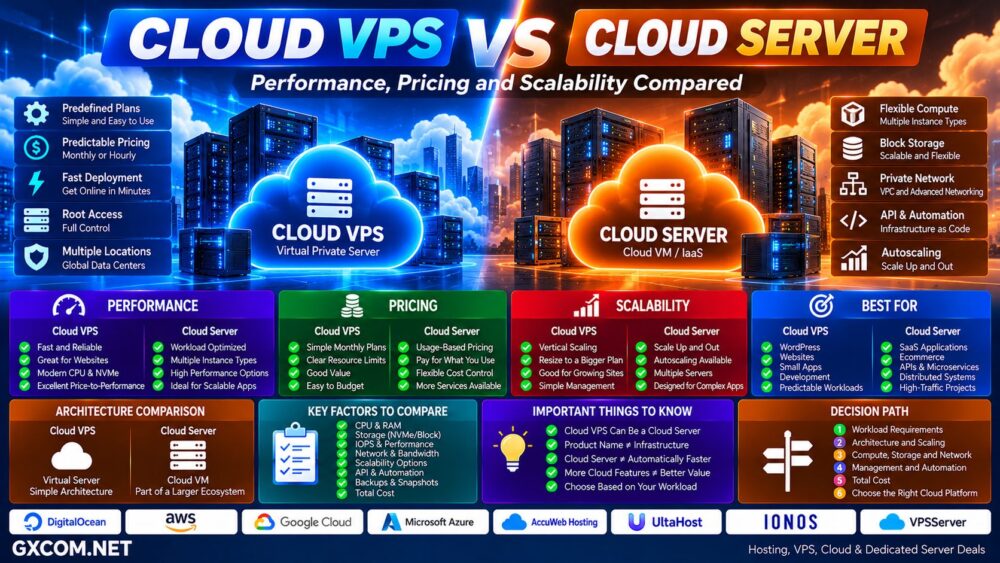
Cloud VPS vs Cloud Server: Quick Comparison
| Feature | Cloud VPS | Cloud Server |
|---|---|---|
| Typical Model | Packaged virtual server | Cloud compute instance / VM |
| Resources | Usually predefined plans | Often broader instance choices |
| Root Access | Usually yes | Usually yes |
| Provisioning | Fast | Fast / on demand |
| Scaling | Usually resize plan | Vertical and horizontal options |
| Billing | Often monthly or hourly | Often usage based |
| Networking | Usually simpler | Often more configurable |
| Storage | Often bundled | May separate local and block storage |
| API / Automation | Provider dependent | Common |
| Complexity | Lower | Potentially higher |
| Best For | Websites and straightforward workloads | Scalable applications and infrastructure |
What Is a Cloud VPS?
A Cloud VPS is a virtual private server delivered through infrastructure with cloud characteristics.
Instead of being permanently tied to the traditional model of one physical server divided into multiple VPS instances, the service may use a larger pool of compute, storage, and networking resources.
A typical customer experience remains simple:
Choose VPS Plan → Select OS → Select Location → Deploy Server
The provider handles much of the infrastructure complexity behind the scenes.
Cloud VPS products commonly include:
- vCPU
- RAM
- SSD or NVMe storage
- Bandwidth allowance
- Public IP address
- Linux or Windows options
- Root or administrator access
- Snapshots or backups
For customers coming from conventional VPS hosting, the model is easy to understand.
What Is a Cloud Server?
“Cloud server” is a broader term.
It commonly refers to a virtual server or cloud VM running inside an Infrastructure-as-a-Service environment.
A cloud server may be only one component of a larger architecture:
Cloud VM + Block Storage + Private Network + Load Balancer + Firewall + Database + API
Large cloud platforms can offer multiple server families optimized for different workloads, including:
- General-purpose compute
- Compute-optimized instances
- Memory-optimized instances
- Storage-optimized instances
- GPU instances
- High-performance computing
This makes cloud servers particularly useful when infrastructure needs to grow beyond a single machine.
Cloud VPS and Cloud Server Can Overlap
This is the most important distinction to understand.
Cloud VPS and Cloud Server are not universally separate technologies.
A provider may call its virtual machine:
- Cloud VPS
- Cloud Server
- Cloud VM
- Compute Instance
- Virtual Server
- Instance
The underlying technology may be very similar.
For example, a virtual machine deployed on cloud infrastructure can technically satisfy both the idea of a VPS and a cloud server.
Therefore, compare the actual architecture and features rather than relying on the product label.
Product Name ≠ Infrastructure Architecture.
Cloud VPS vs Cloud Server Performance
Neither model is automatically faster.
Performance depends on the resources behind the instance:
- CPU architecture and generation
- Shared vs dedicated CPU
- CPU frequency
- RAM allocation
- Local vs network storage
- SSD or NVMe
- Storage IOPS
- Network throughput
- Virtualization
- Resource contention
A well-provisioned Cloud VPS with modern AMD or Intel processors and local NVMe storage can outperform a more expensive cloud server for some workloads.
Likewise, a compute-optimized cloud instance with dedicated CPU resources can outperform a budget Cloud VPS when sustained processing performance matters.
Cloud Server ≠ Automatically Faster Server.
Shared CPU vs Dedicated CPU Matters
One specification that can matter more than the product name is CPU allocation.
Entry-level Cloud VPS plans frequently use shared vCPU resources.
This works well for:
- Blogs
- Small websites
- Development
- Low-traffic applications
- Bursty workloads
For sustained workloads such as busy databases, SaaS applications, video processing, game servers, and high-traffic websites, dedicated CPU resources may provide more predictable performance.
Always determine whether the advertised vCPU is shared or dedicated.
Cloud VPS and Cloud Server Providers to Compare
Once the terminology is clear, provider selection should focus on the actual infrastructure: CPU allocation, storage, network, locations, scaling tools, billing, backups, and management.
For users looking for relatively straightforward cloud-oriented VPS infrastructure, VPSServer, UltaHost, IONOS, and AccuWeb Hosting are among the platforms worth comparing according to the workload and current product configuration.
Broader cloud compute platforms such as DigitalOcean, AWS, Google Cloud, and Microsoft Azure provide virtual servers as part of much larger cloud ecosystems.
| Provider Type | Typical Strength | Best Comparison Point |
|---|---|---|
| VPSServer | Cloud VPS | Deployment, locations and resources |
| UltaHost | VPS / Cloud Infrastructure | Management, resources and pricing |
| IONOS | VPS / Cloud | Business infrastructure and cost |
| AccuWeb Hosting | VPS / Cloud | Linux, Windows and management options |
| Hyperscale / Developer Cloud | Full cloud ecosystem | APIs, scaling, networking and services |
Always verify current products before ordering because providers can change server generations, pricing, storage, bandwidth, and available regions.
Cloud VPS vs Cloud Server Scalability
Scalability is where a full cloud-server platform can become more powerful.
A Cloud VPS commonly scales vertically:
2 vCPU / 4GB → 4 vCPU / 8GB → 8 vCPU / 16GB
This is simple and works well for many websites and applications.
A broader cloud environment can make horizontal scaling easier:
Server 1 + Server 2 + Server 3 → Load Balancer
Additional instances can be created as demand grows and removed when demand falls.
Cloud platforms may also integrate autoscaling systems that create or remove compute capacity according to defined policies or workload demand.
Vertical Scaling vs Horizontal Scaling
Vertical scaling means making one server larger.
Horizontal scaling means adding more servers.
A Cloud VPS can support both depending on the provider, but full cloud platforms are generally designed around infrastructure that can extend beyond one VM.
For a small website, that additional complexity may provide little practical benefit.
For a rapidly growing SaaS application, it can be extremely useful.
Cloud VPS vs Cloud Server Storage
Cloud VPS plans frequently bundle storage directly into the server package:
4 vCPU + 8GB RAM + 160GB NVMe
Cloud server platforms may separate compute and storage.
A server might use:
- Local SSD or NVMe
- Network block storage
- Object storage
- Snapshots
- Multiple attached volumes
Separating storage from compute can increase flexibility, but it can also make pricing and architecture more complicated.
Local NVMe vs Network Block Storage
Local NVMe can provide very low latency and high I/O performance because storage is physically close to the compute host.
Network block storage can provide different advantages, including flexible capacity, persistent storage, snapshots, and easier movement between compute instances.
The right architecture depends on the workload.
Do not assume the word “cloud” means storage is faster.
Cloud VPS vs Cloud Server Pricing
Cloud VPS pricing is often easier to understand.
A plan may simply be:
$X / Month → CPU + RAM + Storage + Bandwidth
Some providers also support hourly billing while maintaining a monthly maximum.
Cloud server platforms may charge independently for:
- Compute time
- Block storage
- Snapshots
- Backups
- Public IPv4
- Outbound bandwidth
- Load balancers
- Managed databases
- Additional cloud services
This makes usage-based infrastructure highly flexible but potentially more difficult to estimate.
Simple Monthly Pricing vs Usage-Based Pricing
Consider two different buying models:
Cloud VPS:
$X/month → Server package
Cloud Infrastructure:
Compute + Storage + Traffic + IP + Backup + Load Balancer + Other Services
The second model is not inherently more expensive.
It simply requires a more complete cost calculation.
Hourly Price ≠ Total Monthly Cost.
Cloud VPS for Websites and WordPress
For a conventional WordPress website, a Cloud VPS can provide an excellent balance between control, performance, simplicity, and cost.
A typical architecture may need only:
Cloud VPS → Nginx/LiteSpeed → PHP → MariaDB → WordPress
Adding a complex cloud architecture does not automatically improve the website.
Caching, database optimization, CDN configuration, CPU performance, PHP workers, and storage performance may have a greater effect.
Cloud Server for SaaS and Web Applications
Cloud server infrastructure becomes more attractive when the application is designed around multiple infrastructure components.
For example:
Load Balancer → Application Servers → Managed Database → Object Storage
This architecture can allow different components to scale independently.
Typical workloads include:
- SaaS platforms
- Large ecommerce systems
- APIs
- Microservices
- Data processing
- AI applications
- Large databases
- Enterprise applications
Cloud Server for Temporary Workloads
Usage-based cloud servers are particularly useful for infrastructure that does not need to run permanently.
Examples include:
- Software testing
- CI/CD
- Batch processing
- Development environments
- Temporary databases
- Traffic campaigns
- Data processing jobs
A server can be created for the workload and removed when the job is complete.
Which Providers Fit Different Cloud Workloads?
For users who primarily need a straightforward virtual server for websites, applications, remote workloads, or development, comparing VPSServer, UltaHost, IONOS, and AccuWeb Hosting can provide a useful starting point.
For architectures that require extensive APIs, multiple compute families, load balancing, autoscaling, managed databases, object storage, or a large ecosystem of infrastructure services, full cloud platforms such as DigitalOcean, AWS, Google Cloud, and Azure become more relevant.
The important point is not to choose the platform with the longest feature list.
Choose the infrastructure complexity your workload actually needs.
Workload → Architecture → Compute → Storage → Network → Scaling → Management → Total Cost.
Cloud VPS vs Cloud Server Reliability
Cloud infrastructure can reduce dependence on a single physical machine, but neither label guarantees application-level high availability.
A single cloud server is still a single application instance.
High availability may require:
- Multiple servers
- Load balancing
- Database replication
- Redundant storage
- Health checks
- Backups
- Multiple availability zones
- Failover systems
Cloud Server ≠ Automatically Highly Available Application.
Cloud VPS vs Cloud Server Management
Both models can be unmanaged.
Launching a server in the cloud does not mean the provider automatically manages:
- Operating-system updates
- Web server
- Database
- Security
- Firewall configuration
- Application updates
- Monitoring
- Backups
Managed services can reduce this burden, but management should be evaluated separately from the underlying cloud architecture.
Cloud VPS vs Cloud Server for Developers
Developers may prefer cloud server platforms when automation is important.
Modern platforms can provide:
- REST APIs
- CLI tools
- Terraform integration
- Custom images
- Snapshots
- Private networking
- Infrastructure automation
- Autoscaling
For a developer who simply needs one Linux machine for an application, however, a Cloud VPS may provide everything required with less complexity.
Cloud VPS vs Traditional VPS
Do not confuse this comparison with the difference between cloud and traditional VPS infrastructure.
A traditional VPS is commonly associated with virtual machines hosted on a single physical server, while a Cloud VPS can operate within a broader cloud resource environment.
For that comparison, read our
Cloud VPS vs Traditional VPS
guide.
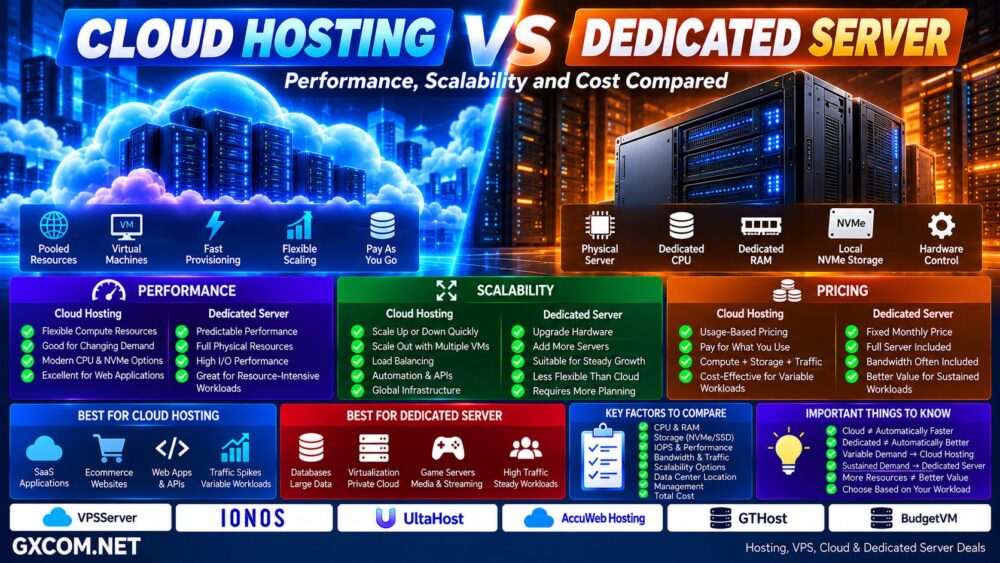
Cloud Server vs Dedicated Server
A cloud server is normally virtualized, while a dedicated server provides an entire physical machine to one customer.
Dedicated infrastructure can be attractive when workloads need large sustained resources, physical hardware control, predictable performance, or configurations that do not need rapid cloud-style scaling.
Cloud infrastructure emphasizes flexibility; dedicated infrastructure emphasizes physical resource ownership and isolation.
For broader dedicated-server options, see our
Dedicated Server Hosting Guide.
Cloud VPS vs Cloud Server: Pros and Cons
| Cloud VPS | Cloud Server | |
|---|---|---|
| Main Advantage | Simplicity | Infrastructure flexibility |
| Deployment | Easy | Highly configurable |
| Pricing | Often predictable | Often usage based |
| Scaling | Good | Potentially extensive |
| Networking | Usually simpler | More configurable |
| Automation | Provider dependent | Common |
| Complexity | Lower | Higher potential complexity |
| Best For | Sites and straightforward apps | Scalable cloud architectures |
Choose Cloud VPS If…
- You need one or a few virtual servers
- You host websites or WordPress
- You prefer predictable pricing
- You want simple deployment
- You do not need complex cloud networking
- You want VPS-style management
- Your workload is relatively predictable
Choose a Cloud Server Platform If…
- You need multiple server types
- You expect horizontal scaling
- You need APIs and infrastructure automation
- You need advanced private networking
- You use load balancers
- You need separate block or object storage
- You build SaaS or distributed applications
- You need temporary on-demand compute
Questions to Ask Before Buying
- Is the CPU shared or dedicated?
- What processor generation is used?
- How much RAM is included?
- Is storage local or network attached?
- Is storage SSD or NVMe?
- Are IOPS limited?
- How is bandwidth charged?
- Is IPv4 included?
- Can the server be resized?
- Can additional instances be created through an API?
- Are private networks available?
- Are load balancers available?
- Are backups included?
- How are snapshots billed?
- What happens during host failure?
- What is the real monthly cost?
Cloud VPS vs Cloud Server: Which Should You Choose?
For websites, WordPress, development servers, and straightforward applications, Cloud VPS often provides the cloud capabilities users actually need without unnecessary infrastructure complexity.
For SaaS, distributed applications, rapidly changing workloads, infrastructure automation, and architectures involving multiple servers and cloud services, a broader cloud server platform provides more room to scale.
But the labels themselves should never make the decision.
Cloud VPS ≠ Basic Technology.
Cloud Server ≠ Automatically Faster.
More Cloud Features ≠ Better Value.
A simple Cloud VPS running modern CPU hardware with fast NVMe storage can be the better server for one workload, while a full cloud infrastructure platform can be the better architecture for another.
Use this decision path:
Workload → Architecture → CPU + RAM → Storage → Network → Scaling → Automation → Management → Total Cost → Right Cloud Platform.
The best choice is the infrastructure model that solves your actual workload requirements without paying for complexity you do not need.