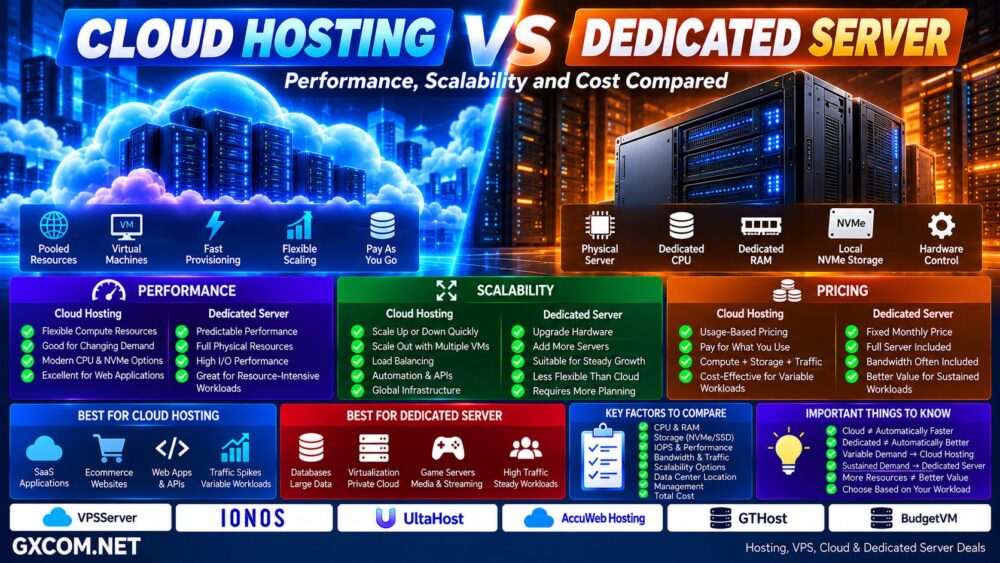
Cloud hosting and dedicated servers represent two very different approaches to infrastructure.
Cloud hosting draws computing resources from a broader pool of virtual and physical infrastructure, making it easier to provision, resize, and distribute workloads. A dedicated server gives one customer access to an entire physical machine, providing dedicated CPU, RAM, storage, and network resources without sharing the underlying server with other tenants.
Neither architecture is automatically better.
Cloud infrastructure is particularly attractive when workloads change frequently or applications need flexible scaling. Dedicated servers remain extremely relevant for sustained high-performance workloads, large databases, virtualization, high-bandwidth applications, and environments where predictable physical resources matter.
In this Cloud Hosting vs Dedicated Server comparison, we examine performance, scalability, reliability, pricing, storage, management, traffic patterns, and total infrastructure cost.
Cloud Hosting vs Dedicated Server: Quick Comparison
| Feature | Cloud Hosting | Dedicated Server |
|---|---|---|
| Infrastructure | Pooled cloud resources | Single physical server |
| Hardware | Usually virtualized | Physical hardware |
| CPU / RAM | Allocated cloud resources | Entire server resources |
| Scaling | Highly flexible | Hardware limited |
| Provisioning | Usually rapid | Provider dependent |
| Performance | Flexible and workload dependent | Highly predictable potential |
| Hardware Control | Limited | High |
| Physical Isolation | Usually no | Yes |
| Billing | Often usage based | Often fixed monthly |
| Best For | Dynamic workloads | Large sustained workloads |
What Is Cloud Hosting?
Cloud hosting uses computing resources from a cloud infrastructure rather than depending entirely on one conventional physical hosting server.
A cloud environment can combine:
- Virtual machines
- Compute clusters
- Block storage
- Object storage
- Private networks
- Load balancers
- Firewalls
- Managed databases
- APIs and automation
Resources can often be provisioned or resized quickly as requirements change.
A simplified architecture might look like:
Cloud Compute + Storage + Network → Application
This flexibility makes cloud hosting attractive for websites and applications with unpredictable or rapidly changing demand.
What Is a Dedicated Server?
A dedicated server is an entire physical server allocated to one customer.
Instead of sharing the underlying machine with other VPS or cloud tenants, the customer receives access to the server's physical resources.
A typical configuration may include:
- AMD EPYC, AMD Ryzen, or Intel Xeon CPU
- Dedicated RAM
- SSD or NVMe storage
- RAID options
- Dedicated network interfaces
- Remote management such as IPMI or KVM
- Custom operating systems
This model is particularly useful when workloads require sustained processing power, large amounts of RAM, predictable storage I/O, or greater hardware control.
For a deeper introduction, see our
Dedicated Server Hosting Guide.
Cloud Hosting vs Dedicated Server Performance
A dedicated server has an obvious architectural advantage: its physical CPU, RAM, and storage resources are not divided between unrelated server tenants.
This can provide highly predictable performance for sustained workloads.
But this does not mean dedicated servers automatically outperform cloud hosting.
Cloud providers offer many different compute classes, including high-frequency CPU, dedicated vCPU, memory-optimized instances, GPU infrastructure, and other workload-specific configurations.
Performance depends on:
- CPU generation
- CPU frequency
- Core count
- Shared vs dedicated CPU
- RAM
- Storage architecture
- IOPS
- Network throughput
- Virtualization overhead
- Application architecture
Dedicated Hardware ≠ Automatically Faster Application.
Performance Consistency Matters
Dedicated infrastructure becomes particularly attractive when the workload runs continuously at high utilization.
Examples include:
- Large databases
- Virtualization hosts
- Game servers
- Video processing
- High-traffic applications
- Data processing
- Large ecommerce platforms
Because the physical hardware belongs to one customer, performance can be easier to predict.
Cloud infrastructure can also provide predictable performance when dedicated CPU or appropriate instance types are selected, but buyers should understand exactly what resources they are purchasing.
Cloud and Dedicated Server Providers to Compare
Once the architectural difference is clear, compare providers according to the workload rather than simply choosing “cloud” or “dedicated.”
For cloud-oriented infrastructure, VPSServer, IONOS, UltaHost, and AccuWeb Hosting are among the providers worth comparing based on their current compute, VPS, cloud, and management options.
For dedicated infrastructure, providers such as GTHost, BudgetVM, UltaHost, IONOS, and AccuWeb Hosting can also be relevant depending on location, hardware requirements, bandwidth, and current server availability.
| Provider | Relevant Infrastructure | What to Compare |
|---|---|---|
| VPSServer | Cloud VPS | Cloud deployment and locations |
| IONOS | Cloud / Dedicated | Business infrastructure and pricing |
| UltaHost | VPS / Dedicated | Resources and management |
| AccuWeb Hosting | Cloud / VPS / Dedicated | OS, management and resources |
| GTHost | Dedicated Servers | Hardware, bandwidth and locations |
| BudgetVM | Dedicated Infrastructure | Price-to-resource value |
Hardware generations, available locations, pricing, bandwidth policies, and server inventory change frequently, so verify the current configuration before ordering.
Cloud Hosting vs Dedicated Server Scalability
Scalability is one of the strongest advantages of cloud infrastructure.
Cloud resources can often be increased through:
More CPU → More RAM → Larger Instance
This is vertical scaling.
Cloud architecture can also scale horizontally:
Server 1 + Server 2 + Server 3 → Load Balancer
Horizontal scaling allows applications to distribute traffic across multiple instances rather than continuously making one server larger.
How Dedicated Servers Scale
Dedicated servers can also scale, but the process is different.
Vertical scaling may require:
- Adding RAM
- Adding storage
- Changing CPU where supported
- Migrating to a larger server
Horizontal scaling requires provisioning additional physical servers.
That is entirely practical, but generally less instantaneous than adding cloud instances.
Cloud → Software-Driven Scaling
Dedicated → Hardware-Driven Scaling
Cloud Hosting vs Dedicated Server Reliability
Cloud hosting can reduce dependence on one physical machine when the application and infrastructure are designed to use redundant cloud resources.
However, simply running one virtual machine in the cloud does not automatically create high availability.
Application-level resilience may require:
- Multiple instances
- Load balancing
- Database replication
- Redundant storage
- Multiple zones
- Backups
- Health checks
- Failover
A conventional dedicated server creates a clearer physical single point of failure unless redundancy is built around it.
Dedicated architectures can solve this with multiple physical servers, redundant storage, load balancing, and failover systems.
Cloud Hosting ≠ Automatic High Availability.
Cloud Hosting vs Dedicated Server Pricing
The two models often approach pricing differently.
Cloud:
Compute + Storage + Traffic + IP + Backup + Cloud Services
Dedicated:
Physical Server + Bandwidth + IP + Management + Licenses
Cloud infrastructure often uses hourly or usage-based billing, although fixed monthly cloud plans are also common.
Dedicated servers are frequently priced monthly with a defined hardware configuration.
Which Is Cheaper?
There is no universal answer.
Cloud can be extremely cost-efficient when workloads are temporary, variable, or capable of scaling down when demand falls.
Dedicated servers can become economically attractive when a large amount of compute, RAM, storage, or bandwidth is required continuously.
Consider two workload patterns:
Variable Workload:
20% → 90% → 30% → 100% → 25%
Cloud can adapt resources to changing demand.
Steady Workload:
80% → 82% → 78% → 85% → 80%
A dedicated server may provide strong value because the hardware is being used continuously.
Cheap Hourly Rate ≠ Cheap Monthly Infrastructure.
Bandwidth Can Change the Cost Equation
Bandwidth is particularly important for:
- Video
- Streaming
- Downloads
- Large websites
- CDN origin servers
- Game distribution
- Backup services
Some dedicated-server packages include large traffic allocations or high-bandwidth port options.
Cloud platforms may charge outbound data transfer separately.
For bandwidth-intensive workloads, compare actual monthly transfer requirements rather than only CPU and RAM pricing.
Cloud Hosting vs Dedicated Server Storage
Cloud infrastructure commonly separates compute and storage.
Options may include:
- Block storage
- Local SSD
- Local NVMe
- Object storage
- Snapshots
Dedicated servers provide direct access to physical storage devices installed in the machine.
This can include:
- NVMe SSD
- SATA SSD
- HDD
- U.2 NVMe
- RAID arrays
Dedicated local NVMe can be extremely attractive for workloads requiring consistent low-latency storage performance.
Cloud Hosting for Traffic Spikes
Cloud infrastructure is particularly useful when demand changes rapidly.
Examples include:
- Flash sales
- Holiday ecommerce
- Viral content
- Product launches
- Ticketing systems
- Seasonal applications
When the application supports horizontal scaling, additional instances can be added as demand increases and removed later.
This avoids maintaining enough permanent hardware for the highest possible traffic level.
Dedicated Servers for Sustained Workloads
Dedicated servers become especially compelling when demand is consistently high.
Examples include:
- Large databases
- Virtualization
- High-traffic websites
- Game servers
- Media platforms
- Large ecommerce systems
- Data processing
- Private cloud infrastructure
In these scenarios, the customer can continuously use the physical CPU, RAM, storage, and network resources being paid for.
Which Providers Fit Different Workloads?
For workloads where rapid deployment, flexible resource allocation, geographic expansion, and changing demand are priorities, compare cloud-oriented services from VPSServer, IONOS, UltaHost, and AccuWeb Hosting.
For sustained CPU, large RAM configurations, dedicated NVMe, virtualization, or bandwidth-heavy applications, dedicated offerings from GTHost, BudgetVM, IONOS, UltaHost, and AccuWeb Hosting are relevant to compare based on current inventory.
The decision should follow the workload:
Workload → Demand Pattern → CPU + RAM → Storage → Bandwidth → Scaling → Management → Total Cost.
Cloud Hosting vs Dedicated Server for WordPress
Most WordPress websites do not need an entire dedicated server.
Cloud hosting can provide a flexible growth path for WordPress, particularly when combined with caching, CDN services, database optimization, and scalable resources.
Dedicated infrastructure becomes more relevant for very large WordPress or WooCommerce deployments with sustained resource requirements.
Do not move to dedicated hardware simply because traffic has increased.
First determine whether the bottleneck is:
CPU → RAM → PHP → Database → Storage → Network → Application
Cloud Hosting vs Dedicated Server for Ecommerce
Cloud infrastructure is attractive for ecommerce businesses with highly variable demand.
Dedicated infrastructure can be attractive for established stores with large, predictable workloads.
Many large environments can also use hybrid architectures:
Cloud Front End + Dedicated Database / Backend Infrastructure
The decision does not always need to be entirely cloud or entirely dedicated.
Cloud Hosting vs Dedicated Server for Databases
Databases highlight the strengths of both architectures.
Cloud platforms provide flexible database deployment, snapshots, replication, managed database services, and rapid resource changes.
Dedicated servers provide direct physical resources and can offer highly consistent CPU, memory, and local storage performance.
Large, I/O-intensive databases can benefit significantly from dedicated hardware, while applications prioritizing elasticity, managed services, and rapid scaling may favor cloud infrastructure.
Cloud Hosting vs Dedicated Server for Virtualization
Dedicated servers are commonly used as virtualization hosts because the customer controls the entire physical machine.
One powerful dedicated server can host multiple virtual machines depending on CPU, RAM, storage, virtualization software, and licensing.
Cloud infrastructure effectively provides virtualization as a service, removing much of the need to manage the underlying physical hardware.
The choice becomes:
Control the Physical Host → Dedicated Server
Consume Virtual Infrastructure → Cloud
Cloud Hosting vs Dedicated Server Security
Dedicated servers provide physical tenant isolation because the underlying machine is assigned to one customer.
Cloud platforms rely heavily on virtualization and software-defined isolation while also providing extensive security tooling.
Security ultimately depends on the complete architecture:
- Identity and access management
- Firewall rules
- Operating-system security
- Application security
- Encryption
- Network segmentation
- Monitoring
- Backups
Dedicated Hardware ≠ Automatically Secure.
Cloud Hosting vs Dedicated Server Management
Neither cloud nor dedicated infrastructure automatically means managed hosting.
An unmanaged cloud VM and an unmanaged dedicated server can both require the customer to maintain:
- Operating system
- Security updates
- Web server
- Database
- Monitoring
- Backups
- Application stack
Managed hosting adds a service layer on top of the infrastructure and should be evaluated separately.
Cloud Hosting vs Dedicated Server: Pros and Cons
| Cloud Hosting | Dedicated Server | |
|---|---|---|
| Main Advantage | Elasticity and flexibility | Dedicated physical resources |
| Scaling | Excellent | Hardware based |
| Performance | Highly configurable | Predictable potential |
| Hardware Control | Limited | High |
| Isolation | Virtualized | Physical |
| Pricing | Often variable | Often predictable |
| Provisioning | Usually rapid | Provider dependent |
| Best For | Changing workloads | Sustained workloads |
Choose Cloud Hosting If…
- Your traffic changes significantly
- You need rapid provisioning
- You want to scale resources up and down
- You use multiple geographic regions
- You need infrastructure APIs
- You deploy temporary workloads
- You build horizontally scalable applications
- You prefer usage-based infrastructure
Choose a Dedicated Server If…
- Your workload is consistently resource intensive
- You need dedicated physical CPU and RAM
- You need large local NVMe storage
- You require predictable sustained performance
- You run virtualization
- You have high bandwidth requirements
- You want hardware-level control
- Your workload can efficiently use a large server 24/7
Questions to Ask Before Choosing
- Is demand stable or unpredictable?
- Do you need vertical or horizontal scaling?
- How much sustained CPU do you use?
- How much RAM do you require?
- What storage latency and IOPS do you need?
- How much monthly bandwidth do you use?
- Do you need physical hardware isolation?
- Do you need API automation?
- Do you need multiple regions?
- How important is rapid provisioning?
- Are backups included?
- Is management included?
- How is outbound traffic billed?
- What is the real monthly infrastructure cost?
Cloud Hosting vs Dedicated Server: Which Should You Choose?
Cloud hosting is particularly strong when demand changes frequently and infrastructure needs to scale quickly. Its ability to provision resources on demand makes it suitable for growing applications, seasonal ecommerce, SaaS platforms, development environments, and distributed architectures.
Dedicated servers remain extremely competitive when workloads are large, sustained, and predictable. Direct access to physical CPU, RAM, storage, and network resources can provide excellent performance consistency and strong value when the hardware is heavily utilized.
The choice should not be based on which technology sounds newer.
Cloud ≠ Automatically Faster.
Dedicated ≠ Automatically Better Performance.
More Hardware ≠ Better Value.
Instead, examine how the workload behaves.
Variable Demand → Elastic Infrastructure → Cloud
Sustained Demand → Dedicated Resources → Dedicated Server
For many organizations, the final architecture may even combine both approaches.
Use this decision path:
Workload → Demand Pattern → Performance → Storage → Bandwidth → Scalability → Management → Total Cost → Right Infrastructure.
The better infrastructure is the one that delivers the required performance and reliability while minimizing unused resources, unnecessary complexity, and long-term operating cost.