Proxmox Backup Server setup is an important step for administrators who need reliable virtual machine backups, predictable storage usage, and tested recovery procedures. A backup job that finishes successfully is useful, but it does not guarantee that a business can recover quickly after a server failure.
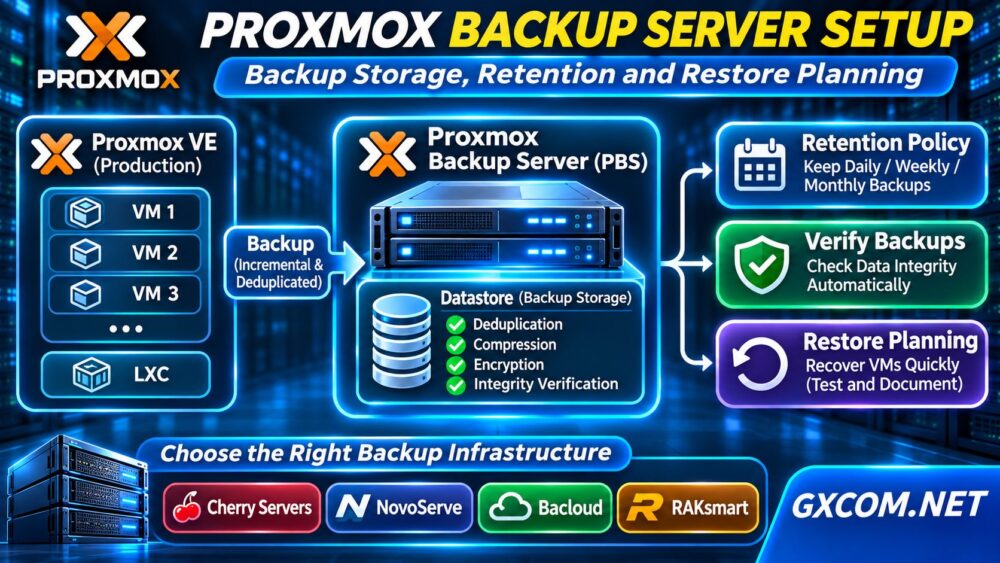
Proxmox Backup Server (PBS) integrates with Proxmox Virtual Environment (VE) and supports incremental backups, deduplication, encryption, and integrity verification. This guide explains how to configure backup storage, define retention policies, and plan restoration before choosing suitable server infrastructure.
What Is Proxmox Backup Server?
Proxmox Backup Server is an open-source backup platform designed for virtual machines, containers, and supported host-level backups. It stores backup data in datastores and reduces duplicate storage through chunk-based deduplication.
Unlike keeping backups only on the same virtualization host, a separate PBS system can reduce the risk of losing production workloads and their local backups together.
However, separation alone is insufficient. Administrators should also consider off-site copies, access controls, encryption keys, and recovery testing.
Proxmox Backup Server System Requirements
For production deployments, Proxmox recommends modern 64-bit server hardware, sufficient memory, and storage capable of handling random I/O operations. Its documented recommendation includes at least four CPU cores and 4 GiB of base memory, with additional memory according to storage capacity.
Backup storage performance matters because deduplication, verification, and garbage collection can generate substantial metadata activity.
Before installation, evaluate:
- Usable storage capacity and expected backup growth.
- Disk latency, random IOPS, and redundancy.
- Network bandwidth between PBS and Proxmox VE.
- Separate operating-system and backup-data storage.
- Power, hardware failure, and off-site recovery risks.
Our NVMe VPS vs SSD Performance guide explains why storage technology alone does not determine application performance.
How to Install Proxmox Backup Server
Step 1: Prepare the Backup Host
Download the official PBS installation image and verify its integrity using the published checksum. Prepare compatible hardware or an appropriately isolated test environment.
For production, a separate physical host is generally preferable to storing every backup alongside the virtual machines it protects.
Step 2: Install and Configure Networking
Boot the installer, select the operating-system disk, configure networking, and complete installation. After rebooting, open the management interface:
https://YOUR-PBS-IP:8007Replace the placeholder with your server address. Restrict administrative access through firewall rules, secure authentication, and appropriate network segmentation.
Step 3: Create a Backup Datastore
Prepare and mount the intended backup filesystem. In the PBS interface, navigate to Datastore and select Add Datastore.

Specify a descriptive datastore name and the correct backing directory. Configure appropriate permissions and review the prune and garbage collection settings.
A datastore should use storage reserved for backup data, not an arbitrary directory on a nearly full system disk.
Connect Proxmox VE to PBS
In the Proxmox VE interface, open Datacenter → Storage → Add → Proxmox Backup Server.
Enter the PBS server address, datastore name, account credentials, and certificate fingerprint as required. Use a dedicated account with permissions appropriate to the backup workflow.
After adding the storage target, create a scheduled backup job under the Proxmox VE backup configuration. Select the relevant virtual machines, destination datastore, schedule, and supported backup options.
Run an initial backup manually and inspect its task log before relying on automation.
Plan Backup Storage Capacity
Storage planning begins with the amount of protected data, its daily change rate, retention duration, and expected deduplication efficiency.
For example, ten virtual machines containing 100 GB of used data each represent approximately 1 TB of logical source data. Their actual backup footprint may be lower because of compression and deduplication, but the reduction is workload-dependent.
Encrypted or frequently changing data may deduplicate less effectively. Leave capacity headroom for new snapshots, maintenance operations, and unexpected growth.
Monitor actual datastore consumption rather than relying on a fixed compression ratio.
Configure Proxmox Backup Retention Policies
Retention policies determine which backup snapshots remain available. PBS supports time-based options such as daily, weekly, monthly, and yearly retention.
An illustrative policy might keep:
- Seven daily recovery points.
- Four weekly recovery points.
- Three monthly recovery points.
These are planning examples, not universal recommendations. Adjust retention according to business requirements, recovery objectives, and available capacity.
Pruning vs Garbage Collection
Pruning removes expired backup snapshot references according to retention rules. It does not necessarily reclaim the underlying data immediately.
Garbage collection identifies and removes unreferenced chunks when eligible, freeing datastore capacity.
Schedule both processes and monitor their results. Never assume that deleting old snapshot entries instantly creates free disk space.
Verify Backups and Test VM Restoration
PBS supports verification jobs that check backup integrity. Schedule verification and investigate failures promptly.
Verification does not replace a functional restore test. Periodically restore a selected virtual machine to an isolated environment and confirm that its operating system, applications, and data work correctly.
Measure recovery time and document required credentials, network settings, and encryption keys.
For additional recovery planning, see our VPS Snapshot and Backup Recovery guide.
Protect Backups Against Host Failure and Ransomware
Use separate credentials, least-privilege permissions, and network restrictions. Where supported, configure remote synchronization to another PBS instance at a different location.
Keep encryption keys securely outside the protected infrastructure. Losing the necessary decryption material can make encrypted backups unusable.
Consider immutable or offline backup copies through suitable complementary infrastructure. PBS replication alone should not be treated as complete ransomware protection.
Our Unmanaged Server Security Checklist covers broader server-hardening practices.
When Does PBS Need Better Infrastructure?
Slow backup jobs do not automatically mean that PBS needs more CPU cores. Examine disk latency, datastore utilization, network throughput, verification activity, and concurrent backup schedules.
Shared storage contention or insufficient random I/O capacity can affect deduplication and maintenance performance. A dedicated storage server may offer greater hardware control and more predictable resource allocation.

Our Dedicated Server Hosting guide explains when physical infrastructure may be appropriate.
Compare Dedicated Backup Server Providers
Cherry Servers is worth evaluating for bare-metal deployments requiring configurable physical resources. NovoServe provides dedicated server options for organizations considering European or US infrastructure locations.
Bacloud offers another dedicated hosting option for teams comparing storage capacity and operational costs. RAKsmart is relevant for buyers evaluating dedicated infrastructure and regional deployment requirements.
Before purchasing, verify available drive bays, storage types, RAID or ZFS suitability, bandwidth, remote management, and replacement procedures. None of these providers should be assumed to include a managed PBS service.
Compare deployment models in our Bare Metal Server Comparison.
Frequently Asked Questions
Does Proxmox Backup Server Support Incremental Backups?
Yes. PBS uses incremental data transfer and deduplication to reduce repeated backup data, although actual savings depend on workload characteristics.
Does Pruning Immediately Free Disk Space?
No. Pruning removes snapshot references; garbage collection subsequently reclaims eligible unreferenced chunks.
Can PBS Replace an Off-Site Backup?
No. A local PBS instance improves backup management but should be supplemented with geographically separate or otherwise isolated recovery copies when risk requirements justify them.
Final Verdict
A reliable Proxmox Backup Server setup combines correctly sized storage, scheduled retention, garbage collection, verification, and real restoration tests.
When monitoring reveals storage or network limitations, compare dedicated and bare-metal infrastructure based on measured backup workloads, recovery objectives, and verified hardware specifications rather than advertised capacity alone.