Choosing a cloud server for SaaS applications involves more than selecting CPU cores and RAM. A subscription platform must serve multiple customers, isolate their data, handle unpredictable demand, and maintain sustainable infrastructure costs as revenue grows.
The right hosting architecture depends on tenant count, application concurrency, database requirements, security boundaries, and operational expertise. This guide explains multi-tenant deployment models, practical scaling decisions, and cloud hosting costs for growing SaaS businesses.
What Does a SaaS Cloud Server Need?
A SaaS application typically combines an application layer, database, authentication system, background workers, and supporting services such as caching and object storage.
Early-stage products may run these components on one cloud VPS. However, as customer activity grows, shared resources can create performance bottlenecks and availability risks.
Evaluate infrastructure using peak concurrent requests, database latency, memory consumption, storage performance, and recovery requirements. A higher virtual CPU count does not automatically improve inefficient application code.
For the underlying hosting tradeoffs, see our cloud hosting vs VPS comparison.
Multi-Tenant SaaS Architecture: Pool, Bridge and Silo
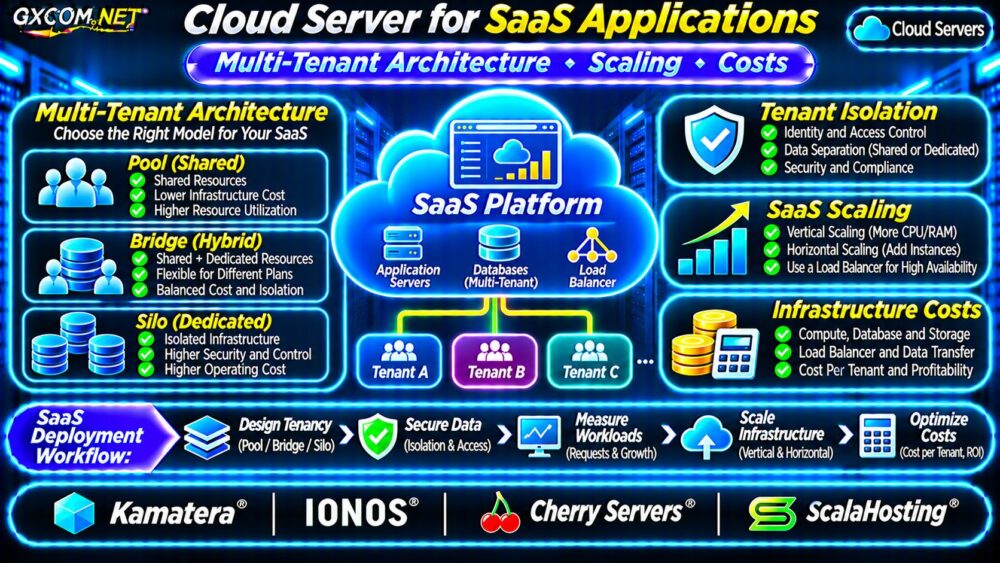
Multi-tenancy allows one software platform to serve multiple customer organizations, called tenants. Infrastructure sharing can improve resource utilization, but tenant isolation must be designed explicitly.
| Architecture | Resource Model | Primary Tradeoff |
|---|---|---|
| Pool | Shared application and database resources | Efficient utilization; strict logical isolation needed |
| Bridge | Mix of shared and dedicated resources | Flexible isolation with additional complexity |
| Silo | Dedicated resources for individual tenants | Greater separation; higher operating overhead |
Pool: Lower Infrastructure Overhead
A pooled design may store tenant records in shared database tables identified by a tenant ID. Every query, cache key, background job, and authorization decision must enforce the correct tenant boundary.
Authentication alone does not guarantee isolation. Test cross-tenant access attempts and apply database-level controls where appropriate.
Bridge: Different Resources for Different Customers
A bridge design combines shared services with dedicated components for selected customers. For example, standard subscribers may share a database while enterprise customers receive separate database instances.
This approach can support different service tiers, but provisioning, monitoring, migrations, and billing become more complex.
Silo: Dedicated Tenant Infrastructure
Silo deployments allocate separate infrastructure to individual customers. They may suit specialized security or contractual requirements, although dedicated capacity increases cost and management overhead.

Dedicated resources do not eliminate the need for application security, backups, or access controls.
Database Isolation and Performance Planning
Database design is often the most important SaaS scaling decision. A pooled PostgreSQL or MySQL database can serve many tenants, provided queries consistently enforce tenant context and indexes match access patterns.
Monitor slow queries, connection counts, lock contention, storage latency, and growth in the largest tenants. One unusually active customer can degrade shared performance without appropriate workload controls.
Consider connection pooling, query limits, per-tenant rate limits, and dedicated database resources for customers with exceptional requirements.
Database backups must also support practical restoration. Restoring an individual tenant from a shared database can be more complicated than restoring an entire database instance.
Vertical vs Horizontal SaaS Server Scaling
Vertical scaling increases CPU, RAM, or storage resources on an existing server. It is relatively straightforward but remains constrained by instance limits and may require maintenance.
Horizontal scaling adds application instances behind a load balancer. It can distribute requests and improve fault tolerance when the application supports multiple concurrent instances.
Prepare Applications for Multiple Servers
Store persistent files in appropriate shared storage, avoid relying on local session state, and make background jobs safe to retry. Ensure that only intended workers process each queued task.
Load testing should measure response-time percentiles, request failures, database saturation, and queue delays. Scaling based only on average CPU utilization can miss important bottlenecks.
Read our cloud VPS high availability guide for related redundancy and failover considerations.
Calculate SaaS Cloud Infrastructure Costs
Infrastructure cost should be evaluated against paying customers, not just monthly server prices. Include compute, databases, storage, backups, load balancing, networking, monitoring, and administration.
Consider the following hypothetical monthly SaaS budget:
| Expense | Illustrative Cost |
|---|---|
| Two application servers | $80 |
| Database infrastructure | $55 |
| Load balancing | $15 |
| Storage and backups | $20 |
| Network and monitoring | $30 |
| Monthly total | $200 |
With 100 paying tenants, infrastructure averages $2 per tenant monthly. At 250 tenants with unchanged spending, that falls to $0.80. These are arithmetic illustrations, not provider quotations or guaranteed scaling outcomes.
Real costs may rise with storage growth, traffic, larger customers, support requirements, and additional database capacity.
Track Cost Per Tenant and Gross Margin
Calculate infrastructure cost per paying tenant = monthly infrastructure spending ÷ paying tenants.
For accurate profitability analysis, include attributable operational expenses and avoid treating infrastructure cost alone as total SaaS cost of goods sold.
Our cloud server cost optimization guide explains additional budget controls.
Four Cloud Hosting Providers for SaaS Applications
These GXCOM.NET-approved providers represent infrastructure options, not preconfigured SaaS platforms. Verify the selected plan’s networking, management, backup, and scaling capabilities.
Kamatera: Configurable Cloud Resources
Kamatera is relevant when SaaS teams need adjustable cloud server configurations. Evaluate compute sizing, private networking, load balancing options, and recurring resource charges.
IONOS: Cloud Infrastructure Planning
IONOS provides cloud infrastructure options for teams comparing compute and network requirements. Confirm product-specific availability, storage, billing rules, and operational responsibilities.
Cherry Servers: Infrastructure Control
Cherry Servers deserves consideration for applications requiring flexible server, storage, and networking choices. Verify deployment locations and the exact infrastructure configuration before purchasing.
ScalaHosting: Managed Server Alternative
ScalaHosting may suit smaller SaaS teams seeking assistance with server administration. Confirm whether the chosen service covers application deployment, database operations, and recovery tasks.

Security and Recovery Requirements
Protect tenant identity throughout application requests, background processing, exports, and administrative tools. Enforce least-privilege permissions and audit sensitive cross-tenant operations.
Maintain independent backups, test restoration, and define recovery time and recovery point objectives. Replication alone does not protect against accidental deletion or application-level corruption.
Our VPS snapshot and backup recovery guide covers essential data protection considerations.
When Should SaaS Move to Dedicated Infrastructure?
Cloud servers remain useful when flexible provisioning and workload changes matter. Dedicated servers become worth evaluating when sustained resource consumption, specialized configurations, or predictable hardware performance justify the change.
For hardware-oriented purchasing decisions, see our dedicated servers for SaaS applications comparison.
Frequently Asked Questions
Can a SaaS Application Start on One VPS?
Yes. A small SaaS product can start on one appropriately configured VPS, provided backups, security, monitoring, and a migration plan are in place.
Does Multi-Tenancy Automatically Reduce Hosting Costs?
No. Shared infrastructure can improve utilization, but tenant isolation, noisy-neighbor controls, monitoring, and operational complexity still create costs.
Final Verdict
Choose a cloud server for SaaS applications according to tenant isolation, measured performance, scaling requirements, and cost per customer. Pool architectures emphasize efficiency, while bridge and silo approaches provide additional deployment flexibility or separation.
Compare Kamatera, IONOS, Cherry Servers, and ScalaHosting using actual service requirements. Start with a manageable architecture, test tenant boundaries, and expand infrastructure when workload evidence supports the investment.