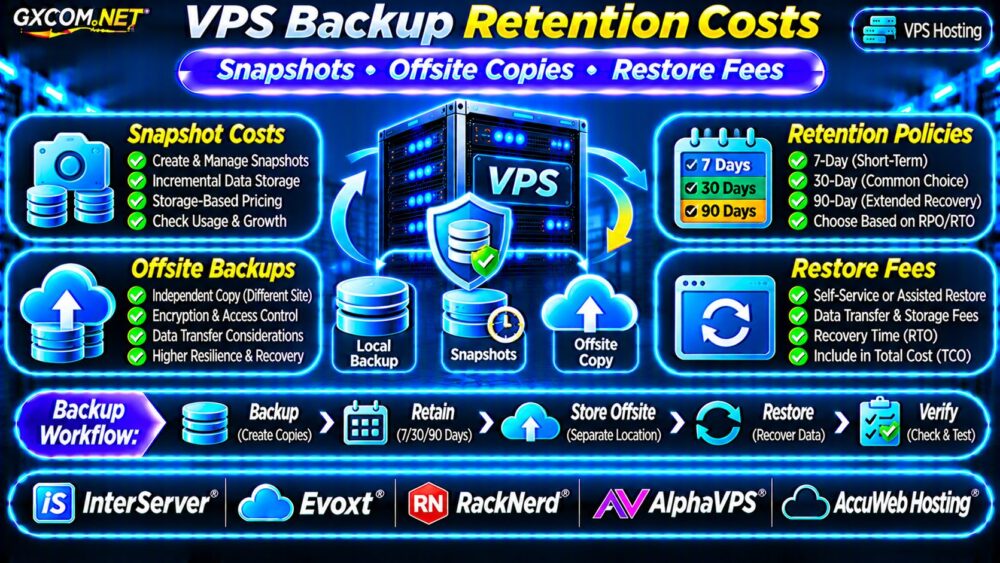
VPS backup retention costs can turn an inexpensive virtual private server into a surprisingly expensive hosting service. Snapshots, offsite copies, extended retention, and emergency restoration may all be billed separately from the advertised VPS price.
For WordPress websites, business applications, and databases, backups are essential. However, paying for unnecessary recovery points is wasteful, while choosing insufficient protection can make an outage much more expensive. This guide explains how to compare backup policies and calculate realistic ownership costs.
What Determines VPS Backup Retention Costs?
Backup pricing depends on how much data is protected, how frequently copies are created, and how long they remain available.
Common billing models include fixed backup add-ons, storage-based charges, and plans that reserve backup capacity as a percentage of the VPS disk size.
Before purchasing, establish whether the quoted price covers:
- Scheduled backups and manual snapshots.
- Stored backup capacity and retention duration.
- Independent or geographically separate storage.
- Restoration operations and data transfers.
- Backups retained after VPS cancellation or deletion.
These details matter more than a simple advertisement stating that backups are available.
VPS Snapshots vs Independent Backups
A snapshot captures a storage volume’s state at a particular moment. Depending on the platform, subsequent snapshots may store only changed blocks.
Snapshots can simplify rollback after software updates, but they may depend on the same provider account or storage infrastructure as the original server.
Independent backups can offer additional protection against account compromise, accidental deletion, or provider-level failures.
For operational procedures, read our VPS Snapshot Backup and Recovery Guide.
Compare 7-Day, 30-Day and 90-Day Retention
Retention determines how far back an administrator can recover data. A seven-day policy may suit frequently updated development systems, while production applications often require longer recovery histories.
| Retention | Potential Use | Cost Consideration |
|---|---|---|
| 7 days | Recent mistakes and failed updates | Lower storage demand |
| 30 days | Business websites and routine recovery | More retained changes |
| 90 days | Extended incident investigation | Greater storage exposure |
Longer retention does not always increase costs proportionally. Incremental storage, compression, data churn, and provider-specific deletion rules influence actual consumption.

Example: Calculate Snapshot Storage Charges
Assume a fictional provider charges $0.05 per GB-month of billable snapshot storage.
If seven-day retention consumes 80GB, the estimated charge is $4 monthly. At 150GB for thirty days, it becomes $7.50. At 280GB for ninety days, it reaches $14.
These are illustrative storage assumptions, not actual provider prices or guaranteed retention-to-capacity relationships.
Why Offsite VPS Backups Matter
Offsite backups place recoverable data outside the primary VPS environment. Depending on the architecture, copies may be stored in another facility, region, provider, or independently controlled storage account.
This reduces reliance on a single failure domain. However, geographic separation alone does not guarantee backup integrity or successful recovery.
Choose storage with appropriate access restrictions, encryption, and documented retention controls. Where supported, immutable backup protection can help resist unauthorized deletion.
Calculate Offsite Storage and Transfer Costs
Offsite expenses may include storage capacity, outgoing transfer, API operations, backup software, and restoration traffic.
Incremental backups can reduce transferred data, but frequently modified databases may still generate substantial daily changes.
For cloud-specific replication expenses, see our Cloud VPS Bandwidth Costs Guide.
VPS Restore Fees and Hidden Recovery Expenses
A backup is only valuable when it can be restored. Some services include self-service restoration, while others may charge for assisted recovery, transferred data, or temporary infrastructure.
Ask whether restoration overwrites the existing VPS or can create a separate recovery environment.
Also confirm whether database restoration, application configuration, and DNS changes are included in technical support.
Even when a provider charges nothing for the restore operation, administrator labor and downtime can create substantial business costs.
Set Recovery Objectives Before Buying
Recovery point objective (RPO) defines acceptable data loss. Recovery time objective (RTO) defines the targeted service restoration time.
A website updated weekly may tolerate daily backups. An order-processing database may require more frequent protection and transaction-aware recovery.
Shorter objectives often increase storage, software, or infrastructure expenses.
Test restores regularly. Verify database consistency, application functionality, credentials, and backup decryption rather than checking only whether a file exists.
Five VPS Providers to Compare
The following GXCOM.NET-approved affiliate providers are relevant candidates. Verify backup functionality and pricing for the exact plan before purchasing.
InterServer: VPS Cost Planning
InterServer is worth evaluating when comparing VPS resources and recurring costs. Confirm backup add-ons, storage limits, restoration procedures, and customer responsibilities.
Evoxt: VPS Snapshot Requirements
Evoxt can be assessed for smaller VPS deployments. Check available snapshot features, backup frequency, retention limits, and recovery access.
RackNerd: Budget VPS Protection
RackNerd may appeal to budget-conscious buyers. Compare promotional hosting prices with independent backup expenses and renewal terms.
AlphaVPS: Self-Managed Recovery
AlphaVPS is relevant for Linux administrators managing their own backup workflows. Verify storage availability, recovery options, and infrastructure responsibilities.
AccuWeb Hosting: Backup Support Options
AccuWeb Hosting is another candidate for comparing VPS backup and management services. Review supported backup products, restoration assistance, and additional charges.
For broader infrastructure comparisons, consult our Best VPS Providers Guide.
Calculate Monthly and Three-Year Backup Costs
Consider a hypothetical VPS deployment with the following monthly expenses:
| Component | Illustrative Monthly Cost |
|---|---|
| VPS hosting | $18 |
| Snapshot storage | $7 |
| Offsite backup storage | $5 |
| Transfer and monitoring allowance | $3 |
| Total | $33 |
Annual spending would equal $396, while a thirty-six-month baseline would reach $1,188 if usage and pricing remained unchanged.

That excludes exceptional recovery labor, taxes, migration expenses, and downtime. Compare these costs with the consequences of losing critical data.
How to Reduce Backup Costs Safely
- Apply retention schedules based on business recovery requirements.
- Exclude reproducible caches and unnecessary temporary files.
- Use incremental backups where supported.
- Monitor stored data growth and expired recovery points.
- Keep independent copies of critical application data.
- Test restoration before reducing backup coverage.
For lower-cost infrastructure choices, review our Cheap VPS Providers Comparison.
Frequently Asked Questions
Are VPS Backups Included in Hosting Prices?
Sometimes. Included capacity, scheduling, retention, and restoration terms vary by provider and plan.
Does a Snapshot Replace an Offsite Backup?
Not necessarily. A snapshot may share account or infrastructure dependencies with the primary VPS.
Are VPS Restores Always Free?
No. Charges may apply for assisted restoration, storage, transfers, or temporary recovery resources.
Final Verdict
VPS backup retention costs should be part of every hosting purchase decision. Compare snapshot policies, offsite storage, restore fees, and recovery objectives before choosing the lowest-priced server.
Evaluate InterServer, Evoxt, RackNerd, AlphaVPS, and AccuWeb Hosting using documented product terms. A reliable backup strategy protects business data while keeping long-term VPS spending predictable.