A VPS ransomware recovery plan determines whether an encrypted server becomes a temporary outage or a prolonged business crisis. Attackers may encrypt application files, steal credentials, destroy accessible backups, or leave persistence mechanisms behind. Restoring a snapshot without investigating the compromise can bring the same threat back online.
This guide explains how to contain an incident, identify trustworthy recovery points, rebuild a clean server, and test restored services. The goal is operational recovery, not simply making encrypted files disappear.
1. Contain the Compromised VPS
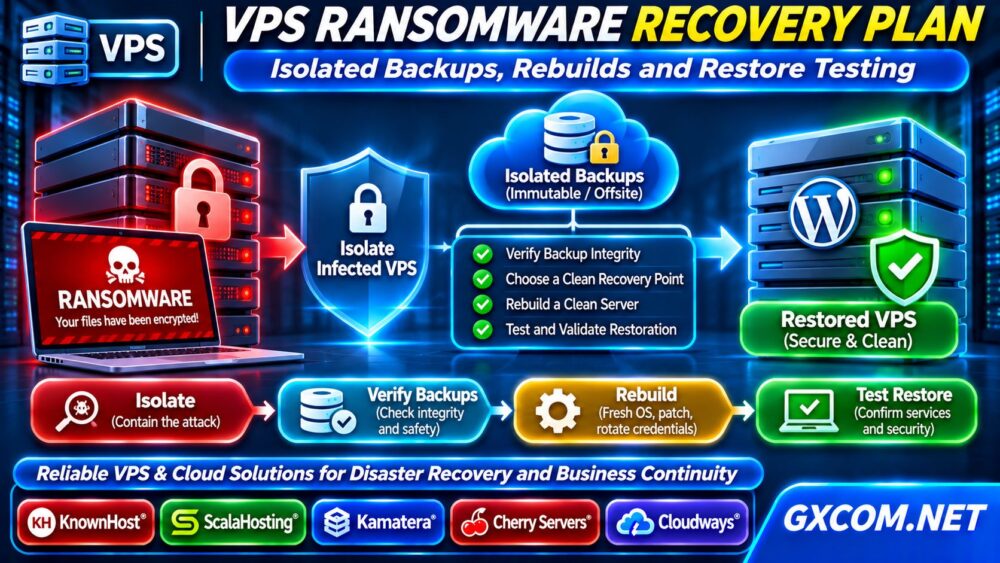
When ransomware is suspected, restrict the affected VPS from external and internal networks using provider controls or carefully planned firewall rules. Prevent lateral movement and further access to backup repositories. Do not immediately wipe the instance: logs, memory, and disk evidence may help determine what happened.
Notify your incident response team, hosting provider, and relevant stakeholders. If personal information may have been exposed, assess applicable notification obligations with qualified advisers.
Preserve evidence using an approved forensic process. Avoid running unknown cleanup scripts or contacting attackers from the compromised machine.
2. Determine the Scope of the Attack
Identify affected servers, user accounts, databases, shared storage, backup credentials, and administrative consoles. Examine available authentication logs, security alerts, and recent configuration changes from a trusted environment.
Look for suspicious privileged accounts, unauthorized SSH keys, unexpected scheduled tasks, and unusual outbound connections. Ransomware may be only the visible final stage of a broader intrusion.
Record a timeline of confirmed events. If the original entry point remains unknown, treat related systems and credentials as potentially exposed until investigated.
3. Protect and Verify Isolated Backups
Recovery depends on backups attackers cannot modify or delete using compromised production credentials. Maintain separate access controls, offsite copies, and offline or appropriately immutable recovery points.
Check backup timestamps, retention policies, integrity reports, and evidence of unauthorized changes. A recent backup is not necessarily clean: malware or malicious accounts may have existed before encryption began.
Our VPS Snapshot and Backup Recovery guide explains why snapshots alone are insufficient as a disaster recovery strategy.

Never connect a suspected infected backup directly to production. Inspect it in an isolated recovery environment first.
4. Choose a Clean Recovery Point
Select a backup created before the earliest credible compromise indicator, not merely before files were encrypted. Validate application data, database consistency, and the backup’s restore procedure.
Compare recovery point objective (RPO), the acceptable amount of data loss, with recovery time objective (RTO), the acceptable restoration duration. A daily backup may be inadequate for an active transactional application.
If no trustworthy backup exists, preserve encrypted evidence and seek specialist assistance. Public decryptors may exist for some ransomware families, but recovery is never guaranteed.
5. Rebuild the VPS From Trusted Media
Provision a fresh VPS or reinstall from a verified operating-system image. Do not treat the compromised installation as trustworthy simply because an antivirus scan reports no findings.
Apply security updates, configure host firewalls, remove unnecessary services, and create new administrative credentials. Rotate SSH keys, API tokens, database passwords, application secrets, and backup access credentials from clean devices.
Use separate identities for production administration and backup management. Review our Unmanaged Server Security Checklist before exposing the replacement server to public traffic.
6. Restore Applications and Data Carefully
Restore validated data into the rebuilt environment using least-privilege accounts. Scan restored files, review application dependencies, and avoid blindly importing old startup scripts or privileged configuration.
For WordPress, verify core files, plugins, themes, uploads, and database content. For databases, confirm consistency and reconcile transactions created after the selected recovery point where reliable records exist.
Keep the restored system isolated until authentication, application functionality, and security monitoring pass validation. Document every change for later review.
7. Test Recovery Before Reopening Traffic
Test logins, database writes, scheduled jobs, payment integrations, backups, and monitoring alerts. Confirm that applications can reach only their intended dependencies.
Perform a controlled restore rehearsal and record actual recovery duration. A backup that has never been restored successfully is an unverified recovery promise.
After reopening traffic, monitor privileged logins, file changes, outbound connections, and unexpected resource spikes. Retain a rollback plan in case compromise indicators return.
8. Fix the Weakness That Enabled the Incident
Review the initial access path, exposed services, vulnerable applications, and identity permissions. Patch the confirmed weakness and investigate other systems using the same credentials or software.
Our VPS CPU Steal Time troubleshooting guide can help distinguish virtualization contention from application resource pressure during post-recovery monitoring.
Do not confuse performance tuning with incident containment. More CPU or storage does not prevent ransomware when credentials and access controls remain compromised.
9. Design a More Resilient Backup Architecture
Use multiple recovery copies across independent failure domains, with at least one copy protected against deletion by compromised production accounts. Test retention, immutability settings, encryption keys, and restoration permissions.
Estimate storage growth, network transfer time, and database recovery requirements. Our Dedicated Server vs Cloud Server comparison explains infrastructure tradeoffs when designing recovery environments.
Schedule periodic restore drills and update the plan after infrastructure changes. Recovery objectives should reflect business priorities, not arbitrary backup frequencies.

10. When Should You Change Hosting Infrastructure?
Consider a hosting change when existing services cannot provide appropriate backup isolation, access controls, recovery capacity, or administrative support. Confirm requirements before purchasing: providers vary significantly by plan.
KnownHost and ScalaHosting are relevant managed VPS options. Kamatera offers configurable cloud resources, while Cherry Servers provides bare-metal infrastructure for teams needing hardware control. Cloudways is another option for managed cloud application hosting.
Compare backup responsibility, storage costs, recovery access, support boundaries, and geographic separation. For managed environments, see our Managed Cloud Hosting comparison.
Frequently Asked Questions
Can a VPS Snapshot Remove Ransomware?
A clean snapshot may help restore a system, but snapshots can be compromised or deleted. Investigate the intrusion and rebuild trust before restoration.
Should I Pay the Ransom?
Payment does not guarantee recovery or prevent data disclosure. Consult incident response, legal, and law-enforcement resources before decisions.
How Often Should I Test Backups?
Test according to system criticality and after significant changes. Include complete application restores, not just file integrity checks.
Final Verdict
Effective VPS ransomware recovery requires containment, trustworthy backups, clean rebuilding, credential rotation, and verified restoration. The best recovery plan is practiced before an incident and updated whenever applications or infrastructure change.