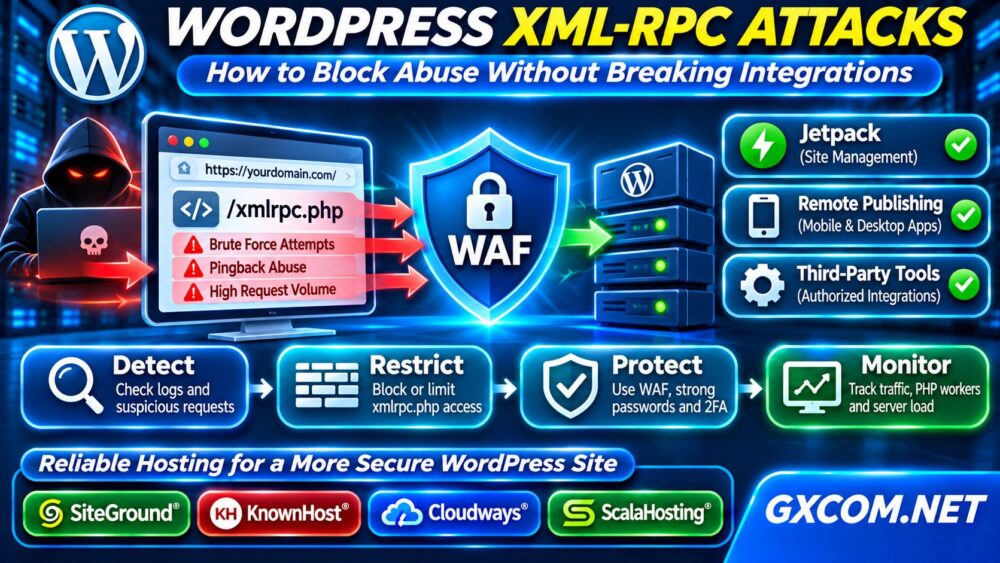
WordPress XML-RPC attacks can generate thousands of unwanted requests, attempt password guessing, and consume server resources. The target is usually xmlrpc.php, a built-in endpoint that allows compatible applications to communicate with WordPress remotely.
Blocking every request may reduce abuse, but it can also interrupt legitimate integrations. This guide explains how to identify suspicious activity, restrict XML-RPC safely, and determine whether application security or hosting limitations are the real problem.
What Is WordPress XML-RPC?
XML-RPC is a remote communication protocol supported by WordPress. Its endpoint, /xmlrpc.php, accepts structured requests for supported remote operations.
WordPress also provides the REST API, which many modern applications use instead. However, some existing integrations may still depend on XML-RPC.
Therefore, the correct security decision depends on your website’s integrations, not simply whether the endpoint exists.
Why Do Attackers Target xmlrpc.php?
Attackers may use XML-RPC authentication methods to attempt unauthorized logins. Automated tools can repeatedly submit credentials or exploit the endpoint’s multicall functionality to package multiple operations into requests.
Pingback functionality has also been abused to generate unwanted requests toward other websites. This is distinct from a successful compromise of your WordPress installation.
Even unsuccessful attacks may create unnecessary PHP processing, database activity, and noisy security logs.
However, seeing XML-RPC requests does not automatically mean an attacker gained access. Investigation should establish whether requests are malicious, blocked, or part of legitimate application activity.
Step 1: Check Whether XML-RPC Is Accessible
Begin with a simple HTTP request:
curl -i https://example.com/xmlrpc.phpReplace the example domain with your website. A normal GET request may return a message indicating that the XML-RPC server accepts POST requests only.
This response confirms endpoint behavior, not a vulnerability. A 403 response may indicate an intentional firewall restriction.
Review whether your website uses Jetpack, legacy mobile publishing, or another integration requiring XML-RPC before changing access rules.
Step 2: Identify Suspicious Requests in Server Logs
Inspect Apache or Nginx access logs for repeated requests targeting the endpoint. On a typical Apache installation:
sudo grep 'xmlrpc.php' /var/log/apache2/access.log | tail -30Paths differ between distributions and hosting panels. Review request frequency, response codes, source addresses, and timestamps.

Repeated POST requests from many addresses may indicate automated abuse. Nevertheless, avoid treating every request as hostile without checking associated integrations.
Correlate suspicious traffic with PHP worker utilization, error logs, and application response times.
Step 3: Block XML-RPC When It Is Unnecessary
If your website does not require XML-RPC, blocking the endpoint at the web server or firewall layer can prevent requests from reaching WordPress.
Apache Configuration
For Apache installations that support the relevant directives, an example restriction is:
<Files "xmlrpc.php">
    Require all denied
</Files>
Apply the rule in an appropriate server configuration or permitted .htaccess context. Verify syntax and test the website afterward.
Nginx Configuration
Within the appropriate Nginx server block, a restrictive location can be configured:
location = /xmlrpc.php {
    deny all;
}
Validate the configuration using nginx -t before reloading Nginx. Confirm that the intended virtual host receives the rule.
These examples block legitimate XML-RPC traffic as well as attacks. Do not apply them without checking compatibility.
Step 4: Preserve Required Integrations
If an integration requires XML-RPC, consider narrower controls instead of completely blocking the endpoint.
Possible approaches include limiting authentication attempts, restricting trusted source addresses where practical, and applying carefully tested WAF rules.
WordPress also provides filters that developers can use to disable XML-RPC authentication methods. However, disabling authentication is not identical to removing every XML-RPC capability.
Test changes in staging before deployment. Our WordPress Staging Site guide explains how to evaluate plugin and server changes without immediately affecting production.
Step 5: Configure Cloudflare or Another WAF
A web application firewall can inspect and restrict suspicious requests before they reach the origin server.
For websites using Cloudflare, review security events and create narrowly scoped rules based on the endpoint, request method, and observed traffic patterns.
A blanket challenge or block may interrupt legitimate remote publishing tools. Test exceptions carefully and avoid trusting easily spoofed user-agent strings.
Rate limiting can reduce abusive request volume, but thresholds must account for legitimate automation and shared source addresses.
Step 6: Strengthen WordPress Authentication
Blocking XML-RPC does not replace broader account security. Attackers can also target the normal login page or vulnerable plugins.
Use strong unique passwords, multifactor authentication where supported, limited administrator privileges, and timely software updates.
Remove unused accounts and review unexpected login activity. Maintain independent backups and a documented recovery procedure.
Our Unmanaged Server Security Checklist covers additional server-hardening measures.
Step 7: Diagnose PHP Worker and Server Load
High XML-RPC request volume can increase PHP processing demand, especially when requests bypass page caching.
Monitor concurrent PHP workers, CPU usage, memory pressure, response times, and firewall events during suspicious traffic.
Our WordPress PHP Worker Limits guide explains why uncached requests can create queues and slow down otherwise healthy websites.
First block or limit abusive traffic. Adding more CPU or memory without addressing the attack source may only increase the resources available to unwanted requests.
When Should You Consider Better Hosting?
Most XML-RPC problems can be addressed through configuration, application security, and firewall controls. Hosting upgrades become relevant when monitoring reveals persistent resource limitations or inadequate administrative access.

SiteGround is worth evaluating for WordPress-oriented hosting and managed operations. KnownHost and ScalaHosting offer managed VPS options for websites needing greater server control.
Cloudways provides managed cloud hosting for applications requiring flexible infrastructure management.
Compare firewall controls, support scope, PHP resources, backup policies, and security responsibilities. Verify specific plan features before purchasing; no hosting provider can guarantee complete protection from attacks.
For broader infrastructure decisions, explore our Managed Cloud Hosting comparison.
Frequently Asked Questions
Is WordPress XML-RPC a Vulnerability?
Not automatically. XML-RPC is a supported interface, but exposed functionality can be abused. Risk depends on configuration, authentication security, and installed software.
Will Disabling XML-RPC Break Jetpack?
It may disrupt features that depend on XML-RPC. Check your current integration requirements and test before blocking access.
Does Blocking XML-RPC Stop All Brute-Force Attacks?
No. Attackers may target other authentication endpoints. Maintain layered login protection and application security.
Final Verdict
WordPress XML-RPC attacks should be handled with evidence-based controls. Identify abusive requests, confirm integration requirements, and restrict unnecessary access at the server or firewall layer.
When legitimate traffic and security controls still expose infrastructure limitations, compare managed hosting, VPS, and cloud solutions based on actual workload and operational requirements.