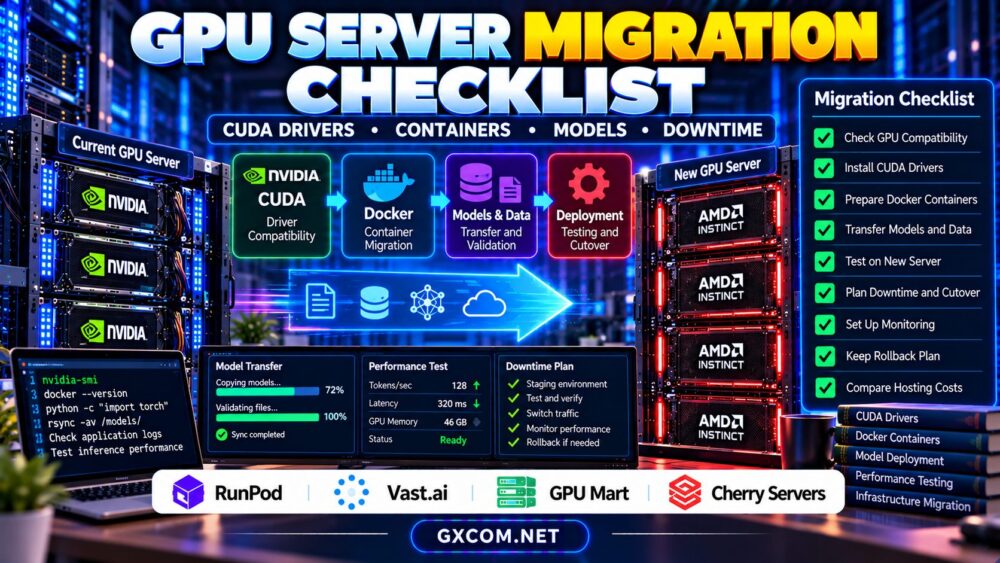
A GPU server migration checklist helps AI teams move workloads between cloud instances, dedicated servers, and hosting providers without unnecessary downtime. Unlike ordinary website migrations, GPU infrastructure changes can introduce CUDA driver conflicts, incompatible containers, missing model files, and expensive dataset transfers.
Whether you are upgrading an accelerator, switching GPU hosting providers, or moving inference workloads into production, a structured migration plan protects performance and service continuity. This guide covers the essential technical checks, practical cutover methods, and purchasing considerations.
1. Audit Your Existing GPU Environment
Before provisioning a replacement server, document the current environment. Record GPU model, operating system, kernel, driver version, CUDA runtime, framework releases, container images, and storage dependencies.
On an NVIDIA Linux server, begin with:
nvidia-smi
docker --version
df -h
These commands provide an initial hardware, container, and storage inventory. They do not replace application-specific checks.
Record baseline inference latency, training throughput, GPU memory consumption, and peak concurrency. Without measurements, identifying performance regressions after migration becomes difficult.
2. Verify CUDA Drivers and GPU Compatibility
A new accelerator may require a different NVIDIA driver branch. Meanwhile, your application could depend on particular CUDA libraries, framework builds, or GPU architecture support.
Check the target driver’s compatibility with your CUDA runtime and container images before copying workloads. Remember that the CUDA version reported by nvidia-smi is not necessarily the installed CUDA Toolkit version.
Our NVIDIA GPU driver compatibility guide explains these dependencies.
If migrating to AMD hardware, validate ROCm support separately. CUDA-specific software should not be assumed to operate unchanged on an AMD accelerator.
3. Prepare Docker Images and Application Dependencies
Containerization improves portability, but GPU containers still depend on host drivers, device access, and compatible runtime configuration.
Pin production images using immutable digests where possible. Export environment variables, application configuration, dependency manifests, and deployment scripts.
Do not copy only a running container’s writable filesystem and assume the application is reproducible. Rebuild or retrieve the intended image and test GPU access on the destination.
Check secrets management separately. Credentials should be transferred through approved secure channels rather than embedded in container images or public repositories.
4. Inventory Models, Datasets, and Checkpoints
AI workloads often contain multiple storage components: model weights, tokenizer files, datasets, fine-tuning checkpoints, configuration files, and generated outputs.
Identify which files are essential, which can be downloaded again, and which require consistent backups. Large model repositories may contain symbolic links or cached artifacts that need special handling.
For storage sizing and checkpoint planning, consult our GPU server storage requirements guide.

Confirm that the destination has enough usable capacity for active datasets, temporary transfers, application logs, and future checkpoints.
5. Transfer Data Without Losing Consistency
For Linux-to-Linux transfers, rsync can synchronize files while preserving relevant metadata when configured appropriately.
rsync -aH --info=progress2 \
  /srv/models/ \
  user@new-server:/srv/models/
Use SSH authentication and verify destination permissions. The example assumes that both systems are trusted and that the destination directory is appropriate.
For actively changing datasets or checkpoints, perform an initial transfer while the source remains online, then schedule a final synchronization after writes are paused.
Verify critical artifacts with checksums or application-level integrity checks. A completed transfer does not automatically guarantee consistent model state.
6. Estimate Network Transfer Time and Charges
Dataset migration may become the longest part of the project. Transfer duration depends on effective throughput, storage performance, congestion, and protocol overhead.
For example, moving 1 TB over a sustained 1 Gbps connection requires approximately 2.2 hours under ideal decimal-unit assumptions. Actual transfers generally take longer.
Check whether the original provider charges for outbound traffic, whether the destination charges for incoming transfers, and whether cross-region movement creates additional costs.
Our GPU server network bandwidth guide explains these factors in detail.
7. Test the Destination Before Production Cutover
Start the application on the new server without directing production traffic to it. Validate GPU visibility, model loading, container startup, storage mounts, and required network ports.
Run representative inference or training tests using the same inputs as your original environment. Compare latency, throughput, memory consumption, and error rates.
Pay particular attention to framework warnings, unsupported kernels, quantization behavior, and model output differences.
For customer-facing inference APIs, verify authentication, health checks, monitoring, and application dependencies before proceeding.
8. Minimize Downtime With a Controlled Cutover
A parallel deployment can reduce interruption when both environments support the application. Keep the original service operational while testing the replacement.
For web-facing APIs, consider load-balancer routing, weighted traffic distribution, or a controlled endpoint change. DNS changes alone do not guarantee immediate traffic migration because clients may cache records.
Pause state-changing operations when necessary, complete the final data synchronization, and monitor the new service closely after cutover.
Maintain a documented rollback threshold based on errors, latency, or unavailable functionality.
9. Compare GPU Hosting Providers Before Migrating
Moving providers creates an opportunity to improve hardware fit, deployment flexibility, and operating costs. However, advertised GPU specifications do not establish software compatibility or migration support.
| Provider | Potential Migration Fit | Verify First |
|---|---|---|
| RunPod | Containerized AI workloads | GPU options, storage, runtime restrictions |
| Vast.ai | Marketplace GPU configurations | Host reliability, persistence, networking |
| GPU Mart | Persistent GPU server environments | Driver control, storage, migration support |
| Cherry Servers | Dedicated infrastructure evaluation | GPU availability, provisioning, administration |
RunPod is relevant for container-oriented GPU deployments. Compare its available environments and persistent storage arrangements. Read our RunPod GPU cloud review for additional context.
Vast.ai offers marketplace-based GPU rental, where individual host characteristics can differ. Verify reliability and storage behavior before moving critical workloads.
GPU Mart is worth evaluating for longer-lived GPU infrastructure. Confirm available configurations and administrative permissions.
Cherry Servers may suit dedicated infrastructure requirements, subject to verification of suitable GPU-enabled products.
10. Budget for Overlap and Recovery
Migration expenses extend beyond the replacement server’s advertised price. Budget for temporary overlapping instances, outbound transfers, persistent storage, backups, and engineering time.
Suppose the old environment costs $0.70 hourly and the replacement costs $0.90 hourly. A hypothetical 12-hour overlap would cost $19.20 in combined compute charges, excluding other expenses.
Keep the original environment available until the replacement passes acceptance tests, but establish a clear shutdown deadline to avoid unnecessary recurring charges.

GPU Server Migration Checklist Before Cutover
- Document GPU drivers, CUDA, frameworks, and containers.
- Verify model files, datasets, and checkpoint integrity.
- Confirm network capacity and transfer charges.
- Test GPU execution and application performance.
- Prepare monitoring, traffic routing, and rollback.
- Approve final synchronization and shutdown procedures.
Compare GPU Hosting for Your Next Deployment
Evaluate GPU compatibility, container portability, persistent storage, network transfer policies, and total migration costs before selecting a provider.
Frequently Asked Questions
Can GPU workloads migrate without downtime?
Some stateless inference services can use parallel deployment and controlled traffic switching. Stateful training workloads may require checkpoints or temporary interruption.
Do Docker containers eliminate CUDA compatibility problems?
No. Containers package application dependencies but still require compatible host GPU drivers and device access.
Should I migrate models before changing DNS?
Yes. Transfer and validate essential models and application dependencies before routing production traffic to the replacement environment.
Final Verdict
A successful GPU server migration depends on verified software compatibility, consistent model storage, realistic performance testing, and a reversible cutover plan. Compare approved providers against your actual workload requirements rather than GPU specifications alone. Careful preparation reduces downtime, unexpected charges, and deployment failures.