Choosing between a GPU VPS and a dedicated GPU server is not simply a question of price. The decision affects GPU access, performance consistency, memory allocation, software compatibility, and the amount of infrastructure your team must manage.
A GPU VPS can provide a convenient environment for AI development, rendering, and smaller inference workloads. A dedicated GPU server may offer stronger resource isolation and more predictable performance for sustained production tasks. However, neither architecture automatically guarantees a particular level of GPU exclusivity.
This comparison explains GPU passthrough, virtualization, performance isolation, and long-term costs so you can choose infrastructure based on measurable requirements.
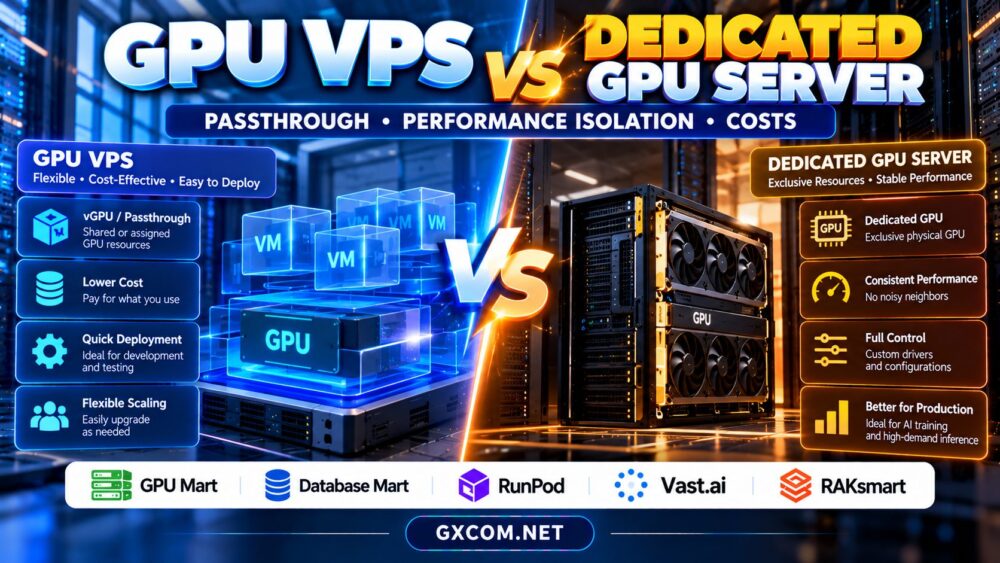
GPU VPS vs Dedicated GPU Server: Key Differences
A GPU VPS is a virtual server with access to GPU acceleration. Depending on the provider, that access may involve a shared virtual GPU, an assigned physical GPU through passthrough, or another managed allocation model.
A dedicated GPU server generally gives one customer control over an entire physical server containing one or more GPUs. It typically offers greater hardware control, although the exact management permissions and support arrangements vary.
| Feature | GPU VPS | Dedicated GPU Server |
|---|---|---|
| Compute environment | Virtual machine | Physical server |
| GPU allocation | Shared or assigned, depending on plan | Typically exclusive physical GPUs |
| Performance isolation | Depends on virtualization and allocation | Usually stronger hardware isolation |
| Hardware control | Limited by hypervisor and provider | Generally broader administrative control |
| Scaling | Often convenient for smaller deployments | May require hardware upgrades or migration |
| Best fit | Development and flexible workloads | Sustained, hardware-intensive workloads |
GPU Passthrough vs vGPU: Why the Difference Matters
GPU passthrough assigns a physical GPU device to a virtual machine, commonly through technologies such as PCIe device assignment and IOMMU. This can give the guest operating system relatively direct access to GPU hardware.
However, passthrough does not automatically mean every resource on the host is dedicated. CPU cores, storage, and network bandwidth may still be shared. Confirm whether the assigned GPU is exclusive and whether the provider permits required drivers.
Virtual GPU technology can divide supported GPU resources among multiple virtual machines. Depending on the platform, customers may receive defined memory allocations and scheduling policies rather than unrestricted access to the physical device.
Ask whether the service uses full-device passthrough, hardware-supported partitioning, or time-shared virtualization. Also verify CUDA compatibility, driver restrictions, and whether your software requires features unavailable in the selected configuration.
For a closer look at virtualized hosting options, see our AI GPU VPS providers comparison.

Performance Isolation: Dedicated Does Not Always Mean Faster
A dedicated GPU can reduce contention from other customers using the same accelerator. This matters when inference latency, training throughput, or rendering completion times must remain predictable.
Nevertheless, performance also depends on GPU generation, memory bandwidth, CPU capacity, PCIe connectivity, cooling, storage, and software optimization. A newer GPU VPS configuration can outperform an older dedicated server on some workloads.
Shared GPU environments may introduce variable scheduling delays, while dedicated environments can still experience bottlenecks from insufficient CPU resources or slow dataset access.
Benchmark identical models and settings before purchasing. Measure tokens per second, time to first token, GPU utilization, memory consumption, and performance variation across repeated runs.
For LLM deployments, our AI inference server sizing guide explains how concurrency and GPU memory affect production capacity.
GPU Memory, CUDA Support, and Workload Compatibility
GPU memory determines whether models, datasets, and intermediate computations fit on the accelerator. With a GPU VPS, advertised VRAM may represent an allocated portion of a larger physical device rather than the full GPU memory.
For dedicated hardware, the complete GPU memory is normally available to the customer’s workloads, subject to operating-system and runtime overhead.
Check whether the environment supports your CUDA version, container runtime, machine-learning framework, and required driver privileges. Some virtualized configurations restrict low-level management tools or specialized GPU functionality.
Multi-GPU training adds another consideration: interconnect topology. Dedicated systems may provide specific PCIe or NVLink arrangements, while virtualized offerings may expose only selected devices.
Our NVIDIA AI GPU servers guide provides additional context on accelerator selection.
GPU VPS vs Dedicated GPU Server Costs
GPU VPS plans may be attractive when workloads are intermittent, especially if the provider supports flexible provisioning. Dedicated servers can become economically competitive when GPU demand remains high throughout the month.
Compare effective costs rather than headline prices. Include GPU rental, allocated CPU and RAM, persistent storage, bandwidth, backups, software licensing, and administrative labor.
Consider a hypothetical GPU VPS costing $0.60 per active hour. Running it for 100 hours would cost $60 before additional charges; running it for 720 hours would cost $432. These are illustrative figures, not current provider quotations.
A dedicated server with a fixed monthly price may be more predictable, but paying for unused capacity can increase the cost per completed job.
Also investigate billing while instances are stopped. Persistent disks, reserved resources, and network services may continue generating charges.
Our affordable GPU servers comparison helps readers examine budget-oriented alternatives.
Five Approved Providers Worth Evaluating
GPU Mart: GPU-Oriented Server Requirements
GPU Mart is worth evaluating when your project needs a GPU-focused hosting environment. Review whether a particular offering provides exclusive GPU access, the available VRAM, supported operating systems, and administrative permissions.
Database Mart: Persistent Hosting Considerations
Database Mart can be included in a broader infrastructure comparison. Verify the actual GPU-enabled product, if available, rather than assuming ordinary VPS or dedicated hosting includes acceleration.
RunPod: Flexible AI Workload Deployment
RunPod is relevant for teams exploring GPU-based development and inference deployments. Compare the selected product’s resource allocation, storage persistence, deployment controls, and billing behavior against your application requirements.
Vast.ai: Marketplace GPU Rental
Vast.ai offers another comparison route for GPU rental. Evaluate individual marketplace listings carefully because hardware, host conditions, reliability, and network characteristics can differ between offers.
RAKsmart: Dedicated Infrastructure Evaluation
RAKsmart may be considered when evaluating dedicated server procurement. Confirm current GPU inventory, device exclusivity, server location, and technical support before treating a configuration as suitable for AI workloads.
For additional supplier research, see our GPU cloud provider analysis. Compare actual configurations rather than relying on brand names alone.

Which Option Should You Choose?
Choose a GPU VPS when your priority is development flexibility, smaller workloads, or testing different configurations without committing to an entire physical machine. Confirm GPU allocation and virtualization restrictions before deployment.
Choose a dedicated GPU server when sustained utilization, exclusive hardware access, custom drivers, or predictable infrastructure control justify the commitment.
For either option, request precise specifications and benchmark your own application. A reliable purchase decision should reflect workload performance, operational responsibilities, and total monthly cost.
Compare GPU Hosting Options
Evaluate GPU allocation, memory, software compatibility, and total costs before choosing your next deployment.
Frequently Asked Questions
Does GPU passthrough guarantee dedicated GPU performance?
Not entirely. Passthrough can assign a physical GPU to a VM, but shared host resources and configuration limits may still affect performance.
Can a GPU VPS run large language models?
Yes, if the available GPU memory, drivers, compute resources, and deployment permissions meet the model’s requirements.
Is a dedicated GPU server cheaper for continuous use?
It can be, but the answer depends on utilization, hardware generation, monthly pricing, and operational costs. Compare real workload economics.
Final Verdict
GPU VPS hosting favors flexibility, while dedicated GPU servers favor hardware control and predictable resource access. Neither is universally better. Verify passthrough or vGPU allocation, benchmark performance isolation, and calculate total costs before committing to a provider.