A dedicated server advertised with a 10Gbps network port sounds significantly faster than a server with a 1Gbps connection. In theory, the port supports ten times the line rate. But does that translate into ten times faster downloads, better website performance, or lower latency?
Not necessarily.
The actual performance of a dedicated server depends on more than its network interface. Provider uplinks, bandwidth commitments, traffic allowances, routing, network congestion, storage performance, and the remote endpoint can all limit throughput.
For infrastructure buyers, the 10Gbps vs 1Gbps Dedicated Server decision is about matching network capacity to real workloads rather than paying for the highest advertised port speed.
This guide compares network port speed, bandwidth, latency, transfer limits, unmetered plans, 95th-percentile billing, practical benchmarks, and infrastructure costs. It also explains what to verify when comparing providers such as Cherry Servers, ServerMania, GTHost, DediXLAB, and Hostwinds.
Editorial methodology: Network calculations in this guide use standard decimal units and clearly stated assumptions. The numerical examples are theoretical or hypothetical, not independently measured results or current provider quotations. Actual performance and availability vary by server configuration, network path, and contract.
10Gbps vs 1Gbps Dedicated Server: Quick Verdict
Choose a 1Gbps dedicated server when your sustained and peak network traffic comfortably fits within 1Gbps, your application does not require extremely fast bulk transfers, and cost efficiency matters more than additional network headroom.
Choose a 10Gbps dedicated server when your workload can actually exceed 1Gbps, you transfer large datasets frequently, or you need additional aggregate throughput for many simultaneous connections.
Do not choose 10Gbps solely to improve website loading time or network latency. A faster port does not automatically improve routing, round-trip time, application processing, or single-user download speeds.
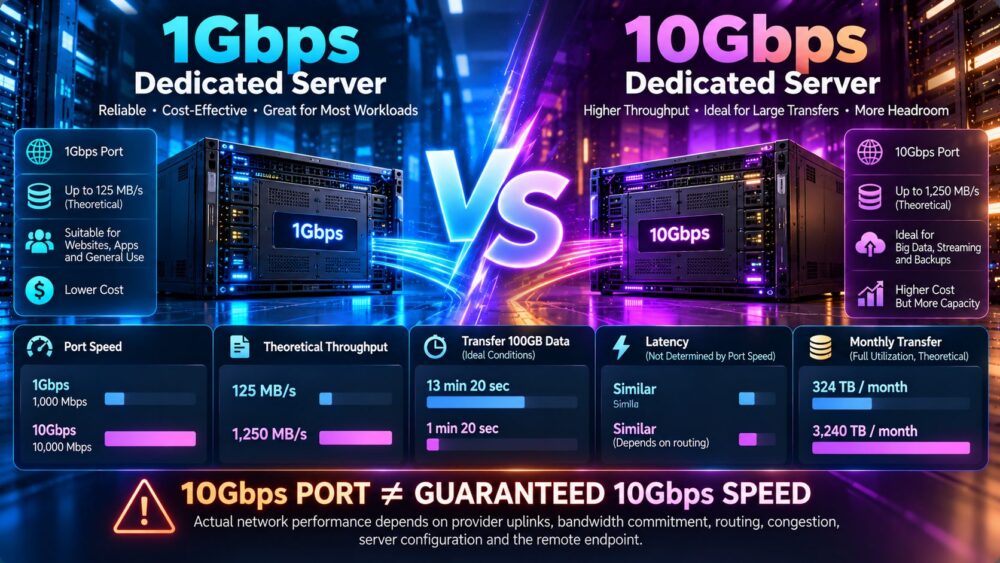
| Factor | 1Gbps Dedicated Server | 10Gbps Dedicated Server |
|---|---|---|
| Advertised port rate | 1,000 Mbps | 10,000 Mbps |
| Theoretical maximum | 125 MB/s | 1,250 MB/s |
| Ideal transfer of 100GB | 13 minutes 20 seconds | 1 minute 20 seconds |
| Single-connection speed | Depends on end-to-end path | Depends on end-to-end path |
| Latency improvement | Not determined by port speed | Not automatically lower |
| Aggregate throughput ceiling | Lower | Higher |
| Traffic allowance | Provider-specific | Provider-specific |
| Typical purchasing priority | Cost and sufficient capacity | Higher peak or sustained throughput |
What Does a 1Gbps Dedicated Server Mean?
A 1Gbps dedicated server generally has a network connection advertised at a nominal rate of one gigabit per second.
One gigabit equals 1,000 megabits in standard decimal networking notation.
1Gbps in Megabytes per Second
Because one byte contains eight bits:
1,000 Mbps / 8 = 125 MB/s.
This is a theoretical conversion of line rate. Actual application throughput is lower after accounting for protocol overhead and other limitations.
What Can a 1Gbps Server Handle?
A 1Gbps connection can support many conventional websites, application servers, APIs, databases, and business services.
Whether it is sufficient depends on the size, frequency, and concurrency of data transfers.
When 1Gbps Becomes a Bottleneck
A 1Gbps port may become restrictive when sustained traffic approaches its usable capacity, especially during backups, replication, media delivery, or high-concurrency downloads.
What Does a 10Gbps Dedicated Server Mean?
A 10Gbps dedicated server generally has a network interface or uplink advertised at ten gigabits per second.
However, a 10Gbps port does not automatically mean the hosting provider guarantees 10Gbps of usable internet throughput at all times.
10Gbps in Megabytes per Second
The theoretical line-rate conversion is:
10,000 Mbps / 8 = 1,250 MB/s.
10Gbps Port vs 10Gbps Guaranteed Bandwidth
A 10Gbps network interface defines a potential link speed. The actual committed capacity may be lower.
For example, a provider might offer a 10Gbps port with a lower guaranteed bandwidth commitment or a defined monthly transfer allowance.
10Gbps Shared vs Dedicated Capacity
Providers may use different commercial terms to describe port capacity, shared uplinks, or committed bandwidth.
Buyers should request written confirmation of the service's actual throughput commitment and congestion policies.
Port Speed vs Bandwidth vs Data Transfer
These three concepts are related but should not be used interchangeably.
Port Speed
Port speed describes the nominal data rate of a network connection, such as 1Gbps or 10Gbps.
Bandwidth Capacity
In hosting offers, bandwidth may refer to available throughput, committed capacity, or a commercial service tier.
The precise meaning should be verified in the provider's terms.
Monthly Data Transfer
Monthly transfer is the quantity of data moved during a billing period, commonly measured in GB or TB.
Example: Fast Port, Small Allowance
A server may have a 10Gbps port but only a limited monthly transfer allowance.
Large bursts may be possible, yet sustained high-volume transfers could trigger overage charges, throttling, or other contractual consequences.
Network Capacity Verdict
Always compare port rate, committed throughput, monthly transfer, overage policy, and routing quality together.
10Gbps vs 1Gbps: Real Download Speed
A faster server port can improve downloads only when the remaining network path and receiving system support the additional throughput.
Client Connection Limits
A user with a 100Mbps home connection cannot download at 10Gbps from a remote server.
Remote Server Limits
The receiving endpoint may have a slower port, a bandwidth cap, or insufficient CPU or storage performance.
Internet Routing
Traffic crosses multiple networks. Congestion or poor routing can reduce throughput independently of the dedicated server's port speed.
TCP Behavior
TCP congestion control, round-trip time, packet loss, and receive-window sizing can influence transfer speed.
Parallel Transfers
Multiple simultaneous connections may achieve higher aggregate throughput than a single connection, depending on the workload and network conditions.
Real Download Speed Verdict
A 10Gbps server can offer a higher throughput ceiling, but the user will experience that benefit only when the complete transfer path can use it.
Does 10Gbps Reduce Latency?
Not automatically.
Latency is affected by physical distance, routing, network equipment, queueing, congestion, and application behavior.
Latency vs Throughput
Throughput measures how much data can be transferred over time.
Latency measures the delay associated with communication.
Serialization Delay
A faster link can reduce the time required to serialize a packet onto that link.
However, for many internet applications, propagation delay, routing, and server processing contribute much more to total response time.
Queueing Under Load
Additional link capacity can reduce congestion-related queueing when a slower link is the actual bottleneck.
That does not mean a lightly loaded 10Gbps connection will always have lower latency than a lightly loaded 1Gbps connection.
Latency Verdict
For latency-sensitive applications, measure round-trip time, packet loss, jitter, routing, and application response times—not just port speed.
1Gbps vs 10Gbps: How Long Do Large Transfers Take?
Consider a theoretical 100GB file transfer.
Using decimal units:
100GB × 8 = 800Gb.
At an ideal 1Gbps:
800Gb / 1Gbps = 800 seconds, or 13 minutes 20 seconds.
At an ideal 10Gbps:
800Gb / 10Gbps = 80 seconds, or 1 minute 20 seconds.
These results are idealized lower bounds. Real transfers take longer because of protocol overhead, congestion, storage limitations, and other bottlenecks.
| Transfer Size | 1Gbps Ideal Time | 10Gbps Ideal Time |
|---|---|---|
| 10GB | 80 seconds | 8 seconds |
| 100GB | 13 min 20 sec | 1 min 20 sec |
| 500GB | 1 hr 6 min 40 sec | 6 min 40 sec |
| 1TB | 2 hr 13 min 20 sec | 13 min 20 sec |
Monthly Data Transfer: The Hidden Difference
A dedicated server's port speed determines a potential transmission rate, not the amount of data included in the hosting plan.
1Gbps at Continuous Full Utilization
At an ideal 1Gbps, a connection could theoretically transfer 10.8TB per day.
Across 30 days, that equals 324TB.
10Gbps at Continuous Full Utilization
At an ideal 10Gbps, a connection could theoretically transfer 108TB per day.
Across 30 days, that equals 3,240TB.
Why These Numbers Matter
A plan offering a 10Gbps port and 20TB of monthly transfer does not permit continuous 10Gbps traffic for the entire month without exceeding that allowance.
Traffic Allowance Verdict
Estimate monthly data volume separately from peak throughput requirements.
Metered vs Unmetered Dedicated Server Bandwidth
Bandwidth billing models can change the economics of a dedicated server.
Metered Traffic
Metered plans provide a defined transfer allowance or charge based on measured usage.
Unmetered Traffic
Unmetered plans generally do not impose a conventional per-GB traffic allowance within the stated service conditions.
However, unmetered does not necessarily mean unlimited capacity, unrestricted use, or guaranteed full-port throughput.
Unmetered 1Gbps
An unmetered 1Gbps plan may be attractive for predictable sustained traffic that fits within its usable capacity.
Unmetered 10Gbps
An unmetered 10Gbps plan may support higher aggregate throughput, but buyers should examine fair-use terms, network commitments, and acceptable-use policies.
Billing Verdict
Compare the actual service commitment and contract, not only the word “unmetered.”

What Is 95th-Percentile Bandwidth Billing?
Some hosting and colocation services use 95th-percentile billing for network traffic.
How It Works
Traffic is sampled at regular intervals during a billing period.
Samples are sorted, and the highest five percent are excluded before determining the billing percentile.
Important Contract Details
Providers may differ in sampling intervals, inbound and outbound treatment, committed rates, and overage calculation.
Why It Matters
Short bursts may affect the billing calculation differently from sustained traffic.
95th-Percentile Verdict
Ask the provider for its exact measurement and billing methodology before selecting a plan.
10Gbps vs 1Gbps for High-Traffic Websites
Website traffic volume alone does not determine whether a 10Gbps port is necessary.
Dynamic Websites
Database queries, application execution, caching, and storage can limit website performance before network throughput becomes a bottleneck.
Static Content
Large static assets and downloads may place greater demand on outbound bandwidth.
Traffic Spikes
Sudden traffic peaks can require additional network headroom, especially when many users download large resources simultaneously.
CDN Integration
A content delivery network can distribute cached content closer to users and reduce traffic reaching the origin server.
Website Verdict
Measure peak outbound throughput and application response time before upgrading from 1Gbps to 10Gbps.
10Gbps vs 1Gbps for Video Streaming
Video delivery can consume substantial bandwidth, particularly when many viewers stream simultaneously.
Estimating Streaming Capacity
For a simplified example, assume each viewer consumes 5Mbps.
At a theoretical 1Gbps:
1,000Mbps / 5Mbps = 200 simultaneous streams.
At a theoretical 10Gbps:
10,000Mbps / 5Mbps = 2,000 simultaneous streams.
These figures ignore protocol overhead, traffic variability, transcoding costs, and other operational limits.
Transcoding Bottlenecks
CPU or GPU transcoding capacity may become the limiting factor before network bandwidth.
CDN Offloading
For large audiences, a CDN may be more effective than upgrading only the origin server's network port.
Streaming Verdict
Calculate viewer bitrate, concurrency, CDN cache hit rate, and origin bandwidth requirements together.
10Gbps vs 1Gbps for Backups and Data Replication
Large backup jobs and replication tasks are among the clearest use cases for higher network throughput.
Backup Windows
A faster connection may reduce the time required to transfer large backup datasets when storage and remote endpoints can sustain the transfer.
Database Replication
Replication performance depends on the database engine, change rate, storage, and network behavior.
Cross-Region Transfers
Long-distance links can introduce additional latency and throughput constraints.
Recovery Time Objectives
Organizations with demanding recovery targets may need faster transfer capacity, but network upgrades should be evaluated alongside backup architecture and storage performance.
Backup Verdict
Consider 10Gbps when data volume and recovery requirements justify it, after validating end-to-end throughput.
10Gbps vs 1Gbps for Game Servers
Game server performance is often more sensitive to latency, jitter, packet loss, and server processing time than to extremely high aggregate throughput.
Latency
Network path and geographical distance can have a major impact on player experience.
Packet Loss
Loss and congestion can degrade real-time gameplay.
CPU Performance
Game simulation performance may depend heavily on processor speed and application optimization.
Network Capacity
Additional bandwidth matters when the server approaches its current throughput ceiling.
Game Hosting Verdict
A well-routed 1Gbps server can be preferable to a poorly routed 10Gbps server for many game workloads.
10Gbps vs 1Gbps for AI and Data Workloads
AI infrastructure can generate large data transfers between storage, training systems, and inference services.
Dataset Transfers
Large datasets may benefit from higher throughput when source and destination systems support it.
Model Checkpoints
Moving large model checkpoints between systems can consume substantial network capacity.
Distributed Training
Distributed training may require specialized high-performance networking. A public 10Gbps internet port is not equivalent to a dedicated low-latency GPU cluster interconnect.
Inference Traffic
Some inference services are limited by GPU compute or model execution rather than external network bandwidth.
AI Infrastructure Verdict
Separate public internet connectivity from private cluster networking when designing AI infrastructure.
Shared Bandwidth vs Dedicated Bandwidth
Two servers advertised with the same port rate may deliver different performance under load.
Shared Network Infrastructure
Multiple customers may share upstream network capacity.
Committed Bandwidth
A provider may offer a specific committed rate or contractual performance commitment.
Oversubscription
Network oversubscription occurs when potential customer demand exceeds the capacity available at a shared aggregation point.
Congestion
Congestion may reduce throughput and increase queueing delay.
Network Commitment Verdict
Request details about guaranteed capacity, uplink design, and traffic policies when comparing premium network plans.
International Network Performance and Routing
A server with a 10Gbps port may still deliver disappointing performance to users in another country.
Geographical Distance
Physical distance contributes to propagation delay.
Transit Providers
Different upstream networks and peering arrangements can produce different routes and performance.
Regional Congestion
Congested international routes can limit throughput.
Packet Loss
Packet loss can significantly affect TCP transfer performance.
Routing Verdict
Test from the actual countries and networks where your customers or applications operate.
How to Benchmark a 1Gbps or 10Gbps Dedicated Server
Meaningful network testing requires more than running one speed test.
1. Confirm Link Negotiation
Verify the network interface is operating at the expected link speed.
2. Test Against a Capable Endpoint
The remote test server must have enough available bandwidth to avoid becoming the bottleneck.
3. Use iperf3
iperf3 can measure network throughput between controlled endpoints.
4. Compare Single and Parallel Streams
Test both single-stream and parallel-stream performance.
5. Test Different Locations
Use endpoints in relevant geographic regions.
6. Measure Latency and Loss
Record round-trip time, jitter where relevant, and packet loss.
7. Monitor CPU Usage
Encryption, packet processing, and application overhead may limit throughput.
8. Monitor Storage Throughput
File transfer benchmarks can be constrained by disk read or write speeds.
9. Repeat During Peak Hours
Test at different times to identify congestion-related variation.
10. Compare With the Contract
Determine whether observed results align with the provider's actual service commitment.
Example iperf3 Commands
Install iperf3 on two servers you control or have permission to test.
On the receiving server:
iperf3 -sOn the sending server:
iperf3 -c SERVER_IP -t 30For a parallel-stream test:
iperf3 -c SERVER_IP -P 8 -t 30For a reverse-direction test:
iperf3 -c SERVER_IP -R -t 30Replace SERVER_IP with the authorized destination server address.
Parallel streams may help reveal available aggregate capacity, but they should not be presented as proof of guaranteed single-connection performance.
Use an appropriate maintenance window and avoid saturating production networks without authorization.
Common Reasons a 10Gbps Server Does Not Reach 10Gbps
- The provider has a lower committed bandwidth rate.
- The upstream network is congested.
- The remote endpoint has insufficient capacity.
- The client uses a slower network connection.
- Packet loss reduces effective TCP throughput.
- The application cannot generate traffic fast enough.
- CPU processing or encryption limits performance.
- Storage read or write speed becomes the bottleneck.
- Network interface settings or drivers are misconfigured.
- Traffic shaping or contractual rate limits apply.
A high-speed network port removes one possible bottleneck. It does not eliminate all other constraints.
10Gbps vs 1Gbps Dedicated Server Cost Comparison
The financial decision should account for port upgrades, bandwidth commitments, data transfer charges, and the value of faster completion.
Hardware Cost
Equivalent servers may differ in price because of CPU, RAM, storage, and configuration choices.
Network Port Upgrade
A 10Gbps port may be included in some configurations or offered as an additional paid option.
Traffic Allowance
Higher port speed does not necessarily include more monthly data transfer.
Overage Charges
Metered plans may apply additional charges when traffic exceeds the included allowance.
Committed Bandwidth
Guaranteed or committed capacity can have a different cost structure from a best-effort port.
Operational Value
Faster transfers may reduce backup windows, deployment time, or data processing delays.
Hypothetical 36-Month Infrastructure Cost
Consider two hypothetical dedicated servers with equivalent hardware.
| Cost Component | 1Gbps Server | 10Gbps Server |
|---|---|---|
| Base server rental | $100/month | $100/month |
| Network upgrade | $0/month | $60/month |
| Backup service | $15/month | $15/month |
| Monthly total | $115 | $175 |
| 12-month total | $1,380 | $2,100 |
| 36-month total | $4,140 | $6,300 |
Illustrative assumptions only. These are not provider quotations. Both configurations are assumed to include sufficient traffic for the intended workload, with no overage charges. Taxes, setup fees, management, and other optional services are excluded.
Under these assumptions, the 10Gbps configuration costs $2,160 more over three years.
The upgrade is economically justified only if its additional capacity creates enough operational or commercial value.
When Is a 10Gbps Dedicated Server Worth It?
Consider a 10Gbps upgrade when:
- Peak network traffic regularly approaches 1Gbps.
- Large transfers must complete within short windows.
- Many users require high aggregate download capacity.
- Backup and replication tasks are network-limited.
- Storage and remote endpoints can sustain higher throughput.
- The provider offers an appropriate bandwidth commitment.
- The cost of network congestion exceeds the upgrade cost.
For smaller workloads, improving application caching, database performance, or content delivery may provide more value than increasing port speed.
Dedicated Server Providers to Compare
Network specifications vary across providers, locations, and individual server products. Always verify the exact port, transfer allowance, and bandwidth commitment before ordering.
Cherry Servers
Cherry Servers offers dedicated and bare-metal infrastructure that may appeal to businesses requiring control over server resources and networking.
When evaluating Cherry Servers, confirm available port speeds, included traffic, network upgrade options, and regional connectivity for the selected hardware.
ServerMania
ServerMania provides dedicated server infrastructure and related hosting services.
It is worth comparing for businesses evaluating hardware, network capacity, and support requirements.
Request the specific port rate, committed bandwidth, traffic allowance, and overage terms rather than relying on a general product description.
GTHost
GTHost offers dedicated server products and may be relevant for buyers prioritizing deployment speed and available server configurations.
Check the network port, transfer policy, server location, and any product-specific bandwidth restrictions.
DediXLAB
DediXLAB may be considered by buyers evaluating budget-oriented dedicated infrastructure.
Compare its exact network specifications, support scope, traffic policies, and upgrade availability before making a purchasing decision.
Hostwinds
Hostwinds provides dedicated hosting services and support options.
For network-sensitive workloads, verify the available port speeds, included bandwidth, managed support coverage, and network policies for the chosen server.
Dedicated Server Provider Network Checklist
| Question | Why It Matters |
|---|---|
| Is the port 1Gbps or 10Gbps? | Defines nominal connection speed |
| Is the full port rate guaranteed? | Clarifies throughput commitment |
| Is bandwidth shared? | Identifies possible contention |
| What monthly transfer is included? | Controls data-volume costs |
| Are overages charged? | Prevents billing surprises |
| Is traffic billed at the 95th percentile? | Changes usage economics |
| Which regions are available? | Affects user latency and routing |
| Is DDoS protection included? | Affects resilience and service terms |
| Are test IPs available? | Enables route and latency testing |
| What are the upgrade terms? | Supports future capacity planning |
For a wider hardware and provider evaluation, see our Bare Metal Server Comparison.
10Gbps vs 1Gbps: Dedicated Server vs VPS
Dedicated servers and VPS products may advertise similar port speeds, but their resource allocation models differ.
Dedicated Server Networking
A dedicated server provides exclusive use of its allocated physical compute hardware, while upstream network infrastructure may still be shared.
VPS Networking
A VPS uses virtualized resources and may share host networking capacity with other virtual machines.
Advertised Port Rates
A 10Gbps VPS interface does not automatically provide the same guaranteed throughput as a dedicated network commitment.
Infrastructure Verdict
Evaluate actual resource allocation, network policy, and workload requirements rather than comparing interface speeds alone.
Read our Dedicated Server vs VPS Comparison for a deeper explanation of hardware isolation and performance trade-offs.
10Gbps vs 1Gbps for Cloud vs Dedicated Infrastructure
Cloud and dedicated hosting use different infrastructure and billing models.
Cloud Networking
Cloud instances may have network performance tiers, transfer charges, and virtualized network interfaces.
Dedicated Networking
Dedicated servers provide physical hardware allocation, but external network capacity still depends on the service plan.

Data Transfer Charges
Some cloud services charge separately for outbound transfer, while dedicated hosting offers may include defined traffic allowances.
Choosing an Architecture
Compare the complete cost of compute, networking, storage, and operations.
Our Dedicated vs Cloud Server Guide explores these infrastructure differences.
How to Decide Whether to Upgrade from 1Gbps to 10Gbps
- Collect at least several weeks of network usage data.
- Measure peak and sustained throughput separately.
- Identify whether the current port is saturated.
- Measure latency, packet loss, and routing quality.
- Check CPU, storage, and application bottlenecks.
- Estimate future concurrency and data transfer growth.
- Review the provider's monthly traffic allowance.
- Compare the full upgrade cost.
- Benchmark a 10Gbps configuration when possible.
- Upgrade only when the expected benefit justifies the expense.
For guidance on selecting a suitable server tier, see our Affordable Dedicated Server Deals Guide.
Common Mistakes When Comparing Server Network Speeds
Mistake 1: Assuming 10Gbps Guarantees 10Gbps Downloads
Actual performance depends on the complete network path.
Mistake 2: Confusing Port Speed With Monthly Transfer
These are separate service characteristics.
Mistake 3: Assuming Faster Ports Reduce Latency
Routing, distance, congestion, and application behavior remain important.
Mistake 4: Ignoring the Remote Endpoint
A slow receiving system can limit transfers.
Mistake 5: Ignoring Storage Performance
Disk throughput can prevent a server from fully using a high-speed connection.
Mistake 6: Trusting One Speed Test
Results can vary by endpoint, time, and test methodology.
Mistake 7: Overlooking Bandwidth Billing
Metered transfer, unmetered terms, and 95th-percentile billing can produce different costs.
Mistake 8: Upgrading Before Measuring
More network capacity provides little value if the current link is not the bottleneck.
Frequently Asked Questions
Is a 10Gbps dedicated server ten times faster than a 1Gbps server?
Its nominal port rate is ten times higher, but actual application performance may improve by much less because of other bottlenecks.
What is the difference between 1Gbps and 10Gbps?
1Gbps represents one gigabit per second, while 10Gbps represents ten gigabits per second.
How fast is 1Gbps in MB/s?
The theoretical line-rate conversion is 125MB/s before protocol overhead.
How fast is 10Gbps in MB/s?
The theoretical line-rate conversion is 1,250MB/s before protocol overhead.
Does a 10Gbps port guarantee 10Gbps internet speed?
No. Actual throughput depends on the provider's commitment, network conditions, and remote endpoints.
Does 10Gbps improve website loading speed?
Only when network throughput is a meaningful bottleneck. Application processing, caching, and latency may matter more.
Does 10Gbps reduce ping?
Not automatically. Port speed and round-trip latency measure different characteristics.
What does unmetered bandwidth mean?
It generally means traffic is not billed through a conventional per-GB allowance within the plan's stated conditions, but it does not necessarily mean unlimited capacity.
What is the difference between shared and dedicated bandwidth?
Shared bandwidth may be subject to contention, while dedicated or committed bandwidth refers to a defined service commitment under the provider's terms.
What is 95th-percentile billing?
It is a billing method based on sampled traffic rates after excluding the highest five percent of samples, subject to the provider's measurement rules.
How much data can a 1Gbps port transfer in a month?
At an ideal continuous full rate for 30 days, approximately 324TB in decimal units. Actual allowances and throughput may be much lower.
How much data can a 10Gbps port transfer in a month?
At an ideal continuous full rate for 30 days, approximately 3,240TB in decimal units. This is not a statement about any provider's included transfer.
Is 1Gbps enough for WordPress hosting?
For many WordPress workloads, yes. Measure actual traffic and application performance before upgrading.
Do game servers need 10Gbps?
Many game servers do not. Latency, packet loss, routing, and CPU performance can matter more than extremely high port speed.
Is 10Gbps useful for video streaming?
It can be useful for high aggregate delivery demand, although CDNs and transcoding capacity also affect the architecture.
Is 10Gbps useful for backups?
It can reduce transfer time when storage, remote endpoints, and network paths can sustain the higher rate.
Can a 10Gbps server still have slow international connections?
Yes. International routing, congestion, and packet loss can reduce effective throughput.
How can I test dedicated server network speed?
Use authorized endpoints, tools such as iperf3, and repeat tests across different locations and times.
Is 10Gbps always more expensive than 1Gbps?
Not necessarily. Pricing depends on the provider, product, included transfer, and network commitment.
When should I upgrade from 1Gbps to 10Gbps?
Upgrade when measured traffic requirements exceed the practical capacity of the existing connection and the additional throughput justifies its cost.
Final Verdict: 10Gbps vs 1Gbps Dedicated Server
The best 10Gbps vs 1Gbps Dedicated Server choice depends on real network demand, not the advertised port rate alone.
A 1Gbps server can be sufficient for many websites, applications, and business workloads when traffic remains below its practical throughput ceiling.
A 10Gbps server can provide valuable additional capacity for large transfers, high-concurrency delivery, backups, and network-intensive services.
However, a faster port does not guarantee faster downloads, lower latency, better routing, or unlimited monthly transfer.
Before purchasing, verify the provider's network commitment, monthly transfer allowance, congestion policy, routing quality, and total cost.
WORKLOAD → PEAK TRAFFIC → PORT SPEED → COMMITTED BANDWIDTH → ROUTING → TRANSFER ALLOWANCE → TOTAL COST