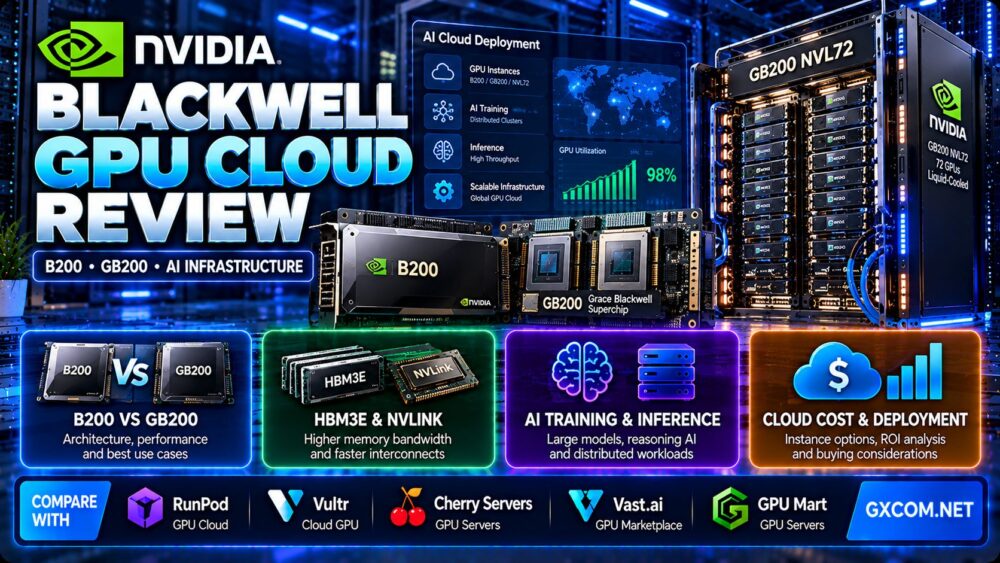
This NVIDIA Blackwell GPU cloud review examines the B200, GB200 Grace Blackwell Superchip, and GB200 NVL72 from an AI infrastructure buying perspective. For organizations deploying large language models, reasoning systems, generative AI applications, and distributed training clusters, choosing Blackwell cloud infrastructure requires more than comparing theoretical GPU performance.
The real purchasing questions involve GPU memory, interconnect topology, CPU architecture, software compatibility, cloud availability, networking, workload utilization, and the total cost of completing useful AI work.
Blackwell represents a major advancement in NVIDIA's data center architecture, but a single B200 GPU instance, a GB200-based node, and a rack-scale GB200 NVL72 deployment are fundamentally different products.
In this review, we explain those differences, examine AI training and inference requirements, compare deployment models, and outline how to evaluate GPU infrastructure providers including RunPod, Vultr, Cherry Servers, Vast.ai, and GPU Mart.
Editorial methodology: This article draws on published NVIDIA architecture documentation and cloud infrastructure purchasing principles. GXCOM.NET has not independently benchmarked B200 or GB200 systems, tested provider uptime, or verified live GPU inventory. Performance claims attributed to NVIDIA should not be interpreted as independently reproduced results.
NVIDIA Blackwell GPU Cloud Review: Quick Verdict
NVIDIA Blackwell cloud infrastructure is worth evaluating for demanding AI workloads that can benefit from high memory bandwidth, advanced low-precision computing, and high-speed GPU interconnects.
B200-based cloud instances may suit organizations requiring powerful GPU compute without purchasing physical hardware. GB200 systems introduce a tightly integrated Grace CPU and Blackwell GPU architecture, while GB200 NVL72 targets large-scale AI systems requiring extensive GPU-to-GPU communication.
However, Blackwell is not automatically the most economical choice for smaller models, lightly utilized applications, or workloads that do not benefit from its architecture.
| Evaluation Area | Blackwell Cloud Assessment |
|---|---|
| GPU architecture | NVIDIA Blackwell |
| Key products | B200, GB200 and GB200 NVL72 |
| Primary workloads | AI training, inference, reasoning and HPC |
| Memory technology | High-bandwidth HBM3E on the evaluated systems |
| Interconnect | Configuration-dependent NVLink and related technologies |
| Deployment | GPU instances, integrated systems and rack-scale infrastructure |
| Main advantage | High compute density and advanced AI acceleration |
| Main limitation | Infrastructure complexity, availability and workload-dependent cost |
| Buying priority | Cost per completed AI workload at required service quality |
What Is NVIDIA Blackwell GPU Cloud Infrastructure?
NVIDIA Blackwell is a GPU architecture designed for accelerated computing, including AI training, inference, data processing, and high-performance computing.
Cloud providers can offer Blackwell hardware through different service models, including dedicated GPU instances, multi-GPU servers, managed clusters, and larger integrated AI infrastructure deployments.
These services differ in how customers access GPUs, manage software, allocate resources, and pay for infrastructure.
A cloud instance advertised as a Blackwell GPU does not necessarily provide access to an entire GB200 system or NVL72 rack.
For a broader comparison of accelerator generations, see our NVIDIA H100 vs H200 vs B200 comparison.
NVIDIA B200 vs GB200 vs GB200 NVL72
The distinction between these products is essential when evaluating Blackwell cloud offers.
NVIDIA B200 GPU
The NVIDIA B200 is a Blackwell Tensor Core GPU designed for demanding data center workloads.
It provides high-bandwidth GPU memory and acceleration features relevant to modern AI frameworks.
Cloud customers should verify the exact B200 configuration, allocated GPU count, memory capacity, host CPU, storage, and interconnect topology.
A single-GPU rental may be appropriate for workloads that fit within one accelerator and do not require extensive multi-GPU communication.
NVIDIA GB200 Grace Blackwell Superchip
The GB200 Grace Blackwell Superchip integrates one NVIDIA Grace CPU with two Blackwell GPUs through NVIDIA's NVLink-C2C technology.
This architecture is designed to improve communication between CPU and GPU resources and support demanding accelerated computing workloads.
However, the Grace CPU uses an Arm-based architecture. Customers should verify operating system images, container dependencies, compiled libraries, and application compatibility.
NVIDIA GB200 NVL72
GB200 NVL72 is a liquid-cooled, rack-scale system containing 36 Grace CPUs and 72 Blackwell GPUs.
NVIDIA specifies approximately 13.4TB of total HBM3E GPU memory and 130TB/s of aggregate NVLink communication bandwidth for the rack-scale configuration.
These are system-level specifications, not the resources allocated to an individual GPU instance.
NVL72 is designed for very large AI models and workloads that benefit from extensive communication across GPUs.
Blackwell Product Comparison
| Product | Architecture | Typical Evaluation Focus |
|---|---|---|
| B200 | Individual Blackwell GPU | Per-GPU performance, memory and rental configuration |
| GB200 | Grace CPU plus two Blackwell GPUs | CPU-GPU integration and software compatibility |
| GB200 NVL72 | 72-GPU liquid-cooled rack-scale system | Distributed AI, high-speed interconnect and cluster economics |
Blackwell GPU Memory: Why Capacity and Bandwidth Matter
GPU memory determines whether an AI workload can run efficiently on a particular accelerator configuration.
For large language model inference, memory consumption includes model weights, runtime overhead, activations, and key-value cache.
Longer context windows and higher concurrency can increase memory requirements substantially.
Model Weights
The amount of memory required for model weights depends on parameter count and numerical precision.
Lower-precision formats can reduce memory usage, but compatibility and model quality must be evaluated.
KV Cache
Transformer inference commonly uses a key-value cache to avoid repeating certain calculations.
Cache requirements can grow with sequence length, batch size, and model architecture.
A model that fits comfortably at low concurrency may run out of memory when many users submit long requests.
Memory Bandwidth
High memory bandwidth can improve workloads that frequently move model data between memory and compute units.
However, actual inference speed also depends on kernels, batching, precision, and compute utilization.
Multi-GPU Memory
Multiple GPUs do not automatically behave like one unrestricted pool of memory.
Applications must use appropriate model parallelism, communication libraries, and supported interconnects.
Before renting multiple Blackwell GPUs, confirm how the GPUs communicate and whether the required framework supports that topology.
Blackwell AI Inference Performance
Blackwell introduces architectural capabilities relevant to modern AI inference, including low-precision acceleration and high-bandwidth communication.
However, theoretical performance does not directly translate into application throughput.
Time to First Token
For interactive LLM applications, time to first token measures how quickly a model begins producing output.
It can be influenced by queueing, prompt processing, model execution, and network latency.
Output Tokens per Second
Generation speed is important for chatbots, coding assistants, and reasoning applications.
Benchmark results should specify the model, precision, input length, output length, batch size, and serving software.
Concurrent Requests
Production inference services must handle multiple users without excessive latency.

Higher concurrency may improve hardware utilization but can increase memory pressure and tail latency.
Low-Precision Computing
Blackwell supports advanced low-precision computing capabilities, including NVIDIA's NVFP4-related acceleration features.
Real benefits depend on software support, quantization methods, and acceptable model quality.
Customers should not assume that every model automatically benefits from a lower numerical precision.
Reasoning Models
Reasoning-intensive applications may generate substantially more tokens than conventional short-response workloads.
This increases the importance of sustained inference throughput, memory efficiency, and cost per generated token.
Blackwell for AI Training and Fine-Tuning
Blackwell infrastructure can support demanding AI training workloads, but hardware selection should follow model requirements and distributed training architecture.
Full Model Training
Large-scale training can require many accelerators working together.
GPU count, memory, networking, checkpoint storage, and software parallelism all influence training efficiency.
Fine-Tuning
Fine-tuning smaller models may not require an entire GB200 system.
Parameter-efficient approaches can reduce memory and compute requirements.
Before choosing expensive infrastructure, compare the actual training time and total cost across suitable GPU generations.
Distributed Training
Distributed workloads can be limited by communication overhead.
NVLink, InfiniBand, Ethernet design, and software libraries such as NCCL are important considerations.
Adding more GPUs may deliver diminishing returns when communication and synchronization dominate the workload.
Checkpoint Storage
Training checkpoints can be large and must be written reliably.
Slow storage or poorly designed checkpoint schedules can reduce effective training throughput.
For broader purchasing considerations, explore our NVIDIA GPU server providers guide.
Why NVLink and Networking Matter for GB200
High-speed GPU communication is a major architectural feature of GB200 systems.
However, buyers should distinguish between GPU-to-GPU communication inside a system and communication across separate cloud nodes.
Intra-System Communication
NVLink and NVSwitch enable high-bandwidth communication among supported GPUs.
These technologies are especially relevant when model parameters or activations must move between devices.
Inter-Node Networking
Large clusters also depend on high-performance network fabrics such as InfiniBand or appropriately designed Ethernet networks.
Network congestion, latency, topology, and collective communication performance can affect training throughput.
Cloud Allocation Boundaries
Renting multiple GPUs does not guarantee that they share the same NVLink domain.
Customers should request clear documentation about GPU topology, interconnect bandwidth, and placement guarantees.
Storage Networking
Dataset ingestion and checkpointing can require substantial storage throughput.
High GPU performance may be wasted if storage systems cannot supply data efficiently.
Blackwell Cloud Deployment Models
Organizations can access GPU infrastructure through different service models.
Single-GPU Cloud Instances
Single-GPU instances may be suitable for inference, development, testing, and smaller training workloads.
They are easier to evaluate and generally require less distributed systems engineering.
Multi-GPU Cloud Servers
Multi-GPU servers support workloads that require more memory or compute capacity than one GPU can provide.
Customers should confirm GPU topology, CPU resources, RAM, local storage, and networking.
Managed GPU Clusters
Managed clusters can reduce some orchestration work for large-scale training and inference.
However, the customer still needs to validate workload performance, scheduling behavior, data movement, and costs.
Rack-Scale GB200 Systems
GB200 NVL72 represents a different procurement category from a conventional GPU virtual machine.
Rack-scale infrastructure can involve dedicated capacity arrangements, specialized cooling, networking, and enterprise procurement processes.
Not every cloud provider offers direct customer access to complete NVL72 systems.
Blackwell GPU Cloud Availability: What Should Buyers Verify?
NVIDIA announced general cloud availability of GB200 NVL72-based instances through CoreWeave in February 2025.
However, cloud availability is not uniform across providers, regions, and service models.
Customers should verify the exact hardware and allocation offered rather than assuming every product labeled Blackwell is equivalent.
GPU Model
Confirm whether the service provides B200, GB200-based infrastructure, or another Blackwell-family accelerator.
GPU Allocation
Check whether the offer includes a full physical GPU, multiple GPUs, or a partitioned resource.
Geographic Region
GPU inventory can vary significantly between regions.
Location also affects network latency, data residency, and application architecture.
Capacity Reservation
Large training jobs may require guaranteed access to multiple GPUs for an extended period.
Confirm reservation terms and what happens if capacity becomes unavailable.
Software Environment
Verify driver versions, CUDA compatibility, container images, framework support, and CPU architecture.
Blackwell GPU Cloud Cost: Beyond Hourly Pricing
Blackwell infrastructure can involve significant operating costs, especially when multiple accelerators and high-performance networking are required.
However, the lowest hourly rental rate is not necessarily the lowest cost per completed workload.
Compute Charges
GPU billing may depend on allocated devices, rental duration, reservation terms, and service type.
Compare equivalent resource allocations rather than relying on product names alone.
Idle Capacity
Dedicated GPU instances can generate charges while idle under their billing terms.
Organizations should monitor utilization and avoid allocating expensive capacity before workloads are ready.
Storage
Large datasets, model checkpoints, and inference artifacts can require substantial storage.
Review persistent storage, temporary storage, snapshot, and backup policies.
Networking
Data transfer charges and network performance can materially affect total costs.
For distributed training, poor communication efficiency can also increase the amount of billable GPU time.
Software and Operations
Include deployment engineering, monitoring, orchestration, security, troubleshooting, and recovery procedures.
Total Cost Formula
Total AI workload cost = GPU compute + Storage + Data transfer + Reserved capacity + Operational services + Recovery overhead + Applicable taxes.
Then calculate:
Cost per completed workload = Total attributable cost / Number of successfully completed workloads.
For inference:
Cost per million output tokens = Total attributable inference cost / Successfully generated output tokens × 1,000,000.
Input tokens, output tokens, latency targets, and batching behavior should be reported separately when comparing serving systems.
B200 vs H200: When Is Upgrading Worth It?
Moving from Hopper-generation GPUs to Blackwell may improve performance for compatible workloads, but the decision should be based on measured results.
A newer GPU may provide better throughput or memory capabilities while carrying a different rental cost.
The upgrade is economically justified when the performance improvement, operational benefits, or memory requirements outweigh the additional expense.
Compare Equivalent Workloads
Use the same model, numerical precision, batch size, input length, output length, and framework configuration where possible.
Measure Real Throughput
Evaluate tokens per second, completed training steps, or successful inference requests.
Check Software Support
Older framework builds may not fully exploit newer accelerator features.
Calculate Effective Cost
Compare the total cost of completing the same workload at the required quality and latency.
A cheaper hourly GPU can be more expensive if it takes substantially longer to finish the job.
RunPod vs Vultr vs Cherry Servers vs Vast.ai vs GPU Mart
Several GPU infrastructure providers are relevant when evaluating Blackwell cloud deployment strategies.
However, the following comparison concerns their general service models. It does not establish that every provider currently offers B200 or GB200 capacity.
| Provider | Infrastructure Approach | Buying Consideration |
|---|---|---|
| RunPod | GPU cloud instances and serverless services | GPU deployment flexibility and AI workflows |
| Vultr | Cloud GPU infrastructure | Cloud instances, regions and infrastructure management |
| Cherry Servers | Dedicated and cloud infrastructure | Physical hardware allocation and customization |
| Vast.ai | GPU marketplace | Individual machine availability and host reliability |
| GPU Mart | GPU server hosting | Fixed hardware configurations and server control |
RunPod
RunPod provides GPU cloud and serverless infrastructure for AI workloads.
It may be relevant to developers evaluating model deployment, inference endpoints, and configurable GPU environments.
For serverless deployment considerations, read our RunPod Serverless GPU review.
Vultr
Vultr offers cloud GPU infrastructure for AI and accelerated computing.
Buyers should compare supported GPU models, regional inventory, networking, and software requirements.
See our Vultr Cloud GPU review for broader infrastructure considerations.
Cherry Servers
Cherry Servers offers dedicated infrastructure and selected GPU-capable server products.
It may be relevant to organizations prioritizing dedicated hardware control and customized server configurations.
Customers should verify the exact accelerator inventory rather than assuming all Blackwell products are available.
Vast.ai
Vast.ai provides a GPU marketplace where individual offers can differ in hardware, pricing, reliability, and rental conditions.
It may suit technically capable teams that can evaluate specific GPU offers and tolerate infrastructure variation.
GPU Mart
GPU Mart offers GPU server products and hosting configurations.
It may be relevant to customers seeking conventional GPU server rental arrangements.
Verify GPU model, memory, system resources, network characteristics, and current availability before comparing with Blackwell cloud offers.
Blackwell Cloud Security and Operational Requirements
AI infrastructure procurement should include security, reliability, and data governance considerations.
Data Protection
Verify where datasets and model artifacts are stored and processed.
Organizations handling sensitive data should review contractual and technical controls.
Access Management
Use appropriate identity controls, least-privilege permissions, and credential management.
Checkpoint and Recovery Strategy
Large training jobs should have reliable checkpoint procedures and independent storage.
Monitoring
Track GPU utilization, memory usage, network throughput, errors, job completion rates, and total spending.
Availability Planning
Production systems should account for infrastructure maintenance, hardware faults, and regional service disruptions.
Who Should Choose NVIDIA Blackwell GPU Cloud?
Good Candidates
- Organizations deploying large language models.
- AI teams operating reasoning-intensive inference systems.
- Researchers training or fine-tuning demanding models.
- Businesses requiring high-memory GPU configurations.
- Infrastructure teams building multi-GPU AI services.
- Organizations evaluating high-throughput production inference.
Who Should Consider Alternatives?
- Developers running small models that fit on lower-cost GPUs.
- Teams with low and unpredictable utilization.
- Applications without software support for Blackwell features.
- Organizations without the engineering resources to manage complex GPU clusters.
- Workloads where storage or network performance is the primary bottleneck.
NVIDIA Blackwell GPU Cloud Pros and Cons
Advantages
- Advanced GPU architecture for modern AI workloads.
- High-bandwidth GPU memory.
- Low-precision acceleration capabilities.
- Strong potential for demanding AI inference.
- High-speed interconnect options in integrated systems.
- Architecture suitable for large-scale distributed AI.
- Multiple cloud deployment models.
Limitations
- Higher infrastructure complexity for large deployments.
- Cloud availability varies by provider and region.
- Software compatibility must be verified.
- GB200 introduces Arm CPU considerations.
- Large clusters require specialized networking and orchestration.
- Actual performance depends on model and software configuration.
- High hourly costs can become inefficient under low utilization.
- Published benchmark claims may not represent customer workloads.
Blackwell GPU Cloud Buying Checklist
- Define the AI workload and target model.
- Calculate required GPU memory.
- Determine whether B200, GB200 or rack-scale infrastructure is necessary.
- Check CUDA, framework and container compatibility.
- Confirm CPU architecture requirements.
- Verify actual GPU allocation and interconnect topology.
- Review available regions and inventory.
- Evaluate storage and checkpoint requirements.
- Confirm network bandwidth and data transfer policies.
- Measure realistic training or inference throughput.
- Test latency under expected concurrency.
- Review capacity reservation and cancellation terms.
- Calculate total workload cost.
- Compare with suitable Hopper-generation alternatives.
- Plan security, monitoring and recovery.
Frequently Asked Questions
What is NVIDIA Blackwell GPU cloud?
It refers to cloud infrastructure built on NVIDIA Blackwell-family accelerators, offered through GPU instances, integrated systems, managed clusters or larger AI infrastructure deployments.

What is the difference between B200 and GB200?
B200 is a Blackwell GPU. GB200 Grace Blackwell Superchip integrates one Grace CPU and two Blackwell GPUs through a high-speed CPU-GPU interconnect.
What is GB200 NVL72?
GB200 NVL72 is a liquid-cooled rack-scale system containing 36 Grace CPUs and 72 Blackwell GPUs connected through high-speed NVLink infrastructure.
Is GB200 faster than B200?
They are not directly equivalent products. GB200 combines CPUs and GPUs in an integrated architecture, while NVL72 is a much larger system. Performance comparisons require matching workloads and allocated resources.
Is Blackwell good for AI inference?
Blackwell is designed for demanding AI inference workloads, but actual performance depends on model architecture, precision, software, memory requirements and deployment configuration.
Can I rent a single B200 GPU?
Availability depends on the cloud provider, region and current inventory. Confirm whether the advertised service provides a full B200 GPU or another allocation model.
Does GB200 use an Arm CPU?
Yes. The Grace CPU in GB200 is Arm-based, so software compatibility should be checked before deployment.
Is Blackwell cheaper than H200?
Not universally. Compare actual rental terms and the cost of completing equivalent workloads rather than assuming newer hardware is automatically more economical.
Do all GPU cloud providers offer GB200?
No. GPU availability and service models vary. Customers should verify current hardware listings and allocation terms with each provider.
Should I choose Blackwell for a small AI model?
Not necessarily. Smaller models may run economically on other GPU generations. The best choice depends on memory, throughput, latency and total cost.
Final Verdict: Is NVIDIA Blackwell GPU Cloud Worth It?
Our NVIDIA Blackwell GPU cloud review finds that B200 and GB200 infrastructure deserves consideration for demanding AI training, inference, and reasoning workloads.
The key is choosing the correct deployment scale. A single B200 instance, an integrated GB200 system, and a GB200 NVL72 rack serve different infrastructure requirements.
Organizations should prioritize software compatibility, GPU memory, interconnect topology, workload throughput, availability and total operating cost.
Before committing to a deployment, compare suitable cloud and dedicated infrastructure options, test representative workloads, and calculate the cost of completing useful AI work.
MODEL REQUIREMENTS → GPU ARCHITECTURE → MEMORY → INTERCONNECT → SOFTWARE → CLOUD AVAILABILITY → THROUGHPUT → TOTAL COST → DEPLOYMENT DECISION