RTX 3090 vs RTX 4090 is one of the most practical GPU comparisons for AI developers searching for affordable 24GB GPU servers. Both NVIDIA GeForce graphics cards offer 24GB of GDDR6X memory, making them relevant for local language model inference, LoRA and QLoRA fine-tuning, image generation, computer vision, and other GPU-accelerated workloads. However, their architectures, computing performance, power requirements, and rental economics differ significantly.
The RTX 3090 remains an option worth evaluating when rental prices are competitive. The RTX 4090 delivers newer Ada Lovelace capabilities and substantially greater theoretical compute performance, but its higher rental cost may not always translate into better value for every AI workload.
This guide compares RTX 3090 and RTX 4090 GPU servers, explains what 24GB of VRAM can realistically support, and shows how to evaluate AI performance, software compatibility, hosting providers, and total workload costs.
RTX 3090 vs RTX 4090: Specifications Compared
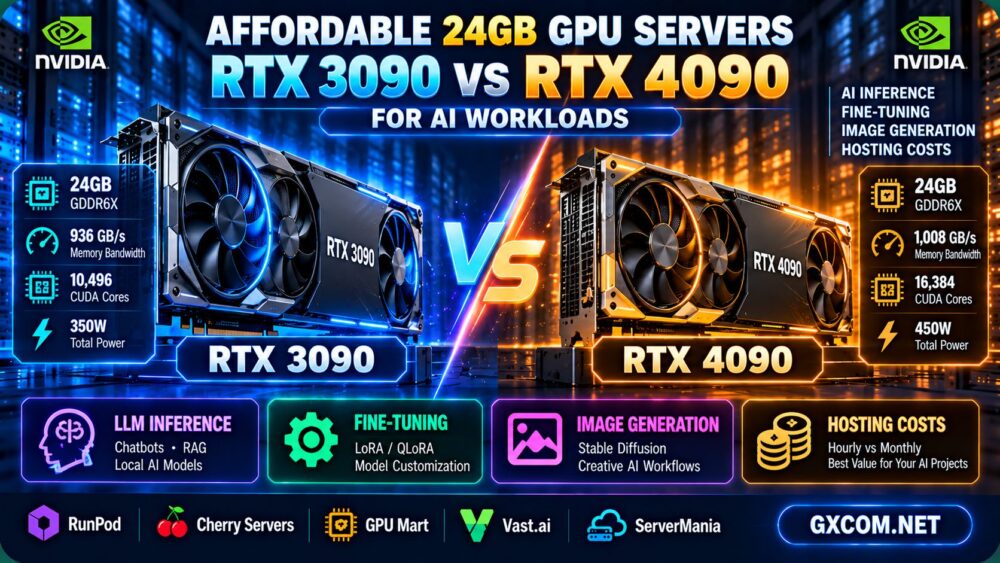
Although both GPUs provide the same memory capacity, the underlying hardware is substantially different.
| Specification | NVIDIA RTX 3090 | NVIDIA RTX 4090 |
|---|---|---|
| Architecture | Ampere | Ada Lovelace |
| GPU memory | 24GB GDDR6X | 24GB GDDR6X |
| Memory bandwidth | 936GB/s | 1,008GB/s |
| CUDA cores | 10,496 | 16,384 |
| Tensor Core generation | Third generation | Fourth generation |
| Peak FP32 performance | Approximately 35.6 TFLOPS | Approximately 82.6 TFLOPS |
| Reference total graphics power | 350W | 450W |
| NVLink support | Yes, with compatible hardware | No |
| AV1 hardware encoding | No | Yes |
Specifications describe physical graphics cards. Actual hosted configurations, power limits, virtualization arrangements, and application performance may differ. Peak FP32 values are not AI inference or training benchmarks.
The RTX 4090 provides approximately 8% more theoretical memory bandwidth than RTX 3090, alongside substantially higher peak compute capability. However, both GPUs remain limited to 24GB of onboard memory.
Why 24GB GPU Servers Remain Relevant for AI
GPU memory is a critical resource for modern AI workloads. A 24GB accelerator can be useful for many smaller and medium-sized models, particularly when developers use supported quantization or parameter-efficient training techniques.
Compared with GPUs offering 8GB, 12GB, or 16GB of VRAM, a 24GB card provides additional flexibility for model weights, activation buffers, and inference context.
However, 24GB is not sufficient for every large language model or training configuration.
What Can Fit Into 24GB of VRAM?
A simplified estimate for dense model weights is:
Model weight memory = parameter count × bytes per parameter
| Model Size | 16-bit Weights | 8-bit Weights | 4-bit Weights |
|---|---|---|---|
| 7B parameters | 14GB | 7GB | 3.5GB |
| 8B parameters | 16GB | 8GB | 4GB |
| 13B parameters | 26GB | 13GB | 6.5GB |
| 30B parameters | 60GB | 30GB | 15GB |
These are approximate decimal weight-only estimates for dense models. Actual memory requirements include quantization metadata, KV cache, temporary buffers, framework overhead, and other runtime resources.
For example, a 13B model stored at 16-bit precision requires approximately 26GB for weights alone, exceeding either GPU's 24GB capacity. Quantization may reduce memory requirements, but compatibility and model quality must also be considered.
For detailed sizing methods, see our LLM hosting requirements guide.
RTX 3090 vs RTX 4090 for LLM Inference
The RTX 3090 vs RTX 4090 decision for language model inference depends on the model, quantization format, context length, serving engine, and required throughput.
RTX 3090 for Budget-Conscious Inference
RTX 3090 can be a practical choice for supported LLM workloads that fit within 24GB of GPU memory.
It may be particularly attractive for experimentation, personal AI projects, small-scale inference services, and workloads where the rental price is substantially lower than newer alternatives.
However, older Tensor Core capabilities and lower peak compute performance may affect throughput for supported AI operations.
RTX 4090 for Faster AI Inference
RTX 4090 introduces Ada Lovelace architecture and fourth-generation Tensor Cores.
Compatible inference workloads may benefit from higher compute throughput and newer numerical capabilities.
Nevertheless, performance improvements depend on the inference framework, model architecture, batch size, and precision. A newer GPU does not guarantee a fixed percentage improvement in generated tokens per second.
What Should You Benchmark?
- Tokens generated per second.
- Time to first token.
- Latency under concurrent requests.
- GPU memory utilization.
- Maximum practical context length.
- Cost per million generated tokens.
For production-oriented evaluation, our AI inference server hosting guide explains the broader infrastructure requirements.
RTX 3090 vs RTX 4090 for LoRA and QLoRA Fine-Tuning
Fine-tuning language models can require substantially more GPU memory than inference because training introduces additional memory for gradients, optimizer states, activations, and temporary computations.
Full-parameter training of large models may exceed the practical capabilities of a single 24GB GPU.
RTX 3090 for Parameter-Efficient Fine-Tuning
RTX 3090 remains relevant for supported LoRA and QLoRA workloads when model size, sequence length, batch size, and training configuration fit within available memory.
Its value depends on rental pricing and the total time required to finish the training job.
RTX 4090 for Compute-Intensive Fine-Tuning
RTX 4090 may reduce training time for compatible workloads through higher compute capability and architectural improvements.
However, it still provides 24GB of VRAM. Training configurations that exceed this capacity may require additional optimization, CPU offloading, or a different GPU.

For a more detailed explanation of training methods, see our LoRA, QLoRA and GPU fine-tuning requirements guide.
RTX 3090 vs RTX 4090 for Stable Diffusion and Image Generation
Generative image workloads are another important use case for affordable 24GB GPU servers.
Diffusion models, image upscaling, inpainting, and other creative AI applications can benefit from GPU memory and compute performance.
RTX 3090 for Affordable Image Generation
RTX 3090 can support many image generation workflows when the required model, resolution, and batch size fit within its memory.
It may offer good value for occasional image generation or cost-sensitive batch processing.
RTX 4090 for Higher Image Generation Throughput
RTX 4090 may provide faster processing for compatible image generation workloads.
The benefit should be measured using identical models, software versions, image resolutions, precision settings, and batch sizes.
For example, a server with a higher hourly price may still offer a lower cost per image if it completes significantly more images during the same billing period.
CUDA, PyTorch and AI Software Compatibility
Both RTX 3090 and RTX 4090 support NVIDIA's CUDA computing ecosystem and compatible AI frameworks.
However, software compatibility should never be assumed solely because a server includes an NVIDIA GPU.
Check CUDA and Driver Requirements
Before renting a server, verify:
- The installed NVIDIA driver supports the GPU and software environment.
- The CUDA runtime matches the intended framework build.
- PyTorch or another AI framework supports the accelerator.
- Required custom kernels and inference extensions are compatible.
- The operating system and container runtime meet application requirements.
- The hosting environment permits necessary software installation.
Why Newer Architecture Support Matters
RTX 4090 belongs to the Ada Lovelace generation, while RTX 3090 uses Ampere.
Some optimized kernels and numerical formats may perform differently across these architectures.
Benchmark the actual application rather than assuming that theoretical compute figures translate directly into real-world performance.
RTX 3090 vs RTX 4090: Multi-GPU Server Considerations
Some AI workloads benefit from multiple GPUs when one accelerator cannot provide sufficient memory or compute capacity.
However, multi-GPU deployment introduces communication overhead, software complexity, and additional infrastructure costs.
RTX 3090 and NVLink
RTX 3090 supports NVLink with compatible hardware configurations.
This can provide a high-bandwidth connection between supported GPUs, but it does not automatically combine two 24GB cards into one universally accessible 48GB memory device.
Software must explicitly manage model partitioning, distributed computation, and memory placement.
RTX 4090 and PCIe Communication
RTX 4090 does not support NVLink. Multi-GPU communication relies on supported system interconnects and software strategies.
For workloads requiring substantial cross-GPU communication, server topology and data transfer overhead should be evaluated carefully.
Our multi-GPU server hosting guide explains PCIe, NVLink, and scaling considerations in more detail.
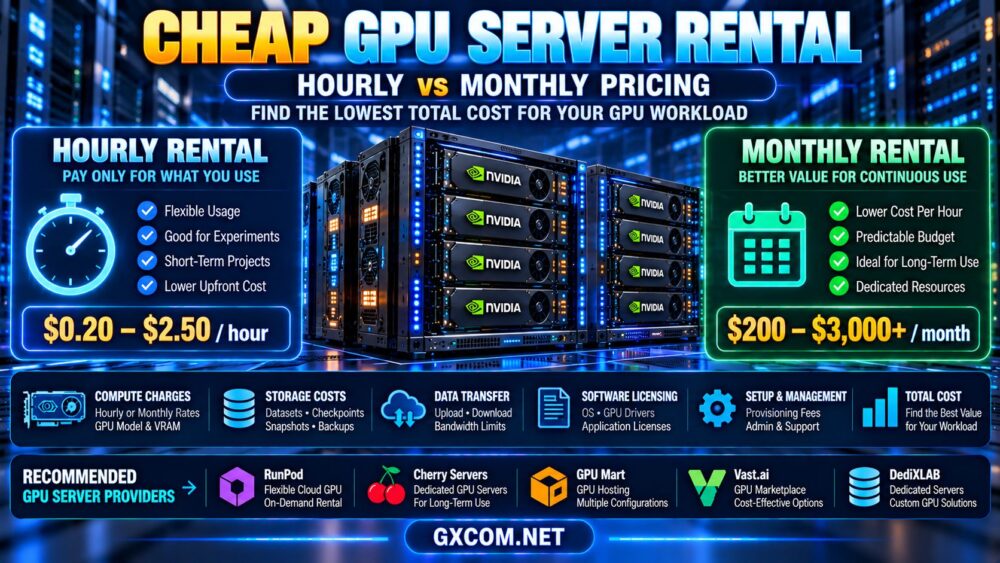
Affordable 24GB GPU Servers: Hourly vs Monthly Rental
When comparing affordable 24GB GPU servers, rental economics matter as much as the physical accelerator.
Hourly GPU hosting can be useful for short experiments, occasional training jobs, and temporary inference workloads.
Monthly or dedicated GPU server rental may become attractive when utilization is predictable and sustained.
Calculate Total Compute Cost
Use the following simplified formula:
Compute cost = billable GPU hours × hourly GPU rate
Then include applicable storage, networking, licensing, setup, and support charges.
Illustrative RTX 3090 vs RTX 4090 Rental Example
Assume two hypothetical offers:
- RTX 3090 server: $0.35 per billable hour.
- RTX 4090 server: $0.65 per billable hour.
| Monthly Usage | RTX 3090 Compute Cost | RTX 4090 Compute Cost |
|---|---|---|
| 100 hours | $35 | $65 |
| 200 hours | $70 | $130 |
| 400 hours | $140 | $260 |
| 720 hours | $252 | $468 |
These are hypothetical examples for explaining rental economics. They are not verified market prices, current supplier quotations, or evidence of product availability.
Under these assumptions, RTX 4090 costs approximately 1.86 times as much per hour. It would need to deliver approximately 1.86 times the useful output per hour to match RTX 3090's compute cost per completed task.
Actual performance ratios vary substantially by workload and software configuration.
For a broader discussion of billing models, see our cheap GPU server rental cost comparison.
Cost per Token: A Better Metric for AI Server Value
For LLM inference, the cheapest hourly GPU is not necessarily the most economical option.
Startups and developers should compare total billable infrastructure cost against successfully generated output tokens.
Cost per million output tokens = total billable cost ÷ output tokens × 1,000,000
Hypothetical Throughput Comparison
Assume the following illustrative results for the same inference workload:
| Metric | RTX 3090 | RTX 4090 |
|---|---|---|
| Hourly rental | $0.35 | $0.65 |
| Illustrative output rate | 50 tokens/second | 110 tokens/second |
| Output tokens per hour | 180,000 | 396,000 |
| Compute cost per million tokens | About $1.94 | About $1.64 |
All throughput and pricing values are hypothetical and do not represent actual benchmarks or supplier prices. The calculation assumes continuous productive generation and excludes other costs.
This example illustrates how a faster GPU can potentially deliver better economics despite a higher hourly rate.
For production decisions, test the same model, quantization, context length, concurrency, and latency targets on both GPUs.
Where to Rent RTX 3090 or RTX 4090 GPU Servers
Several hosting companies and GPU platforms are relevant when researching affordable AI compute.
However, RTX 3090 and RTX 4090 are GeForce-class GPUs. Their availability in hosted environments varies, and customers should verify the exact product and applicable service terms before purchasing.
RunPod: Cloud GPU Computing
RunPod is relevant for AI developers evaluating cloud GPU infrastructure, temporary experiments, and model deployment.
Review its current GPU catalog, allocation model, persistent storage, and billing terms. Do not assume that both RTX 3090 and RTX 4090 are available in every region or deployment type.
Vast.ai: GPU Marketplace Rental
Vast.ai provides a GPU marketplace where individual listings can differ in hardware, price, storage, and host conditions.
For cost-sensitive AI workloads, compare exact GPU specifications, available VRAM, reliability, and data persistence before selecting a listing.
GPU Mart: GPU Hosting Configurations
GPU Mart can be evaluated for GPU-oriented hosting and dedicated hardware requirements.
Confirm whether the desired 24GB GeForce accelerator is available, whether GPU resources are dedicated, and which operating systems and drivers are supported.
Cherry Servers: Dedicated GPU Infrastructure
Cherry Servers is relevant when considering dedicated GPU infrastructure for longer-running AI workloads.
Verify the exact GPU model, CPU and RAM configuration, network specifications, and contractual requirements. A general GPU server offering does not establish RTX 3090 or RTX 4090 availability.
ServerMania: Custom Server Requirements
ServerMania may be considered when discussing dedicated infrastructure and custom server configurations.
Organizations seeking specific GeForce hardware should request written confirmation of availability, hosting suitability, GPU allocation, and commercial terms before comparing quotations.
Important: Provider inclusion is not a claim that every company currently stocks RTX 3090 or RTX 4090 servers. Confirm availability and service conditions directly.
RTX 3090 vs RTX 4090: Which 24GB GPU Server Should You Choose?
The RTX 3090 vs RTX 4090 decision should depend on workload requirements and measured cost efficiency.
| Workload | Starting Recommendation | Reason |
|---|---|---|
| Budget AI experimentation | Evaluate RTX 3090 | Potentially attractive rental economics |
| Small and medium LLM inference | Benchmark both | Same VRAM, different compute performance |
| LoRA and QLoRA fine-tuning | Benchmark both | Training time and memory limits matter |
| High-throughput image generation | Evaluate RTX 4090 | Newer architecture and greater compute capability |
| AV1 video encoding | Evaluate RTX 4090 | Dedicated AV1 hardware encoding support |
| NVLink-dependent configuration | Evaluate compatible RTX 3090 systems | RTX 4090 lacks NVLink |
| Models exceeding 24GB VRAM | Consider higher-memory GPUs | Neither card increases single-GPU memory capacity |
These are workload-based starting points, not guaranteed performance rankings.

Affordable 24GB GPU Server Buying Checklist
- Confirm the exact GPU: RTX 3090 or RTX 4090, including allocation details.
- Verify 24GB of usable VRAM: Check virtualization and resource restrictions.
- Estimate model memory: Include weights, KV cache, and runtime overhead.
- Check CUDA compatibility: Confirm drivers, frameworks, and optimized kernels.
- Benchmark useful throughput: Measure tokens, images, or training tasks per hour.
- Review CPU and RAM: Avoid preprocessing and data loading bottlenecks.
- Check NVMe storage: Include datasets, model weights, and checkpoints.
- Evaluate network quality: Consider upload speed, transfer charges, and latency.
- Compare billing models: Include idle time, storage, and monthly commitments.
- Confirm hosting terms: Verify hardware availability, support, and permitted workloads.
Frequently Asked Questions
Is RTX 4090 better than RTX 3090 for AI?
RTX 4090 has newer architecture and significantly higher theoretical compute performance. It may be faster for many compatible AI workloads, but both GPUs provide 24GB of VRAM. The better rental value depends on actual performance and pricing.
How much VRAM do RTX 3090 and RTX 4090 have?
Both GPUs provide 24GB of GDDR6X memory.
Can RTX 3090 run a 13B language model?
A dense 13B model at 16-bit precision requires approximately 26GB for weights alone, exceeding 24GB. Quantized configurations may fit, depending on the model, runtime overhead, and context requirements.
Is RTX 4090 good for LoRA fine-tuning?
RTX 4090 can be suitable for supported parameter-efficient fine-tuning workloads. Actual feasibility depends on model size, quantization, sequence length, batch size, and framework compatibility.
Does RTX 4090 support NVLink?
No. RTX 4090 does not support NVLink. RTX 3090 supports NVLink in compatible configurations, but memory pooling is not automatic.
Which GPU is cheaper to rent?
Rental prices depend on the provider, location, billing model, and availability. RTX 3090 may be attractive at a lower rate, but RTX 4090 can sometimes provide better cost per completed workload.
Is RTX 4090 worth paying more for?
It can be worthwhile when the application benefits enough from higher compute performance to offset the rental premium. Benchmark the actual workload before deciding.
Can I use RTX 3090 or RTX 4090 for production AI hosting?
Both can run compatible AI applications, but they are consumer GeForce GPUs rather than enterprise data center accelerators. Evaluate reliability, cooling, memory requirements, hosting policies, and operational support before production deployment.
Final Verdict: RTX 3090 vs RTX 4090 for AI Workloads
The RTX 3090 vs RTX 4090 comparison is particularly relevant for developers seeking affordable 24GB GPU servers without committing to more expensive data center hardware.
RTX 3090 remains a practical candidate for budget-conscious AI experimentation, supported LLM inference, and parameter-efficient fine-tuning when rental pricing is favorable.
RTX 4090 offers newer Ada Lovelace architecture, greater theoretical compute performance, and additional media capabilities that may improve throughput for compatible workloads.
However, both GPUs share the same 24GB memory limit. Workloads requiring more memory may need a different accelerator or multi-GPU strategy.
RunPod, Vast.ai, GPU Mart, Cherry Servers, and ServerMania represent different infrastructure options to investigate, but buyers should verify exact GeForce GPU availability and commercial terms.
AI MODEL → VRAM REQUIREMENTS → GPU PERFORMANCE → RENTAL RATE → COST PER COMPLETED TASK
The best affordable 24GB GPU server is the one that meets your software and performance requirements at the lowest sustainable total workload cost.