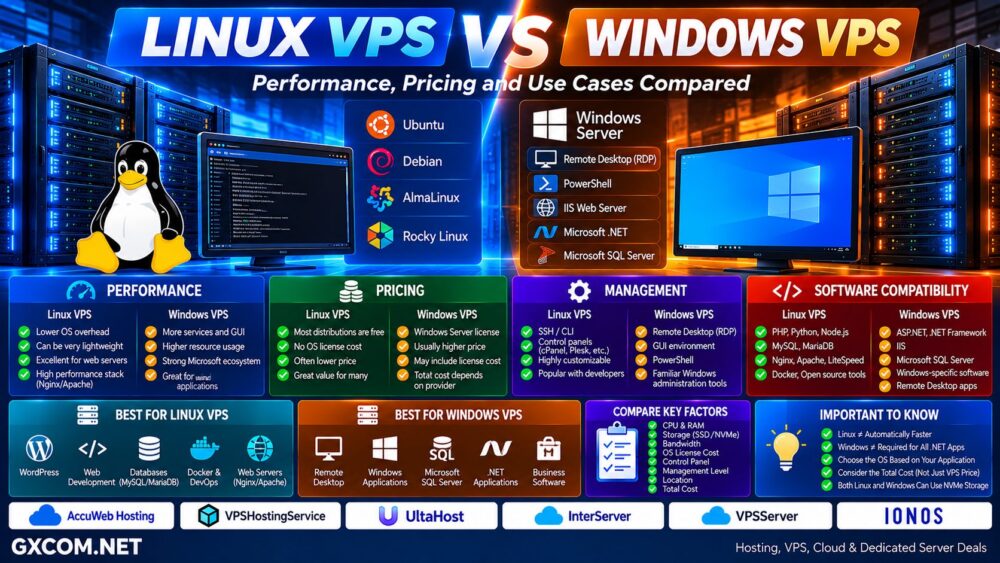
Linux VPS and Windows VPS can run on identical server hardware while providing very different hosting environments.
Both can offer dedicated virtual resources, administrator-level access, SSD or NVMe storage, dedicated IP addresses, and the ability to install custom applications. The main difference is the operating system—and that choice affects software compatibility, licensing, management, security workflows, resource usage, and total server cost.
Linux dominates many web-server and cloud workloads, while Windows VPS remains important for applications built around Microsoft technologies, Windows administration tools, Remote Desktop, and software that specifically requires Windows.
In this Linux VPS vs Windows VPS comparison, we examine performance, pricing, management, control panels, software compatibility, WordPress, databases, remote desktops, and the workloads best suited to each operating system.
Linux VPS vs Windows VPS: Quick Comparison
| Feature | Linux VPS | Windows VPS |
|---|---|---|
| Operating System | Linux distributions | Windows Server |
| License Cost | Most distributions are free | Commercial licensing normally applies |
| Typical Management | SSH / CLI / Control Panel | RDP / PowerShell / GUI |
| Web Stack | Apache, Nginx, LiteSpeed | IIS plus other supported servers |
| Microsoft .NET | Modern .NET supported | Best fit for Windows-specific .NET workloads |
| ASP.NET | Modern ASP.NET Core supported | Strong Microsoft ecosystem support |
| SQL Server | Supported on selected Linux distributions | Native Microsoft environment |
| WordPress | Excellent | Possible |
| Remote Desktop | Possible with additional software | Native RDP environment |
| Resource Overhead | Can be very lightweight | Usually requires more resources |
| Best For | Web hosting, development, databases | Microsoft and Windows applications |
What Is a Linux VPS?
A Linux VPS is a virtual private server running a Linux-based operating system.
Common distributions include:
- Ubuntu
- Debian
- AlmaLinux
- Rocky Linux
Linux VPS hosting is widely used for websites, databases, APIs, development environments, containers, control panels, VPNs, SaaS applications, and general server workloads.
Administration is commonly performed through SSH and the command line, although hosting control panels can provide graphical management interfaces.
What Is a Windows VPS?
A Windows VPS is a virtual server running Microsoft Windows Server.
Administrators commonly connect through Remote Desktop Protocol (RDP), providing a familiar graphical desktop environment similar to a Windows PC.
Windows VPS is particularly useful when applications depend on:
- Windows Server
- IIS
- Windows-specific .NET applications
- Microsoft SQL Server
- PowerShell
- Remote Desktop
- Windows-only business software
For some workloads, choosing Windows is therefore not a preference—it is an application requirement.
Linux VPS vs Windows VPS Performance
The operating system affects resource usage, but it is only one component of VPS performance.
Actual server performance depends on:
- CPU model
- vCPU allocation
- Shared vs dedicated CPU
- RAM
- SSD or NVMe storage
- Storage IOPS
- Network performance
- Virtualization
- Application configuration
- Operating-system configuration
A minimal Linux installation can operate with relatively low system overhead because unnecessary graphical components and services can be omitted.
Windows Server typically operates a larger system environment, especially when using the graphical desktop experience.
That does not mean Linux automatically makes every application faster.
Operating System ≠ Entire Server Performance.
Linux Can Be More Resource Efficient
One advantage of Linux is the ability to create extremely lightweight server installations.
A web server may need only:
Linux → Nginx → PHP → Database → Application
without running a desktop interface.
This can leave more RAM and CPU capacity available for the actual workload.
That advantage can be particularly useful on smaller VPS plans where every gigabyte of RAM matters.
Windows Performance Depends on the Workload
Windows Server should not be treated simply as a slower alternative.
If an application is designed specifically for Windows technologies, running it in its intended environment can be more practical than trying to recreate the same stack elsewhere.
The correct question is therefore not:
Which operating system is universally faster?
It is:
Which operating system best supports the application you need to run?
Linux and Windows VPS Providers to Compare
Once the operating-system requirements are clear, compare providers based on CPU, RAM, storage, Windows licensing, management, data-center location, bandwidth, backups, and total cost.
For buyers who need both Linux and Windows options, providers such as AccuWeb Hosting, VPSHostingService, UltaHost, InterServer, and IONOS are relevant platforms to compare based on their current VPS offerings.
For cloud-oriented VPS workloads, VPSServer is also worth comparing where its available operating systems match your requirements.
| Provider | VPS Focus | What to Compare |
|---|---|---|
| AccuWeb Hosting | Linux / Windows VPS | OS options, resources and management |
| VPSHostingService | Linux / Windows VPS | Windows pricing, RAM and storage |
| UltaHost | VPS / Managed VPS | Resources, management and locations |
| InterServer | VPS | Linux and Windows configurations |
| IONOS | VPS / Cloud | Infrastructure and total cost |
| VPSServer | Cloud VPS | Cloud deployment and OS availability |
Operating-system availability and licensing can change, so always verify the current VPS configuration before ordering.
Linux VPS vs Windows VPS Pricing
Linux VPS is often cheaper when otherwise comparable servers are offered because popular Linux distributions such as Ubuntu and Debian do not require a commercial operating-system license fee.
Windows Server is commercially licensed, and hosting providers may incorporate that licensing expense into the VPS price or charge it separately.
The relevant calculation is therefore:
VPS + Operating System + Control Panel + Management + Backup + Software Licenses = Real Monthly Cost.
Never compare Linux and Windows VPS from the headline server price alone.
Linux VPS vs Windows VPS Management
The administration experience is one of the biggest differences.
Linux:
SSH → Shell → Configuration Files → Package Manager
Windows:
RDP → Windows Desktop → Server Manager / PowerShell
Linux can be extremely efficient for administrators comfortable with command-line tools.
Windows can be easier for users already familiar with graphical Windows administration.
Neither approach is inherently easier for everyone. Familiarity matters.
Linux VPS vs Windows VPS Control Panels
A control panel can substantially reduce the difference in day-to-day hosting management.
Linux VPS environments commonly use hosting panels such as:
- cPanel
- Plesk
- DirectAdmin
Windows VPS environments commonly use Plesk and other Windows-compatible management software.
Control-panel licenses can add to the total monthly cost, so include them when comparing VPS prices.
Linux VPS vs Windows VPS for WordPress
Linux is generally the natural choice for WordPress VPS hosting.
The WordPress ecosystem works extremely well with common Linux web stacks built around Nginx or Apache, PHP, and MySQL or MariaDB.
Linux also provides extensive documentation, automation tools, control panels, and hosting software built specifically around this environment.
WordPress can run on Windows Server, but most WordPress users do not need Windows unless another application requirement makes it necessary.
Linux VPS vs Windows VPS for Databases
Both operating systems can host powerful database platforms.
Linux is commonly paired with:
- MySQL
- MariaDB
- PostgreSQL
- Redis
Windows Server is commonly associated with Microsoft SQL Server, although SQL Server also supports selected Linux environments.
The database platform and application architecture should therefore determine the operating system rather than assumptions based on historical compatibility.
Linux VPS vs Windows VPS for .NET
Modern .NET is cross-platform, which means many newer .NET applications can run on Linux as well as Windows.
However, older applications or software that depends on Windows-specific frameworks, IIS features, COM components, or other Microsoft technologies may still require Windows Server.
Before buying a Windows VPS specifically for .NET, identify exactly which framework and dependencies the application uses.
Windows VPS for Remote Desktop
Remote Desktop is one of the strongest reasons users specifically search for Windows VPS.
A Windows VPS can provide a persistent remote Windows environment accessible from another computer.
Common use cases include:
- Remote business applications
- Windows administration
- Development and testing
- Automation software
- Windows-only applications
- Remote working environments
However, software compatibility should be checked carefully. A VPS normally provides virtualized CPU resources and does not automatically include a dedicated GPU.
Linux VPS for Developers
Linux is heavily used in modern software development and server deployment.
It is particularly well suited to:
- PHP
- Python
- Node.js
- Ruby
- Go
- Docker
- Git
- Web APIs
- DevOps tools
- Open-source databases
The large open-source server ecosystem makes Linux a natural platform for many development workloads.
Which VPS Providers Fit Different Workloads?
For conventional Linux website hosting, development environments and open-source server stacks, compare the current VPS plans from UltaHost, IONOS, InterServer, AccuWeb Hosting, and VPSServer according to CPU, RAM, NVMe storage, bandwidth and location.
If Windows Server and Remote Desktop are requirements, AccuWeb Hosting and VPSHostingService are particularly relevant providers to include in your comparison, alongside other providers offering properly licensed Windows VPS configurations.
Do not choose a Windows VPS simply because you use Windows on your personal computer.
Choose Windows when the server workload benefits from or requires Windows.
Application → OS Requirement → CPU + RAM → Storage → Location → License → Provider → Total Cost.
Linux VPS vs Windows VPS Security
Neither operating system is automatically secure simply because of its name.
Security depends heavily on administration.
For either platform, important practices include:
- Installing security updates
- Using strong authentication
- Restricting unnecessary ports
- Configuring firewalls
- Securing administrator accounts
- Monitoring logs
- Maintaining backups
- Updating applications
Linux administrators should secure SSH and root access, while Windows administrators should pay particular attention to RDP exposure, administrator accounts, firewall rules, and patching.
Operating System ≠ Security Strategy.
Linux VPS vs Windows VPS with NVMe
Both Linux and Windows VPS can benefit from NVMe storage.
NVMe is a storage technology and is not exclusive to either operating system.
For database-heavy applications, ecommerce, multi-site hosting and other I/O-intensive workloads, storage performance may be an important part of the server decision.
See our
NVMe VPS vs SSD VPS
comparison for a deeper look at storage performance.
Linux VPS vs Windows VPS on Cloud Infrastructure
Both operating systems can also run as virtual machines on cloud infrastructure.
Cloud architecture changes how compute, storage, networking, provisioning and scaling may operate, but it does not eliminate the Linux-versus-Windows application decision.
For the infrastructure difference, read our
Cloud VPS vs Traditional VPS
comparison.
Managed vs Unmanaged Linux and Windows VPS
The operating system is separate from the management model.
A Linux VPS can be managed or unmanaged.
A Windows VPS can also be managed or unmanaged.
Self-managed servers require the customer to handle much more of the operating system, software, security, monitoring and troubleshooting.
If you do not want to administer the server yourself, compare the exact management scope offered by the provider.
Our
Managed vs Unmanaged VPS
guide explains this distinction in more detail.
Linux VPS vs Windows VPS: Pros and Cons
| Linux VPS | Windows VPS | |
|---|---|---|
| Main Advantage | Efficiency and open-source ecosystem | Microsoft ecosystem and native GUI |
| OS License | Usually no commercial fee | Usually licensed |
| Management | SSH / CLI / Panels | RDP / GUI / PowerShell |
| Resource Usage | Can be very lightweight | Usually higher baseline requirements |
| WordPress | Excellent fit | Supported but usually unnecessary |
| Microsoft Workloads | Depends on application | Excellent fit |
| Remote Desktop | Additional setup | Native environment |
| Best For | Web and open-source workloads | Windows-specific workloads |
Choose Linux VPS If…
- You host WordPress or other PHP websites
- You use Nginx or Apache
- You use MySQL, MariaDB or PostgreSQL
- You develop with common open-source server technologies
- You use Docker or DevOps tools
- You are comfortable with SSH
- You want a lightweight server environment
- You want to avoid Windows licensing costs
Choose Windows VPS If…
- Your application requires Windows Server
- You need Windows-specific software
- You depend on IIS features
- You need a native Remote Desktop environment
- You use legacy Windows-dependent .NET applications
- Your business software requires Windows
- You prefer Windows server administration
Questions to Ask Before Buying
- Does the application require Linux or Windows?
- Which OS versions are available?
- Is the Windows license included?
- What CPU model is used?
- How much RAM is included?
- Is storage SSD or NVMe?
- Is the VPS managed or unmanaged?
- Is a control panel included?
- Are backups included?
- How much bandwidth is provided?
- Which data-center locations are available?
- What is the renewal price?
- What is the real monthly cost including licenses?
Linux VPS vs Windows VPS: Which Should You Choose?
Choose Linux VPS when your workload is built around WordPress, PHP, open-source databases, web development, containers, or conventional Linux server software.
Choose Windows VPS when the application specifically requires Windows Server, Microsoft technologies, Remote Desktop, IIS, or Windows-only software.
For applications capable of running well on either operating system, Linux can provide a lightweight environment without the additional Windows operating-system licensing component.
But do not choose an operating system from price alone.
Linux ≠ Automatically Faster.
Windows ≠ Automatically Better for Every .NET Application.
The most reliable decision process is:
Application → Software Compatibility → OS → CPU + RAM → Storage → Management → License → Provider → Total Cost.
The operating system should follow the workload. Once that requirement is clear, compare VPS providers based on the complete server configuration rather than choosing Linux or Windows from familiarity alone.