Web hosting and WordPress hosting are often presented as two different hosting products, but the relationship between them is simpler than it first appears.
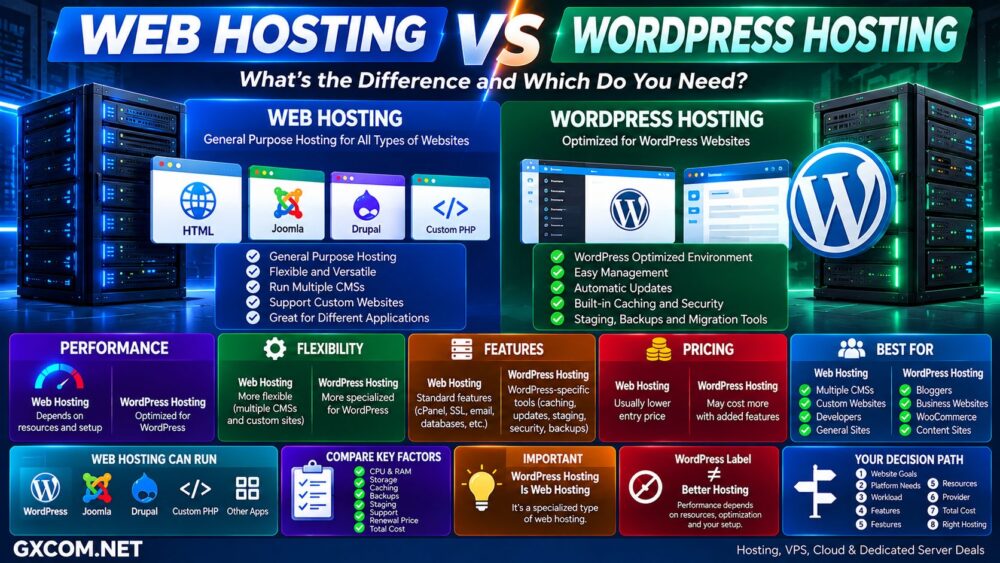
Web hosting is the broad category. It provides the infrastructure required to make websites and web applications available online. WordPress hosting is web hosting specifically configured or optimized for websites running WordPress.
That means every WordPress hosting plan is a form of web hosting, but not every web hosting plan is specifically designed for WordPress.
The practical difference usually appears in performance optimization, automatic updates, caching, security tools, staging, backups, migration features, WordPress support, and how much website management the hosting provider handles.
In this Web Hosting vs WordPress Hosting comparison, we examine performance, pricing, flexibility, management, security, WooCommerce support, and the situations where paying for WordPress-specific hosting makes sense.
Web Hosting vs WordPress Hosting: Quick Comparison
| Feature | Web Hosting | WordPress Hosting |
|---|---|---|
| Primary Purpose | General website hosting | Hosting optimized for WordPress |
| WordPress Support | Usually supported | Primary platform |
| Other CMS | Usually supported | May be restricted |
| Custom Applications | Depends on plan | Usually more limited |
| WordPress Installation | Usually available | Often pre-installed or one-click |
| WordPress Updates | May require user management | Often automated |
| WordPress Caching | Plan dependent | Often optimized |
| Staging | Plan dependent | Common on higher tiers |
| WordPress Security | General hosting security | May include WordPress-specific tools |
| Technical Support | General hosting support | May include WordPress expertise |
| Flexibility | Higher | More WordPress focused |
| Best For | Different CMSs and general websites | Websites committed to WordPress |
What Is Web Hosting?
Web hosting is the infrastructure and service that stores website files, databases, applications, images, and other resources and makes them accessible through the internet.
The term covers many different infrastructure models, including:
- Shared hosting
- VPS hosting
- Cloud hosting
- Dedicated servers
- Managed hosting
- WordPress hosting
General-purpose web hosting may support WordPress alongside other platforms such as Joomla, Drupal, custom PHP applications, website builders, and other software depending on the hosting environment.
See our Web Hosting resources for more information about general website hosting.
What Is WordPress Hosting?
WordPress hosting is web hosting designed specifically around the requirements of the WordPress content management system.
Depending on the provider and plan, WordPress-specific features can include:
- WordPress pre-installation
- Automatic WordPress updates
- WordPress-specific caching
- Automatic backups
- Staging environments
- WordPress migration tools
- Malware scanning
- WP-CLI
- WordPress-focused support
- WooCommerce tools
The objective is not necessarily to provide completely different hardware. It is often to make deploying, maintaining, securing, and optimizing WordPress easier.
Explore our WordPress Hosting resources for WordPress-specific hosting guides.
The Biggest Difference: General Purpose vs WordPress Optimized
The simplest way to understand the difference is:
Web Hosting → Many Website Platforms
WordPress Hosting → WordPress-Focused Environment
A conventional web-hosting account may still run WordPress perfectly well.
The advantage of a dedicated WordPress hosting product is that more of the hosting stack and management experience may already be configured around WordPress.
WordPress Hosting ≠ Completely Different Internet Infrastructure.
Web Hosting vs WordPress Hosting Performance
WordPress hosting is often marketed as faster, but the product name alone does not guarantee better performance.
Website speed depends on:
- CPU performance
- Available RAM
- SSD or NVMe storage
- PHP configuration
- Web server
- Database performance
- Server-side caching
- Object caching
- CDN
- WordPress theme
- Plugins
- Application optimization
- Network latency
WordPress hosting can have an advantage when the provider uses WordPress-specific caching, database optimization, CDN integration, optimized PHP settings, or other platform-specific technologies.
However, a well-optimized WordPress website on quality general web hosting can still perform extremely well.
WordPress Hosting ≠ Automatically Faster WordPress.
Web Hosting and WordPress Hosting Providers to Compare
Once you understand the technical difference, it becomes easier to compare real hosting providers based on the features included rather than simply choosing whichever plan contains the word “WordPress.”
GXCOM.NET readers comparing these two hosting approaches can consider providers such as GreenGeeks, Bluehost, IONOS, UltaHost, FastComet, ChemiCloud, HostArmada, and AccuWeb Hosting.
| Provider | Relevant Hosting | Worth Comparing For |
|---|---|---|
| GreenGeeks | Web / WordPress Hosting | Small business and WordPress websites |
| Bluehost | Web / WordPress Hosting | WordPress-focused website hosting |
| IONOS | Web / WordPress Hosting | Business websites and WordPress |
| UltaHost | Web / WordPress Hosting | General hosting and growth options |
| FastComet | Web / WordPress Hosting | Managed website experience |
| ChemiCloud | Web / WordPress Hosting | WordPress and general websites |
| HostArmada | Web / WordPress Hosting | Managed hosting features |
| AccuWeb Hosting | Web / WordPress Hosting | Budget and managed hosting options |
Do not choose from brand name alone. Compare the actual plan resources, backup frequency, staging support, storage, website limits, migration policy, introductory price, renewal price, and support scope.
Do You Need WordPress Hosting to Use WordPress?
No.
A self-hosted WordPress website can run on many hosting environments as long as the server meets WordPress requirements.
That can include:
- Shared web hosting
- WordPress hosting
- VPS
- Cloud hosting
- Dedicated servers
The important difference is convenience and optimization rather than whether WordPress can technically run.
This is why a general web-hosting plan with WordPress support can still be completely appropriate for many websites.
Web Hosting vs WordPress Hosting Pricing
Basic general-purpose web hosting is often inexpensive because the service is standardized and designed to support a broad range of websites.
WordPress hosting may cost more when it includes additional services such as:
- Automated updates
- Enhanced backups
- Staging
- Specialized caching
- Security tools
- WordPress support
- Premium plugins or themes
- Migration assistance
However, there is substantial overlap in the market. Some providers include managed WordPress features inside standard web-hosting plans, while others sell them as separate premium products.
Compare Renewal Price, Not Just Introductory Price
Hosting promotions can make two products appear much cheaper than their long-term cost.
Before purchasing, compare:
- Introductory monthly equivalent
- Required contract length
- Amount charged upfront
- Renewal price
- Number of websites
- Storage
- Backups
- Staging
- Domain renewal
The useful formula is:
Hosting + Renewal + Backup + Security + Premium Tools + Maintenance = Real Website Cost.
Web Hosting vs WordPress Hosting Flexibility
General web hosting usually provides greater platform flexibility.
Depending on the plan, you may be able to host:
- WordPress
- Joomla
- Drupal
- Custom PHP websites
- Other CMS platforms
- Multiple website types
WordPress hosting is deliberately more specialized.
That specialization can be an advantage when every website you operate uses WordPress, but it may be unnecessary if you need to run different applications.
Web Hosting vs WordPress Hosting for Beginners
Both can be beginner friendly.
Modern web-hosting platforms commonly provide control panels, SSL, one-click installers, email, DNS tools, and customer support.
WordPress hosting can simplify the process further by preconfiguring the environment around WordPress.
A beginner may receive:
Hosting → WordPress Installed → SSL → Updates → Caching → Backup → Dashboard
This reduces the number of technical decisions required to launch and maintain a website.
Web Hosting vs WordPress Hosting Security
Quality general web hosting and WordPress hosting can both provide secure environments.
The potential advantage of WordPress hosting is the addition of platform-specific security controls.
Depending on the provider, these may include:
- WordPress vulnerability monitoring
- Automatic core updates
- Plugin update management
- Malware scanning
- Web application firewall
- Login protection
- Automatic backups
None of these eliminate the website owner's responsibilities.
Weak passwords, abandoned plugins, insecure administrator accounts, outdated themes, and poor application practices can still create security risks.
WordPress Hosting ≠ Automatic WordPress Security.
Web Hosting vs WordPress Hosting for WooCommerce
WooCommerce is where resource requirements become more important.
A small online store can run successfully on conventional web hosting or an entry-level WordPress plan.
As the store grows, dynamic workloads from:
- Shopping carts
- Checkout
- Customer accounts
- Product searches
- Inventory
- Payment gateways
- Database queries
- Concurrent users
can increase CPU, RAM, PHP worker, and database requirements.
At that point, compare actual resources and architecture instead of simply moving to another plan because it is labeled “WordPress.”
Which Providers Fit Different WordPress Needs?
By this stage, the more useful question is not simply “which provider is best?” but which type of provider matches the way you intend to operate the website.
For a straightforward WordPress blog or small business website, GreenGeeks, Bluehost, IONOS, and AccuWeb Hosting are among the providers worth comparing for current WordPress and web-hosting plans.
Users who place greater emphasis on a managed website experience can also compare FastComet, ChemiCloud, HostArmada, and UltaHost.
The final choice should depend on current plan specifications rather than the provider category alone.
Website → WordPress Requirements → Resources → Management → Provider → Renewal Cost.
WordPress Hosting vs Managed WordPress Hosting
Another important distinction is that the term “WordPress hosting” does not always mean fully managed WordPress hosting.
A basic WordPress hosting product may simply provide an environment configured for WordPress.
A stronger managed WordPress service may additionally handle or automate:
- Core updates
- Backups
- Security monitoring
- Caching
- Performance optimization
- Staging
- Migration
- WordPress-specific troubleshooting
Always examine exactly what “managed” means for the individual provider.
For a broader explanation of the management layer, read our
Managed Hosting vs Shared Hosting
comparison.
When Should You Choose General Web Hosting?
General web hosting makes sense when:
- You are not committed to WordPress
- You want to run multiple CMS platforms
- You need greater software flexibility
- You operate a simple website
- You are comfortable maintaining WordPress yourself
- A standard plan already provides the resources you need
- Keeping costs low is a priority
When Should You Choose WordPress Hosting?
WordPress hosting becomes attractive when:
- Your website definitely uses WordPress
- You want easier WordPress installation
- You value automatic updates
- You want WordPress-specific caching
- You need staging
- You want simplified backups
- You prefer WordPress-focused support
- You operate a growing WordPress business site
- You want to reduce routine maintenance
When Should You Move Beyond WordPress Hosting?
WordPress hosting is not the final infrastructure level.
A growing website may eventually require more CPU, RAM, storage, scalability, or server-level control than its current hosting plan provides.
Possible upgrade paths include:
Web Hosting → WordPress Hosting → Cloud / VPS → Dedicated Infrastructure
The exact path depends on workload.
If resource limits rather than WordPress management have become the problem, see our
Shared Hosting vs VPS Hosting
comparison.
Web Hosting vs WordPress Hosting: Pros and Cons
| Web Hosting | WordPress Hosting | |
|---|---|---|
| Main Advantage | Flexibility | WordPress convenience and optimization |
| Main Limitation | Fewer WordPress-specific features | More platform focused |
| Performance | Depends on infrastructure and resources | May include WordPress optimization |
| Maintenance | More general | May automate WordPress tasks |
| Support | General hosting | May be WordPress focused |
| Cost | Often lower at entry level | Can cost more for additional features |
| Best For | Different website platforms | WordPress websites |
Questions to Ask Before Choosing
- Will every website use WordPress?
- How much CPU and RAM does the plan provide?
- Is caching included?
- Are automatic updates included?
- How frequently are backups created?
- Can you restore backups yourself?
- Is staging included?
- Is migration free?
- Does support troubleshoot WordPress?
- How many websites can you host?
- What is the storage limit?
- What is the introductory price?
- What is the renewal price?
These questions reveal considerably more about hosting value than the product name alone.
Web Hosting vs WordPress Hosting: Which Do You Need?
Choose general web hosting if you want maximum flexibility, may use different content management systems, or simply need affordable infrastructure capable of running WordPress alongside other applications.
Choose WordPress hosting when WordPress is definitely your platform and the plan provides meaningful WordPress-specific benefits such as optimized caching, automatic updates, staging, backups, security tools, migration assistance, or specialized support.
Do not pay more simply because a hosting plan contains “WordPress” in its name.
Compare what is actually included.
WordPress Label ≠ Better Hosting.
The better decision path is:
Website → Platform → Workload → WordPress Features → Resources → Support → Provider → Renewal Cost → Right Hosting.
For many smaller WordPress websites, quality general web hosting can be completely sufficient. For businesses and growing WordPress sites where maintenance, optimization, staging, backups, and WordPress-focused support have real value, a dedicated WordPress hosting plan can provide a more convenient operating environment.