WooCommerce hosting deals can reduce the cost of launching an online store, but an attractive introductory discount does not guarantee affordable long-term hosting. PHP worker restrictions, database performance, backup charges, and renewal pricing can turn a seemingly inexpensive plan into a costly upgrade.
Unlike a basic WordPress blog, a WooCommerce store processes shopping carts, customer sessions, inventory updates, and payments. These dynamic operations make resource limits especially important when comparing hosting promotions.
This guide explains how to evaluate WooCommerce hosting offers, compare four established providers, and calculate realistic ownership costs before purchasing.
What Makes a WooCommerce Hosting Deal Worth Buying?
The best hosting deal is not necessarily the plan with the largest advertised discount. It is the package that provides sufficient resources, manageable operating responsibilities, and predictable renewal expenses for your store.
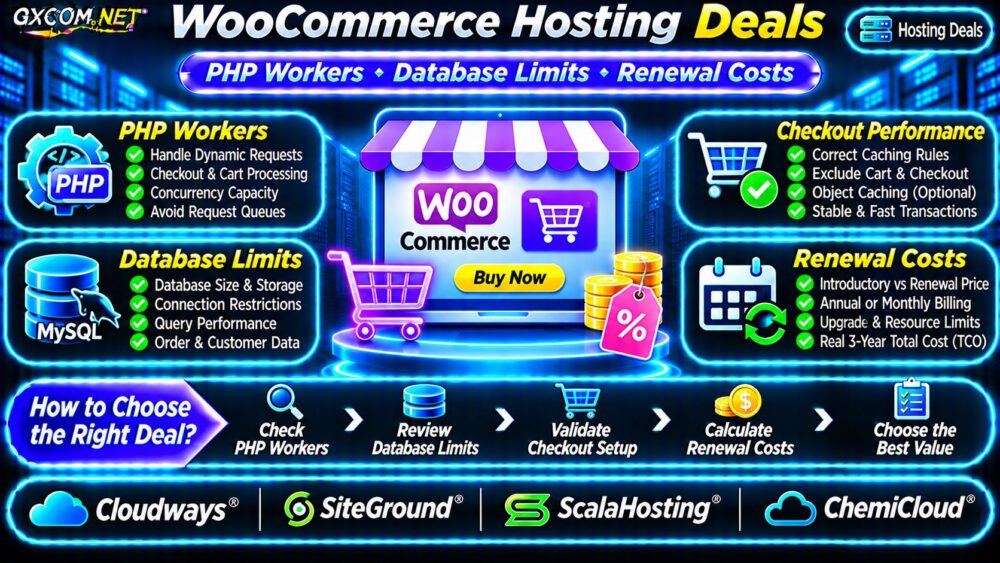
Before purchasing, examine five areas:
- PHP worker capacity and concurrent dynamic requests.
- Database performance, storage, and connection restrictions.
- Checkout caching compatibility and background processing.
- Backups, staging, support, and migration costs.
- Introductory pricing, renewal rates, and upgrade conditions.
A promotional plan that cannot handle ordinary checkout traffic may deliver less value than a higher-priced package with suitable resources.
PHP Workers: Understand the Limits Behind the Discount
PHP workers execute dynamic PHP requests. When all available workers are occupied, additional requests may wait, increasing response times or causing timeouts.
WooCommerce generates dynamic requests through checkout, customer accounts, AJAX operations, and background processes. A product page served from full-page cache behaves differently from a personalized checkout request.
How Many PHP Workers Does Your Store Need?
There is no universal requirement. Capacity depends on dynamic request rates, execution duration, application efficiency, and traffic bursts.
For illustration, six dynamic requests per second, each occupying a worker for half a second, require approximately three busy workers on average. Real stores need additional headroom for unpredictable activity.
Ask prospective hosts whether worker counts are disclosed, whether limits vary by plan, and what happens when requests exceed capacity. Some platforms expose different resource controls instead of a fixed advertised worker number.
More workers also consume memory. Increasing concurrency without adequate RAM or database capacity may simply move the bottleneck elsewhere.
Database Limits: Look Beyond Advertised Storage
WooCommerce databases store orders, products, customer records, settings, and operational information. Slow queries or restricted database resources can affect checkout even when sufficient disk space remains.
Evaluate database size allowances, connection limits, CPU restrictions, storage performance, and access to diagnostic tools. Some hosting packages advertise generous SSD storage without explaining database-specific resource policies.

WooCommerce High-Performance Order Storage can improve order-data architecture when supported and configured correctly, but it does not eliminate inefficient queries or infrastructure limitations.
For a broader explanation of account restrictions, read our shared hosting resource limits guide.
Checkout Performance and Caching Requirements
Page caching can reduce server work for suitable storefront content. However, WooCommerce cart, checkout, and customer account pages generally require dynamic handling to preserve customer-specific information.
Verify that your hosting stack, caching plugin, and CDN respect these exclusions. Incorrect caching can cause stale carts, account information problems, or checkout failures.
Object caching may reduce repeated database operations, but its availability, configuration, and resource allocation vary between hosting plans.
When diagnosing slow checkout responses, our high TTFB troubleshooting guide explains how to distinguish backend delays from other performance problems.
Compare Four WooCommerce Hosting Providers
The following approved providers represent different hosting approaches. Their inclusion does not imply a currently verified discount, identical resources, or guaranteed checkout performance.
Cloudways: Managed Cloud Flexibility
Cloudways is relevant for merchants considering managed cloud infrastructure and adjustable server resources. Compare the underlying server configuration, application management tools, backup charges, and total recurring bill.
Check whether the selected configuration provides sufficient PHP execution capacity and whether scaling requires downtime or additional administration.
SiteGround: WordPress-Oriented Hosting
SiteGround is a candidate for stores prioritizing a WordPress-oriented hosting environment. Review the selected plan’s resource restrictions, caching configuration, support scope, and renewal terms.
Do not assume that features advertised for one hosting tier are included in every entry-level package.
ScalaHosting: Managed Hosting Upgrade Options
ScalaHosting can be considered when a growing store may need a managed VPS or more configurable resources. Compare the complete management package, CPU and RAM allocation, storage, and migration requirements.
A more capable plan is only worthwhile when its additional resources address measured limitations.
ChemiCloud: Small-Store Hosting Candidate
ChemiCloud is worth evaluating for smaller WooCommerce installations seeking conventional hosting arrangements. Confirm compatibility, database policies, backup conditions, and available upgrade paths.
Check current promotional eligibility and renewal pricing directly before selecting a billing term.
WooCommerce Hosting Renewal Costs: Calculate Three Years
Introductory prices often apply only to an initial billing period. A longer prepaid term can reduce the advertised monthly equivalent while increasing upfront commitment.
Consider this hypothetical comparison:
| Cost Item | Plan A | Plan B |
|---|---|---|
| First-year hosting | $60 | $120 |
| Second-year hosting | $180 | $144 |
| Third-year hosting | $180 | $144 |
| Annual extras | $36 | $24 |
| Three-year total | $528 | $444 |
These figures are illustrative, not actual provider quotations. Plan A appears cheaper initially but costs more over three years under the stated assumptions.
Include domain renewals, premium backups, email, security services, additional storage, and migration charges when applicable. Compare equivalent resource levels rather than unrelated entry and premium plans.
Hidden Costs That Can Erase Hosting Savings
Some offers exclude services that become important as an online store grows. Before checkout, verify whether the following are included or billed separately:
- Automatic backups, retention, and restoration assistance.
- Staging environments and safe deployment tools.
- Malware cleanup and application-level support.
- Additional database or storage resources.
- Professional migration and email hosting.
Staging is particularly important for stores that frequently update plugins or payment integrations. Our WordPress staging site guide explains how to test changes without overwriting live orders.

When Should You Upgrade Your Hosting Plan?
Upgrade decisions should follow measurements rather than traffic estimates alone. Investigate repeated PHP queues, memory exhaustion, database delays, throttling, and failed background tasks.
First optimize plugins, queries, caching exclusions, and scheduled jobs. Then compare whether additional workers, stronger database resources, or a different hosting architecture addresses the remaining problem.
For more purchasing options, explore our hosting deals and discounts category.
WooCommerce Hosting Deals FAQ
Is Cheap Shared Hosting Suitable for WooCommerce?
It can support smaller stores when resource limits match actual workloads. Growing stores should monitor checkout behavior and database demand rather than relying on advertised visitor allowances.
Do More PHP Workers Guarantee Faster Checkout?
No. Workers help process concurrent PHP requests, but slow database queries, insufficient CPU, external payment services, and inefficient plugins can still cause delays.
Should I Choose Annual or Monthly Billing?
Monthly billing offers flexibility, while longer commitments may reduce introductory costs. Compare cancellation terms, renewal prices, and total expenses before prepaying.
Final Verdict: Buy Resources, Not Just Discounts
The best WooCommerce hosting deals combine appropriate PHP capacity, dependable database resources, correct checkout caching, and transparent renewal pricing.
Compare Cloudways, SiteGround, ScalaHosting, and ChemiCloud against your store’s measured requirements. Verify the exact plan terms before purchasing, and prioritize sustainable three-year value over the largest introductory discount.