VPS deals for self-hosted GitHub Actions runners deserve a different comparison from ordinary website hosting. Continuous integration jobs can create short CPU spikes, download large dependencies, generate temporary build files, and sit idle between deployments. The cheapest virtual private server may therefore deliver poor value if builds queue, fail, or require frequent cleanup.
This guide explains how to choose VPS resources for private CI/CD workloads, estimate monthly costs, and compare infrastructure providers without assuming that a low advertised price guarantees fast builds.
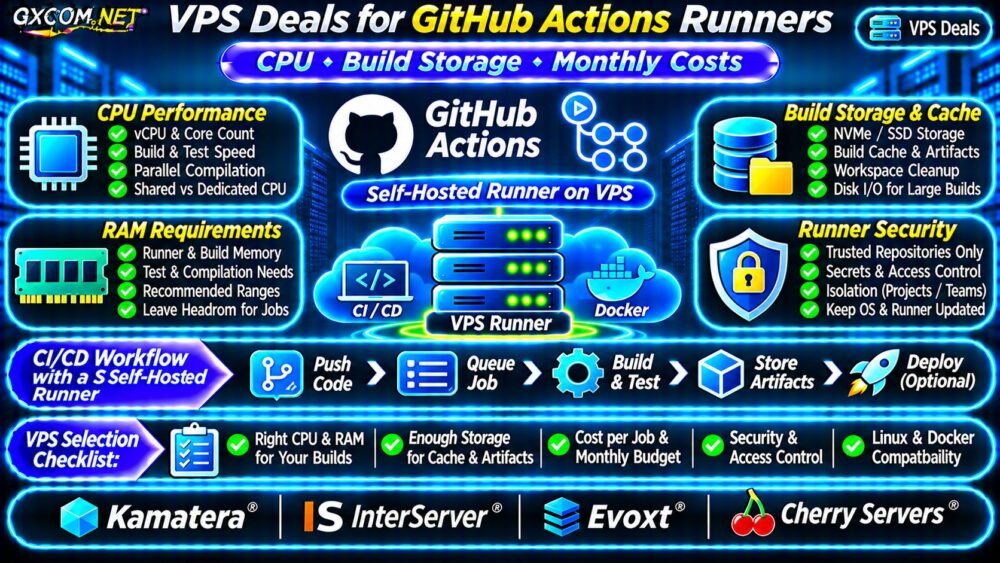
When Does a Self-Hosted GitHub Actions Runner Make Sense?
A self-hosted runner is a machine managed by your team that executes GitHub Actions jobs. It can be a VPS, dedicated server, or another supported system. Teams may prefer one when workflows need custom packages, controlled networking, persistent tools, or access to private infrastructure.
However, GitHub-hosted runners can be simpler for occasional builds. GitHub’s billing and included-minute rules depend on the repository and account arrangement, so compare current official terms before choosing self-hosting.
Remember that self-hosted runners are not automatically isolated between jobs. Persistent machines require deliberate security controls and maintenance.
CPU Requirements: Build Time Matters More Than Core Count
Compilation, test execution, image building, and dependency processing can place very different demands on CPU resources. Two advertised vCPUs do not necessarily deliver the same sustained performance across providers.
Measure the wall-clock duration of representative workflows and record peak CPU utilization. Check whether builds are CPU-bound, memory-bound, or waiting for storage and network operations. Parallel compilation can benefit from additional cores, but only when the build tools and workload support concurrency.
Shared Versus Dedicated CPU
Shared-vCPU plans can be reasonable for infrequent development jobs. Repeated heavy builds may justify clearer CPU allocation policies or a more predictable compute tier. Review our VPS CPU steal time guide when investigating scheduling delays.
Do not interpret a dedicated CPU label as proof of a specific build-time improvement. Benchmark your own pipeline before committing to a longer billing term.
How Much RAM Does a CI Runner Need?
The runner application itself needs relatively few resources, but the programs it launches can consume substantial memory. Java compilation, browser-based testing, and parallel test suites may need more RAM than a lightweight script.
As illustrative planning categories, 2–4 GB can be considered for simple jobs, 8 GB for moderately demanding builds, and 16 GB or more for memory-intensive pipelines. These are not GitHub minimum specifications or guaranteed capacities.

Leave headroom for the operating system, filesystem cache, and concurrent processes. Monitor peak resident memory and out-of-memory events before upgrading.
Build Storage, Caches and Disk I/O
CI storage usage includes checked-out repositories, dependency caches, container layers, compiled artifacts, logs, and temporary files. A small source repository can still generate many gigabytes of build output.
Estimate the largest workspace plus temporary files and operating-system requirements. NVMe storage may help I/O-heavy builds, but actual performance depends on the provider’s storage implementation and contention.
Persistent Cache Versus Clean Builds
Persistent caches can reduce repeated downloads, but they also consume disk capacity and may introduce stale dependencies. Configure cache expiration and workspace cleanup. Never treat a persistent workspace as a security boundary.
For container-based workflows, check our Docker VPS hosting deals comparison for underlying container resource considerations. GitHub specifies Linux with Docker installed when using Docker container actions or service containers on a self-hosted runner.
Runner Concurrency and Queue Time
A single runner application processes one job at a time. Adding more runners or machines can improve throughput when several workflows are queued, but parallel builds also increase CPU, memory, and storage demand.
Measure job arrivals, queue duration, and execution time. For sporadic activity, a constantly running VPS may spend most of the month idle. For frequent deployments, predictable fixed-capacity infrastructure can be easier to budget.
Autoscaling and ephemeral runners may reduce persistent-state risks, but they add provisioning and orchestration complexity. Confirm that the chosen VPS platform supports the required automation before planning automatic shutdown or creation.
Security: Avoid Untrusted Workflows on Persistent VPS Runners
GitHub warns that self-hosted runners can be compromised by untrusted workflow code. A public pull request may expose a persistent runner to malicious commands or attempts to access credentials.
Prefer GitHub-hosted or properly isolated ephemeral execution for untrusted contributions. For controlled private workloads, restrict repository access, minimize token permissions, isolate secrets, patch the host, and prevent unnecessary inbound network exposure.
Use separate runner environments for projects with different trust levels. A VPS firewall alone cannot make arbitrary workflow code safe.
Calculate Monthly VPS Runner Costs
Compare the total monthly infrastructure bill with useful completed jobs, not simply the advertised number of vCPUs. Include backups where necessary, additional disks, network transfer, administration, and the cost of failed or delayed builds.
| Hypothetical Expense | Runner A | Runner B |
|---|---|---|
| VPS per month | $12 | $24 |
| Extra storage and monitoring | $3 | $6 |
| Total monthly cost | $15 | $30 |
| Completed jobs per month | 150 | 400 |
| Infrastructure cost per job | $0.10 | $0.075 |
These figures are hypothetical, not vendor prices or benchmark results. They assume different monthly job counts and exclude engineering labor, taxes, GitHub plan charges, and security operations. Higher throughput is not guaranteed by a larger VPS.
Annual infrastructure spending in this illustration is $180 versus $360. Evaluate whether saved engineering time and reduced queue delays justify any additional expense.
Four Approved VPS Providers to Compare
Kamatera: Configurable Cloud Compute
Kamatera is a candidate when teams want to adjust CPU, RAM, and storage for changing CI workloads. Check the chosen instance family, billing model, and network or backup additions.
InterServer: Persistent Linux VPS
InterServer is worth evaluating for a continuously available Linux runner. Confirm the selected plan’s resource allocation, disk capacity, support boundaries, and renewal conditions.
Evoxt: Budget-Conscious Runner Hosting
Evoxt can be considered for smaller self-managed pipelines. Verify sustained CPU policies, supported operating systems, storage allocation, and outbound transfer allowances before purchasing.

Cherry Servers: Infrastructure-Focused Builds
Cherry Servers offers infrastructure choices to investigate for more demanding build environments. Compare the exact server product, CPU allocation, storage configuration, and management obligations.
These are infrastructure candidates, not confirmed GitHub Actions-specific promotions. For general recovery planning, consult our VPS snapshot and backup recovery guide.
VPS Runner Buying Checklist
- Benchmark real builds before selecting vCPU capacity.
- Measure peak RAM, cache size, and workspace growth.
- Confirm Linux, architecture, Docker, and outbound HTTPS compatibility.
- Review shared-CPU policies, network limits, and renewal terms.
- Separate trusted jobs from untrusted contributions.
- Include maintenance and security work in the monthly budget.
Frequently Asked Questions
Is a VPS Always Cheaper Than GitHub-Hosted Runners?
No. Occasional jobs may be more economical on GitHub-hosted infrastructure, especially when eligible included usage covers demand. Compare current billing and operating costs.
Can One VPS Run Multiple GitHub Actions Jobs?
Multiple runner applications or machines can support concurrent jobs, but each runner application handles one job at a time. Capacity and isolation must be planned accordingly.
Final Verdict
The best VPS deals for self-hosted GitHub Actions runners balance measured build performance, sufficient cache storage, predictable monthly costs, and secure execution. Compare Kamatera, InterServer, Evoxt, and Cherry Servers using actual workflow requirements rather than unsupported speed claims.