Hostinger and IONOS are two major hosting providers serving websites, WordPress projects, businesses, developers, and VPS users, but their platforms are built around somewhat different priorities.
Hostinger emphasizes an integrated hosting experience with its own control panel, website-building tools, WordPress features, cloud hosting, and KVM VPS infrastructure.
IONOS combines web hosting with a broader infrastructure portfolio that includes VPS, cloud services, dedicated servers, storage, networking, and business-oriented services.
That means the right provider depends on much more than the advertised introductory price.
In this Hostinger vs IONOS comparison, we examine web hosting, WordPress, VPS, performance, storage, bandwidth, management, pricing, renewals, scalability, and which platform better matches different workloads
Hostinger vs IONOS: Quick Comparison
| Feature | Hostinger | IONOS |
|---|---|---|
| Web Hosting | Yes | Yes |
| WordPress Hosting | Yes | Yes |
| VPS | KVM VPS | VPS / Cloud Infrastructure |
| Windows VPS | Check current availability | Available on supported VPS plans |
| Dedicated Servers | Not the primary product focus | Yes |
| NVMe Storage | Available on selected hosting and VPS plans | Available on hosting and VPS plans |
| Control Experience | hPanel / custom tools | IONOS control environment |
| VPS Root Access | Yes | Yes |
| Best Fit | Website owners and streamlined hosting | Hosting plus broader infrastructure needs |
Hostinger Overview
Hostinger has expanded from affordable shared hosting into a broader website and server platform.
Its product ecosystem includes:
- Web hosting
- WordPress hosting
- Website building
- Cloud hosting
- KVM VPS
- Domains
- Email and related website services
One of Hostinger's defining characteristics is its integrated user experience.
Instead of relying primarily on a traditional cPanel workflow for standard hosting, Hostinger has developed its own hPanel environment and tightly integrates website management, WordPress, backups, security, domains, and AI-assisted tools.
That makes it particularly relevant for users who want to launch and manage websites without building a complex infrastructure stack.
IONOS Overview
IONOS covers many of the same entry-level hosting requirements but extends much further into infrastructure.
Its portfolio includes:
- Web hosting
- WordPress hosting
- VPS
- Cloud infrastructure
- Dedicated servers
- Storage
- Networking
- Domains
- Business services
This makes IONOS relevant not only to website owners but also to developers and businesses that may eventually need virtual servers, Windows Server, private networking, additional storage, or dedicated hardware.
Hostinger → Website Hosting + Streamlined Management + VPS
IONOS → Website Hosting + VPS + Broader Server Infrastructure
Hostinger vs IONOS for Web Hosting
For ordinary websites, both providers bundle many of the components users would otherwise need to purchase or configure separately.
Hostinger's current web hosting plans can include features such as a domain for the first year, SSL, email, backups, CDN, WordPress support, website-building tools, and AI features depending on the plan.
IONOS web hosting also combines domains, SSL, email, NVMe storage, security tools, and different performance resource levels depending on the package.
The biggest practical difference is therefore not whether either provider can host a WordPress site.
Both can.
Instead compare:
- Number of websites
- Storage allocation
- Backup frequency
- Email allocation
- CDN
- Control panel preference
- Introductory term
- Renewal price
Hostinger vs IONOS Pricing
Pricing is one of the easiest areas to compare incorrectly.
Both companies may advertise promotional rates, but the displayed monthly figure can depend on the contract length and introductory period.
For example, Hostinger's promotional web hosting pricing can be tied to a multi-year upfront commitment, while IONOS frequently structures promotions around an introductory period followed by a different ongoing monthly price.
Therefore, do not compare only:
$X/month vs $Y/month.
Compare:
Initial Payment + Contract Length + Renewal Cost + Required Add-ons = Real Hosting Cost.
Compare Hostinger and IONOS Before Ordering
Because both providers cover multiple hosting categories, the most useful comparison starts with the product you actually need.
| Requirement | Hostinger | IONOS |
|---|---|---|
| Simple Website | Web Hosting | Web Hosting |
| WordPress | WordPress / Web Hosting | WordPress / Web Hosting |
| Linux VPS | KVM VPS | VPS |
| Windows Server | Verify current product availability | Windows VPS options |
| Dedicated Hardware | Not the core offering | Dedicated Server options |
| Cloud Infrastructure | Cloud hosting products | Broader cloud/server infrastructure |
Do not choose either provider from the homepage promotional price alone. Open the configuration that matches your workload and compare the complete checkout price, renewal terms, resources, location, backups, licenses, and management features.
Hostinger vs IONOS VPS
The comparison becomes more technical when moving from managed web hosting to VPS.
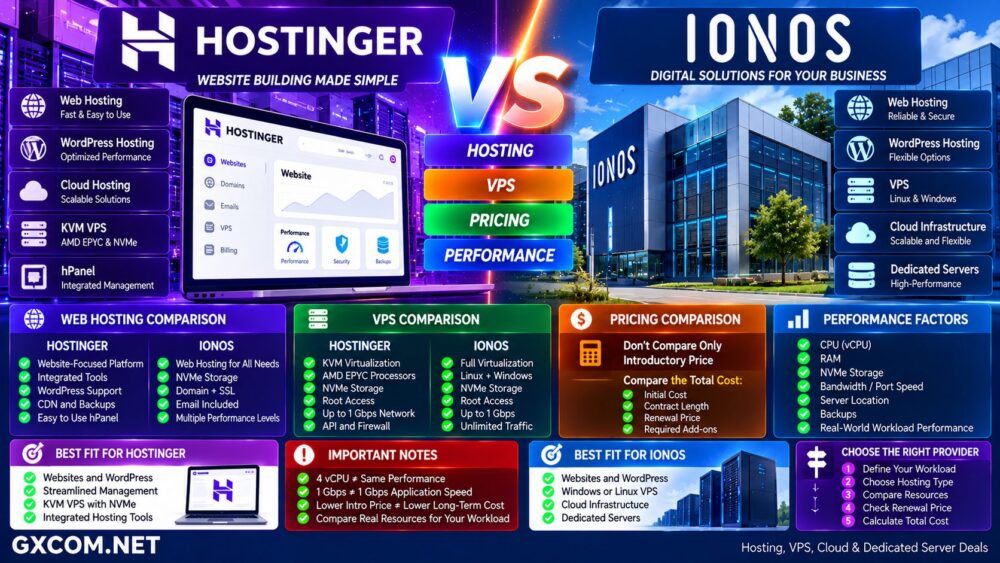
Hostinger's current VPS platform uses KVM virtualization, AMD EPYC processors, NVMe storage, root access, a public API, firewall management, backups, and up to 1 Gbps network connectivity.
Its VPS plans scale through progressively larger CPU, RAM, storage, and bandwidth allocations.
IONOS VPS also provides full virtualization and root access, with NVMe storage and up to 1 Gbps external connectivity.
IONOS additionally supports Linux and Windows Server options and integrates VPS with infrastructure capabilities such as private networking, load balancing, block storage, and object storage.
For a broader explanation of VPS architectures, see our
Cloud VPS vs Traditional VPS comparison.
Hostinger vs IONOS VPS Resources
Do not compare VPS providers by vCPU count alone.
A useful comparison should include:
- CPU architecture
- vCPU allocation
- RAM
- NVMe capacity
- Storage performance
- Bandwidth allocation
- Port speed
- Virtualization
- Server location
- Backup policy
For example, one provider may include more storage while another may offer a larger bandwidth allocation or different infrastructure services.
4 vCPU ≠ Same Performance Everywhere.
Hostinger vs IONOS Storage
NVMe storage is now available across important products from both companies.
But the word “NVMe” alone does not tell you the actual storage performance.
Real-world I/O depends on:
- Underlying drives
- Storage architecture
- IOPS limits
- Host utilization
- Filesystem
- Application workload
For websites, databases, and VPS workloads, measure actual application performance instead of assuming that identical storage labels produce identical results.
See our
NVMe VPS vs SSD VPS comparison
for a deeper explanation of storage differences.
Hostinger vs IONOS Performance
There is no useful universal answer such as “Hostinger is always faster” or “IONOS is always faster.”
Performance varies according to the product, plan, location, website configuration, caching, application, and workload.
For web hosting, test:
- TTFB
- Cached page speed
- Uncached page speed
- WordPress admin responsiveness
- Database-heavy pages
- Traffic under load
For VPS, test:
- CPU performance
- Disk I/O
- Memory
- Network throughput
- Latency
- Sustained load
Hosting Brand ≠ Performance Benchmark.
Compare equivalent plans under the same workload whenever possible.
Hostinger vs IONOS for WordPress
Hostinger is strongly oriented toward users who want an integrated WordPress and website-management workflow.
Depending on the selected hosting plan, features can include WordPress tools, backups, CDN, security, staging-related functionality, and AI-assisted site management.
IONOS also provides WordPress-specific hosting and conventional web hosting capable of running WordPress.
The choice should therefore consider how much control you want versus how much of the website-management workflow you want the provider to simplify.
For more context, see our
Web Hosting vs WordPress Hosting comparison.
Hostinger vs IONOS for Beginners
Beginners usually care less about infrastructure architecture and more about getting a working website online quickly.
Important factors include:
- Setup process
- Control panel usability
- Website migration
- WordPress installation
- Backups
- Support
- Renewal pricing
Hostinger's tightly integrated hosting environment can appeal to users who prefer one interface for website management.
IONOS can appeal to users who want conventional hosting now but may later expand into a broader server and infrastructure portfolio.
Hostinger vs IONOS for Developers
Developer requirements are different from beginner hosting requirements.
Once you move to VPS, both providers give substantially more server control.
Hostinger provides root-access KVM VPS infrastructure and API functionality.
IONOS provides root-access VPS infrastructure and additional options such as private networks, load balancing, block storage, and object storage.
Developers should evaluate the complete environment rather than choosing based on the cheapest VPS tier.
Hostinger vs IONOS for Windows VPS
This is an important distinction for users who specifically require Microsoft Windows Server.
IONOS currently advertises Windows Server options on its VPS platform alongside Linux distributions.
If Windows is mandatory, compare:
- Windows license cost
- Windows Server version
- CPU
- RAM
- NVMe storage
- Remote Desktop access
- Bandwidth
- Total monthly price
Never assume that a cheap Linux VPS price also represents the price of the equivalent Windows configuration.
Hostinger vs IONOS Bandwidth and Network
Network specifications deserve special attention for VPS users.
Hostinger currently advertises 1 Gbps network speed on its VPS plans, with defined bandwidth allocations that increase by tier.
IONOS advertises external VPS connectivity up to 1 Gbps and unlimited traffic on its current VPS+ platform.
Those are different models.
When comparing them, consider:
- Port speed
- Traffic allowance
- Fair-use or applicable terms
- Location
- Latency
- Real sustained throughput
1 Gbps Port ≠ Guaranteed 1 Gbps Application Throughput.
Hostinger vs IONOS Backups
Backup features vary by product and plan.
Hostinger currently includes weekly backups on its VPS plans and offers different backup frequencies across web hosting tiers.
IONOS offers backup and data-protection options across its product portfolio, with exact inclusions depending on the service.
Before purchasing, determine:
- Is backup included?
- How frequently does it run?
- How long are backups retained?
- Can you restore them yourself?
- Does restoration cost extra?
A backup feature should not replace an independent backup strategy for critical data.
Hostinger vs IONOS Scalability
Both platforms allow customers to move beyond entry-level web hosting, but they take different paths.
A Hostinger growth path may look like:
Web Hosting → Cloud Hosting → VPS
An IONOS infrastructure path can extend further:
Web Hosting → VPS → Cloud Infrastructure → Dedicated Server
The right path depends on whether your project is primarily a website or is evolving into a broader infrastructure environment.
Hostinger vs IONOS for Ecommerce
Small ecommerce sites can run on web or WordPress hosting from either provider.
As stores grow, performance becomes increasingly dependent on:
- PHP resources
- Database performance
- Object caching
- CDN
- Storage I/O
- Traffic patterns
Do not upgrade simply because page views increase.
Identify the actual bottleneck first.
Traffic → CPU → RAM → Database → Storage → Network
Hostinger vs IONOS Support
Both companies provide customer support, but support quality should be evaluated according to the product being purchased.
Managed web hosting support and unmanaged VPS administration are not the same service.
Before purchasing a VPS, determine whether support covers:
- Infrastructure problems
- Operating-system administration
- Control panel issues
- Application configuration
- Backups
- Security incidents
Root access does not mean the provider will administer everything inside the server.
Hostinger vs IONOS: Pros and Trade-Offs
| Area | Hostinger | IONOS |
|---|---|---|
| Web Hosting | Integrated website-focused platform | Broad traditional hosting portfolio |
| WordPress | Strong integrated workflow | Dedicated WordPress options |
| VPS | KVM, AMD EPYC, NVMe | Full virtualization, NVMe, Linux/Windows |
| Networking | Defined bandwidth by VPS tier | Unlimited traffic on current VPS+ plans |
| Infrastructure Expansion | Hosting, cloud hosting and VPS | VPS, cloud, storage and dedicated servers |
| Pricing Structure | Often favors longer commitments | Often uses introductory pricing periods |
| Main Consideration | Renewal and commitment length | Post-promotion price and product configuration |
Consider Hostinger If…
- You want an integrated website-management environment
- You primarily run WordPress or websites
- You value Hostinger's hPanel workflow
- You want KVM VPS with NVMe storage
- You are comfortable with longer promotional commitments
- You want website, domain, email, and hosting tools in one ecosystem
Consider IONOS If…
- You want web hosting plus broader server infrastructure options
- You need Linux or Windows VPS choices
- You value unlimited traffic on applicable VPS plans
- You may later require dedicated servers
- You need private networking or additional cloud infrastructure services
- You prefer its contract and pricing structure for your workload
Questions to Ask Before Choosing Hostinger or IONOS
- Do you need web hosting or VPS?
- How many websites will you host?
- How much storage do you need?
- Do you need WordPress-specific tools?
- Do you need Linux or Windows?
- How much monthly bandwidth will you use?
- Do you need root access?
- Do you need private networking?
- How frequently are backups created?
- Which data center location do you need?
- What is the initial contract length?
- What will the service cost after the promotion?
- What add-ons will you actually need?
- What is the total cost over 12, 24, or 48 months?
Hostinger vs IONOS: Which Hosting Provider Fits Your Needs?
Hostinger and IONOS overlap across web hosting, WordPress, and VPS, but their product ecosystems are not identical.
Hostinger places strong emphasis on a streamlined website-hosting experience and integrates web hosting, WordPress, website-building tools, cloud hosting, and KVM VPS into a relatively unified environment.
IONOS combines conventional hosting with a broader infrastructure portfolio that extends into Windows and Linux VPS, cloud services, storage, networking, and dedicated servers.
The better fit therefore depends on what you are actually building.
Website-Focused Workload → Compare Web Hosting Features and Renewal Cost
Server Workload → Compare CPU, RAM, NVMe, Bandwidth and OS
Growing Infrastructure → Compare Scalability and Product Ecosystem
Do not select either provider because one promotional price looks cheaper on the first screen.
Use this decision path:
Workload → Hosting Type → Resources → Performance → Location → Management → Initial Price → Renewal Price → Total Cost.
That approach provides a much more useful Hostinger vs IONOS comparison than treating every hosting plan as if it were the same product.