Choosing a Linux VPS for Docker containers requires more than counting virtual CPU cores. Containers share the host operating system kernel, but applications still consume processor time, memory, disk space, and network resources.
A small VPS can run several lightweight services, while a database-backed application may need considerably more capacity. Understanding these differences helps developers avoid unstable deployments and unnecessary hosting expenses.
This guide covers practical sizing, Docker Compose deployment, security, and the total cost of running containers on a VPS.
Why Run Docker on a Linux VPS?
Docker packages applications and their dependencies into portable containers. A Linux VPS provides an environment where developers can control container images, networking, persistent volumes, and deployment schedules.
Compared with shared hosting, a VPS generally offers greater operating system access and configuration flexibility. However, customers also become responsible for updates, monitoring, and security unless their service agreement includes management.
Our VPS vs shared hosting comparison explains when this additional control becomes worthwhile.
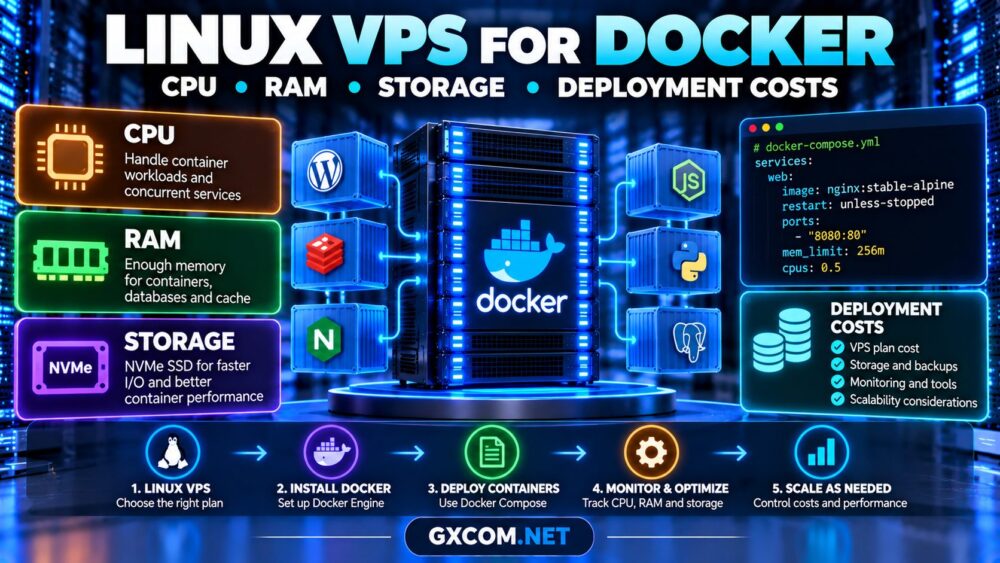
How Much CPU Does Docker Need?
Docker itself typically adds modest overhead, but containerized applications can place significant demands on the CPU.
A reverse proxy and small API may operate comfortably with limited processing capacity. Video encoding, continuous integration jobs, and high-traffic applications require more resources.
Shared vCPUs may also experience inconsistent performance when physical host resources are contested.
Before choosing a plan, examine our VPS CPU steal time guide to understand scheduling delays and noisy-neighbor risks.
Docker supports CPU controls through cgroups. These can limit individual containers, but they cannot create additional physical processing capacity.
How Much RAM Is Enough?
Memory requirements depend on the applications running inside containers, not simply the number of containers.
| Docker Workload | Starting VPS RAM | Considerations |
|---|---|---|
| Testing and small services | 2 GB | Limited headroom |
| Small web application | 4 GB | Proxy and application workers |
| Application with database | 8 GB | Database cache and background jobs |
| Multiple production services | 16 GB+ | Load-dependent sizing |
These are illustrative starting points, not guaranteed minimum requirements.
Reserve memory for the operating system, Docker daemon, filesystem cache, monitoring agents, and unexpected workload spikes.

Set container memory limits carefully. Excessively restrictive limits can cause out-of-memory termination even when the VPS has unused capacity.
Storage Requirements: SSD vs NVMe VPS
Docker storage includes downloaded images, writable container layers, logs, and persistent application data.
Databases should use properly configured persistent volumes rather than relying on disposable container layers.
NVMe storage may improve latency-sensitive workloads, but advertised disk technology alone does not guarantee consistent performance.
Evaluate random I/O, write latency, and storage contention. Our NVMe VPS benchmarking guide covers these measurements.
Leave free disk capacity for image updates, temporary files, database growth, and backup operations. Configure log rotation to prevent container logs from exhausting storage.
Deploy Docker Compose on Ubuntu VPS
Begin with an updated, supported Ubuntu installation and a non-root administrator with sudo privileges.
Install Docker Engine and the Compose plugin using Docker’s official repository instructions for your Ubuntu release. Avoid mixing incompatible installation methods.
After installation, verify the environment:
sudo docker version
sudo docker compose version
Create a project directory and a simple Compose configuration:
services:
  web:
    image: nginx:stable-alpine
    restart: unless-stopped
    ports:
      - "8080:80"
    mem_limit: 256m
    cpus: 0.5
Save the configuration as compose.yaml, then launch it:
sudo docker compose up -d
sudo docker compose ps
sudo docker stats
This example runs an Nginx container with resource limits. It is a demonstration, not a complete production deployment.
Review firewall rules before publishing ports. Docker’s networking rules may interact with or bypass expected UFW restrictions.
For production, configure HTTPS, application secrets, image update procedures, and persistent storage where necessary.
Four VPS Providers to Compare for Docker
Choose providers according to CPU allocation, Linux compatibility, storage performance, bandwidth, and recovery options.
Evoxt: Budget-Conscious Development
Evoxt is worth evaluating for developers seeking economical Linux VPS resources. Compare the selected plan’s CPU allocation, RAM, storage, and network limits before deploying Docker workloads.
Vultr: Flexible Cloud Deployments
Vultr is relevant for teams comparing cloud compute configurations and geographic deployment options. Review the specific instance family and its resource allocation model.
RAKsmart: VPS and Cloud Infrastructure
RAKsmart can be considered for container workloads requiring VPS or cloud server infrastructure. Verify Linux image availability, resource specifications, and administrative access for the chosen product.
AlphaVPS: Self-Managed Linux Hosting
AlphaVPS is another candidate for developers comfortable managing their own servers. Compare storage capacity, network policies, recovery access, and upgrade options.
For a broader purchasing shortlist, consult our best VPS providers comparison.
What Does Docker VPS Hosting Really Cost?
The monthly server subscription is only one component of operating expenses.
| Cost Component | What to Evaluate |
|---|---|
| Compute | vCPU and RAM allocation |
| Storage | Disk capacity and additional volumes |
| Backups | Retention and independent storage |
| Networking | Transfer limits and outbound traffic |
| Operations | Monitoring, updates, and administrator time |
Development servers may tolerate occasional downtime. Customer-facing applications need stronger monitoring, backup procedures, and recovery planning.
When comparing VPS hosting deals, calculate recurring expenses rather than relying on promotional pricing alone.
Security and Maintenance Considerations
Docker isolation does not replace server security. Containers share the host kernel, making operating system updates and container privileges important.

Use trusted images, restrict unnecessary capabilities, avoid privileged containers, and keep the Docker API inaccessible from untrusted networks.
Membership in the Docker group effectively grants powerful host-level access. Assign it only to trusted administrators.
Back up application data independently and test restoration before relying on the deployment for critical workloads.
When Should You Upgrade Your Docker VPS?
Consider upgrading when monitoring shows sustained CPU saturation, memory pressure, storage latency, or insufficient disk capacity.
Check container-level metrics alongside host measurements. A poorly configured application may benefit more from optimization than additional vCPUs.
For growing deployments, consider separating databases, using dedicated CPU resources, or moving services across multiple servers.
Frequently Asked Questions
Can Docker run on a 2GB VPS?
Yes, lightweight containers can run on 2GB RAM, but application requirements and available memory determine practical capacity.
Does Docker require NVMe storage?
No. NVMe may benefit storage-intensive workloads, but many lightweight services operate adequately on SSD storage.
Is Docker suitable for production VPS hosting?
Yes, provided deployment security, persistent storage, monitoring, backups, and recovery procedures are properly managed.
Should I choose managed or unmanaged VPS?
Choose according to your team’s Linux administration skills, support requirements, and operational budget.
Final Verdict
The best Linux VPS for Docker containers balances predictable CPU performance, sufficient RAM, reliable storage, and manageable operating costs.
Start with realistic workload measurements, choose a provider whose resource policies fit your application, and plan for monitoring, backups, and future growth.