How Cloud Server Auto Scaling Works
Cloud server auto scaling helps applications adjust computing capacity when traffic or processing demand changes. Instead of permanently paying for enough servers to handle the busiest hour, businesses can add resources during demand spikes and reduce capacity when usage falls.
However, automatic scaling is not a feature included with every cloud server. Some platforms provide native scaling services, while others require orchestration software, monitoring integrations, or custom automation. Understanding these differences is essential before choosing a hosting provider.
Our cloud hosting vs VPS comparison explains how infrastructure flexibility differs across hosting models.
Vertical Scaling vs Horizontal Scaling
Vertical scaling increases the CPU, RAM, or storage resources assigned to an existing server. It is relatively straightforward, but resizing may require downtime or a restart. It also has limits determined by the available instance sizes.
Horizontal scaling adds or removes application instances. Multiple servers can process requests simultaneously, usually through a load balancer. This approach supports greater elasticity but requires applications to handle shared sessions, background jobs, and database connections correctly.
For a small website with predictable traffic, vertical upgrades may be sufficient. SaaS platforms, ecommerce applications, and frequently changing workloads may benefit from horizontal scaling once their architecture supports it.
CPU Thresholds: When Should Scaling Start?
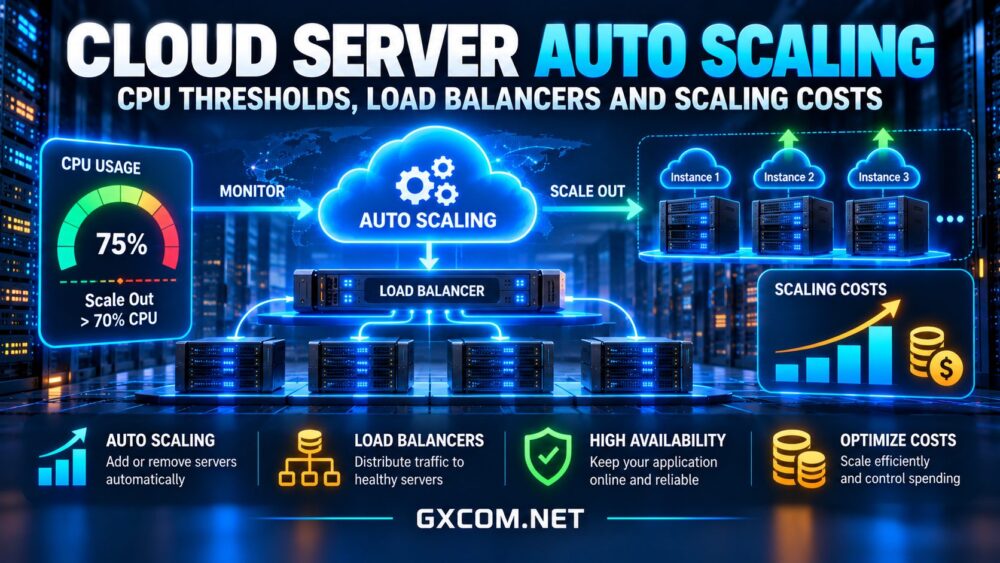
CPU utilization is a common auto scaling signal because sustained processor demand can indicate insufficient compute capacity. For example, a team might configure a hypothetical policy to add an instance when average CPU utilization remains above 70% for several minutes.
That threshold is an illustration, not a universal recommendation. The appropriate value depends on workload behavior, instance performance, startup time, and how quickly demand changes.
Why CPU Alone Can Be Misleading
Applications may slow down even when CPU usage remains moderate. Database locks, exhausted connection pools, memory pressure, storage latency, and external API delays can all affect response times.
Effective scaling policies combine infrastructure metrics with application indicators such as request latency, queue depth, requests per instance, and error rates. A CPU-heavy batch processor may need different rules from a web application serving interactive customers.
Cooldown Periods and Scaling Stability
Cooldown or stabilization periods help prevent repeated scaling actions when utilization fluctuates around a threshold. Without appropriate controls, an application may repeatedly add and remove instances, increasing operational risk and potentially generating unnecessary charges.

Use separate scale-out and scale-in conditions. Removing capacity should generally be more conservative, especially when active requests or long-running jobs must finish before an instance shuts down.
Why Load Balancers Matter
A load balancer distributes incoming requests across healthy application instances. When auto scaling adds servers, the load balancer can begin directing traffic to them after they pass health checks.
Load balancing also supports maintenance and failure handling, but it does not automatically make an application highly available. Database dependencies, shared storage, deployment failures, and network design can still create single points of failure.
For horizontal scaling, applications should minimize reliance on local session files and instance-specific storage. Centralized session management, shared object storage, and reliable database connectivity can make scaling safer.
Four Cloud Hosting Providers to Evaluate
Cloud providers differ in automation interfaces, managed services, and operational responsibility. Buyers should distinguish native automatic scaling from manual resizing or API-based provisioning.
Vultr: Compute Infrastructure for Custom Scaling
Vultr offers cloud compute infrastructure that developers can incorporate into automated deployment workflows. Teams should verify current API capabilities, load balancing options, monitoring integrations, and instance availability in their selected region.
Running multiple instances does not guarantee a ready-made scaling policy. Application orchestration and lifecycle management may remain the customer’s responsibility.
Kamatera: Flexible Cloud Resource Configuration
Kamatera is relevant for businesses seeking configurable cloud server resources. Its flexibility can support capacity planning and infrastructure automation, depending on the selected services and implementation.
Confirm whether the required scaling behavior is automated, which tools are necessary, and how server resizing or additional instances affect billing.
Akamai Cloud: Developer-Controlled Scaling
Akamai Cloud (formerly Linode) provides cloud infrastructure suitable for developer-managed applications. Teams can evaluate compute instances, networking, and automation capabilities when designing their own scaling architecture.
Before purchasing, confirm available load balancing products, regional constraints, instance provisioning behavior, and any additional services required.
Cloudways: Managed Hosting and Scaling Options
Cloudways may appeal to teams running compatible web applications that prefer managed hosting workflows. Scaling capabilities and automation depend on the underlying cloud product and selected plan.
Buyers should distinguish server resizing from automatic horizontal scaling. Review application compatibility, support responsibilities, and current feature availability. Our managed cloud hosting comparison provides additional context.
Understanding Auto Scaling Costs
Auto scaling can improve resource efficiency, but it does not guarantee a lower cloud bill. Additional application instances consume compute resources, while load balancers, monitoring, storage, network transfer, and database capacity can create separate expenses.
Consider a hypothetical application running two servers at $25 per month each. Its base compute expense would be $50 monthly. If traffic spikes require two additional servers for one-quarter of the month, the extra compute expense would be approximately $12.50 under a simplified proportional billing assumption.
The resulting $62.50 estimate excludes load balancing, storage, networking, and other services. Actual billing depends on the provider’s pricing increments and product terms.
Hidden Costs of Scaling Out
Scaling policies can increase outbound traffic, cross-region communication, monitoring volume, and database demand. Poorly configured retries or background jobs may multiply these costs without improving customer experience.
Review our cloud VPS bandwidth costs guide when estimating transfer expenses. Compare infrastructure options through our cloud hosting deals guide, but verify the total cost of the complete scaling architecture.

Best Practices Before Enabling Auto Scaling
- Benchmark first: Identify real performance bottlenecks using representative traffic.
- Set minimum capacity: Maintain enough instances for normal demand and resilience.
- Use multiple metrics: Combine CPU signals with latency, queues, and error rates.
- Test instance startup: Account for provisioning, application initialization, and health checks.
- Protect stateful services: Plan database connections, sessions, and background processing.
- Control spending: Configure capacity limits, budgets, alerts, and scaling reviews.
Teams building subscription software should also consider tenant isolation and predictable infrastructure growth. Our cloud hosting for SaaS applications guide covers those architectural decisions.
Final Verdict
Cloud server auto scaling is most valuable when demand varies significantly and the application can safely add or remove capacity. CPU thresholds provide a starting point, but reliable scaling also depends on load balancing, application metrics, stabilization rules, and cost controls.
For predictable workloads, a properly sized fixed server may remain simpler and more economical. Choose a cloud provider based on verified automation capabilities, operational requirements, and the complete cost of running the application—not merely the availability of an auto scaling feature.