Small business owners often face a difficult hosting decision: start with an affordable shared hosting plan or invest immediately in a more powerful server.
For many company websites, shared hosting can be a practical starting point. A business that mainly publishes service information, contact details, and occasional blog posts may not need a dedicated server or advanced cloud infrastructure.
However, shared hosting for small business websites has limitations. As traffic grows, applications become more complex, or customer transactions increase, resource restrictions can begin affecting reliability and performance.
This guide explains when shared hosting is enough, which warning signs matter, and when upgrading to managed WordPress hosting, VPS, or cloud hosting becomes worthwhile.
What Is Shared Hosting for Small Business?
Shared hosting allows multiple customers to use infrastructure managed by a hosting provider. Each customer receives a hosting account with defined resources and access permissions.
The provider generally handles the underlying server infrastructure, while website owners remain responsible for many application-level tasks, including content, accounts, and website configuration.
Shared hosting can reduce administration costs because businesses do not need to manage an entire server.
However, resource allocation, account restrictions, security features, and support coverage vary between providers and plans.
1. When Is Shared Hosting Enough for a Business Website?
Shared hosting may be sufficient when a website has predictable resource requirements and does not rely on unusually demanding applications.
Common examples include:
- Local business websites displaying services and contact information.
- Professional portfolios and company profiles.
- Small WordPress blogs with moderate publishing activity.
- Restaurant websites with menus and reservation links.
- Service businesses using simple contact or appointment forms.
These websites can often operate effectively on a properly configured shared hosting plan.
However, traffic volume alone is not enough to determine suitability. Plugin behavior, caching, database queries, and concurrent requests also affect resource usage.
2. Shared Hosting Benefits for Small Businesses
The main advantage of shared hosting is simplicity.
Many plans provide a control panel, website installation tools, basic hosting management, and access to technical support.
Potential benefits include:
- Lower infrastructure costs compared with many dedicated environments.
- Reduced server administration responsibilities.
- Convenient website and domain management.
- Support for common content management systems.
- Upgrade options as business requirements change.
However, advertised features should always be checked against the specific plan. Email, backups, malware removal, and advanced management may be excluded or charged separately.
3. Understanding Shared Hosting Resource Limits
Shared hosting accounts commonly operate within CPU, memory, disk I/O, and concurrent processing restrictions.
A business website may perform well during ordinary traffic but encounter problems during promotions, seasonal demand, or unusually heavy application activity.
Resource exhaustion can contribute to slow dynamic pages, failed requests, or temporary service errors.
Before upgrading, determine whether the bottleneck comes from hosting capacity, inefficient plugins, uncached requests, or database performance.
Our Shared Hosting Resource Limits Guide explains CPU, RAM, disk I/O, and Entry Processes.
4. Business Website Features That Increase Hosting Demands
Not all business websites require the same hosting resources.

| Business Website Type | Typical Hosting Demand | What to Watch |
|---|---|---|
| Company information website | Often relatively light | Page speed, forms, uptime |
| WordPress blog | Depends on traffic and plugins | Cache efficiency, database activity |
| Appointment booking website | More dynamic requests | Availability, database reliability |
| Membership website | Authenticated and personalized traffic | Concurrent users, PHP processing |
| WooCommerce store | Potentially demanding dynamic workload | Checkout, orders, database performance |
Businesses using ecommerce, customer portals, or resource-intensive applications should evaluate their hosting requirements more carefully.
Our WordPress Hosting for WooCommerce Guide explains PHP workers, database load, and checkout performance.
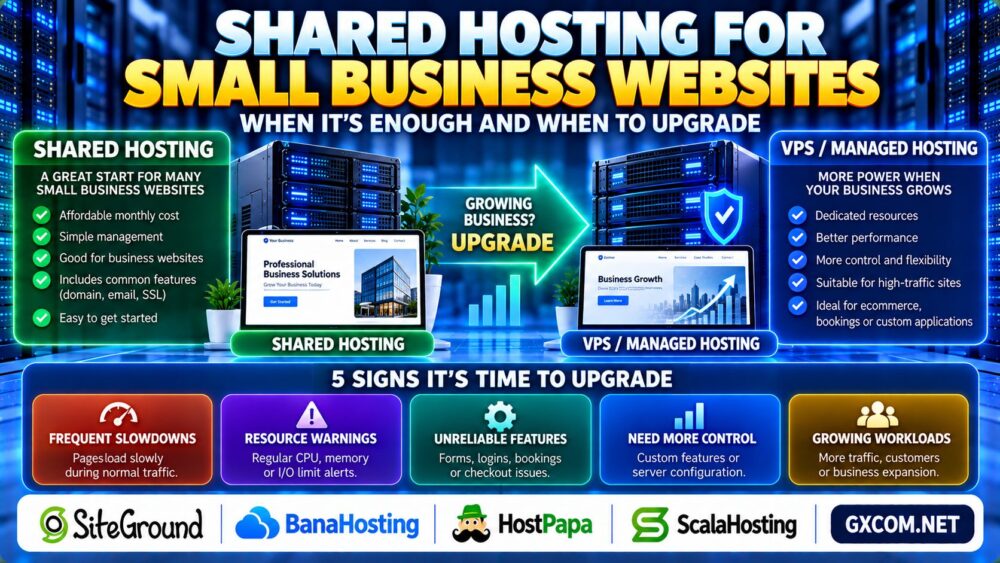
5. Five Signs Your Business Has Outgrown Shared Hosting
Sign 1: Frequent Slowdowns During Normal Business Activity
If important pages regularly become slow during expected traffic, investigate whether resource limits or application inefficiencies are responsible.
Sign 2: Repeated Resource Limit Warnings
Frequent CPU, memory, I/O, or concurrent request warnings may indicate that the current account is approaching its practical capacity.
Sign 3: Business-Critical Features Become Unreliable
Problems affecting contact forms, customer logins, bookings, or checkout can create operational risks.
Sign 4: You Need Greater Server Control
Custom software, specific server configurations, or background services may require an environment with more administrative flexibility.
Sign 5: Growth Requires More Predictable Resources
When a business depends on consistent application performance, a VPS or suitable managed hosting platform may provide a more appropriate resource model.
These signs should trigger investigation rather than an automatic purchase. Monitoring and optimization may resolve some problems without changing hosts.
6. Security, Backups and Reliability for Business Websites
Business websites should prioritize security and recoverability regardless of hosting price.
Check whether the hosting plan supports:
- HTTPS and SSL certificate management.
- Reliable backup and restoration procedures.
- Secure administrative access.
- Malware prevention and incident response options.
- Supported PHP and application updates.
- Clear technical support responsibilities.
Shared hosting can be suitable for business use, but a provider's security controls do not replace responsible website maintenance.
Businesses should maintain independent backups of important website data and verify that restoration procedures work.
7. Hidden Costs of Small Business Shared Hosting
Low introductory prices can make shared hosting attractive, but the long-term cost may differ from the initial offer.
Review renewal pricing, domain registration, email services, backup storage, security add-ons, and migration fees.
A plan that initially appears inexpensive may become less competitive when essential business features are billed separately.
For a detailed explanation, read our Web Hosting Renewal Costs Guide.
8. Shared Hosting vs Managed WordPress vs VPS
When a business grows, several hosting options may become relevant.
| Hosting Option | Potential Advantage | Main Consideration |
|---|---|---|
| Shared Hosting | Simple and potentially affordable | Account-level resource restrictions |
| Managed WordPress Hosting | WordPress-focused management features | Plan limits and included services |
| Managed VPS | Greater resource control and management support | Higher complexity or cost |
| Cloud Hosting | Flexible infrastructure options | Pricing and administration vary |
No hosting architecture is automatically best for every small business.
For a broader infrastructure comparison, see our VPS vs Shared Hosting Guide.
9. Comparing Shared Hosting Providers for Small Business
When evaluating business hosting, compare support coverage, performance limits, backup policies, email options, renewal costs, and upgrade flexibility.
SiteGround is a relevant candidate for businesses comparing WordPress-focused hosting and website management tools.
BanaHosting and HostPapa are additional providers worth investigating for general website hosting and small-business requirements.
ScalaHosting can also be considered when evaluating a potential move toward managed VPS hosting as resource requirements increase.
Specific features vary by provider, product, and plan tier. Confirm current terms and resource allocations before purchasing.
10. How to Upgrade Without Disrupting Your Business
Before changing hosting providers, document your current website requirements and identify the problems the upgrade should solve.
Create verified backups, check application compatibility, and plan how DNS, email, SSL, and customer data will be handled.
Test the destination environment before switching production traffic whenever possible.
For a more complete transfer checklist, see our Managed Hosting Migration Services Guide.

Small Business Hosting Buying Checklist
- Identify the website's primary business functions.
- Estimate normal and peak traffic requirements.
- Check CPU, RAM, storage, and account restrictions.
- Review SSL, backups, security, and support.
- Confirm email and domain-related costs.
- Compare introductory and renewal pricing.
- Check migration assistance and upgrade options.
- Choose based on actual business needs, not server specifications alone.
Frequently Asked Questions
Is shared hosting good for small business websites?
Yes. It can be suitable for many small business websites with modest resource requirements and straightforward applications.
When should a small business upgrade from shared hosting?
Consider upgrading when confirmed resource limits, application requirements, or operational risks cannot be addressed adequately through optimization.
Can shared hosting handle a small online store?
It may support some smaller stores, but ecommerce workloads should be evaluated based on checkout reliability, dynamic traffic, and database demands.
Is VPS always faster than shared hosting?
No. Performance depends on hardware, resource allocation, configuration, caching, and application efficiency.
Does shared hosting include business email?
Some plans include email hosting, while others offer it separately. Verify mailbox features and renewal charges.
Should a new business start with VPS hosting?
Not necessarily. A well-configured shared hosting plan may be enough until the website requires more resources or administrative control.
Final Verdict: Start with What Your Business Needs
Shared hosting for small business websites can be a sensible choice when workloads are manageable, security and backups are properly configured, and the hosting plan provides reliable support.
Upgrading becomes worthwhile when the business genuinely needs greater resource capacity, control, or operational flexibility.
Evaluate real performance, business-critical functions, and total hosting costs before deciding. The goal is not to buy the largest server, but to choose infrastructure that supports your business reliably as it grows.