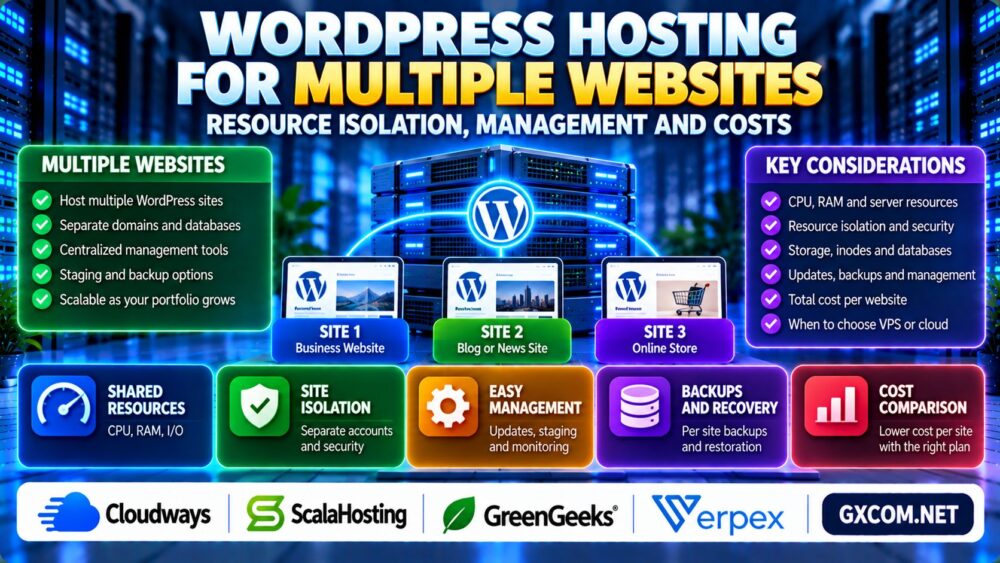
Running several WordPress websites under one hosting plan can reduce administrative work and simplify billing. However, a plan that supports multiple domains does not necessarily provide independent server resources, security boundaries, or backups for every website.
Choosing WordPress hosting for multiple websites requires understanding how CPU, RAM, storage, databases, and account permissions are shared.
Whether you manage three business websites, several blogs, or a growing client portfolio, this guide explains how to compare hosting architectures, resource isolation, management features, and total costs.
Can You Host Multiple WordPress Websites on One Hosting Plan?
Yes. Many hosting environments can accommodate multiple separate WordPress installations, provided the selected plan permits additional websites and has sufficient resources.
Each installation can use its own domain, database, themes, plugins, and administrator accounts.
However, the websites may still share the same hosting account, operating system environment, resource allocation, and security permissions.
The number of allowed websites is therefore only one part of the buying decision.
1. Multiple WordPress Installations vs WordPress Multisite
Hosting several independent WordPress installations is different from using the WordPress Multisite feature.
With independent installations, each website generally maintains its own WordPress core files, database configuration, plugins, and administrative environment.
WordPress Multisite allows a network of sites to operate under a shared WordPress installation, with centralized network administration and shared code components.
| Feature | Separate WordPress Sites | WordPress Multisite |
|---|---|---|
| WordPress installation | One per website | Shared network installation |
| Plugin management | Managed per installation | Network-level controls available |
| Database structure | Typically separate databases | Shared database with site-specific tables |
| Administration | Independent administrators | Network administration |
| Isolation | Depends on hosting accounts | Sites share application infrastructure |
Multisite can simplify certain centralized workflows, but it is not a security isolation mechanism.
For unrelated businesses or clients, separate installations and hosting accounts may provide clearer operational boundaries.
2. CPU, RAM and PHP Resource Sharing
When multiple WordPress sites operate within one shared hosting account, they may compete for the same CPU, memory, disk I/O, and concurrent processing limits.
A traffic spike on one website can consume resources needed by another website, depending on the hosting architecture.
Resource-intensive plugins, scheduled tasks, database queries, and background operations can increase this competition.
Before purchasing, verify whether the advertised resources apply per website, per hosting account, per container, or per server.
Our Shared Hosting Resource Limits Guide explains CPU, RAM, I/O, and Entry Processes in more detail.
3. Resource Isolation: Why Separate Accounts Matter
Resource isolation determines how effectively one website's activity is prevented from affecting another.
Several websites installed under the same control panel account may share filesystem permissions and resource quotas.
Separate hosting accounts, containers, or virtual machines can offer stronger boundaries, depending on their configuration.
For client websites, ask whether the platform provides independent system users, file permissions, databases, and resource allocations.

Account separation can reduce the impact of certain compromises, but it does not eliminate every security risk.
4. WordPress Security Across Multiple Websites
Managing more websites means maintaining more plugins, themes, administrative accounts, and application configurations.
An outdated plugin on one site may create risks for other websites if they share accessible files or credentials.
Recommended practices include:
- Use separate administrator credentials for each website.
- Apply appropriate filesystem permissions.
- Keep WordPress, themes, and plugins updated.
- Use individual database credentials where possible.
- Enable multifactor authentication when supported.
- Maintain independent recovery options.
For websites operated on behalf of unrelated customers, stronger account isolation is usually preferable to placing everything under one shared login.
5. Storage, Inodes and Database Growth
Multiple WordPress installations can generate substantial numbers of files through themes, plugins, uploaded images, thumbnails, caches, and backups.
Even when disk space remains available, a shared hosting account may approach its file-count or inode allowance.
Each additional installation can also create database storage and maintenance requirements.
Check total account storage, inode restrictions, database limits, and backup retention before adding more websites.
Our Shared Hosting Inode Limits Guide explains why file counts can become restrictive before storage capacity is exhausted.
6. Backups, Updates and Centralized Management
Multi-website hosting becomes harder to manage as the number of installations grows.
Useful management features include centralized update visibility, per-site backups, staging environments, access controls, and website-level monitoring.
Ask whether the hosting platform allows individual sites to be restored without replacing unrelated websites.
Also verify whether backups are stored outside the primary hosting environment and whether restoration carries additional charges.
For major plugin, theme, or PHP changes, a staging environment can reduce deployment risks.
See our WordPress Staging Hosting Guide for testing and deployment considerations.
7. Shared Hosting vs Managed Cloud vs VPS
Different hosting architectures provide different levels of control, resource allocation, and administration.
| Hosting Type | Potential Advantage | Main Consideration |
|---|---|---|
| Multi-site shared hosting | Simple administration and potentially lower cost | Shared account resources and restrictions |
| Managed cloud hosting | Flexible application management and infrastructure options | Platform-specific resource sharing and charges |
| Managed VPS | More control over allocated virtual server resources | Management scope and server capacity |
| Reseller hosting | May provide separate customer accounts | Account limits, resource allocations, and administration |
Shared hosting may be sufficient for several low-traffic websites. Managed cloud or VPS hosting becomes more attractive when workloads grow or greater control is required.
For the underlying infrastructure differences, read our VPS vs Shared Hosting Comparison.
8. Comparing WordPress Hosting Providers
When choosing hosting for multiple WordPress sites, compare resource policies and administration features rather than relying only on the maximum website count.
Cloudways is a relevant candidate for users evaluating managed cloud environments and the management of multiple WordPress applications.
ScalaHosting is worth considering when comparing managed VPS resources and server administration requirements.
GreenGeeks and Verpex are additional options to investigate for website hosting and multi-site management needs.
Features differ across products and plan tiers. Confirm supported website counts, resource limits, account separation, backups, and renewal terms directly with the provider.
9. How Much Does Hosting Multiple WordPress Sites Cost?
The advertised monthly hosting fee does not always represent the total operating cost.
Consider the following expenses:
- Base hosting subscription and renewal price.
- Additional website or account allowances.
- Backup storage and restoration services.
- Security, staging, and management features.
- Control panel or software licenses.
- Migration assistance and technical administration.
Calculate the total cost of ownership and divide it by the number of actively hosted websites to estimate an average cost per site.
However, a low average cost is not automatically good value if one busy website can disrupt the others.
10. When Should You Separate Websites?
Separating websites may be appropriate when they belong to different clients, have different security requirements, or experience significantly different traffic levels.
It can also make sense when a single installation regularly consumes most of the available account resources.
Agencies should consider independent customer access, billing, backup restoration, and account-level isolation.

Our Reseller Hosting for Agencies Guide explores hosting arrangements for managing customer websites.
Multiple WordPress Hosting Buying Checklist
- Confirm the number of websites allowed.
- Identify whether resources are shared per account.
- Check CPU, RAM, storage, and inode limits.
- Review filesystem and database isolation.
- Verify individual backup and restoration options.
- Compare staging and update management features.
- Calculate renewal and additional service costs.
- Confirm the upgrade and migration process.
Frequently Asked Questions
Can I host multiple WordPress websites on one account?
Yes, if the hosting plan supports multiple installations and provides sufficient resources for their combined workloads.
Does unlimited websites mean unlimited resources?
No. Storage, CPU, memory, inode, database, and acceptable-use restrictions may still apply.
Is WordPress Multisite the same as multiple WordPress installations?
No. Multisite uses a shared WordPress network, while independent installations generally maintain separate application environments.
Can one WordPress website slow down another?
Yes. Websites sharing the same resource allocation may affect each other during traffic spikes or resource-intensive operations.
Is VPS better for hosting multiple WordPress sites?
It can provide greater resource control, but the best option depends on traffic, technical expertise, isolation requirements, and budget.
Should client websites use separate hosting accounts?
Separate accounts are often preferable for unrelated clients because they can provide clearer security, access, billing, and recovery boundaries.
Final Verdict: Choose Isolation and Resources, Not Just Website Count
The best WordPress hosting for multiple websites plan should support your combined workloads without creating unnecessary security or management risks.
Compare resource isolation, file limits, backups, administrative tools, and total costs before purchasing.
For a few small websites, shared hosting may be sufficient. Growing portfolios and business-critical applications may justify managed cloud, VPS, or separately isolated hosting accounts.