Cloud VPS vs traditional VPS is one of the most important comparisons for businesses, developers, and website owners choosing virtual server hosting. Both solutions provide virtualized computing resources, root access, and greater control than typical shared hosting. However, their underlying infrastructure, management tools, scaling options, and billing models can differ.
Cloud VPS hosting is often promoted as more flexible and scalable. Traditional VPS hosting is commonly associated with predictable monthly pricing and straightforward server configurations.
But does cloud VPS actually deliver better performance? Is it more reliable? And is the additional flexibility worth the potential cost?
The answer depends on the provider, virtualization architecture, resource allocation, and application workload.
CLOUD VPS ≠ AUTOMATICALLY FASTER VPS.
MORE vCPU ≠ MORE PERFORMANCE.
CLOUD INFRASTRUCTURE ≠ AUTOMATIC HIGH AVAILABILITY.
In this guide, we compare cloud VPS and traditional VPS hosting across performance, scalability, reliability, storage, networking, management, and total cost. We also explain where providers such as Hostwinds, Cherry Servers, and ServerSP fit into the buying decision.
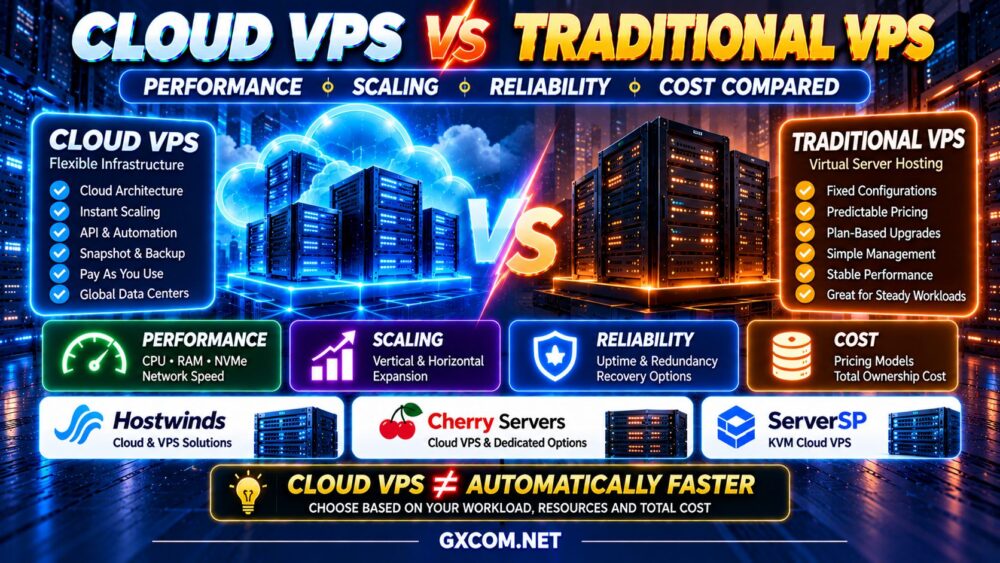
Cloud VPS vs Traditional VPS: Quick Comparison
| Feature | Cloud VPS | Traditional VPS |
|---|---|---|
| Infrastructure | Cloud-oriented virtual server platform | Virtual server on host infrastructure |
| Virtualization | Commonly KVM or similar technology | Commonly KVM or similar technology |
| CPU Performance | Depends on hardware and allocation | Depends on hardware and allocation |
| RAM | Allocated virtual memory | Allocated virtual memory |
| Storage | Local or network-backed storage | Often local or host-attached storage |
| Scaling | May offer API-driven resizing and automation | Often plan-based upgrades |
| Billing | Hourly, monthly, or usage-based | Often fixed monthly or annual |
| High Availability | Architecture-dependent | Architecture-dependent |
| Management | Cloud panel, API, automation tools | VPS control panel and provider tools |
| Best For | Flexible and changing workloads | Stable workloads and predictable budgets |
Key takeaway: Cloud VPS is generally worth considering when infrastructure flexibility, automation, and scaling are priorities. Traditional VPS can remain an excellent choice for stable workloads that do not require advanced cloud features.
What Is Traditional VPS Hosting?
A traditional Virtual Private Server is a virtual machine created on a physical server using virtualization technology.
The physical host runs a hypervisor that divides computing resources among multiple virtual servers. Each VPS operates with its own operating system environment and allocated resources.
Typical features include:
- Virtual CPU cores
- Allocated RAM
- Virtual disk storage
- Operating system access
- Root or administrator privileges
- Fixed hosting plans
- Provider-specific upgrade options
Traditional VPS hosting is often attractive because it offers a relatively straightforward service model.
Customers select a server configuration, pay a recurring subscription, and operate their applications within the available resources.
However, traditional VPS hosting is not necessarily outdated or technologically inferior. Modern VPS platforms can use current processors, NVMe storage, advanced virtualization, and automated provisioning.
What Is Cloud VPS Hosting?
A cloud VPS is a virtual server delivered through a cloud-oriented infrastructure platform.
Like traditional VPS hosting, it generally provides virtual CPU, memory, storage, networking, and operating system control.
The difference is often found in the surrounding infrastructure and management capabilities.
Depending on the provider, cloud VPS services may include:
- Self-service provisioning
- API access
- Flexible instance configurations
- Snapshots and images
- Cloud networking features
- Resource resizing
- Infrastructure automation
- Additional cloud services
Some cloud VPS platforms also support migration, redundancy, or advanced storage architectures.
However, these capabilities are not universal. The term “cloud VPS” does not guarantee shared storage, automatic failover, or a multi-node high-availability deployment.
For a provider-focused overview, explore our Best Cloud VPS Hosting comparison.
Cloud VPS vs Traditional VPS Performance
Performance is one of the most misunderstood differences between cloud VPS and traditional VPS hosting.
A cloud VPS is not automatically faster because it uses the word “cloud.”
Actual performance depends on CPU architecture, resource allocation, storage latency, network quality, and application efficiency.
1. CPU Performance
Both cloud VPS and traditional VPS platforms may use shared or dedicated CPU allocation models.
A virtual server with four vCPU does not necessarily provide the same processing capacity as another server advertising four vCPU.
Important variables include:
- Processor generation
- Single-core performance
- Shared versus dedicated CPU allocation
- Host resource contention
- CPU scheduling
- Sustained workload limits
4 vCPU ≠ 4 vCPU.
For lightly loaded websites, CPU differences may be less noticeable than application configuration or caching.
For sustained compute workloads, predictable CPU allocation can be more important than the total advertised core count.
2. RAM Performance
Both hosting models allocate memory to virtual machines.
RAM capacity influences database caching, application concurrency, and operating system performance.
However, additional RAM does not automatically improve applications that are limited by CPU or storage.
MORE RAM ≠ FASTER VPS.
Monitor memory usage and swapping before choosing a larger plan.
3. Storage Performance
Storage architecture can vary significantly across both hosting models.
Traditional VPS services may use local SSD or NVMe storage attached to the physical host.
Cloud VPS platforms may use local storage, distributed storage, or network-attached volumes.
Neither approach is automatically superior.
Local NVMe storage can provide excellent latency, while well-designed distributed storage may offer operational flexibility and resilience features.
Real performance depends on:
- IOPS
- Storage latency
- Throughput limits
- Host contention
- Storage replication
- Application access patterns
For more technical detail, read our NVMe VPS Performance guide.
4. Network Performance
Network quality matters for websites, APIs, databases, and real-time applications.
Important factors include:
- Data center location
- Network routing
- Latency
- Packet loss
- Port speed
- Traffic limits
- Network congestion
A virtual server advertised with a high-speed network port may still deliver lower real-world throughput because of provider limits, congestion, or routing conditions.

1 GBPS PORT ≠ 1 GBPS GUARANTEED PERFORMANCE.
Cloud VPS vs Traditional VPS Scalability
Scalability is one area where cloud-oriented infrastructure can offer meaningful advantages.
However, the actual difference depends on the provider's platform and the application's architecture.
Vertical Scaling
Vertical scaling means increasing the resources allocated to one server.
For example:
2 vCPU / 4GB RAM → 4 vCPU / 8GB RAM → 8 vCPU / 16GB RAM
Cloud VPS platforms may provide convenient resizing through a dashboard or API.
Traditional VPS providers may also support upgrades, but the process can depend on available plans and physical host capacity.
Resizing either type of server may require a restart or downtime.
Horizontal Scaling
Horizontal scaling means distributing an application across multiple servers.
A simplified architecture might look like:
LOAD BALANCER → MULTIPLE APPLICATION SERVERS → DATABASE
Cloud infrastructure may make it easier to automate deployment and add instances.
However, horizontal scaling is primarily an application architecture challenge.
Applications must handle shared data, user sessions, database connections, and deployment consistency.
Creating multiple virtual machines does not automatically make an application horizontally scalable.
Which Hosting Model Scales Better?
Cloud VPS is often more convenient when workloads require frequent provisioning, automation, or changing resource allocations.
Traditional VPS can still scale through upgrades and additional servers, but its available tools and automation may be more limited.
For a small website with predictable demand, advanced cloud scaling features may provide little practical benefit.
Cloud VPS vs Traditional VPS Reliability
Cloud hosting is frequently associated with higher reliability, but this requires careful qualification.
A single cloud VPS instance can still fail.
Potential causes include:
- Operating system errors
- Application crashes
- Storage failures
- Network incidents
- Host maintenance
- Configuration mistakes
Some cloud platforms offer infrastructure features that can support recovery or redundancy.
However, high availability generally requires appropriate architecture, monitoring, failover procedures, and tested recovery plans.
CLOUD VPS ≠ AUTOMATIC ZERO DOWNTIME.
Traditional VPS Reliability
A traditional VPS can be reliable when operated on quality hardware with appropriate monitoring, backups, and maintenance.
Its availability may depend heavily on the physical host and provider's recovery procedures.
Cloud VPS Reliability
A cloud VPS may benefit from additional infrastructure services, but the specific protections depend on the product.
Do not assume that a cloud control panel means automatic live migration or failover is included.
Compare published service-level agreements, backup options, recovery procedures, and infrastructure architecture.
Cloud VPS vs Traditional VPS Cost Comparison
Pricing can be one of the biggest practical differences between the two hosting models.
Traditional VPS products frequently use fixed monthly or annual subscriptions.
Cloud VPS platforms may offer hourly billing, monthly packages, or usage-based pricing.
| Cost Factor | Cloud VPS | Traditional VPS |
|---|---|---|
| Compute | Hourly or monthly, depending on plan | Often fixed subscription |
| Storage | Included or billed separately | Often bundled |
| Bandwidth | Allowances or usage-based charges | Often bundled allowances |
| Backups | May be additional | May be additional |
| Management | Varies by product | Varies by product |
| Billing Predictability | Depends on usage model | Often straightforward |
Cloud VPS is not necessarily more expensive. Traditional VPS is not necessarily cheaper.
The real cost depends on the resources and services included in each plan.
Example: Fixed Monthly VPS
Consider a hypothetical traditional VPS with a fixed monthly charge of $20.
If its storage, traffic, and resource limits meet the application's requirements, budgeting may be straightforward.
Example: Usage-Based Cloud VPS
Now consider a hypothetical cloud VPS with a compute charge of $0.03 per billable hour.
At 730 billable hours, compute would cost $21.90 before additional services.
Backups, extra storage, network transfer, and other services could increase the final bill.
These examples are illustrative, not current provider quotations.
For a complete explanation of compute, storage, bandwidth, and hidden charges, read our Cloud Server Pricing Explained guide.
When Is Cloud VPS More Cost-Effective?
Cloud VPS can offer strong value when an application benefits from flexible provisioning or resource changes.
Potential examples include:
- Temporary development environments
- Short-term testing
- Applications with changing resource needs
- Automated deployment pipelines
- Projects requiring cloud APIs
However, usage-based pricing is only advantageous when billing policies and resource lifecycle management align with actual usage.
Some resources may remain billable after a virtual machine is stopped.
When Is Traditional VPS More Cost-Effective?
Traditional VPS hosting can be attractive for stable workloads that run continuously.
Examples include:
- Small business websites
- Personal projects
- Low-traffic applications
- Development servers that run continuously
- Self-managed WordPress websites
When the included resources are sufficient, a fixed monthly package can simplify budgeting.
For buyers focused on affordability, see our Cheap Cloud VPS Hosting guide for a broader discussion of performance and total value.
Cloud VPS vs Traditional VPS for WordPress
WordPress can perform well on either hosting model.
Important factors include:
- PHP performance
- Database efficiency
- Page caching
- Object caching
- Storage latency
- Server location
- Plugin quality
A well-optimized WordPress website on a modest traditional VPS may outperform a poorly configured installation on a larger cloud VPS.
For WordPress, infrastructure quality and application optimization often matter more than the hosting label.
Cloud VPS vs Traditional VPS for Business Applications
Business applications may have different priorities from personal websites.
These can include:
- Predictable performance
- Reliable backups
- Security maintenance
- Database performance
- Application availability
- Disaster recovery
- Support responsiveness
Cloud VPS may be attractive when a business needs infrastructure automation or flexible deployments.
Traditional VPS may be suitable when the application has stable resource requirements and the provider offers dependable service.
Neither approach removes the need for monitoring, security updates, and recovery planning.
Provider Examples: Hostwinds, Cherry Servers and ServerSP
Choosing between cloud VPS and traditional VPS is easier when comparing real product categories rather than relying only on marketing terminology.
Hostwinds — Flexible Cloud and VPS Options
Hostwinds offers cloud server products alongside managed and unmanaged VPS services.
This makes it relevant for customers comparing different virtual server configurations and administration models.
Its products should be evaluated separately because cloud server features, management services, and billing arrangements may differ.
Best fit: Businesses that want to compare cloud infrastructure with more conventional VPS hosting options.
Cherry Servers — Virtual Infrastructure and Dedicated Compute
Cherry Servers offers cloud virtual servers and dedicated bare metal infrastructure.
It is worth considering when an application may eventually need more predictable dedicated compute resources.
Cloud virtual machines can suit flexible deployments, while bare metal may be attractive for sustained high-resource workloads.
However, dedicated hardware is a different product category from traditional shared-host VPS hosting and should not be treated as an exact substitute.
Best fit: Teams evaluating virtual servers alongside dedicated computing infrastructure.
ServerSP — KVM Cloud VPS and Regional Infrastructure
ServerSP provides KVM-based Cloud VPS products with NVMe storage options.
Its supported regional deployments may be relevant for websites and applications targeting specific audiences.
When evaluating ServerSP, compare location, latency, storage configuration, resource limits, and backup policies.
Best fit: Buyers seeking KVM Cloud VPS infrastructure in supported locations.
Cloud VPS vs Traditional VPS: Which Should You Choose?
| Your Priority | Recommended Starting Point |
|---|---|
| Predictable monthly hosting budget | Traditional VPS |
| Infrastructure automation | Cloud VPS |
| Temporary development servers | Cloud VPS with suitable billing |
| Stable small business website | Either, based on service quality |
| Frequent resource changes | Cloud VPS |
| Simple fixed server configuration | Traditional VPS |
| High availability requirements | Evaluate actual architecture, not the label |
| Sustained compute-intensive workload | Compare dedicated CPU and bare metal options |
For most buyers, the decision should begin with workload requirements rather than a preference for a particular marketing term.
Common Cloud VPS Buying Mistakes
Assuming Cloud VPS Is Always Faster
CPU architecture, resource allocation, and application optimization determine real-world performance.
Assuming Cloud Means Automatic Failover
High availability requires appropriate infrastructure features and application design.
Comparing Only vCPU and RAM
Storage latency, network quality, backups, and support can matter just as much.
Ignoring Billing Rules
Usage-based services may generate charges for storage, network transfer, and other resources.
Upgrading Before Finding the Bottleneck
Additional CPU or RAM may not solve inefficient database queries or application problems.
Choosing a Server Too Far From Users
Network latency can affect application responsiveness even when compute resources are sufficient.
Cloud VPS vs Traditional VPS Buying Checklist
- ✓ Compare CPU generation and allocation
- ✓ Check shared versus dedicated CPU
- ✓ Evaluate actual RAM requirements
- ✓ Review SSD or NVMe performance
- ✓ Check network latency and routing
- ✓ Understand bandwidth allowances
- ✓ Confirm backup and recovery policies
- ✓ Review resource upgrade procedures
- ✓ Verify automation and API availability
- ✓ Understand management responsibilities
- ✓ Compare hourly and monthly billing
- ✓ Calculate total operating cost
- ✓ Review uptime commitments
- ✓ Test application performance
Cloud VPS vs Traditional VPS FAQ
Is cloud VPS better than traditional VPS?
Cloud VPS can offer greater infrastructure flexibility and automation, but traditional VPS can provide excellent performance and predictable costs. The better option depends on the provider and workload.
Is cloud VPS faster than regular VPS?
Not necessarily. Performance depends on CPU hardware, resource allocation, storage, networking, and application optimization.
Is cloud VPS more reliable?
Cloud VPS may support additional resilience features, but a single cloud virtual machine is not automatically highly available. Reliability depends on the actual infrastructure and recovery architecture.
Is cloud VPS more expensive?
Not always. Cloud VPS and traditional VPS may use different billing models. Compare compute, storage, bandwidth, backups, and management costs.
Can traditional VPS be upgraded?
Yes. Many traditional VPS providers support plan upgrades, although the process and available configurations vary.
Does cloud VPS use KVM?
Many cloud VPS providers use KVM or similar virtualization technologies. Traditional VPS services may use the same technologies.
Is cloud VPS good for WordPress?
Yes. WordPress can run well on cloud VPS infrastructure, but performance depends on server resources, caching, database configuration, and application optimization.
Can I migrate from traditional VPS to cloud VPS?
Yes, although migration may require transferring application files, databases, configurations, DNS records, and other dependencies. Compatibility and downtime planning are important.
Does cloud VPS automatically scale?
No. Some providers offer automation tools, but scaling depends on the platform and the application architecture. Many resource changes still require manual configuration.
Which VPS should a small business choose?
A small business should prioritize sufficient performance, reliable backups, manageable administration, and predictable operating costs. Either hosting model can be suitable.
Final Verdict: Cloud VPS vs Traditional VPS
Cloud VPS and traditional VPS hosting are not fundamentally different in every respect. Both provide virtualized computing resources, and both can deliver strong performance when configured correctly.
The biggest differences often involve infrastructure flexibility, automation, scaling tools, and billing models.
Choose cloud VPS when your workload benefits from convenient provisioning, resource changes, automation, or integration with other cloud services.
Choose traditional VPS when your application has stable resource requirements and a predictable hosting subscription meets your needs.
Hostwinds, Cherry Servers, and ServerSP illustrate different infrastructure approaches worth evaluating according to workload requirements.
Before buying, follow this framework:
WORKLOAD → CPU → RAM → STORAGE → NETWORK → SCALING → RELIABILITY → TOTAL COST
Remember:
CLOUD VPS ≠ AUTOMATICALLY FASTER.
MORE CORES ≠ MORE PERFORMANCE.
CLOUD ≠ AUTOMATIC HIGH AVAILABILITY.
SCALING ≠ OPTIMIZATION.
The best VPS is the one that provides the resources, reliability, management features, and long-term value your application actually needs.