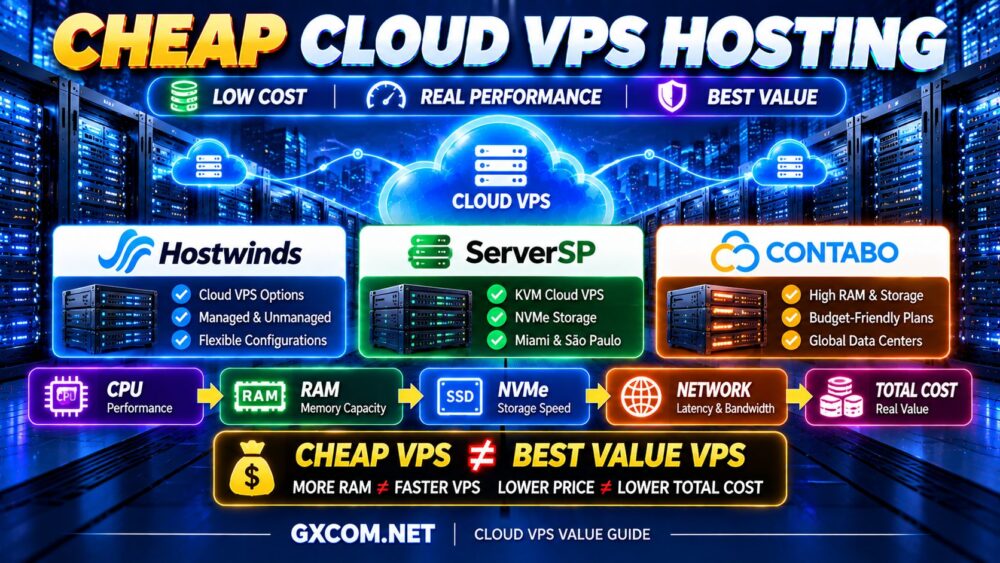
Choosing the best cloud VPS hosting provider is not simply about finding the lowest price or the largest amount of RAM. The right cloud VPS should deliver the CPU performance, storage speed, network quality, management options, and scalability your workload actually needs.
Some cloud VPS services are designed for developers who want complete control over their infrastructure. Others focus on managed hosting, predictable monthly resources, or straightforward deployment for business applications.
The challenge is that two cloud VPS plans with similar specifications can deliver very different experiences.
4 vCPU does not always mean the same performance. More RAM does not automatically make a website faster. And cloud infrastructure does not guarantee zero downtime.
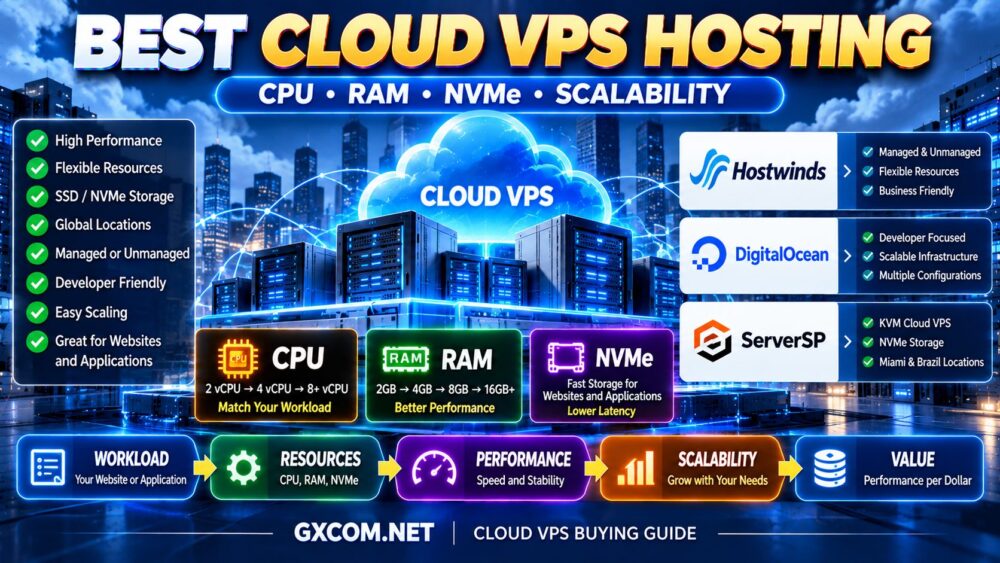
In this guide, we compare three cloud VPS hosting options—Hostwinds, DigitalOcean, and ServerSP—based on their practical strengths, limitations, and ideal use cases. We also explain how to evaluate cloud VPS performance, choose the right resources, and avoid paying for infrastructure you do not need.
Best Cloud VPS Hosting Providers at a Glance
| Provider | Best For | Main Strength | Consider Before Buying |
|---|---|---|---|
| Hostwinds | Businesses and users seeking management options | Managed and unmanaged VPS choices | Confirm management scope, billing, and storage type |
| DigitalOcean | Developers and cloud-native applications | Droplet configurations and developer tooling | Account for self-management and additional services |
| ServerSP | Cloud VPS users targeting the US and Brazil | KVM, NVMe, and regional infrastructure | Confirm location, support scope, and resource limits |
Our quick recommendations:
- Best for managed or unmanaged flexibility: Hostwinds
- Best for developers and cloud applications: DigitalOcean
- Best for Miami and Brazil Cloud VPS deployments: ServerSP
These recommendations reflect product positioning and documented capabilities rather than a controlled performance benchmark. No provider is the fastest or most reliable for every application.
What Is Cloud VPS Hosting?
Cloud VPS hosting provides a virtual server with allocated CPU, memory, storage, and network resources on a provider's virtualized infrastructure.
Unlike shared web hosting, a cloud VPS gives users substantially more control over the operating system, installed software, and server configuration.
Typical cloud VPS workloads include:
- WordPress and business websites
- Web applications and APIs
- Development and staging environments
- Docker containers
- Small and medium-sized databases
- Business software
- Remote administration environments
The term “cloud VPS” is not governed by one universal technical standard. Providers may use it to describe different virtualization platforms, resource models, billing arrangements, and scaling capabilities.
A cloud VPS is also not automatically a high-availability cluster. A single virtual machine can still fail if its underlying infrastructure, operating system, or application experiences problems.
1. Hostwinds — Best for Managed and Unmanaged Cloud VPS Flexibility
Hostwinds is a strong option for buyers who want cloud VPS infrastructure with a choice between handling server administration themselves and purchasing additional management assistance.
Its cloud platform provides configurable virtual servers, resource upgrade options, and management features through its control panel.
Key Strengths
- Managed and unmanaged VPS offerings
- Linux and Windows hosting options
- Configurable CPU, RAM, and storage resources
- Cloud control panel and server management tools
- Upgrade options as resource requirements grow
- Support options for users with different technical skills
Hostwinds is especially relevant when a business wants the flexibility of a VPS without necessarily maintaining every part of the operating system independently.
Who Should Choose Hostwinds?
Consider Hostwinds if you operate a business website, manage client hosting, or need a virtual server with a clearly defined path between unmanaged and managed service.
It can also appeal to experienced administrators who prefer an unmanaged server but want the option to change their support arrangement later.
Potential Limitations
Management level matters. Unmanaged service does not include the same operating-system administration assistance as managed service.
Also verify whether the selected plan uses SSD or NVMe storage, how billing applies, and whether backups are included or purchased separately.
Best fit: Business-oriented cloud VPS users who value management flexibility.
2. DigitalOcean — Best for Developers and Cloud Applications
DigitalOcean is particularly well suited to developers, software teams, and businesses building applications that may expand beyond a single virtual server.
Its Droplets are cloud virtual machines available in multiple configurations, including shared-CPU and dedicated-CPU categories.
Key Strengths
- Multiple virtual machine configuration families
- Shared and dedicated CPU options
- Developer-focused documentation
- API and automation capabilities
- Cloud networking and additional infrastructure services
- Flexible resource selection for different workloads
A lightweight application may be adequately served by a basic shared-CPU Droplet. A CPU-intensive production application may benefit from a CPU-optimized or general-purpose configuration.
This distinction is important because buying more virtual cores is not always equivalent to buying more predictable compute performance.
Who Should Choose DigitalOcean?
DigitalOcean is a strong candidate for developers running APIs, SaaS applications, Linux servers, containerized workloads, and infrastructure managed through scripts or deployment pipelines.
Its ecosystem is also attractive when an application may eventually require additional infrastructure services.
Potential Limitations
Droplets generally require customers to administer their operating systems and applications unless they purchase or use separate management solutions.
Additional infrastructure services, storage, backups, and networking requirements can affect the final bill.
Best fit: Developers and growing applications that benefit from cloud tooling and configurable compute.
3. ServerSP — Best for Regional Cloud VPS Deployment in Miami and Brazil
ServerSP offers Cloud VPS infrastructure with KVM virtualization, NVMe storage, and deployment locations including Miami and São Paulo.
This makes it particularly relevant to businesses serving users in Brazil, Latin America, and nearby markets, although actual network performance should always be tested.
Key Strengths
- KVM-based virtual servers
- NVMe SSD storage
- Root or administrator access
- Cloud VPS management panel
- IPv4 and IPv6 connectivity
- Miami and São Paulo infrastructure options
- Virtual Data Center solutions for managing multiple virtual machines
ServerSP is especially interesting for buyers who want a straightforward Cloud VPS rather than a broad collection of unrelated cloud services.
Who Should Choose ServerSP?
ServerSP can be a practical candidate for websites, business applications, staging environments, and regional services where Miami or São Paulo is a suitable deployment location.
Its Virtual Data Center product is also relevant to agencies and infrastructure resellers that need to create and manage multiple virtual machines from a resource pool.
Potential Limitations
Regional coverage is narrower than that of a large global cloud platform. Verify latency to your actual audience before ordering.

Also confirm the specific Cloud VPS plan's resource allocation, backup policy, support scope, and any storage I/O restrictions.
Best fit: Regional Cloud VPS deployments and users who want KVM-based infrastructure with direct server control.
Hostwinds vs DigitalOcean vs ServerSP: Which Is Better?
There is no universal winner because these providers emphasize different strengths.
Choose Hostwinds when server management options are central to your decision.
Choose DigitalOcean when developer tooling, compute configurations, and cloud application infrastructure are more important.
Choose ServerSP when its regional locations and KVM-based Cloud VPS offering match your requirements.
For buyers who are still deciding whether cloud infrastructure is necessary at all, our Cloud Hosting vs VPS comparison explains the broader hosting tradeoffs.
How to Choose the Best Cloud VPS Hosting Plan
Choosing a provider is only half the decision. The selected instance configuration determines whether the server is appropriate for your application.
1. Start With the Workload
A small website, busy online store, and database-heavy application can have very different infrastructure requirements even when their monthly visitor counts appear similar.
Identify:
- Application type
- Peak concurrent users
- Cached versus dynamic requests
- CPU utilization
- Memory consumption
- Database activity
- Storage growth
WORKLOAD → RESOURCES → PERFORMANCE → COST is a better purchasing framework than choosing the plan with the largest specifications.
2. Compare CPU Quality, Not Just vCPU Count
CPU performance is affected by processor generation, architecture, resource allocation, and contention on shared infrastructure.
A four-vCPU instance with stronger or more predictable CPU resources can outperform a larger shared-CPU configuration for certain applications.
For sustained compute workloads, examine whether the provider offers dedicated CPU options or documented performance characteristics.
3. Select RAM Based on Actual Memory Requirements
RAM supports the operating system, application workers, databases, caching services, and background processes.
Adding memory helps when the server experiences genuine memory pressure. It does not necessarily improve an application limited by CPU or slow database queries.
| RAM | Potential Starting Use Case |
|---|---|
| 1–2GB | Lightweight Linux applications and development |
| 4GB | Small production websites and modest application stacks |
| 8GB | Growing applications, multiple services, and moderate databases |
| 16GB+ | Heavier databases, larger applications, and memory-intensive workloads |
These are illustrative starting ranges, not guaranteed sizing requirements.
4. Examine SSD and NVMe Performance
NVMe storage can be valuable for databases and I/O-intensive applications, but the storage label alone is not enough.
Actual performance can be affected by IOPS limits, latency, storage architecture, and resource contention.
For a deeper explanation, read our NVMe VPS Performance guide.
5. Check Network Location and Bandwidth
Choose a server location based on where your users are located and where other application components run.
Consider network latency, transfer allowances, port speeds, and any traffic restrictions.
A fast CPU cannot eliminate network latency caused by a distant deployment region.
6. Evaluate Management and Support
Unmanaged cloud VPS hosting gives experienced administrators greater control and can reduce direct hosting costs.
Managed services may reduce the operational workload for businesses without dedicated server administrators.
Before purchasing, determine who is responsible for operating-system updates, firewall rules, monitoring, backups, and application troubleshooting.
Cloud VPS Resource Planning by Workload
| Workload | Suggested Starting CPU | Suggested Starting RAM | Main Consideration |
|---|---|---|---|
| Small Website | 1–2 vCPU | 2–4GB | Optimization and caching |
| Business Website | 2–4 vCPU | 4–8GB | Reliability and support |
| Growing Web Application | 4 vCPU+ | 8GB+ | CPU consistency and scaling |
| Database-Heavy Application | 4 vCPU+ | 8–16GB+ | Storage latency and database tuning |
| Development and Staging | 1–4 vCPU | 2–8GB | Flexibility and operating cost |
Use these configurations as initial planning assumptions. Production workloads should be sized through monitoring and load testing.
Cloud VPS vs Traditional VPS: What Actually Changes?
Traditional VPS hosting and cloud VPS hosting share the same basic concept: an isolated virtual server running on physical infrastructure.
The meaningful differences are usually found in the surrounding platform.
A cloud-oriented service may offer:
- Faster instance provisioning
- API-driven deployment
- Additional compute configurations
- Snapshots and infrastructure automation
- Flexible billing arrangements
- Integration with networking and storage services
However, not every cloud VPS includes automatic failover, live migration, or horizontal scaling.
These capabilities must be verified individually.
CLOUD VPS ≠ AUTOMATIC HIGH AVAILABILITY.
Is Cloud VPS Hosting Good for WordPress?
Yes. A properly configured cloud VPS can be an excellent platform for WordPress, especially when a website has outgrown shared hosting or requires more control over PHP, caching, and database configuration.
WordPress performance depends on more than the VPS plan.
- PHP worker configuration
- Database efficiency
- Page caching
- Redis or other object caching
- Theme and plugin quality
- CDN configuration
- CPU and memory availability
A well-optimized WordPress website on a modest cloud VPS may outperform a poorly optimized website running on a much larger instance.
MORE RESOURCES ≠ FASTER WORDPRESS.
Cloud VPS for eCommerce and Business Applications
Online stores, customer portals, and business applications frequently generate dynamic requests that cannot be handled entirely through page caching.
For these workloads, CPU consistency, database performance, and backup strategy become particularly important.
A business-critical application should also have a recovery plan that addresses more than a single virtual machine.
Consider off-server backups, application monitoring, tested restoration procedures, and redundancy where downtime would have significant consequences.
Cloud VPS for Developers and Docker
Cloud VPS hosting is useful for developers who want a reproducible environment for deploying APIs, containers, test applications, and internal services.
Docker can simplify application packaging, but containers still consume CPU, RAM, storage, and network resources.
Do not size a VPS solely by counting containers.
A few lightweight services may use very little memory, while one database container can consume considerably more.
Developer teams should also consider API support, automation, snapshots, deployment regions, and whether the provider supports their preferred operating system.
How Much Does Cloud VPS Hosting Really Cost?
The advertised instance price is not always the total cost of running an application.
Depending on the provider and configuration, additional expenses may include:
- Backups and snapshots
- Additional storage
- Bandwidth or data transfer
- Public IP addresses
- Management services
- Control panel licenses
- Monitoring
- Additional infrastructure components
A useful calculation is:
TOTAL CLOUD VPS COST = COMPUTE + STORAGE + NETWORK + BACKUPS + MANAGEMENT + EXTRAS
Some services bill by the hour or second, while others use fixed subscription cycles or longer-term commitments.
Always check the current billing terms, especially if you plan to create temporary development instances.
Cheap Cloud VPS vs Premium Cloud VPS
Budget cloud VPS hosting can be appropriate for small websites, development environments, and lightweight services.
Premium configurations become more attractive when workloads require sustained CPU performance, additional memory, stronger storage, or enhanced operational support.
But the most expensive plan is not necessarily the best value.
For a price-sensitive workload, compare the amount of useful performance delivered per dollar rather than the largest advertised RAM allocation.
Our Affordable Cloud VPS Deals guide covers the deal-focused side of this decision.
When Should You Upgrade a Cloud VPS?
Upgrade when monitoring shows that your current instance no longer meets the application's requirements.
Warning signs include:
- Persistent CPU saturation
- Memory exhaustion or excessive swapping
- Storage I/O bottlenecks
- Slow database queries under load
- Request queues and timeouts
- Network capacity limitations
Before purchasing a larger instance, determine whether the problem can be resolved through application optimization.
For example, database indexing or effective caching can sometimes deliver greater improvements than adding more CPU cores.
OPTIMIZATION BEFORE UPGRADE.
Cloud VPS Scaling: Vertical vs Horizontal
Vertical scaling increases the resources allocated to an existing instance.
Examples include upgrading from 2 vCPU to 4 vCPU or increasing RAM from 4GB to 8GB.
Horizontal scaling distributes an application across multiple instances, often using a load balancer and shared or external data services.
Vertical scaling is generally simpler, while horizontal scaling can provide greater architectural flexibility at the cost of additional complexity.
Neither approach automatically guarantees uninterrupted operation. Application design and provider capabilities determine how scaling works in practice.
Cloud VPS Security and Backups
Virtualization isolation is useful, but a cloud VPS still requires appropriate security management.
Important practices include:
- Keep the operating system updated
- Use SSH keys where practical
- Restrict unnecessary network ports
- Configure firewalls
- Protect privileged accounts
- Monitor authentication activity
- Back up application data
- Test restoration procedures
Snapshots can simplify recovery, but they should not automatically be treated as a complete backup strategy.
For important applications, maintain backups outside the affected instance or infrastructure failure domain.
Common Cloud VPS Buying Mistakes
Choosing the Cheapest Plan Without Checking CPU Allocation
Shared CPU can provide excellent value, but sustained compute workloads may require more predictable resources.
Buying More RAM Without Measuring Memory Usage
Additional RAM will not fix a CPU-bound application or inefficient database queries.
Assuming All Cloud VPS Providers Offer Automatic Failover
High availability requires specific infrastructure and application capabilities. Do not assume it is included.
Ignoring Backup and Data Transfer Costs
Additional services can materially change the total cost of ownership.
Choosing a Distant Server Location
Network latency can affect user experience even when the virtual server itself performs well.
Confusing Managed and Unmanaged Support
Always determine which maintenance and troubleshooting responsibilities belong to the provider and which belong to you.
Best Cloud VPS Hosting Buying Checklist
- ✓ Identify the application workload
- ✓ Compare shared and dedicated CPU options
- ✓ Check processor and resource information
- ✓ Estimate realistic RAM requirements
- ✓ Evaluate SSD or NVMe performance
- ✓ Choose the appropriate server location
- ✓ Check bandwidth and traffic restrictions
- ✓ Confirm Linux or Windows support
- ✓ Understand managed versus unmanaged responsibilities
- ✓ Review backup and snapshot options
- ✓ Verify scaling capabilities
- ✓ Calculate total operating cost
- ✓ Test latency and application performance
- ✓ Confirm the provider's support scope
Best Cloud VPS Hosting FAQ
What is the best cloud VPS hosting provider?
The best provider depends on the workload. Hostwinds is worth considering for managed and unmanaged flexibility, DigitalOcean for developer-focused cloud infrastructure, and ServerSP for Cloud VPS deployments where Miami or São Paulo is an appropriate location.
Is cloud VPS better than regular VPS?
Not automatically. Cloud VPS may offer convenient provisioning, automation, or scaling options, but the actual advantages depend on the provider's architecture and service features.
How much RAM do I need for cloud VPS hosting?
Lightweight applications may run on 1–2GB, while growing websites and application stacks may need 4–8GB or more. Database-heavy workloads can require substantially more memory. Monitor actual consumption before scaling.
Is cloud VPS hosting good for WordPress?
Yes. Cloud VPS can provide the control and resources needed for WordPress, but performance also depends on PHP, database configuration, caching, and optimization.
Does cloud VPS hosting include backups?
Backup availability varies by provider and plan. Some services include specific backup features, while others charge separately. Always verify retention, restoration, and storage location.
Can cloud VPS handle high-traffic websites?
Yes, provided the application is optimized and the server has sufficient CPU, RAM, storage, and network capacity. Traffic patterns and dynamic request volume matter more than monthly visitor counts alone.
Is NVMe necessary for cloud VPS hosting?
NVMe can benefit storage-intensive applications, particularly databases, but it is not required for every workload. CPU, caching, and application efficiency can be more important.
Should I choose managed or unmanaged cloud VPS?
Choose managed hosting when you need server administration assistance and the service scope meets your requirements. Choose unmanaged hosting when you have the expertise to maintain the operating system and applications yourself.
Can I upgrade a cloud VPS later?
Many providers support resource upgrades, but the process, downtime, limitations, and pricing vary. Confirm scaling options before purchasing.
Final Verdict: Which Cloud VPS Hosting Provider Should You Choose?
There is no single cloud VPS provider that is best for every website, developer, or business.
Hostwinds is a practical option when managed and unmanaged flexibility is an important purchasing factor.
DigitalOcean is particularly attractive for developers and application teams that value cloud tooling, multiple compute configurations, and infrastructure automation.
ServerSP is worth evaluating for KVM-based Cloud VPS deployments focused on Miami, Brazil, and related markets.
Before purchasing, use this decision framework:
WORKLOAD → CPU → RAM → STORAGE → NETWORK → MANAGEMENT → SCALABILITY → TOTAL COST
Remember:
MORE RAM ≠ FASTER VPS.
4 vCPU ≠ 4 vCPU.
CLOUD VPS ≠ AUTOMATIC HIGH AVAILABILITY.
LOWER PRICE ≠ BETTER VALUE.
The best cloud VPS hosting solution is the one that provides the resources, operational control, reliability features, and scalability your application genuinely needs—without unnecessary complexity or wasted spending.