Shared hosting is often the easiest and most affordable way to launch a website. It requires little server administration, usually includes a control panel and can handle many small websites perfectly well.
But as a website grows, shared hosting can eventually become restrictive.
You may start encountering CPU limits, memory limits, slow database performance, traffic spikes or restrictions on server configuration. At that point, a managed VPS becomes an attractive upgrade.
A managed VPS provides more isolated server resources and greater control while the hosting provider handles many server administration tasks for you.
But does every growing website need one?
This Managed VPS vs Shared Hosting comparison explains performance, CPU and RAM resources, control, security, management, scalability and cost—and shows when upgrading actually makes sense.
SHARED HOSTING = SIMPLE + AFFORDABLE
MANAGED VPS = MORE RESOURCES + MORE CONTROL + PROVIDER MANAGEMENT
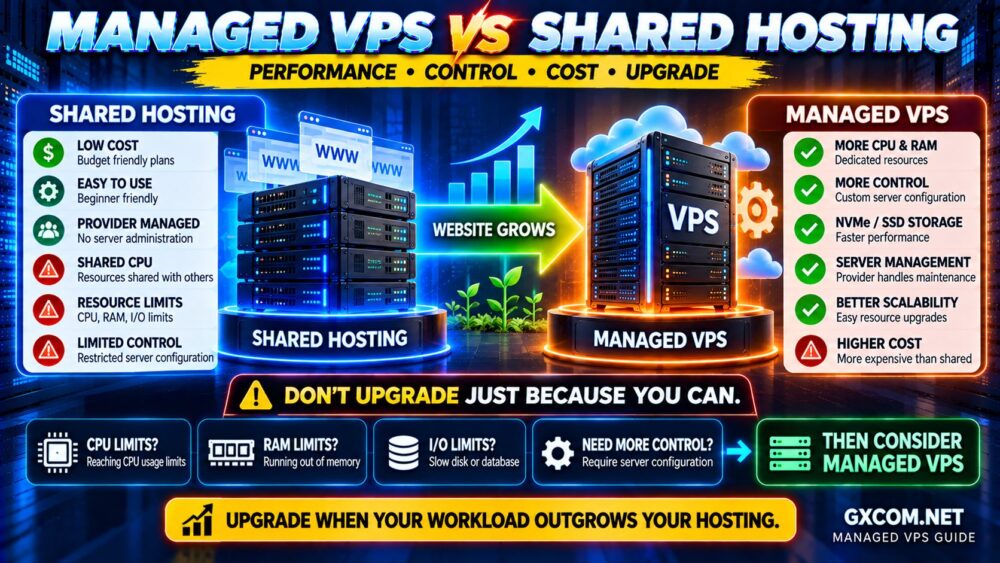
Managed VPS vs Shared Hosting: Quick Comparison
| Feature | Shared Hosting | Managed VPS |
|---|---|---|
| Price | Lower | Higher |
| CPU Resources | Shared and restricted | More clearly allocated |
| RAM | Account-level limits | Defined VPS allocation |
| Storage | Shared infrastructure | Defined SSD/NVMe allocation |
| Root Access | Usually no | Depends on management model |
| Server Configuration | Limited | Much greater flexibility |
| Server Management | Provider | Provider handles agreed management scope |
| Scalability | Plan upgrades | CPU/RAM/storage upgrades |
| Best For | Small websites | Growing or resource-intensive websites |
What Is Shared Hosting?
Shared hosting places multiple customer accounts on the same server infrastructure.
The hosting provider manages the operating system, web server, control panel and underlying server environment.
Customers normally manage their websites through a control panel rather than administering the server itself.
This makes shared hosting attractive for:
- Personal websites
- Blogs
- Portfolio websites
- Small business websites
- Low-to-moderate traffic WordPress sites
- Simple landing pages
The major advantages are simplicity and price.
But because many accounts share infrastructure, providers need resource limits to maintain stability.
These can include:
- CPU limits
- RAM limits
- Disk I/O limits
- IOPS limits
- Entry process limits
- PHP process limits
- Database restrictions
- Inode limits
Our Shared Hosting Limitations guide explains how these restrictions affect real website performance.
What Is a Managed VPS?
A managed VPS is a virtual private server combined with server management services from the hosting provider.
Instead of placing your website inside a tightly controlled shared hosting account, you receive a virtual server with defined resources such as:
- vCPU
- RAM
- SSD or NVMe storage
- Bandwidth
- Operating system environment
The provider then manages some or most of the server administration according to the plan.
Management may include:
- Operating system updates
- Security patching
- Server monitoring
- Control panel management
- Web server configuration
- Backup assistance
- Security hardening
- Troubleshooting
However, the phrase fully managed VPS does not have exactly the same meaning at every hosting company.
Always check the provider's management scope before buying.
Managed VPS vs Shared Hosting: The Biggest Difference
The biggest difference is not simply speed.
It is the way server resources and responsibilities are allocated.
Shared hosting:
ONE SERVER
↓
MANY HOSTING ACCOUNTS
↓
ACCOUNT RESOURCE LIMITS
Managed VPS:
SERVER INFRASTRUCTURE
↓
ISOLATED VIRTUAL SERVER
↓
DEFINED VPS RESOURCES
↓
PROVIDER MANAGEMENT
This gives a managed VPS more flexibility without requiring the customer to become a full-time system administrator.
Performance: Managed VPS vs Shared Hosting
A managed VPS generally has greater performance potential because it provides a clearer allocation of computing resources.
But moving to VPS does not automatically make every website faster.
Real website performance depends on:
- CPU performance
- Available RAM
- Storage performance
- Database efficiency
- PHP configuration
- Caching
- Website code
- Network latency
A badly optimized WordPress website can remain slow after moving to a VPS.
Likewise, a well-optimized cached website can perform extremely well on quality shared hosting.
The correct rule is:
VPS RESOURCES CREATE PERFORMANCE HEADROOM.
OPTIMIZATION DETERMINES HOW WELL YOU USE IT.
CPU: Shared Limits vs VPS Resources
CPU is one of the main reasons growing websites move away from shared hosting.
Shared hosting providers need to prevent one customer from consuming excessive processor time, so CPU usage is normally restricted.
This may become noticeable during:
- Traffic spikes
- WooCommerce activity
- WordPress admin operations
- Backups
- Security scans
- Large database operations
- Background jobs
A VPS generally provides a specified number of vCPUs.
For example:
SHARED HOSTING
CPU usage controlled by account limits
versus:
MANAGED VPS
2 vCPU / 4 vCPU / 8 vCPU or another defined allocation
However, vCPU count alone does not determine performance.
CPU generation, clock performance and whether processor resources are shared or dedicated can also matter.
RAM: A Major VPS Advantage
Shared hosting accounts usually operate within provider-defined memory restrictions.
With a VPS, RAM allocation is much clearer.
A plan may provide:
- 4 GB RAM
- 8 GB RAM
- 16 GB RAM
- 32 GB RAM
This memory can support the operating system, web server, database, PHP processes, caching and applications.
More RAM can be particularly useful for:
- Large WordPress websites
- WooCommerce
- Busy databases
- Object caching
- Multiple websites
- Applications with many concurrent processes
But more RAM does not automatically make a website faster if RAM was never the bottleneck.
MORE RAM ≠ AUTOMATICALLY MORE PERFORMANCE.
Storage and I/O Performance
Both shared hosting and managed VPS plans may advertise SSD or NVMe storage.
The important difference is how storage performance is allocated.
Shared hosting accounts can have restrictions on:
- Disk I/O
- IOPS
- Concurrent processes
VPS plans may provide greater storage performance, but they can still have provider-defined limits.
Do not assume that every NVMe VPS delivers identical performance.
Our NVMe VPS vs SSD VPS comparison explains why NVMe hardware, IOPS limits, I/O policies and host load all influence real VPS storage speed.
Managed VPS vs Shared Hosting for WordPress
Shared hosting is sufficient for many WordPress websites.
A small content website with effective page caching may never require a VPS.
A managed VPS becomes more attractive when WordPress begins consuming substantial server resources.
Typical examples include:
- Large content websites
- High traffic
- Many plugins
- Frequent publishing
- Large databases
- Membership websites
- Multiple WordPress installations
The advantage is not merely additional CPU and RAM.
A managed VPS may also allow the hosting environment to be configured more specifically for the workload.
Managed VPS vs Shared Hosting for WooCommerce
WooCommerce is one of the strongest cases for upgrading from shared hosting as a website grows.
Unlike a mostly cached blog, an online store has many dynamic operations:
- Shopping carts
- Checkout
- Customer accounts
- Product searches
- Inventory updates
- Payment operations
- Order processing
- Background tasks
These activities can increase CPU, PHP and database demand.
A managed VPS provides more resource headroom while retaining professional server management.
That combination can be attractive for store owners who need better performance but do not want to administer Linux themselves.
Control: Why Managed VPS Is Different
Shared hosting intentionally limits server-level control.
You usually cannot freely modify:
- Operating system configuration
- System services
- Web server architecture
- Low-level firewall rules
- Custom server software
A VPS provides a much more flexible environment.
Depending on the provider and management plan, you may be able to customize:
- PHP versions and settings
- Web server configuration
- Database configuration
- Redis or other caching systems
- Firewall rules
- Application services
This is particularly useful when your application has requirements that shared hosting cannot accommodate.
Does Managed VPS Include Root Access?
Sometimes—but not always.
Some managed VPS providers allow full root access while still offering management.
Others restrict certain administrative actions because the provider needs to maintain a supported server configuration.
This is an important buying question:
DO I NEED FULL ROOT ACCESS?
If yes, verify it before purchasing.
Do not assume that every managed VPS provides the same level of administrative control.
Server Management: The Main Reason to Choose Managed VPS
A self-managed VPS gives you server resources but also makes you responsible for server administration.
That can include:
- SSH security
- Firewall configuration
- System updates
- Web server configuration
- Database administration
- Monitoring
- Backups
- Incident response
A managed VPS shifts some or much of this responsibility to the provider.
This is why managed VPS should not be compared only on raw CPU and RAM price.
You are paying for:
SERVER RESOURCES
+
SERVER MANAGEMENT
+
TECHNICAL SUPPORT
For businesses without an experienced system administrator, that service can be valuable.
Managed VPS vs Shared Hosting Security
Shared hosting has a major security advantage for beginners: the provider controls most of the server environment.
With a VPS, the security model changes because you have a more independent server environment.
A properly managed VPS may include assistance with:
- Security updates
- Firewall configuration
- Malware protection
- Monitoring
- Server hardening
But management coverage varies.
You remain responsible for application-level security, including WordPress plugins, themes, passwords and administrator accounts.
For a deeper look at server security, see our How to Secure a VPS guide.
Managed VPS vs Shared Hosting Scalability
Shared hosting usually scales by moving between predefined hosting plans.
Eventually, you may reach the highest shared plan available.
VPS hosting provides a clearer growth path:
2 vCPU / 4 GB RAM
↓
4 vCPU / 8 GB RAM
↓
8 vCPU / 16 GB RAM
↓
LARGER VPS OR CLOUD INFRASTRUCTURE
The exact upgrade process depends on the provider.
Some platforms allow relatively quick resource upgrades, while others may require migration or downtime.
How Much Traffic Can Shared Hosting Handle?
There is no universal visitor number at which shared hosting stops working.
A cached content website may handle far more visitors than a dynamic WooCommerce store on the same hosting plan.
Traffic capacity depends on:
- CPU demand per request
- PHP processing
- Database activity
- Caching
- Concurrent users
- Bot traffic
- Provider resource limits
This is why monthly visitor counts alone are a poor upgrade metric.
Our How Much Traffic Can Shared Hosting Handle? guide explains this in detail.
When Should You Upgrade From Shared Hosting to Managed VPS?
You should consider upgrading when the current hosting environment—not simply the website itself—is becoming a consistent bottleneck.
Common warning signs include:
- CPU limits are repeatedly reached
- RAM limits are repeatedly reached
- Disk I/O is regularly throttled
- Traffic spikes cause errors
- WooCommerce becomes slow under load
- Database-heavy operations are struggling
- You need server-level configuration
- You need more predictable resources
- You host multiple resource-intensive websites
- You have outgrown the provider's shared hosting plans
The correct upgrade process is:
MEASURE
↓
IDENTIFY BOTTLENECK
↓
OPTIMIZE
↓
MONITOR
↓
UPGRADE IF LIMITS REMAIN
When You Should NOT Upgrade Yet
Buying a VPS is not the correct solution to every slow website.
You may not need to upgrade if the real problem is:
- Unoptimized images
- Poor caching
- Slow plugins
- Bad database queries
- Third-party scripts
- External API delays
- Frontend JavaScript
- Poorly configured CDN
A faster server cannot completely solve inefficient application design.
Before upgrading, use the process in our Slow Server Troubleshooting Guide to determine whether CPU, RAM, disk or network resources are actually responsible.
Managed VPS vs Shared Hosting Cost
Shared hosting is almost always cheaper at the entry level.
One server can host many accounts, allowing providers to offer low monthly prices.
Managed VPS costs more because the product combines dedicated virtual server resources with management services.
The real managed VPS cost is closer to:
VPS INFRASTRUCTURE
+
CONTROL PANEL
+
BACKUPS
+
MONITORING
+
SERVER MANAGEMENT
+
SUPPORT
=
REAL MANAGED VPS COST
This is why comparing a $5 self-managed VPS with a $30 or $50 managed VPS solely on CPU and RAM is misleading.
They are not the same service.
Is Managed VPS Worth the Extra Cost?
Managed VPS is usually worth considering when server performance matters to your business but you do not have the time or expertise to administer the server yourself.
The extra cost can buy:
- More predictable resources
- Greater configuration flexibility
- Server monitoring
- Technical assistance
- Security management
- Reduced administration workload
For a personal blog with modest traffic, this may be unnecessary.
For a revenue-generating WooCommerce store or business application, paying more for reliable infrastructure and server management can be much easier to justify.
Managed VPS Providers Worth Comparing
When moving beyond shared hosting, compare providers based on both infrastructure and the actual management service included.
ScalaHosting is particularly relevant for users looking for a managed VPS upgrade path and who prefer provider-assisted server administration.
AccuWeb Hosting is also worth comparing because it offers hosting products across shared, VPS and other server categories, which can be useful when planning a gradual infrastructure upgrade.
Hostwinds can be considered when comparing VPS configurations and different management requirements.
If you are comfortable with a more developer-oriented cloud environment, DigitalOcean represents a different path: flexible cloud virtual machines rather than a traditional fully managed shared-to-VPS experience.
The right comparison is not simply:
WHO HAS THE CHEAPEST VPS?
Instead compare:
RESOURCES → MANAGEMENT SCOPE → SUPPORT → BACKUPS → SECURITY → TOTAL COST.
Shared Hosting vs Managed VPS: Which Should You Choose?
Choose Shared Hosting If:
- Your website is small or relatively lightweight
- Your resource usage remains comfortably within limits
- You do not need server-level configuration
- You want the lowest possible hosting cost
- You want a simple control-panel experience
Choose Managed VPS If:
- Your website repeatedly reaches shared hosting limits
- You need more CPU or RAM
- You run a growing WooCommerce store
- You need more control over the server stack
- You need more predictable resources
- You host multiple demanding websites
- You want VPS resources without managing everything yourself
Managed VPS vs Shared Hosting Decision Checklist
| If You Need… | Usually Choose |
|---|---|
| Lowest hosting cost | Shared Hosting |
| Simple website management | Shared Hosting |
| More CPU and RAM | Managed VPS |
| Greater server control | Managed VPS |
| Custom server configuration | Managed VPS |
| Growing WooCommerce store | Managed VPS |
| Server administration included | Either, but Managed VPS for VPS-level resources |
| Small cached WordPress site | Shared Hosting |
| More predictable resource allocation | Managed VPS |
Common Upgrade Mistakes
Upgrading Because the Website Is Slow Without Finding the Cause
Performance problems can originate from plugins, database queries, external services or frontend code rather than hosting resources.
Buying More RAM Without Checking RAM Usage
If memory is not the bottleneck, additional RAM may provide little benefit.
Assuming Managed Means Everything Is Managed
Always check exactly what the provider includes.
Choosing VPS Based Only on vCPU Count
CPU generation and allocation policies can matter as much as the advertised core count.
Ignoring Backup Policies
Managed hosting does not automatically mean unlimited backups or complete disaster recovery.
Choosing the Cheapest Managed VPS
A low price is not good value if the management scope, infrastructure or support does not meet your requirements.
Managed VPS vs Shared Hosting FAQ
Is managed VPS faster than shared hosting?
A managed VPS generally provides greater performance potential and more predictable resources, but actual speed still depends on server hardware, configuration and website optimization.
When should I move from shared hosting to VPS?
Consider upgrading when an optimized website repeatedly reaches shared hosting CPU, RAM, I/O or process limits, or when you require server-level configuration unavailable on shared hosting.
Do I need technical knowledge for a managed VPS?
Less than with a self-managed VPS, but the amount of knowledge required depends on what the provider actually manages. A control panel and strong management service can make VPS hosting much easier for non-specialists.
Is managed VPS good for WordPress?
Yes, particularly for larger or more resource-intensive WordPress websites. Small cached WordPress websites may not need VPS resources.
Is managed VPS better for WooCommerce?
It can be a strong upgrade for growing WooCommerce stores because dynamic checkout, customer sessions, database operations and background tasks can require more CPU, RAM and PHP capacity.
Does managed VPS include backups?
It depends on the provider and plan. Never assume backups are included; check frequency, retention, storage location and restoration policies.
Does managed VPS include root access?
Some providers allow root access, while others restrict certain administrative functions to maintain their managed environment. Verify the policy before purchasing.
Is managed VPS worth the extra money?
It can be when your website genuinely needs VPS resources and you value provider-assisted server management. For small websites operating comfortably on shared hosting, the additional cost may not be necessary.
Final Verdict: Shared Hosting or Managed VPS?
Shared hosting remains one of the best choices for websites that need affordability, simplicity and minimal server administration.
There is no reason to leave it simply because VPS hosting sounds more powerful.
Upgrade when your workload actually requires it.
Choose shared hosting when you prioritize:
LOW COST → SIMPLICITY → EASY MANAGEMENT
Choose a managed VPS when you prioritize:
MORE RESOURCES → MORE CONTROL → PROVIDER MANAGEMENT
The ideal upgrade path is:
SHARED HOSTING
↓
MEASURE RESOURCE USAGE
↓
OPTIMIZE
↓
LIMITS STILL REACHED?
↓
MANAGED VPS
Do not upgrade because a VPS has more impressive specifications.
UPGRADE WHEN YOUR WORKLOAD OUTGROWS THE ENVIRONMENT.