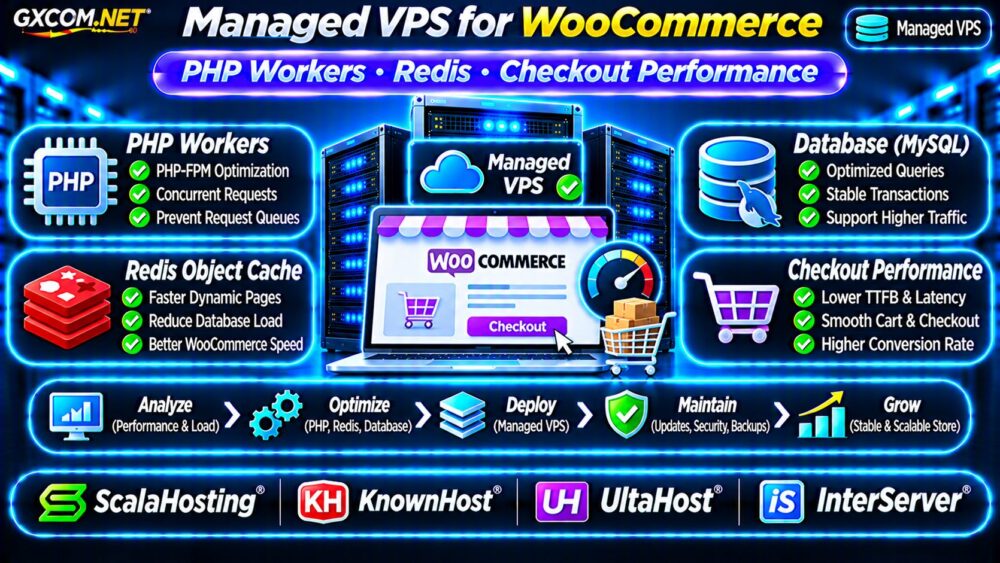
Choosing a managed VPS for WooCommerce is not simply about buying more RAM or faster processors. Online stores generate dynamic requests that cannot always benefit from ordinary page caching. PHP worker availability, Redis object caching, database performance, and hosting support can directly affect shopping carts and checkout responsiveness.
A well-configured managed VPS provides dedicated virtual server resources and administrative assistance, but management responsibilities differ between providers. This guide explains how to identify WooCommerce bottlenecks, select appropriate resources, and compare hosting options without paying for unnecessary upgrades.
Why WooCommerce Needs Different VPS Resources
Unlike a mostly static WordPress website, WooCommerce processes customer sessions, inventory updates, payment requests, and database transactions.
Product pages may benefit from full-page caching, while cart, checkout, and account pages often require personalized responses. These requests depend heavily on PHP execution and database responsiveness.
When concurrent shoppers increase, a VPS with insufficient PHP capacity can develop request queues even when its advertised RAM appears adequate.
PHP Workers: The First WooCommerce Bottleneck
PHP workers execute requests that require server-side PHP processing. In PHP-FPM environments, worker capacity depends on settings such as pm.max_children, available memory, and the selected process management mode.
If all workers are occupied, additional requests may wait for capacity. Customers can experience slow cart updates, delayed checkout pages, or gateway timeouts.
How Many PHP Workers Does WooCommerce Need?
There is no universal worker count. Requirements depend on concurrent uncached requests, execution duration, plugins, and server memory.
For illustration, if an average worker consumes 120MB of memory, ten active workers could consume approximately 1.2GB before accounting for the database, operating system, and other services.
Actual worker memory varies substantially. Measure process usage and request concurrency before changing limits.
Our PHP Worker Limits Guide explains the underlying performance problem in greater detail.
Redis Object Cache: What It Actually Improves
Redis can provide persistent object caching for WordPress and WooCommerce. It reduces repeated database work by storing reusable application objects in memory.
Redis is particularly useful when plugins and product queries repeatedly request the same information. However, it does not automatically eliminate expensive queries or make every checkout operation cacheable.
Redis vs Full-Page Caching
Full-page caching stores rendered responses, while object caching stores reusable application data. These technologies solve different problems.

Cart, checkout, and account pages generally require carefully configured cache exclusions because they contain customer-specific information.
Before enabling Redis, confirm plugin compatibility, cache invalidation behavior, memory limits, and monitoring. Incorrect caching can create stale data or unexpected application behavior.
CPU, RAM and NVMe Storage for WooCommerce
CPU capacity affects PHP execution and database processing. RAM supports PHP workers, MySQL or MariaDB buffers, Redis, and operating system caches.
NVMe storage may improve database responsiveness when storage latency is the limiting factor, but faster disks cannot compensate for inefficient queries or exhausted PHP workers.
For a small store, a modest VPS may be sufficient. Busy stores with extensive plugins, large catalogs, or frequent concurrent checkouts may need substantially more resources.
Use application monitoring rather than generic package labels to determine upgrades.
WooCommerce Checkout Performance: What to Measure
Checkout performance should be tested separately from cached homepage or product-page speed.
Monitor uncached response time, PHP-FPM queue depth, CPU utilization, database query duration, and payment integration errors.
Measure performance under realistic concurrent activity, including adding products to carts and completing test purchases through supported payment sandbox environments.
Investigate Slow Checkout Requests
Common causes include expensive database queries, external payment API latency, slow shipping calculations, excessive plugins, and insufficient PHP capacity.
Increasing VPS resources may help when monitoring confirms saturation. Otherwise, application optimization may deliver greater improvements.
Our High TTFB Troubleshooting Guide covers related server response problems.
What Should Managed VPS Support Include?
Managed VPS hosting usually includes some combination of operating system maintenance, security updates, monitoring, and technical assistance. However, application-level support is not standardized.
Before purchasing, ask whether the provider will configure PHP-FPM, install Redis, troubleshoot database services, investigate WooCommerce performance, and assist with failed updates.
Also confirm backup retention, restoration assistance, control panel licensing, and the limits of migration support.
Compare these responsibilities with our Managed vs Unmanaged VPS Comparison.
Four Managed VPS Providers to Compare
The following GXCOM.NET-approved affiliate providers are relevant candidates for WooCommerce infrastructure. Their exact management coverage, caching support, and application assistance must be verified for each plan.
ScalaHosting: Managed VPS Flexibility
ScalaHosting is worth considering when managed VPS resources, control panel options, and scaling flexibility are priorities. Confirm whether PHP-FPM tuning, Redis setup, and WooCommerce troubleshooting are included.
KnownHost: Support and Reliability Planning
KnownHost is another candidate for stores that value managed server assistance. Compare backup policies, monitoring responsibilities, resource configurations, and application support boundaries.
UltaHost: Resource and Cost Comparison
UltaHost can be evaluated for managed VPS configurations and recurring costs. Verify Redis availability, supported PHP versions, backup options, and the scope of technical assistance.
InterServer: VPS Management Options
InterServer provides another infrastructure comparison point. Review the specific VPS product and management eligibility rather than assuming every plan includes comprehensive WooCommerce administration.
Compare written service commitments alongside CPU, RAM, storage, and renewal pricing.
Managed WooCommerce VPS Pricing and Value
A lower monthly price does not necessarily mean lower operating costs. Unmanaged administration, security maintenance, backup restoration, and troubleshooting consume engineering time.
Consider a hypothetical unmanaged VPS costing $25 monthly and a managed alternative costing $60. The annual difference is $420 before optional services.

If managed support replaces several hours of recurring administration, the premium may be worthwhile. However, application development, premium plugins, and payment gateway charges may remain separate expenses.
These figures are illustrative, not live provider quotations.
WooCommerce VPS Buying Checklist
- Measure PHP worker saturation and uncached checkout latency.
- Confirm Redis compatibility and cache exclusions.
- Size RAM for PHP, database services, and object caching.
- Verify backup retention and tested restoration procedures.
- Check application-level support and migration responsibilities.
- Compare introductory, renewal, and optional service costs.
Frequently Asked Questions
Does Redis Make WooCommerce Checkout Faster?
Redis may reduce repeated database operations, but checkout speed also depends on PHP execution, database queries, plugins, and external services.
Is 4GB RAM Enough for WooCommerce?
It may be adequate for some smaller stores, but required memory depends on worker concurrency, database size, Redis usage, and traffic patterns.
Will Managed VPS Hosting Fix Slow Checkout?
Not automatically. Hosting upgrades help when infrastructure is the bottleneck; inefficient application code and external API delays require separate investigation.
Final Verdict
The best managed VPS for WooCommerce balances PHP worker capacity, Redis configuration, database responsiveness, reliable backups, and clearly defined technical support.
Compare ScalaHosting, KnownHost, UltaHost, and InterServer using actual workload measurements and documented management responsibilities. For additional options, consult our Best VPS Providers Guide.