VPS hosting and cloud hosting are two of the most popular upgrade paths for websites and applications that need more resources than traditional shared hosting.
At first glance, they can look very similar.
Both can provide virtualized computing resources, dedicated allocations of CPU and RAM, SSD or NVMe storage, operating system control and the ability to host demanding applications.
But the infrastructure behind them can be very different.
A traditional VPS usually runs as a virtual machine on a specific physical host. Cloud hosting can distribute compute, storage and networking across a broader infrastructure platform and may offer faster scaling, automation and greater resilience.
However, “cloud” does not automatically mean faster, cheaper or more reliable.
This VPS vs Cloud Hosting comparison explains performance, scalability, reliability, control, pricing and use cases so you can choose the right infrastructure for your workload.
VPS = PREDICTABLE VIRTUAL SERVER
CLOUD = FLEXIBLE INFRASTRUCTURE PLATFORM
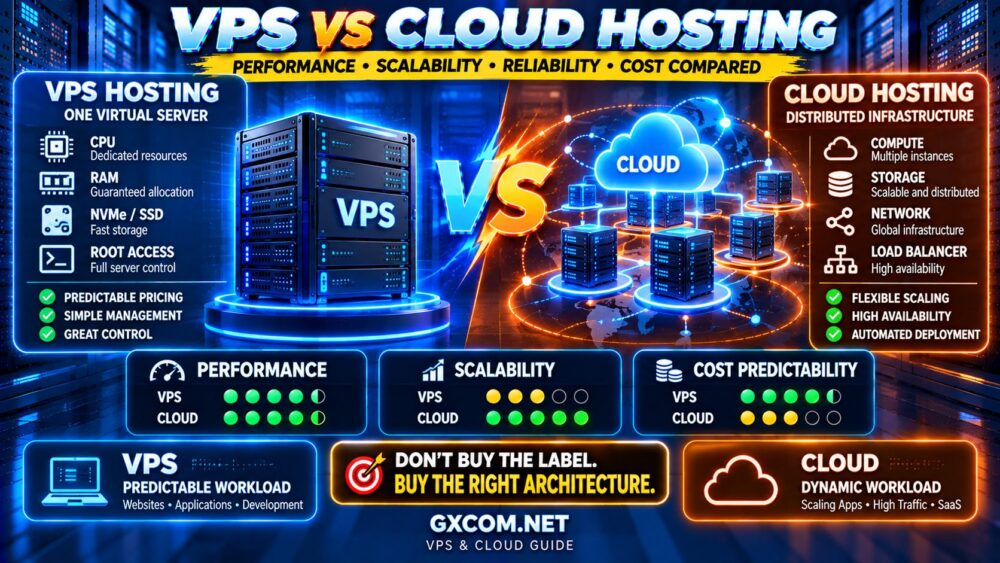
VPS vs Cloud Hosting: Quick Comparison
| Feature | VPS Hosting | Cloud Hosting |
|---|---|---|
| Infrastructure | Usually tied to a host/node | Can use broader cloud infrastructure |
| Performance | Strong and predictable with good provider | Strong but architecture dependent |
| Scalability | Usually vertical upgrades | Often more flexible |
| High Availability | Depends on provider architecture | Potentially stronger |
| Root Access | Usually available | Available on cloud VMs |
| Pricing | Often simple monthly plans | Fixed or usage-based |
| Cost Predictability | Usually high | Can vary |
| Complexity | Lower | Can be higher |
| Best For | Predictable workloads | Dynamic or scalable workloads |
What Is VPS Hosting?
A Virtual Private Server is created by dividing physical server resources into isolated virtual machines using virtualization technology.
A typical VPS plan provides a defined allocation such as:
- 2–8+ vCPU
- 2–32+ GB RAM
- SSD or NVMe storage
- Monthly bandwidth or transfer
- Linux or Windows operating system
- Root or administrator access
You receive an environment that behaves much like an independent server even though the underlying physical infrastructure may be shared with other VPS customers.
This makes VPS hosting popular for:
- WordPress
- WooCommerce
- Business websites
- Web applications
- Development environments
- Databases
- VPNs
- Game servers
The major advantage is straightforward:
DEFINED RESOURCES + SERVER CONTROL + PREDICTABLE PRICING.
What Is Cloud Hosting?
Cloud hosting is a broader term that can describe hosting services built on cloud infrastructure rather than a conventional single-server hosting model.
Depending on the provider, cloud hosting may include:
- Cloud virtual machines
- Cloud VPS
- Managed cloud hosting
- Auto-scaling application platforms
- Distributed storage
- Load balancing
- High-availability infrastructure
This is why comparing “VPS” and “cloud hosting” is not always perfectly straightforward.
A cloud virtual machine can technically function much like a VPS.
For example:
VIRTUAL MACHINE
+
CLOUD INFRASTRUCTURE
=
CLOUD VPS / CLOUD SERVER
The real difference often lies in the surrounding infrastructure, automation, scalability and billing model.
VPS vs Cloud Hosting: Performance
Neither VPS nor cloud hosting is automatically faster.
Performance depends on the resources actually available to your workload.
Important factors include:
- CPU generation
- Shared vs dedicated CPU allocation
- RAM
- Storage latency
- Disk I/O
- IOPS
- Network quality
- Virtualization overhead
- Host utilization
A high-quality VPS running on modern hardware can outperform a poorly configured cloud instance.
Likewise, a powerful cloud VM can outperform a budget VPS.
The correct equation is:
INFRASTRUCTURE LABEL ≠ PERFORMANCE
CPU + RAM + STORAGE + NETWORK + RESOURCE POLICY = REAL PERFORMANCE
CPU Performance: VPS vs Cloud
CPU allocation deserves particular attention because many providers advertise vCPU without clearly explaining how much processing time is actually available.
Two plans may both advertise:
4 vCPU
while delivering significantly different performance.
The difference can result from:
- CPU generation
- Clock speed
- Shared CPU scheduling
- Dedicated CPU allocation
- Host-node utilization
- Provider oversubscription
This applies to both traditional VPS and cloud servers.
4 vCPU ≠ 4 vCPU PERFORMANCE.
Storage Performance: VPS vs Cloud Hosting
Modern VPS and cloud providers increasingly use SSD or NVMe storage.
But the storage label alone does not tell you how fast the server will be.
Traditional VPS providers may use local NVMe storage, RAID arrays or networked storage.
Cloud platforms may separate compute from distributed block storage.
Each architecture has advantages and tradeoffs.
Compare:
- Storage type
- Local vs network storage
- Disk I/O limits
- IOPS limits
- Latency
- Persistence
- Backup and snapshot options
If NVMe performance matters to your workload, our NVMe VPS vs SSD VPS comparison explains why two servers advertising the same storage technology can perform very differently.
Scalability: Where Cloud Hosting Usually Wins
Scalability is one of the strongest arguments for cloud infrastructure.
A conventional VPS often scales vertically:
2 vCPU / 4 GB RAM
↓
4 vCPU / 8 GB RAM
↓
8 vCPU / 16 GB RAM
You move to a larger server plan as resource requirements increase.
Cloud platforms may provide more flexible scaling options, including:
- Rapid instance resizing
- Additional instances
- Load balancing
- Auto-scaling
- Distributed storage
- API-based deployment
This can make cloud hosting attractive for applications with unpredictable or rapidly changing demand.
But not every website needs this complexity.
If your workload is stable, a conventional VPS may provide all the scalability you actually need.
Vertical Scaling vs Horizontal Scaling
This distinction helps explain the cloud advantage.
VERTICAL SCALING
Add more CPU and RAM to one server.
HORIZONTAL SCALING
Add more servers or instances and distribute the workload.
Traditional VPS hosting is commonly associated with vertical scaling.
Cloud infrastructure can make horizontal scaling easier through APIs, load balancers and automated provisioning.
However, horizontal scaling also requires applications designed to support it.
Simply adding more cloud instances does not automatically make every application scalable.
Reliability and High Availability
Cloud hosting is often marketed as more reliable because infrastructure can potentially be distributed across multiple systems.
But “cloud” does not automatically mean “no downtime.”
High availability depends on the architecture actually implemented.
A cloud application may require:
- Multiple compute instances
- Load balancing
- Replicated databases
- Redundant storage
- Health monitoring
- Failover configuration
A single cloud VM can still represent a single point of failure at the application level.
Therefore:
CLOUD INFRASTRUCTURE ≠ AUTOMATIC HIGH AVAILABILITY.
High availability must be designed.
VPS vs Cloud Hosting: Control
Both VPS and cloud virtual machines can provide root access.
This allows you to configure:
- Linux distribution
- Web server
- PHP
- Database
- Firewall
- Caching
- Applications
- Background services
Traditional VPS platforms can sometimes be simpler because the product behaves like a straightforward server.
Cloud platforms may expose additional infrastructure controls such as:
- Virtual networks
- Security groups
- Object storage
- Load balancers
- Private networking
- APIs
- Infrastructure automation
For developers, this flexibility can be valuable.
For users who simply want to host one website, it can be unnecessary complexity.
VPS vs Cloud Hosting: Pricing
VPS hosting generally has one major pricing advantage: simplicity.
You might pay a fixed monthly amount for:
- 4 vCPU
- 8 GB RAM
- 160 GB NVMe
- Several TB of traffic
This makes monthly infrastructure spending relatively easy to predict.
Cloud pricing can be more complicated.
Depending on the provider, you may pay separately for:
- Compute
- Block storage
- Snapshots
- Public IPv4
- Outbound traffic
- Load balancers
- Backup storage
- Additional services
The correct cloud cost calculation can therefore look like:
COMPUTE
+
STORAGE
+
NETWORK
+
BACKUPS
+
MANAGED SERVICES
=
REAL CLOUD COST
Which Is Cheaper: VPS or Cloud Hosting?
For stable workloads requiring one server, a conventional VPS can often provide excellent price-to-resource value.
Cloud becomes financially attractive when its flexibility provides real value—for example, when you need rapid provisioning, variable capacity or infrastructure automation.
The cheapest hourly rate is not necessarily the cheapest workload.
Likewise, the cheapest VPS is not necessarily the best value if performance is inconsistent.
COMPARE COST PER WORKLOAD, NOT JUST COST PER SERVER.
VPS vs Cloud Hosting for WordPress
For a single WordPress website with relatively predictable traffic, VPS hosting can be an excellent choice.
You receive clear resources and can optimize the stack for WordPress.
Cloud infrastructure becomes more attractive when:
- Traffic is highly variable
- Multiple instances are required
- High availability is important
- Automation is required
- Multiple cloud services are involved
For many small and medium WordPress sites, however, the operational simplicity of a VPS may be more valuable than sophisticated cloud scalability.
VPS vs Cloud Hosting for WooCommerce
WooCommerce introduces more dynamic processing than a highly cached blog.
CPU, PHP workers, database performance and storage latency can become important.
A powerful VPS may be sufficient for many stores.
Cloud infrastructure becomes more compelling when the store experiences large traffic spikes or requires a more resilient multi-server architecture.
The important factor is not whether the server is called VPS or cloud.
It is whether the infrastructure can handle the store's peak dynamic workload.
VPS vs Cloud Hosting for SaaS and Applications
Cloud infrastructure becomes particularly attractive for SaaS platforms and modern applications.
Developers may benefit from:
- API-based provisioning
- Snapshots and images
- Private networks
- Load balancers
- Managed databases
- Object storage
- Auto-scaling
- Infrastructure as code
A small application can still start on a VPS.
But cloud infrastructure may provide a more flexible architecture as the application grows.
VPS vs Cloud Hosting for Predictable Workloads
Not every workload needs elastic infrastructure.
Consider a business website that uses approximately the same resources every day.
If a VPS comfortably provides:
- Enough CPU
- Enough RAM
- Enough storage
- Enough bandwidth
then moving to a more complex cloud architecture may provide little practical benefit.
For predictable workloads:
SIMPLE + STABLE + SUFFICIENT
can be better than:
SCALABLE + COMPLEX + UNUSED.
VPS vs Cloud Hosting for Traffic Spikes
This is where cloud infrastructure can become particularly useful.
Traffic can spike because of:
- Viral content
- Product launches
- Marketing campaigns
- News events
- Seasonal demand
- Flash sales
If demand varies dramatically, the ability to deploy or scale resources quickly can be valuable.
But application architecture still matters.
An application that stores sessions and files locally on one server may require additional work before it can scale horizontally across multiple instances.
VPS vs Cloud Hosting: Backups and Disaster Recovery
Both platforms can support snapshots and backups.
Cloud platforms may provide more infrastructure tools for replicating data or rebuilding instances.
But a snapshot should not automatically be treated as a complete backup strategy.
Important data should ideally have:
- Automated backups
- Multiple restore points
- Off-site copies
- Tested restoration procedures
HIGH AVAILABILITY ≠ BACKUP.
SNAPSHOT ≠ COMPLETE DISASTER RECOVERY.
VPS vs Cloud Hosting Security
Both VPS and cloud servers require security configuration when they are self-managed.
This can include:
- SSH hardening
- Firewall configuration
- Security updates
- Access control
- Monitoring
- Backups
- Application security
Cloud platforms may introduce additional concepts such as IAM, security groups and virtual networks.
If you operate your own VPS, our How to Secure a VPS guide covers essential server security practices.
Cloud VPS: Where VPS and Cloud Meet
The hosting market increasingly blurs the line between VPS and cloud hosting.
Many modern providers sell virtual machines built on cloud infrastructure.
These products may be described as:
- Cloud VPS
- Cloud Server
- Cloud Compute
- Virtual Machine
- Compute Instance
This means the real buying decision is often not:
“VPS OR CLOUD?”
but:
“WHAT INFRASTRUCTURE FEATURES DOES THIS SERVER ACTUALLY PROVIDE?”
Our Cloud VPS Deals resources can help when comparing cloud-based virtual server options.
VPS and Cloud Providers Worth Comparing
The best platform depends on whether you prioritize simple VPS resources, cloud flexibility or managed infrastructure.
DigitalOcean is a natural option to compare for developers looking for cloud virtual machines and an ecosystem of additional cloud services.
Vultr is also relevant when comparing cloud compute across multiple locations and server configurations.
Akamai Cloud (formerly Linode) is another established cloud infrastructure option for virtual machines and developer workloads.
For users who want VPS resources but prefer more provider assistance with server administration, ScalaHosting represents a managed VPS route rather than a purely self-managed cloud approach.
When comparing providers, focus on:
WORKLOAD → RESOURCES → SCALABILITY → MANAGEMENT → TOTAL COST.
When VPS Hosting Is Better
Choose VPS hosting when:
- Your workload is relatively predictable
- You want simple monthly pricing
- You need root access
- You want clearly defined CPU and RAM
- You do not need complex cloud services
- You prefer simpler infrastructure
- One server can comfortably handle your workload
For these workloads:
SIMPLICITY CAN BE AN ADVANTAGE.
When Cloud Hosting Is Better
Choose cloud hosting when:
- Your workload changes significantly
- You need rapid provisioning
- You need horizontal scaling
- You need load balancing
- You want API-driven infrastructure
- You need multiple integrated cloud services
- You are designing for greater infrastructure resilience
For these workloads:
FLEXIBILITY CAN BE WORTH THE COMPLEXITY.
VPS vs Cloud Hosting Decision Checklist
| If You Need… | Usually Consider |
|---|---|
| Simple fixed monthly server | VPS |
| Predictable workload | VPS |
| Root access | Either |
| Rapid scaling | Cloud |
| Horizontal scaling | Cloud |
| Load balancing | Cloud |
| API automation | Cloud |
| Simple cost forecasting | VPS |
| Managed server administration | Managed VPS / Managed Cloud |
Common VPS vs Cloud Hosting Mistakes
Assuming Cloud Is Always Faster
Performance depends on CPU, RAM, storage, networking and provider resource policies.
Assuming Cloud Automatically Means High Availability
A single cloud VM can still fail. High availability requires appropriate architecture.
Choosing VPS Only Because It Is Cheaper
Cloud flexibility may justify additional cost for workloads with rapidly changing demand.
Choosing Cloud Because It Sounds More Modern
A stable website that fits comfortably on one VPS may gain little from a more complex architecture.
Ignoring Network and Storage Charges
Cloud bills can include costs beyond compute resources.
Comparing Only vCPU and RAM
CPU generation, storage performance, bandwidth and resource allocation policies can substantially affect real performance.
VPS vs Cloud Hosting FAQ
Is cloud hosting better than VPS?
Not universally. Cloud hosting is generally more flexible and can support advanced scaling architectures, while VPS hosting often provides simpler pricing and excellent value for predictable workloads.
Is VPS faster than cloud hosting?
Neither architecture is automatically faster. Real performance depends on CPU, RAM, storage, networking, virtualization and provider resource allocation.
Is cloud hosting more expensive than VPS?
It can be, especially when compute, storage, bandwidth, backups and additional cloud services are billed separately. For simple predictable workloads, fixed-price VPS plans can be easier to budget.
Can a VPS scale?
Yes. VPS plans can usually be upgraded vertically with additional CPU, RAM and storage. Cloud platforms often provide more options for rapid and horizontal scaling.
What is a cloud VPS?
A cloud VPS is a virtual server delivered using cloud infrastructure. It combines VPS-style virtual machine resources with features that may include cloud networking, APIs, snapshots and flexible deployment.
Which is better for WordPress: VPS or cloud hosting?
A VPS is often sufficient for WordPress websites with predictable workloads. Cloud infrastructure becomes more useful when you need advanced scaling, redundancy or multiple integrated services.
Which is better for WooCommerce?
Both can work well. The correct choice depends on peak dynamic workload, CPU, database performance, scalability requirements and the level of availability required.
Should a small business use VPS or cloud hosting?
For many small businesses, a quality VPS provides enough performance with simpler pricing and management. Cloud hosting becomes more compelling when the business needs flexible scaling or a more advanced infrastructure architecture.
Final Verdict: VPS or Cloud Hosting?
VPS and cloud hosting are not absolute opposites.
Modern cloud platforms frequently deliver virtual servers that function much like VPS instances.
The meaningful differences are usually found in the surrounding infrastructure.
Choose VPS hosting when you prioritize:
PREDICTABLE RESOURCES → SIMPLE PRICING → SERVER CONTROL
Choose cloud hosting when you prioritize:
FLEXIBILITY → SCALABILITY → AUTOMATION → CLOUD SERVICES
And remember:
CLOUD ≠ AUTOMATICALLY FASTER.
VPS ≠ AUTOMATICALLY CHEAPER.
The right decision depends on the workload.
WORKLOAD
↓
CPU + RAM + STORAGE
↓
SCALABILITY REQUIREMENTS
↓
AVAILABILITY REQUIREMENTS
↓
TOTAL COST
↓
RIGHT INFRASTRUCTURE
Do not buy the infrastructure label.
BUY THE ARCHITECTURE YOUR WORKLOAD ACTUALLY NEEDS.