How much CPU, RAM and storage does WordPress actually need?
The answer is not as simple as choosing a hosting plan with the largest numbers.
A small WordPress blog with aggressive caching may run efficiently on modest resources, while a WooCommerce store, membership website, learning platform, or high-traffic publication can require substantially more CPU, memory, PHP capacity and database performance.
This guide explains the practical WordPress hosting requirements for different types of websites, including CPU, RAM, storage, PHP, database resources and bandwidth.
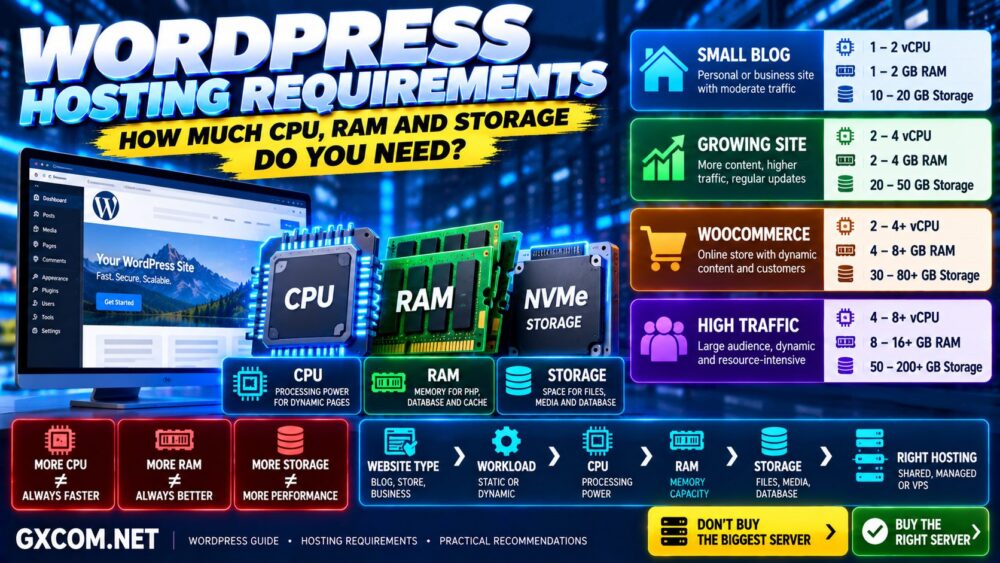
WordPress Sizing Strategy: Website Type → Traffic → Dynamic Workload → CPU → RAM → Storage → Hosting Type
WordPress Hosting Requirements at a Glance
WordPress itself does not publish fixed CPU-core or server-RAM requirements. The resources you need depend on the website and workload.
As a practical starting point, GXCOM.NET recommends considering the following ranges:
| WordPress Site | CPU | RAM | Storage | Typical Hosting |
|---|---|---|---|---|
| Small Blog | 1–2 vCPU* | 1–2 GB* | 10–20 GB | Shared / WordPress Hosting |
| Growing Content Site | 2–4 vCPU | 2–4 GB | 20–50 GB | Managed Hosting / VPS |
| Small WooCommerce Store | 2–4 vCPU | 4–8 GB | 30–80 GB | Managed Hosting / VPS |
| Busy WooCommerce Site | 4–8+ vCPU | 8–16+ GB | 50–150+ GB | Managed VPS / Cloud |
| High-Traffic WordPress | 4–8+ vCPU | 8–16+ GB | 50–200+ GB | Cloud VPS / Dedicated |
*These are practical infrastructure-sizing examples, not official WordPress minimum hardware requirements. Shared hosting providers may not expose CPU and RAM resources in the same way as VPS providers.
Do not select a server from this table alone. Caching, plugins, PHP workers, database activity, concurrent visitors and traffic patterns can dramatically change resource requirements.
What Are the Official WordPress Requirements?
WordPress officially focuses its hosting requirements on the software environment rather than specifying a fixed number of CPU cores or gigabytes of server RAM.
For a modern WordPress installation, your hosting environment should support:
- PHP 8.3 or greater as the recommended baseline
- MariaDB 10.11 or greater, or MySQL 8.0 or greater
- HTTPS
- A compatible web server such as Apache or Nginx
Older software versions may still run WordPress for backward compatibility, but running outdated PHP or database software is not a good long-term hosting strategy.
The key distinction is:
WordPress Software Requirements ≠ WordPress Hardware Requirements.
CPU, RAM and storage should be sized according to your actual workload.
How Much CPU Does WordPress Need?
CPU is one of the most important resources for dynamic WordPress performance.
When a page cannot be served directly from cache, the server may need to:
- Execute PHP
- Load WordPress core
- Run theme functions
- Execute plugins
- Query the database
- Generate HTML
More CPU capacity can allow the server to process more work, but adding CPU cores does not automatically make every WordPress page faster.
More CPU Cores ≠ Faster WordPress Automatically.
1–2 vCPU: Small WordPress Sites
One or two virtual CPU cores can be sufficient for a small WordPress blog or business website when:
- Traffic is relatively low
- Most public pages are cached
- The theme is lightweight
- Plugins are well optimized
- There is limited dynamic activity
Many small sites do not need a VPS at all. Quality shared or managed WordPress hosting may provide better convenience than managing a small server yourself.
2–4 vCPU: Growing WordPress Sites
Two to four vCPU is a useful starting range for growing sites that perform more dynamic processing.
This can include:
- Growing content websites
- Small WooCommerce stores
- Multiple WordPress installations
- Membership websites
- Sites with regular backend activity
CPU architecture and provider resource policies matter too.
Four heavily contended virtual CPU cores can perform differently from four higher-performance cores with more predictable access.
4 vCPU ≠ 4 vCPU Everywhere.
4–8+ vCPU: High-Traffic and Dynamic WordPress
More CPU capacity becomes useful for busy ecommerce, membership, publishing and application-style WordPress sites.
However, investigate the workload before scaling.
If one poorly optimized plugin or database query is consuming CPU, adding more cores may only hide the problem temporarily.
How Much RAM Does WordPress Need?
RAM is another frequently misunderstood hosting specification.
A WordPress server can use memory for:
- PHP workers
- MySQL or MariaDB
- Web server processes
- Redis
- Operating system services
- Control panels
- Security software
- Background processes
More RAM is useful when the server actually needs additional memory or can use it effectively for caching.
But:
More RAM ≠ Faster WordPress Automatically.
Is 1 GB RAM Enough for WordPress?
It can be enough for a small, optimized WordPress installation on a lightweight server stack.
However, 1 GB provides limited headroom once you add a database server, PHP workers, control panel, Redis, security software and other services.
For self-managed VPS hosting, 2 GB generally provides a more comfortable starting point for a small production WordPress website.
Is 2 GB RAM Enough for WordPress?
For many small blogs and business websites, 2 GB can be sufficient when the server is properly configured and traffic is modest.
It is particularly reasonable when:
- Pages are cached
- The plugin stack is lightweight
- The database is small
- Traffic is moderate
- The server is not running many unrelated services
Is 4 GB RAM Enough for WordPress?
Four gigabytes provides significantly more flexibility for growing WordPress sites.
It can support additional PHP capacity, database caching, Redis and more simultaneous activity when the software stack is configured appropriately.
A 2–4 vCPU / 4 GB VPS is therefore a common practical starting configuration for a growing WordPress site that has outgrown conventional shared hosting.
When Do You Need 8 GB or More?
Eight gigabytes or more becomes increasingly relevant for:
- Busy WooCommerce stores
- Large databases
- Multiple websites
- High concurrent traffic
- Large PHP worker pools
- Redis/object caching
- Resource-intensive plugins
Again, unused memory does not improve performance simply because it exists.
WordPress Server RAM vs PHP Memory Limit
These are not the same thing.
Server RAM is the total physical or virtual memory available to the operating system and all server processes.
PHP memory limit controls how much memory an individual PHP execution is allowed to consume.
WordPress WP_MEMORY_LIMIT is a WordPress configuration value that requests a PHP memory allocation for WordPress.
For example:
8 GB Server RAM ≠ 8 GB PHP Memory Limit.
You might have an 8 GB VPS while an individual WordPress PHP process has a much smaller configured memory ceiling.
This distinction is important when diagnosing errors such as:
Allowed memory size exhausted
Increasing WP_MEMORY_LIMIT cannot create physical RAM that the hosting account or server does not have.
How Much Storage Does WordPress Need?
A basic WordPress installation itself requires relatively little storage compared with the media and backups a real website accumulates.
Your storage requirements usually come from:
- Images
- Videos
- Plugins
- Themes
- Database growth
- WooCommerce product images
- Log files
- Backups
- Staging copies
- Email, if hosted on the same account
10–20 GB: Small WordPress Website
For a conventional blog or business website using optimized images, 10–20 GB can provide plenty of space.
Do not upload large video libraries directly to WordPress when specialized video platforms or object storage are more appropriate.
20–50 GB: Growing Content Website
A growing publication with years of images, plugins, backups and database growth may benefit from 20–50 GB or more.
Monitor storage growth rather than guessing based solely on the number of posts.
50–150+ GB: WooCommerce and Media-Heavy Sites
Large product catalogs, high-resolution images, staging sites and local backups can increase storage requirements quickly.
In these environments, storage performance can also matter—not just storage capacity.
SSD vs NVMe for WordPress
Both SSD and NVMe storage are dramatically more suitable for modern hosting than traditional hard drives.
NVMe can provide higher throughput and lower latency than conventional SATA SSD storage, which can be useful for database-heavy and I/O-intensive workloads.
However:
NVMe ≠ Automatically Faster WordPress in Every Situation.
A cached WordPress page may spend very little time accessing storage.
CPU performance, PHP execution, database efficiency, caching and network latency can matter more depending on the workload.
How Much Bandwidth Does WordPress Need?
Bandwidth requirements depend on page size and traffic.
A simplified calculation is:
Monthly Visitors × Average Page Views × Average Page Size = Approximate Data Transfer
For example, a media-heavy website will consume substantially more bandwidth than a lightweight text-focused site with the same number of visitors.
A CDN can reduce some origin-server bandwidth usage by serving cached static resources closer to visitors.
When comparing hosting plans, also distinguish between:
- Port speed
- Monthly transfer allowance
- Fair-use policies
- CDN bandwidth
- Overage pricing
1 Gbps Port ≠ Unlimited 1 Gbps Traffic.
How Much Traffic Can 2 CPU and 4 GB RAM Handle?
There is no reliable universal visitor number.
A 2 vCPU / 4 GB WordPress server could handle dramatically different traffic levels depending on whether requests are cached.
Consider two sites:
Site A: Lightweight blog + full-page cache + CDN.
Site B: WooCommerce + logged-in users + complex database queries.
Even with identical server specifications, Site A may handle substantially more page views because many requests avoid PHP and database processing.
This is why claims such as:
“4 GB RAM = 100,000 visitors”
should be treated cautiously.
Traffic Numbers Alone Do Not Define WordPress Resource Requirements.
WordPress Hosting Requirements for a Small Blog
A small blog is usually one of the least demanding WordPress workloads.
A practical starting profile might be:
| CPU | 1–2 vCPU or equivalent shared resources |
| RAM | 1–2 GB equivalent capacity |
| Storage | 10–20 GB SSD/NVMe |
| Cache | Full-page caching |
| CDN | Optional but useful globally |
In this category, ease of management can be more valuable than buying a VPS unnecessarily.
For users who prefer an inexpensive managed environment, Hostinger is one option worth comparing before moving to self-managed infrastructure.
WordPress Hosting Requirements for a Growing Website
As content, traffic and plugins increase, resource requirements can become less predictable.
A practical starting point might be:
| CPU | 2–4 vCPU |
| RAM | 2–4 GB |
| Storage | 20–50 GB NVMe/SSD |
| Cache | Page cache + optional object cache |
| Hosting | Managed Hosting / VPS / Cloud |
This is also the stage where resource monitoring becomes more useful than generic hosting recommendations.
WordPress Hosting Requirements for WooCommerce
WooCommerce is more demanding because many important requests are dynamic.
Cart, checkout, account sessions, inventory and order processing cannot simply be treated like cached blog posts.
A small store might begin around:
| CPU | 2–4 vCPU |
| RAM | 4–8 GB |
| Storage | 30–80+ GB |
| Object Cache | Often useful |
| Hosting | Managed Hosting / VPS / Cloud |
Busy stores can require substantially more.
For WooCommerce, pay particular attention to:
- CPU performance
- PHP workers
- Database performance
- Redis/object caching
- Storage I/O
- Third-party APIs
WordPress Hosting Requirements for High-Traffic Websites
High-traffic WordPress sites require capacity planning rather than a simple RAM recommendation.
Potential infrastructure can include:
- 4–8+ vCPU
- 8–16+ GB RAM
- Fast NVMe storage
- Redis
- Full-page caching
- CDN/edge caching
- Database optimization
- Appropriate PHP worker capacity
At sufficient scale, application servers, databases, storage and caching may also be separated across different services.
The important principle remains:
Scale the Bottleneck, Not the Specification Sheet.
Shared Hosting vs VPS for WordPress
| Factor | Shared Hosting | VPS |
|---|---|---|
| Management | Easier | Varies |
| Resource Control | Limited | Greater |
| Server Access | Limited | Usually greater |
| Custom Stack | Limited | Flexible |
| Scaling | Plan dependent | More flexible |
| Best For | Small/simple sites | Growing/dynamic sites |
A VPS is not automatically faster simply because it is a VPS.
A well-managed shared hosting platform can outperform a badly configured VPS.
If you decide that VPS resources are appropriate, read our Managed vs Unmanaged VPS comparison before choosing a server.
Managed WordPress Hosting vs VPS
The decision is partly about resources and partly about who manages the infrastructure.
Managed WordPress hosting can handle tasks such as:
- Server configuration
- Caching
- Security
- Updates
- Backups
- WordPress-specific optimization
A VPS can provide greater flexibility, but unmanaged infrastructure places more responsibility on you.
For growing sites that want VPS-level resources without managing every server component, managed infrastructure from providers such as ScalaHosting or UltaHost can be worth comparing.
The correct choice depends on whether you value maximum server control or operational convenience.
How Do You Know When WordPress Needs More Resources?
Do not upgrade based solely on traffic numbers.
Look for measurable evidence.
CPU:
- Consistently high utilization
- Requests queue during normal traffic
- PHP processing slows under load
RAM:
- Memory exhaustion
- Heavy swap usage
- Processes killed because of insufficient memory
Storage:
- Disk nearly full
- High I/O wait
- Slow database/storage operations
Application:
- Slow uncached pages
- Insufficient PHP workers
- Slow database queries
- 503/504 errors under normal load
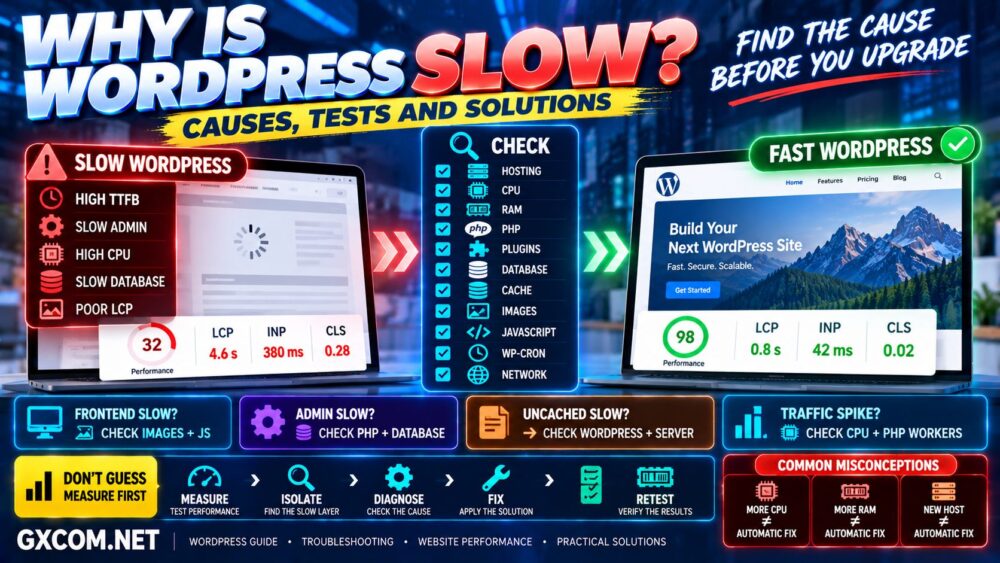
If WordPress is already slow, follow our Slow WordPress troubleshooting guide before assuming that larger hosting is the solution.
Should You Upgrade CPU, RAM or Storage First?
The answer depends entirely on the bottleneck.
| Problem | Investigate First |
|---|---|
| Slow dynamic PHP | CPU / PHP / Plugins |
| Memory exhaustion | RAM / PHP workers / Database |
| Slow database | Queries / CPU / RAM / Storage I/O |
| Disk full | Storage capacity |
| Slow global visitors | CDN / Network / Server location |
| Large images/pages | Frontend optimization |
Never assume that the largest specification is automatically the correct upgrade.
Measure First → Upgrade the Bottleneck Second.
WordPress Hosting Requirements by Website Type
For quick reference:
Small Blog
1–2 vCPU equivalent → 1–2 GB RAM → 10–20 GB → Shared/WordPress Hosting
Growing Website
2–4 vCPU → 2–4 GB RAM → 20–50 GB → Managed Hosting/VPS
Small WooCommerce
2–4 vCPU → 4–8 GB RAM → 30–80 GB → Managed VPS/Cloud
Busy WooCommerce
4–8+ vCPU → 8–16+ GB RAM → 50–150+ GB → Managed VPS/Cloud
High-Traffic WordPress
4–8+ vCPU → 8–16+ GB RAM → 50–200+ GB → Cloud VPS/Dedicated
These are starting points—not hard limits.
WordPress Hosting Requirements FAQ
What are the minimum hosting requirements for WordPress?
WordPress officially specifies software requirements rather than fixed CPU and RAM requirements. A modern environment should use a supported PHP version, MySQL or MariaDB, and HTTPS. Hardware resources depend on the website workload.
How much RAM do I need for WordPress?
A small WordPress site can run with modest memory, while growing or dynamic sites may benefit from 2–4 GB or more. WooCommerce and high-traffic sites can require 4–16+ GB depending on PHP workers, database activity, caching and concurrency.
Is 2 GB RAM enough for WordPress?
Yes, 2 GB can be sufficient for many small optimized WordPress sites on a lightweight server stack. More complex sites or servers running many additional services may require more.
Is 4 GB RAM enough for WordPress?
Four gigabytes is a practical amount for many growing WordPress websites and small dynamic sites, provided CPU, PHP, database and caching are also properly configured.
How many CPU cores does WordPress need?
There is no official fixed CPU requirement. Small sites may run well with 1–2 vCPU equivalent resources, while growing and dynamic websites may benefit from 2–4 or more. CPU performance and workload matter as much as the advertised core count.
How much storage do I need for WordPress?
Many small sites can operate comfortably with 10–20 GB, while media-heavy, WooCommerce and long-running websites may require 50 GB, 100 GB or substantially more. Backups and staging copies can dramatically increase storage usage.
Is NVMe necessary for WordPress?
No. WordPress can run well on quality SSD storage. NVMe can improve storage-intensive workloads, but it does not automatically make every WordPress website faster.
Do I need a VPS for WordPress?
No. Many WordPress sites perform well on quality shared or managed WordPress hosting. VPS hosting becomes attractive when you need more predictable resources, greater control, custom services or additional capacity.
How much RAM does WooCommerce need?
There is no universal requirement. A small store may operate comfortably with several gigabytes of server RAM, while a busy store can require substantially more depending on traffic, PHP workers, plugins, database size and concurrent dynamic requests.
WordPress Hosting Requirements: Final Recommendation
Do not choose WordPress hosting by asking only:
“How much RAM do I get?”
Instead ask:
What workload does my website generate?
For a small blog, quality WordPress or shared hosting can be sufficient.
For a growing website, 2–4 vCPU and 2–4 GB RAM can be a useful VPS sizing range when dedicated resources are actually needed.
For WooCommerce and highly dynamic websites, CPU performance, PHP workers, database resources and caching can become more important than simply purchasing more storage.
For high-traffic WordPress, monitor the complete stack and scale whichever component becomes constrained.
If your website is already performing poorly, first read our WordPress speed optimization guide and identify whether infrastructure is actually the bottleneck.
Website Type → Workload → CPU → RAM → Storage → Hosting Type.
Buy the Resources Your WordPress Workload Needs—not the Biggest Hosting Plan You Can Find.