Cloud VPS and traditional VPS hosting can look almost identical on a pricing page. Both may offer vCPU, RAM, SSD or NVMe storage, root access, Linux or Windows, dedicated IP addresses, and full control over the operating system.
The important difference is usually underneath the virtual server.
A traditional VPS is commonly created by dividing the resources of a single physical server into multiple isolated virtual machines. A Cloud VPS typically places the virtual machine inside a broader cloud infrastructure where compute, storage, networking, or management capabilities can draw from a larger pool of resources.
That architectural difference can affect scalability, hardware-failure recovery, provisioning, billing, automation, and how easily infrastructure can grow with an application.
In this Cloud VPS vs Traditional VPS comparison, we examine architecture, performance, pricing, reliability, NVMe storage, scalability, management, and the workloads best suited to each model.
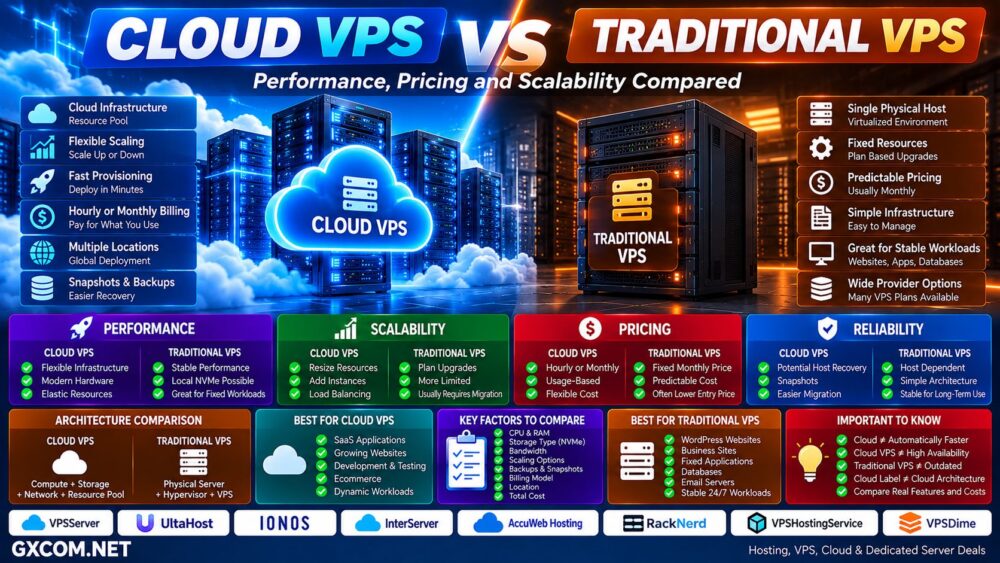
Cloud VPS vs Traditional VPS: Quick Comparison
| Feature | Cloud VPS | Traditional VPS |
|---|---|---|
| Infrastructure | Usually cloud or clustered infrastructure | Usually one physical host |
| Virtualization | Yes | Yes |
| Root Access | Usually yes | Usually yes |
| CPU / RAM | Virtual resources | Virtual resources |
| Scaling | Usually more flexible | Often plan based |
| Provisioning | Often rapid / on demand | Provider dependent |
| Billing | Hourly or monthly common | Monthly common |
| Hardware Failure | May support migration or recovery | More dependent on physical host |
| API / Automation | Common | Provider dependent |
| Cost Predictability | Depends on billing model | Often highly predictable |
| Best For | Growing and dynamic workloads | Stable and predictable workloads |
What Is a Traditional VPS?
A traditional Virtual Private Server uses virtualization to divide a physical server into multiple isolated virtual environments.
A typical architecture looks like:
Physical Server → Hypervisor → VPS A / VPS B / VPS C
Each VPS receives allocated virtual resources such as:
- vCPU
- RAM
- SSD or NVMe storage
- Operating system
- IP addresses
- Network allocation
The customer normally receives root or administrator access and can install web servers, databases, control panels, Docker, development tools, and custom applications.
Traditional VPS hosting remains popular because it is straightforward and often sold at a predictable fixed monthly price.
What Is a Cloud VPS?
A Cloud VPS provides a similar virtual-server experience but operates within a cloud-oriented infrastructure platform.
Instead of thinking only in terms of:
One Physical Server → Multiple VPS
the architecture may look more like:
Compute Cluster + Storage + Network → Cloud Platform → Virtual Servers
Depending on the provider, this can enable:
- Rapid provisioning
- Flexible resource resizing
- Hourly billing
- Snapshots
- Private networks
- Floating IPs
- Load balancers
- API automation
- Multiple geographic locations
- Host migration or recovery features
However, the term “Cloud VPS” is used differently by different providers, so buyers should examine the actual infrastructure features rather than relying on the product name.
Cloud VPS Is Still a VPS
Cloud VPS and traditional VPS are not opposites in the same way that VPS and dedicated servers are.
A VPS describes the virtual-server environment.
“Cloud” describes more about the infrastructure and service model supporting that environment.
Therefore:
Cloud VPS = VPS + Cloud Infrastructure Characteristics
Both can provide root access, isolated operating systems, virtual CPU, RAM, storage, and full application control.
Cloud VPS vs Traditional VPS Performance
Cloud VPS is not automatically faster than traditional VPS.
Performance still depends on:
- CPU model and generation
- Shared vs dedicated vCPU
- CPU contention
- RAM
- SSD or NVMe storage
- Storage architecture
- Network performance
- Virtualization
- Server density
- Application optimization
A traditional VPS running on modern AMD EPYC hardware with fast local NVMe storage can outperform a Cloud VPS with weaker CPU allocation or slower network-attached storage for some workloads.
Cloud ≠ Automatically Faster.
Local NVMe vs Cloud Storage
Storage architecture deserves particular attention.
Traditional VPS platforms often use local SSD or NVMe storage attached directly to the physical host.
Cloud platforms may use local NVMe, distributed storage, network-attached block storage, or combinations of these technologies.
Local NVMe can provide excellent latency and throughput, while distributed storage can provide infrastructure flexibility and redundancy advantages.
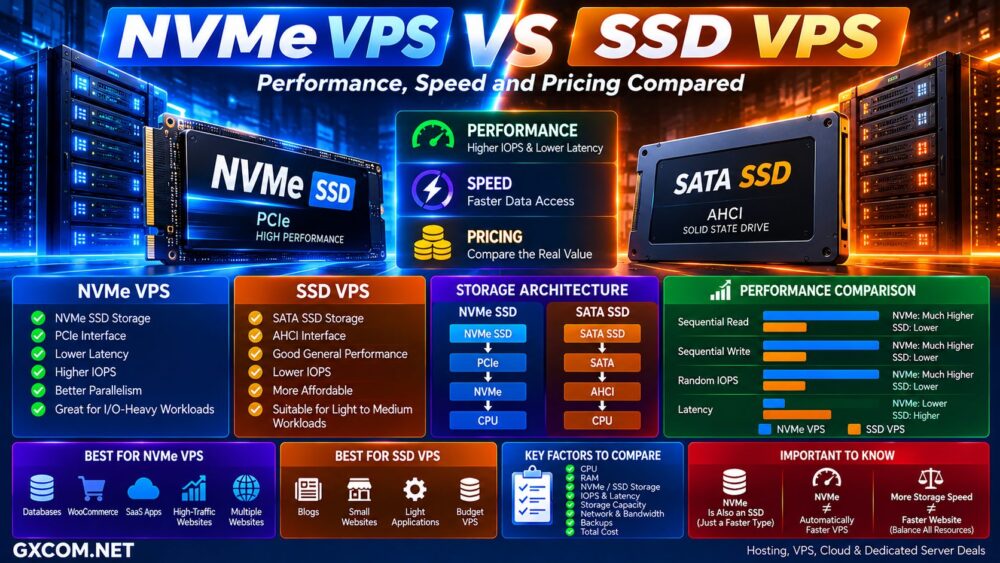
For databases and storage-intensive applications, compare actual IOPS, latency, throughput, backup architecture, and failure recovery rather than simply looking for the word “NVMe.”
NVMe Label ≠ Same Storage Performance.
Cloud VPS and Traditional VPS Providers to Compare
Once the architectural difference is clear, provider selection should focus on how the actual platform implements CPU, RAM, storage, networking, billing, backups, and scaling.
For cloud-oriented VPS infrastructure, VPSServer, UltaHost, IONOS, and AccuWeb Hosting are among the providers worth comparing depending on workload and location requirements.
For users primarily interested in straightforward fixed-price VPS hosting, providers such as InterServer, RackNerd, VPSHostingService, and VPSDime are also relevant options to investigate.
| Provider | Relevant Focus | Worth Comparing For |
|---|---|---|
| VPSServer | Cloud VPS | Flexible cloud resources and global deployment |
| UltaHost | VPS / Cloud Infrastructure | Growing website and application workloads |
| IONOS | VPS / Cloud | Business infrastructure |
| AccuWeb Hosting | Cloud / VPS | Linux and Windows workloads |
| InterServer | VPS | General-purpose virtual servers |
| RackNerd | Budget VPS | Cost-sensitive fixed workloads |
| VPSHostingService | VPS | Linux and Windows VPS workloads |
| VPSDime | VPS | Resource-focused VPS workloads |
Do not classify a provider solely from marketing terminology. Check whether its “Cloud VPS” actually provides the cloud characteristics that matter to your application.
Cloud VPS vs Traditional VPS Scalability
Scalability is one of the strongest potential advantages of Cloud VPS infrastructure.
A traditional VPS commonly scales like this:
2 vCPU / 4GB → Upgrade Plan → 4 vCPU / 8GB → Upgrade Plan → 8 vCPU / 16GB
The upgrade may require a reboot, migration, or movement to another physical host depending on the provider.
Cloud infrastructure is generally designed to make resource provisioning and resizing more flexible.
Some platforms allow CPU, RAM, storage, or additional instances to be provisioned quickly through a dashboard or API.
Vertical vs Horizontal Scaling
There are two important forms of scaling.
Vertical Scaling:
Increase the resources of one server:
4GB RAM → 8GB → 16GB → 32GB
Horizontal Scaling:
Add more servers:
Server 1 + Server 2 + Server 3 → Load Balancer
Traditional VPS can support both approaches, but cloud platforms often provide networking, APIs, load balancing, snapshots, and automation that make multi-server architectures easier to build.
Cloud VPS vs Traditional VPS Reliability
This is another area where marketing claims need careful interpretation.
A traditional VPS normally depends heavily on its physical host.
If that host experiences hardware failure, the virtual machines on it may be affected until the provider repairs the server or restores workloads elsewhere.
A cloud platform may provide infrastructure capable of moving or recovering virtual machines on other hardware.
But this does not mean every Cloud VPS is automatically highly available.
Cloud VPS ≠ High Availability.
True application availability may still require:
- Multiple instances
- Load balancing
- Database replication
- Redundant storage
- Independent backups
- Multi-zone architecture
- DNS failover
Cloud VPS vs Traditional VPS Pricing
Traditional VPS hosting is commonly sold at a fixed monthly price.
For example:
$X / Month → Fixed CPU + RAM + Storage + Traffic
This makes budgeting straightforward.
Cloud VPS platforms may offer:
- Hourly billing
- Monthly billing
- Usage-based billing
- Separate storage charges
- Separate bandwidth charges
- Snapshot charges
- Backup charges
- IPv4 charges
Usage-based pricing can be excellent for development, testing, temporary workloads, and servers that do not run continuously.
For a server running 24/7, however, fixed monthly VPS pricing can sometimes be easier to understand and budget.
Hourly Billing Does Not Automatically Mean Cheaper
Suppose an application runs continuously for an entire month.
The relevant comparison is not:
$0.01/hour vs $10/month
Instead calculate:
Compute + Storage + Traffic + IPv4 + Backups + Licenses + Management = Real Monthly Cost.
Hourly billing provides flexibility. It does not guarantee the lowest total cost.
Cloud VPS for Temporary Workloads
Cloud VPS can be particularly useful when infrastructure is temporary.
Examples include:
- Development servers
- Staging
- Software testing
- CI/CD workloads
- Temporary databases
- Short projects
- Traffic campaigns
- Proof-of-concept deployments
The ability to create a server, use it for several hours or days, and then destroy it can make usage-based cloud infrastructure more efficient than maintaining a permanent server.
Traditional VPS for Predictable Workloads
Traditional VPS remains highly practical for workloads that run continuously and change relatively slowly.
Examples include:
- WordPress websites
- Company websites
- Forums
- Control panels
- Email servers
- Small databases
- Business applications
- Remote desktops
If a server needs approximately the same resources every month, a straightforward fixed VPS package can provide excellent value.
Cloud VPS vs Traditional VPS for WordPress
WordPress itself does not require cloud infrastructure.
A normal WordPress website can run extremely well on a quality traditional VPS.
Cloud VPS becomes more interesting when the WordPress workload requires:
- Rapid resource growth
- Multiple application servers
- Load balancing
- Flexible storage
- API automation
- Infrastructure redundancy
For many WordPress websites, application optimization, caching, database performance, and CDN configuration matter more than whether the provider uses the word “cloud.”
Cloud VPS vs Traditional VPS for Ecommerce
Ecommerce workloads can change significantly during promotions, holidays, product launches, and advertising campaigns.
Cloud VPS can be useful when infrastructure needs to respond to those changes quickly.
However, moving one WooCommerce or Magento server onto a Cloud VPS does not automatically create an elastic ecommerce architecture.
The application itself must be designed to use additional infrastructure effectively.
Scalable Infrastructure ≠ Automatically Scalable Application.
Which VPS Providers Fit Different Workloads?
For projects where rapid deployment, geographic flexibility, cloud-style resource management, and scalable infrastructure matter, VPSServer is particularly relevant to compare alongside VPS and cloud offerings from IONOS, UltaHost, and AccuWeb Hosting.
For relatively stable workloads where predictable monthly cost is the priority, InterServer, RackNerd, VPSHostingService, and VPSDime are among the VPS providers worth comparing.
The correct provider depends on more than architecture:
Workload → CPU + RAM → Storage → Traffic → Location → Scaling → Management → Total Cost.
Cloud VPS vs Traditional VPS Management
Cloud does not necessarily mean managed.
Both Cloud VPS and traditional VPS can be:
- Self-managed
- Managed
With an unmanaged server, the customer may be responsible for:
- Operating-system updates
- Firewall configuration
- Web server
- Database
- Security
- Monitoring
- Backups
- Troubleshooting
If management rather than infrastructure architecture is your main concern, read our
Managed vs Unmanaged VPS
comparison.
Cloud VPS vs Traditional VPS Security
Both can provide strong workload isolation through virtualization.
Security depends on the complete stack, including:
- Hypervisor security
- Operating-system updates
- Firewall
- SSH or RDP configuration
- Application security
- Network architecture
- Backups
- Access controls
Cloud platforms may provide additional tools such as private networking, security groups, snapshots, APIs, and network firewalls.
Those tools improve capabilities, but they still require correct configuration.
Cloud VPS vs Traditional VPS: Pros and Cons
| Cloud VPS | Traditional VPS | |
|---|---|---|
| Main Advantage | Infrastructure flexibility | Simplicity and predictable pricing |
| Scaling | Usually easier | Often plan based |
| Billing | Often flexible | Usually fixed monthly |
| Reliability | Can offer stronger infrastructure recovery | More dependent on host server |
| Automation | Often API friendly | Provider dependent |
| Complexity | Can be higher | Often simpler |
| Best For | Dynamic and growing workloads | Stable workloads |
Choose Cloud VPS If…
- You need rapid provisioning
- Your resource requirements change frequently
- You want hourly or usage-based billing
- You deploy temporary servers
- You need API automation
- You plan multi-server infrastructure
- You need easier scaling paths
- You deploy across multiple locations
Choose Traditional VPS If…
- Your workload is stable
- Your server runs 24/7
- You prefer fixed monthly pricing
- You do not need rapid scaling
- You run a conventional website
- You want straightforward infrastructure
- You prioritize predictable costs
Questions to Ask Before Buying Any VPS
- What CPU model is used?
- Are vCPUs shared or dedicated?
- Is storage local or distributed?
- Is the storage SSD or NVMe?
- What bandwidth is included?
- What happens if the physical host fails?
- Can CPU and RAM be resized?
- Can resources be scaled down?
- Is hourly billing available?
- Are snapshots charged separately?
- Are backups included?
- Is IPv4 included?
- Are private networks available?
- Is API access available?
- What is the real monthly cost?
Cloud VPS vs Traditional VPS: Which Should You Choose?
Cloud VPS is most valuable when you actually use the characteristics that make cloud infrastructure different: rapid provisioning, flexible scaling, automation, pooled infrastructure, geographic deployment, or usage-based billing.
Traditional VPS remains an excellent choice for predictable workloads that simply need a reliable virtual server with fixed resources and straightforward monthly pricing.
Do not pay a premium simply because a provider puts the word “cloud” in the product name.
Cloud Label ≠ Cloud Architecture.
Likewise, do not assume a traditional VPS is outdated. A well-configured VPS running modern CPU hardware and NVMe storage can deliver excellent performance for websites, applications, databases, and business workloads.
The better decision path is:
Workload → Performance → Scaling → Reliability → Billing → Management → Provider → Total Cost → Right VPS.
For stable workloads, simplicity and predictable monthly pricing may provide better value. For applications that need rapid deployment, flexible infrastructure, automation, or frequent resource changes, Cloud VPS can provide a much cleaner path to growth.