Minecraft chunk pregeneration costs depend on the area prepared, the processing time required and the storage needed to retain the resulting world. A larger hosting package may provide additional memory without permitting sustained CPU workloads or extensive pregenerated maps. Consequently, buyers should calculate their exploration budget before choosing a server.
This guide builds on our Minecraft server pre-generation tutorial by focusing on capacity estimates, hosting restrictions and recurring expenses.
Choose a Compatible Generation Tool
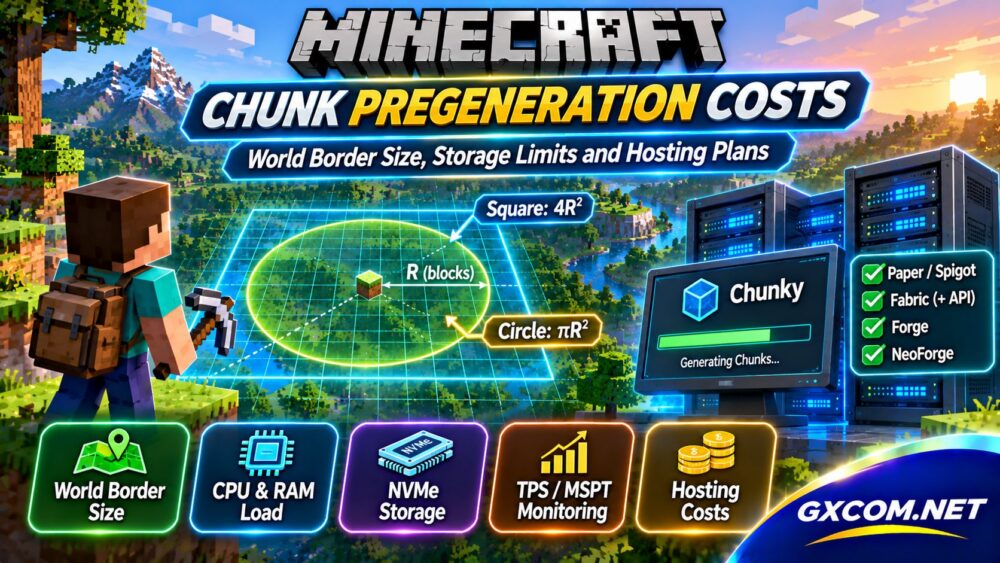
Chunky supports several Java Edition server platforms, including Paper, Fabric, Forge and NeoForge. Select a release matching both the Minecraft version and the server platform. Paper uses the Bukkit-compatible plugin in its plugins directory, whereas Fabric, Forge and NeoForge use corresponding mods. Fabric also requires Fabric API according to the installation documentation.
Native Bedrock Dedicated Server cannot directly execute these Java plugins or mods. Bedrock administrators need a compatible world preparation workflow and must evaluate its storage separately. A Java server accepting Bedrock clients through Geyser remains a Java server for terrain generation purposes.
Calculate Chunk Counts Before Choosing a World Border
Each chunk covers 16 by 16 horizontal blocks. For a square centered on the origin with radius R blocks, approximate the chunk count by dividing the area, four times R squared, by 256. For a circle, divide pi times R squared by 256 instead.
| Radius in blocks | Square estimate | Circle estimate |
|---|---|---|
| 1,000 | 15,625 | 12,272 |
| 2,000 | 62,500 | 49,087 |
| 5,000 | 390,625 | 306,796 |
| 10,000 | 1,562,500 | 1,227,185 |
These theoretical estimates exclude boundary rounding and generation outside the selected area. Doubling the radius quadruples the geometric area. A circle covers approximately 21.5 percent less area than a square with the same radius.
Remember that the Java world border size represents the square diameter, not its radius. A circular generation task inside a square border leaves corners unprepared. Align the permitted exploration region with the generated shape and budget separately for the Nether and End.

Separate Generation Load From Gameplay Load
During pregeneration, terrain algorithms, structures and modded features consume CPU time. Temporary chunk data occupies memory, while region file writes increase disk activity. Generation can employ multiple threads, but its scaling depends on the server implementation and installed content.
Once preparation finishes, exploration within existing terrain avoids much of the initial generation work. Nevertheless, chunk loading, network transmission, entities, redstone and plugins continue consuming resources. View distance determines how much terrain the server sends, while simulation distance influences active game processing. See our view distance and simulation distance guide.
At the normal target of 20 TPS, each tick has a 50 millisecond budget. Monitor MSPT distributions rather than only average TPS, alongside individual CPU utilization, memory pressure and disk latency. Schedule generation during maintenance, pause it when necessary and avoid simultaneous backup compression. Leave memory for the operating system and filesystem cache on self-managed servers.
Estimate World Storage Using a Representative Sample
Generate a small test region with the intended seed, version and modpack. Measure the resulting increase in world storage, then divide it by the number of newly generated chunks. Use that observed average to estimate the larger region, allowing for variation in terrain and structures.
For illustration, assume 40 KiB per chunk. A square radius of 2,000 blocks contains approximately 62,500 chunks, requiring about 2.38 GiB of terrain storage. Increasing the radius to 5,000 blocks raises the estimate to 14.90 GiB. These are hypothetical values, not measured Minecraft benchmarks.
Reserve additional capacity for other dimensions, player data, plugins, logs and temporary files. Three uncompressed full backups of a 15 GiB world require another 45 GiB. Consult our Minecraft backup and migration guide before scheduling large generation jobs.
Compare Hosting Plans and Pregeneration Policies
The following published prices are reference figures, not equivalent performance measurements. Confirm the actual renewal amount, regional availability and permission for sustained generation before purchasing.
Shockbyte: Check World Size Restrictions First
Shockbyte lists an 8 GB Emerald package with a regular displayed price of $31.99 monthly. Its Minecraft terms restrict pregeneration to a radius of 10,000 blocks and prohibit pregenerated chunks in worlds larger than 5 GB. Backup limits include three copies per service and 15 GB across the account. Prolonged excessive CPU usage can also trigger enforcement. A discounted subscription does not remove these restrictions.
Sparked Host: Budget for Explicit NVMe Expansion
Sparked Host lists a Vault Hunters package with 10 GB RAM, three vCPUs and 100 GB storage at $25.90 monthly. The configuration offers 150 GB NVMe for another $5 or 200 GB for another $10 monthly. Three daily backup slots are included. Confirm backup capacity accounting, permitted generation duration and loader compatibility. Allocated vCPUs do not necessarily represent exclusive physical cores.
Host Havoc: Evaluate Java Platform Flexibility
Host Havoc advertises Paper, Fabric and Forge support, NVMe storage, scheduled backups and DDoS mitigation. Its 8 GB Brick package displays a $40 monthly reference price alongside a discounted offer. The product supports Java hosting rather than native Bedrock deployment. Ask about storage quotas, NeoForge availability, sustained CPU allowances and whether your intended Chunky release is permitted.
Match Infrastructure to Community Size
Private survival communities can start with managed memory-based hosting and a limited exploration region. Modded communities should prioritize compatible loaders, CPU allowances and expandable storage. Dedicated vCPU gaming VPS plans offer more administrative control, but buyers must verify processor allocation and sustained usage policies.
Physical servers may suit large networks needing multiple dimensions or concurrent generation tasks. They also introduce administration, security and recovery responsibilities. Compare our dedicated game server storage guide when evaluating local disks and independent archives.
Calculate Recurring Costs Before Expanding
For an illustrative budget, a $25 monthly server, $5 storage upgrade and $3 external backup subscription total $33 monthly or $396 annually. Expanding storage by another $5 monthly increases annual expenditure by $60. Temporary generation infrastructure and data transfers may add further charges.
Choose the smallest useful exploration region, measure actual resource consumption and expand only when demand justifies it. A hosting plan that explicitly permits your workload and offers recoverable backups is more valuable than an apparently unlimited package with restrictive usage terms.